Baldur's Gate 3 Mods: How the Official Mod Manager Works
Baldur's Gate 3 has had an official in-game Mod Manager since Patch 7. Here is how it installs mods, which ones reach PS5, Xbox and Mac, where the 100-mod console cap came from, what mods do to achievements and saves, and how to clear third-party mods out of a PC install.
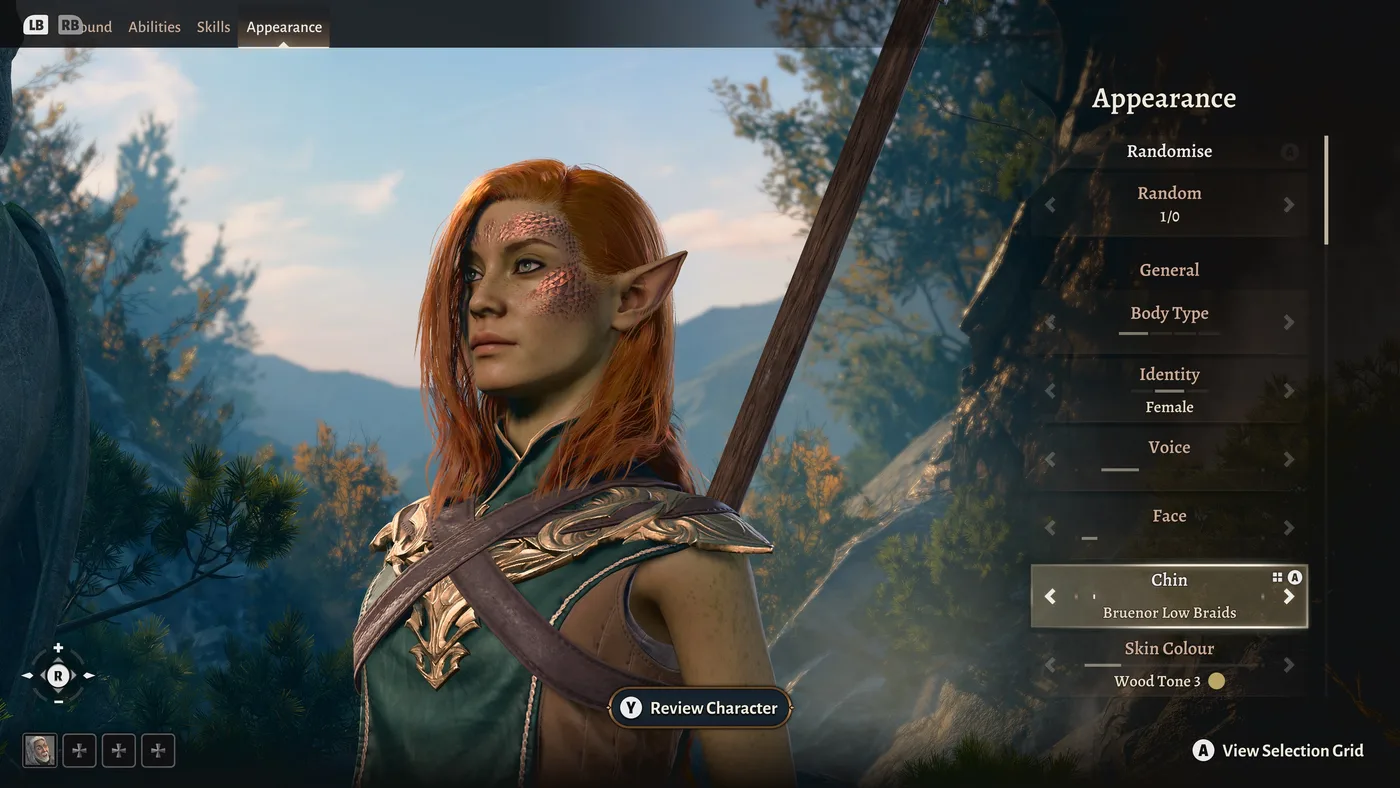
Turn on one mod in Baldur's Gate 3, even a dice skin, and the game switches your achievements off. Larian says so in a single line of Community Update #29, its own guide to playing with mods: achievements are automatically disabled when you are using mods. It is the rule most worth knowing before you open the Mod Manager, and the official system has several more like it, scattered across more than a year of patch notes and support pages.
Since Patch 7, Baldur's Gate 3 has shipped with its own Mod Manager, a browser for mods built with Larian's Toolkit and hosted on mod.io. Below is how it works, which mods reach PS5, Xbox and Mac, where the 100-mod console cap came from, what mods do to saves, achievements and co-op, and how third-party PC mods sit alongside the official ones. The sources are Larian's Patch 7 and Patch 8 notes, Community Updates #29, #34, #35 and #36, the notes for Hotfixes #26 to #29 and the December 2024 console fix, Larian's support FAQs, mod.io's help centre and bg3.wiki's modding pages, all checked on 23 October 2026.
Two ways to mod, one game
Patch 7 reached PC on 5 September 2024 and console and Mac on 1 October 2024. It did not retire the mods people were already running: Larian's Patch 7 notes say players keep the choice between supported mods and third-party mods and mod managers. What changed is that there are now two systems, with different rules.
| Official mods | Third-party mods | |
|---|---|---|
| Made with | Larian's Toolkit, a free PC app on Steam | Any other tool, per Larian's Mod Issues FAQ |
| Where you get them | The in-game Mod Manager, which browses mod.io | Mod sites; bg3.wiki's getting-started guide lists Nexus Mods, Thunderstore and CurseForge |
| Platforms | PC, plus console and Mac for mods Larian has tested and approved | Not usable on consoles, per the Patch 8 notes |
| In the Mod Verification window | Listed by name, with a fix such as Download, Enable, Update or Downgrade | Grouped under Third-Party |
| Removing them | Uninstall in the Mod Manager | Deleting files by hand, covered below |
The rest of this guide is mostly about the left column, because the game manages it itself and consoles cannot use the other one.
Using the in-game Mod Manager
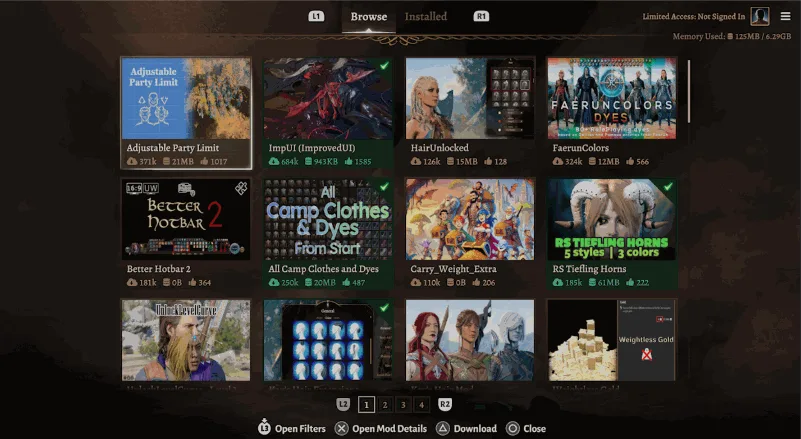
mod.io's help article for the game puts the Mod Manager on the main menu. From there, per Larian's Community Update #29 and the patch notes:
- Browse. The Browse tab has filters to narrow the list; Hotfix #27 fixed the Trending filter so it actually shows trending mods.
- Read the description. Community Update #29 warns that some mods need extra steps, such as downloading a separate mod or changing an in-game setting.
- Download. Larian calls it the download button; mod.io's article calls the same step subscribing, after which the mod is marked Subscribed.
- Let dependencies come along. A mod that another mod needs is a dependency. Community Update #29 says dependencies are shown in the mod listing and should be downloaded and enabled automatically, and Patch 8 added a visual cue when enabling a mod also enables its dependencies.
- Switch mods on and off in the Installed tab. Each mod has a checkbox. Per mod.io's article, uninstalling and unsubscribing sit in the panel at the side of the screen.
- Keep them current. Larian's Mod Issues FAQ recommends updating regularly with the update button on a mod's listing, and warns that problems are most likely just after a game update.
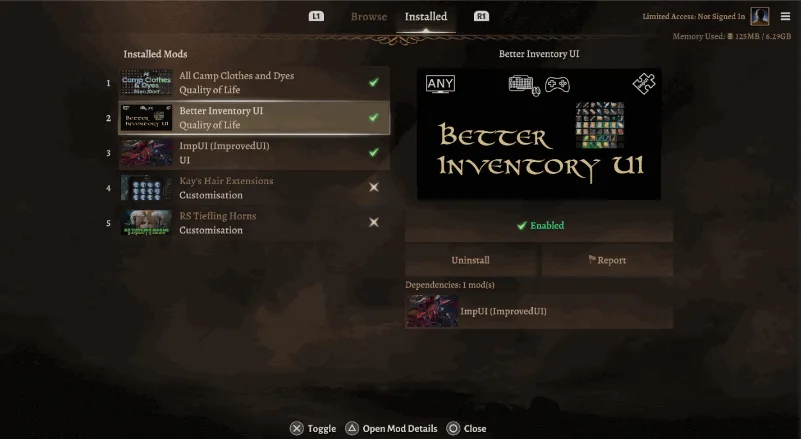
The Installed tab numbers your mods, and Larian's Patch 8 notes refer to a Mod Loading Order section of the Mod Manager. Hotfix #28 fixed dependencies loading in the wrong order after some mods were enabled or disabled.
Signing in is what makes your list portable
You can browse and install without an account. In Larian's own PS5 screenshots, the corner of the Mod Manager reads "Limited Access: Not Signed In". Signing in is what lets the list follow you:
- Patch 8 made logging in to mod.io subscribe you to all the mods you currently have installed.
- Larian's Steam Deck native FAQ says that with a Larian Account connected to mod.io, all your subscribed mods download automatically when the native build takes over from Proton.
- Without it, the same FAQ says to download them again in the Mod Manager or copy the
Modsfolder across by hand in Desktop Mode, from/home/deck/.local/share/Steam/steamapps/compatdata/1086940/pfx/drive_c/users/steamuser/AppData/Local/Larian Studios/Baldur's Gate 3to/home/deck/.local/share/Larian Studios/Baldur's Gate 3/. The matching steps for saves are in our save files guide.
Which mods reach PS5, Xbox and Mac
Console and Mac players get a curated slice of the official catalogue. Community Update #29 sets out how a mod gets there:
- Only mods made with and uploaded through the Toolkit can be eligible, and they also have to pass Larian's internal testing.
- The author asks for it during upload. Larian's Community Team checks the mod against the modding guidelines, then sends batches of mods for internal checks on basic functionality, usability and stability.
- Approved mods are released in batches, so new ones appear in the in-game browser over time.
- Some PC mods cannot make the trip. Larian cites technical limitations on certain platforms.
- New playable races are out. Patch 8's guidelines update says mods that add new playable races cannot be curated for console.
- Do not port someone else's mod to get it approved. Community Update #29 asks players not to, and Hotfix #26 says recreating another person's mod with the Toolkit is not permitted.
The counts in Larian's posts give a sense of scale: 69 mods had passed internal testing on 1 October 2024, and by Hotfix #29 on 21 November 2024 Larian said more than 100 were available to download on console.
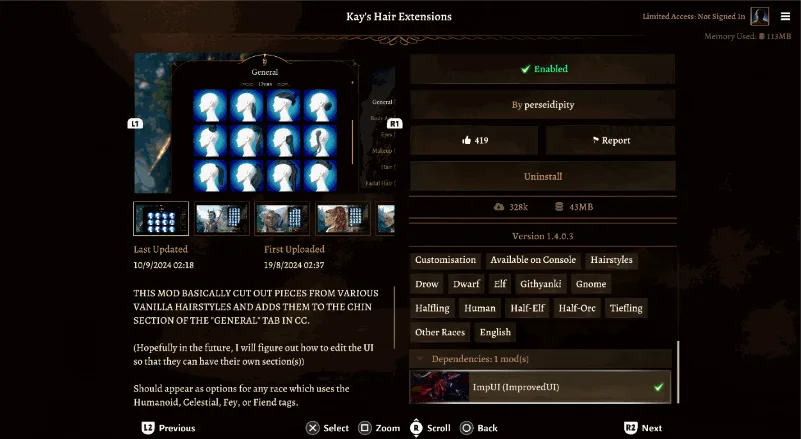
To check a mod from PC, look for the console tag. Patch 8 tells PC players building a cross-play lobby to use the Available on Console & Mac tag, and Community Update #34 adds that you can filter the Mod Browser by it or look for the tag on a mod's details page, as in the screenshot above. The two posts word it slightly differently (Available on Mac and Console in Community Update #34), and the tag in Larian's PS5 screenshot reads Available on Console, so look for the word Console rather than one exact label.
Curation is not a guarantee, either. Community Update #29 says console mods undergo basic stability testing but are still community-made, and that game updates, dependencies and conflicts can change how they behave.
The 100-mod console cap
PS5 and Xbox saves are capped at 100 mods. The cap was not there at the console launch; Larian added it seven weeks later.
| Date | Update | What changed on console |
|---|---|---|
| 1 October 2024 | Patch 7 and Hotfix #27 | Curated mods arrive in the console Mod Manager |
| 21 November 2024 | Hotfix #29, console only | A 100-mod limit; saves with more than 100 mods enabled cannot be loaded for the time being |
| 4 December 2024 | Follow-up console fix | Saves over the limit can be loaded by disabling the mods that were active on them, and you can re-subscribe to up to 100 of them |
| 15 April 2025 | Patch 8 | The limit is restated as 100 for anyone building a cross-play lobby |
Larian's Hotfix #29 notes give the reason: unlike PC, consoles can only juggle so many files at once, and players running more than 100 mods had reported slow loading and crashes. Its advice is to install only the mods you know you will keep playing with.
If you need to trim, the December fix names the mod types that "tend to have a lower impact on saves", and suggests trying to load without them first:
- Dice skins
- Face cosmetics
- Mods that add items
bg3.wiki's mod troubleshooting page is more cautious about that last group: it warns against uninstalling mods that add spells, items or status effects midway through a playthrough, because it can crash the save on loading. Keep a copy of the save before you test either way.
The console Mod Manager also shows a Memory Used counter, visible in the screenshots above. Hotfix #27 fixed it showing a mod's size instead of the memory used, and Hotfix #28 and Patch 8 both fixed how it reports memory after uninstalling a mod on PS5.
A modded save remembers its mods
Community Update #29 is plain about it: to load a modded save, or to join a multiplayer game with mods enabled, you need the same version of the same mods. The Mod Verification Window enforces that. It opens when you load a save from the main menu or join a multiplayer session, and Hotfix #28 renamed it from the Mod Issues window. Its options, from Community Update #29:
| Option | When you see it |
|---|---|
| Download | The save or session has a mod enabled that you do not have installed |
| Enable | You have the mod installed but not enabled |
| Update | Your copy of the mod is older than the session's |
| Downgrade | Your copy of the mod is newer than the session's |
| New Mods | Mods you have enabled that the session does not |
| Third-Party | Mods that are not available through the in-game browser |
On PS5, Hotfix #28 made the Continue button behave like Load Game: it will not start a game while mod issues are unresolved.
Moving a modded run between platforms adds two rules, both from Community Update #29. A PC cross-save that only uses curated mods works on console or Mac, and the game prompts you to download those mods. A cross-save that uses PC mods not approved for console cannot be loaded on console. Hotfix #29 adds that if a cross-save is over the 100-mod limit, you may be able to bring it back under by disabling mods from the PC side. Turning on cross-save, and Larian's six-month expiry on the server copies, are covered in our save files guide.
Taking mods out of a run
Community Update #29 warns that disabling some mods might affect your existing saves. Larian's December 2024 console notes explain why: changes to some files mean particular mods must stay enabled for a save to load correctly. Patch 8 fixed a potential crash when loading a modded save with its mods disabled.
Larian's Mod Issues FAQ lists what a broken modded save tends to look like:
- Loading stalls at a certain percentage
- The game crashes on launch
- UI problems, including missing options or overlapping menus
- Shader problems, such as missing makeup or face textures
- Naked avatars in Character Creation
Larian's advice at Patch 8 was that some mods might not work straight after an update and could take a while to be updated, and that anyone worried about their mod list should start a new playthrough.
Achievements switch off
Community Update #29's line is short: achievements are automatically disabled when you are using mods. Larian's guide does not say whether a save that has used mods gets achievements back once every mod is turned off, so do not count on it. If you are chasing Foehammer, the Honour Mode completion achievement, or Critical Hit for finishing on Tactician, run that campaign with no mods at all. Our Honour Mode tips cover the run itself.
Multiplayer and cross-play
Mods make co-op stricter, not looser. From Larian's cross-play FAQ, Patch 8 notes and Community Update #34:
- Every player needs the exact same mods at the exact same version. The cross-play FAQ puts it as "No more, no less!"
- The Mod Verification Window handles the sync when you join, offering to enable, upgrade, downgrade or install mods. Patch 8 made it trigger however you connect, and made it appear on PC for console-related mod issues.
- A PC host with console or Mac players needs a save with no more than 100 mods, all of them available on console and Mac, per Community Update #34.
- If nobody can connect, the cross-play FAQ suggests trying to host or join without mods.
How co-op works apart from mods, from the host's save to who gets which origin character, is in our multiplayer guide.
Third-party mods on PC
Third-party mods are anything not made with the official Toolkit. They do not appear in the in-game browser and they cannot be used on consoles. What Larian says about them:
- Updates can break them. The Patch 7 notes say some third-party mods may become incompatible after an update, and advise uninstalling mods to confirm whether a problem persists without them.
- Script Extender mods were expected to survive Patch 7. Larian said its compatibility work with mod authors should mean mods that require Norbyte's Script Extender would continue to work, and thanked Norbyte by name.
- Reinstalling the game will not clean them out. Community Update #29 says uninstalling and reinstalling does not remove all mod files.
If you go this route, bg3.wiki's installing guide walks through LaughingLeader's BG3 Mod Manager, a community program separate from Larian's in-game Mod Manager despite the similar name, along with Norbyte's Script Extender.
When the game will not start
Pulled together from Larian's Mod Issues and data-mismatch FAQs, for PC:
- Disable every mod in the Mod Manager and test. If the problem goes away, it is a mod, and Larian asks you to tell its author in a comment on the mod listing. If it persists, report it to Larian support, which says it cannot fix community-made mods.
- Clear the install's Data folder. If
ModsorPublicfolders exist inside...\Baldurs Gate 3\Data, Larian says they are safe to delete. - Delete
modsettings.lsxfrom your profile folder if you are not using a new profile for the current patch. bg3.wiki's installing guide places it inPlayerProfiles\Public. - Check the local Mods folder at
%LocalAppData%\Larian Studios\Baldur's Gate 3\Mods. Larian notes that when no AppData folder exists, the game copies profiles across from the old Documents location, which can bring old mods with them. - Read the launcher's log. A data-mismatch warning writes a list of unexpected files to
%LocalAppData%\Larian Studios\Launcher\Cache, in a file namedsteam_(orgalaxy_on GOG), then the version number, then_alteredFiles.txt. Having the Toolkit installed also triggers the warning, and Larian says you can disregard it in that case. - Verify the game files through Steam or GOG Galaxy.
The launcher's gear icon, bottom left, has buttons that open the profile folder and the install folder, which saves hunting for either.
Making your own: the Toolkit
The Toolkit is the other half of the official system, and it is PC only. From the Patch 7 and Patch 8 notes:
- It is free, and separate. The Toolkit is its own application on Steam. Larian says owners should find it added to their Library once Tools are shown there, and its instructions have you enable the Toolkit Data DLC that mod creation needs.
- It publishes straight to the in-game browser. Mods uploaded through it can be browsed and installed from the game, and only mods made this way can be curated for console and Mac.
- It has grown since launch. Patch 7 added official support for some scripted mods in Osiris, Larian's in-house scripting language. The Patch 8 Toolkit update added partial level editing and the ability to make Photo Mode stickers.
bg3.wiki's modding hub links to Larian's official modding documentation, which lives on its own wiki at docs.baldursgate3.game.
The numbers Larian has published
| Date | Source | Mods uploaded | Mod downloads |
|---|---|---|---|
| 1 October 2024 | Community Update #29 | Over 1,000 | More than 15 million |
| 4 August 2025 | Community Update #35 | Over 8,500 to mod.io | 265 million |
| 1 December 2025 | Community Update #36 | 10,000 to mod.io | Over 350 million |
Community Update #35 also noted that over 248,000 of those downloads were Withers Big Naturals. Make of that what you will.
Quick reference
- The Mod Manager is on the main menu on PC, Mac and console since Patch 7 (PC on 5 September 2024, console and Mac on 1 October 2024). It browses mods made with Larian's Toolkit and hosted on mod.io.
- Achievements are disabled when you use mods, per Larian. Play achievement runs unmodded.
- The console and Mac Mod Manager offers curated mods only: Toolkit-made, requested by the author and passed by Larian's testing. New playable races cannot be curated for console, and third-party mods cannot be used on consoles.
- PS5 and Xbox allow no more than 100 mods on a save, a limit added in Hotfix #29 on 21 November 2024 because consoles can only handle so many files.
- A modded save needs the same mods at the same version. The Mod Verification Window offers Download, Enable, Update or Downgrade, and lists New Mods and Third-Party mods separately.
- Disabling mods mid-run can break a save. Larian names dice skins, face cosmetics and item mods as lower-impact; bg3.wiki warns against pulling mods that add spells, items or status effects. Back up first.
- Sign in to mod.io so your installed mods become subscriptions that follow you, including onto the Steam Deck native build.
- Co-op needs identical mods for every player. A PC host with console players needs 100 or fewer mods, all console-approved.
- To clean out third-party mods on PC, delete
ModsandPublicfrom the install'sDatafolder, removemodsettings.lsx, check%LocalAppData%\Larian Studios\Baldur's Gate 3\Modsand read the launcher's_alteredFiles.txtlog.
Frequently Asked Questions
Do mods disable achievements in Baldur's Gate 3?
Can you use mods in Baldur's Gate 3 on PS5 and Xbox?
What is the mod limit on console in Baldur's Gate 3?
Can I load a modded Baldur's Gate 3 PC save on console?
Do all players need the same mods for Baldur's Gate 3 multiplayer?
How do I remove third-party mods from Baldur's Gate 3 on PC?
Keep Reading
- Baldur's Gate 3 — Community Update #29, Playing With Mods (1 October 2024): the Mod Manager, console and Mac curation, the Mod Verification Window, cross-saves with mods, achievements disabled by mods
- Baldur's Gate 3 — Patch 7 notes (5 September 2024): the in-game Mod Manager, the Toolkit, Osiris scripted mods, third-party mods and Script Extender
- Baldur's Gate 3 — The Final Patch (Patch 8, 15 April 2025): the 100-mod console limit, the Available on Console & Mac tag, no third-party mods on console, no new playable races for console, Mod Manager fixes
- Baldur's Gate 3 — Community Update #34: the Mod Verification window in cross-play and the 100-mod rule for PC hosts with console or Mac players
- Baldur's Gate 3 — Hotfix #26: porting or recreating another person's mod with the Toolkit is not permitted
- Baldur's Gate 3 — Hotfix #27 (1 October 2024): Mod Manager fixes on all platforms, including the Trending filter and the Memory Used counter
- Baldur's Gate 3 — Hotfix #28: the Mod Issues window renamed the Mod Verification Window, dependency load order and PS5 Continue fixes
- Baldur's Gate 3 — Hotfix #29 (21 November 2024, console only): the 100-mod console limit and why it was added
- Baldur's Gate 3 — Small console fix (4 December 2024): loading saves over the 100-mod limit, re-subscribing up to 100 mods, lower-impact mod types
- Baldur's Gate 3 — Hotfix #34: the Steam Deck native build and moving mods across from the Proton folder
- Baldur's Gate 3 — Community Update #35 (4 August 2025): over 8,500 mods uploaded to mod.io and 265 million mod downloads
- Baldur's Gate 3 — Community Update #36 (1 December 2025): 10,000 mods uploaded to mod.io and over 350 million mod downloads
- Larian Support — Mod Issues: supported and third-party mods, symptoms of broken modded saves, troubleshooting, the Data, Mods and Public folders and modsettings.lsx
- Larian Support — The Launcher has a Data Mismatch Error: the _alteredFiles.txt log, the Toolkit warning, clearing mod folders, verifying files
- Larian Support — Steam Deck Native Version: subscribed mods re-download with a Larian Account connected to mod.io, or copy the Mods folder by hand
- Larian Support — Cross-play: everyone in the lobby needs exactly the same mods and versions
- mod.io Help Centre — How do I manage my mods in Baldur's Gate 3: the Mod Manager on the main menu, subscribing, the Installed tab
- BG3 Wiki — Modding hub: links to Larian's official modding documentation and community modding guides
- BG3 Wiki — Installing mods: the community BG3 Mod Manager, Script Extender and modsettings.lsx in PlayerProfiles/Public
- BG3 Wiki — Mod troubleshooting: do not uninstall mods that add spells, items or status effects midway through a playthrough
- BG3 Wiki — Modding guides: the mod sites bg3.wiki lists, including Nexus Mods, Thunderstore and CurseForge
- BG3 Wiki — Achievements: Foehammer for completing the game in Honour Mode, Critical Hit for Tactician
Related Guides
Baldur's Gate 3 Saves: Where They Live, What Larian Deletes
Since 29 September 2026, Larian deletes cross-save copies older than six months. Your own drive was never part of it. Here is where Baldur's Gate 3 actually keeps a campaign on each platform, how cross-save moves one between machines, and the Honour Mode and Custom rules that turn a whole run into one file.
Baldur's Gate 3 Multiplayer: How Co-op Actually Works
A Baldur's Gate 3 co-op campaign can run with any of its players missing except one. The host saves it, loads it and has to be there. Here is how to get up to three friends in, what cross-play and split-screen actually cover, the first-come rules on origin characters, and which systems run separately for each player.
Baldur's Gate 3 Camp Supplies: What to Carry and Sell
A Grilled Steak weighs 3 kilograms and pays 8 Camp Supplies. A Poutine weighs a quarter of a kilogram and pays 20. Both are just "food" in your inventory, and the game never shows you the ratio. Here are the supply-per-kilogram and supply-per-gold numbers from bg3.wiki item data, and the camp chest trick that makes most of the carrying argument moot.
Baldur's Gate 3 Inspiration: What You Can Actually Reroll
Inspiration can stop paying out without telling you. The pool is shared across the party, it caps at four, and a trigger you hit while full gives you the experience and nothing else. Here is the cap, the exact list of rolls the "Roll Again" button will and will not touch, and the enumerated count of how many inspiration goals bg3.wiki lists for each of the twelve backgrounds.
Baldur's Gate 3 Beginner Guide: What Nobody Tells You
The tutorial teaches you to move and attack. It does not teach you that advantage is worth more than any weapon you will find in Act 1, or that Withers will rebuild your entire character for 100 gold. Here is the actual onboarding.
Baldur's Gate 3 Approval: Thresholds and Romance Numbers
The approval bar on a companion's character sheet shows you a category. The scripts behind it check integers, and the two do not line up — Gale's Mystra scene wants 36, Minthara's romance wants 31, and neither number has a band boundary anywhere near it. Here is the threshold table, the per-companion romance numbers the wiki documents, and the things that quietly cost you ten points.