Minecraft Spawn Point: Beds, Respawn Anchors and World Spawn
You died, clicked Respawn, and landed hundreds of blocks from your base. Here is how a bed, a respawn anchor and the spawnpoint command each set your respawn point, what quietly deletes it, and what to do in the five minutes your items last.
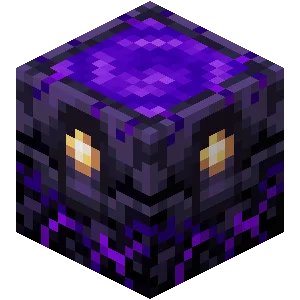
A respawn point can quietly stop working. If the bed you set is missing or obstructed when you die, the death screen's Respawn button drops you at world spawn, possibly a long walk from your base and from the items lying where you died. Here is what sets a respawn point, what removes it, and what to do afterwards.
The four ways to set a respawn point
Your personal spawn point comes from one of four sources, and the most recent one you set wins. If it is missing or blocked when you die, the game sends you to the world spawn instead.
| Source | How you set it | Works in | Fallback if it fails |
|---|---|---|---|
| Bed | Use it (at night to sleep, or in daytime just to set the point) | Overworld only | World spawn |
| Respawn anchor | Charge it with a glowstone block, then use it | Nether only | World spawn |
/spawnpoint command | Run the command (needs cheats) | Any dimension | World spawn |
| World spawn | Set at world creation, movable with /setworldspawn | Overworld default | None, this is the fallback |
Using a charged respawn anchor overrides a bed spawn, and the reverse is also true. The anchor does not act as a backup for a missing bed: per the Minecraft Wiki's respawn anchor page, it does not serve as a backup spawn point to a missing or obstructed bed. You hold one personal spawn point at a time.
Beds: what sets them and what breaks them
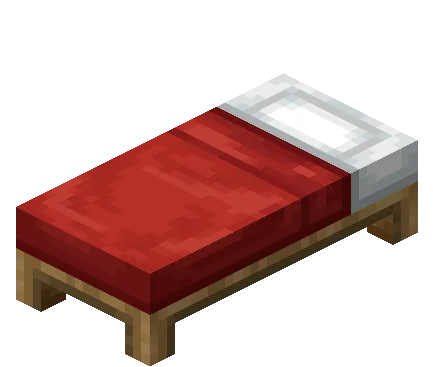
A bed sets your spawn point when you use it, and you do not need to actually sleep. The wiki notes that using a bed in daytime sets the spawn point without entering the bed. The game confirms with a "Respawn point set" message in chat. Several players can set their spawn on the same bed.
The bed is only checked at the moment you respawn. The wiki's example: you can break the bed and place a new one in the same spot, or turn it around, and as long as a bed is there when you die, it still works. What matters is the location of the bed's head, which is the position the game saves.
What blocks a bed spawn
When you respawn, the game looks for a safe place around the bed. It checks the two blocks to the immediate left and right of the head first. If those are blocked it works around the bed, then tries the block above the head and above the foot. A spot is valid when the block at bed level is air or non-solid (a torch counts, glass does not), with a solid block below and room for you to stand within 0 to 2 blocks below the bed. Blocks above the bed itself do not matter, and a slab one block above a bed can supply the two-block-high space because a bed is only half a block tall.
Two details cause most of the lost-bed stories:
- A failed bed is deleted. If the bed is obstructed when you die, your spawn point is cleared after you respawn. Per the wiki, even if you clear the obstruction afterwards you keep respawning at world spawn until you use the bed again. Re-setting the bed is a manual step.
- A missing bed gives you the message. On Bedrock the message is "Your home bed was missing or obstructed"; Java's wording says you have no home bed or respawn anchor, or it was obstructed.
If you share a base, cover the area around the bed with floor and leave headroom rather than packing storage against it.
Sleeping rules worth knowing
You can only sleep when it is night or during a thunderstorm, and you cannot sleep with a monster within 8 blocks horizontally and 5 vertically of the bed head. Sleeping takes 101 ticks. For the wider rules, including multiplayer percentages, the wiki's bed page is the reference. Trying to sleep in the Nether or the End does not fail politely: the bed explodes with power 5, stronger than TNT (power 4). That is also how players use beds as cheap explosives in those dimensions, covered in our Nether guide.
Respawn anchors: the Nether bed
A bed explodes in the Nether, so the respawn anchor is how you set a spawn point there. It is crafted from 6 crying obsidian and 3 glowstone, with the glowstone in the middle row. It must be broken with a diamond pickaxe or better, or it drops nothing.
| Fact | Detail |
|---|---|
| Charging item | Glowstone block (not glowstone dust) |
| Maximum charges | 4 |
| Light level | 3 at one charge, 7 at two, 11 at three, 15 at four |
| Charge cost per respawn | One charge each time you respawn at it |
| Usable in | The Nether only; elsewhere it explodes with power 5 |
| Redstone comparator signal | 3, 7, 11 or 15 for one to four charges |
The detail that matters in practice is that charges are consumed when you die, not when you set the spawn. Four charges is four deaths. The anchor stores charge for everyone who sets their spawn on it, so on a server the charges are shared. You must use the anchor to set your spawn point after charging it, just like a bed. You can recharge it with a dispenser containing glowstone, which makes automation straightforward if you keep a Nether hub.
If an anchor runs out of charges, is destroyed, or is blocked, the game shows a message and sends you to world spawn. There is a trap in the other direction too: per the wiki the anchor works as your respawn point even after you leave the Nether, so dying in the Overworld can send you back to the Nether if the anchor is your most recent spawn point. Use a bed again once you are home.
The Nether is also where a fallback to world spawn hurts most, because the default world spawn is in the Overworld. Hardcore mode is the exception: the wiki states an anchor does not resurrect you in Hardcore, though it may still teleport you and use charges.
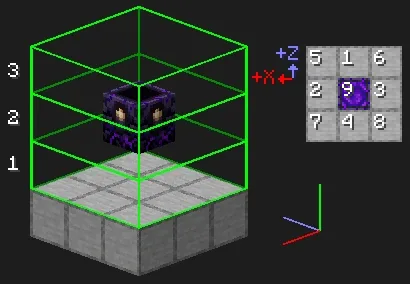
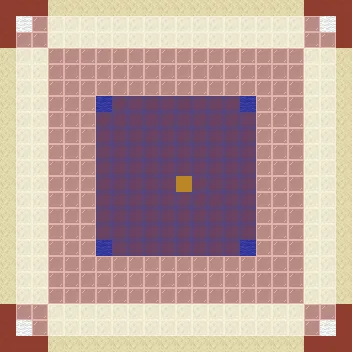
The anchor looks for space in columns around it, ranked as in the diagram, and needs at least a 1x2x1 area. Leave the ring around it open.
/spawnpoint is stricter than a bed
On a server or with cheats on, /spawnpoint sets your respawn at a coordinate. It looks flexible but it has less leniency than a bed. The wiki's rule: the point needs a two-block-tall space free of solid blocks, and if it is obstructed you do not get the neighbouring-block search that beds and anchors get. You respawn at world spawn instead.
Some solid blocks do not obstruct it, including candles, torches, carpets, heavy cores, mob heads and flowers. Lava and water do obstruct it, even though they are non-solid, though kelp and seagrass do not. The game ignores the block below the point, so you can respawn over a magma block or over a hole.
World spawn: the fallback
World spawn is where you first appear and where you land if nothing else works. In Java you appear within a 21 by 21 area around it by default, and you can change the size with the respawn_radius game rule (it was spawnRadius before Java renamed its rules; see our game rules list). Bedrock has its own respawn radius setting.
Finding it is easy: a compass that is not linked to a lodestone points to world spawn. If you want to move it, /setworldspawn does that. Java 1.21.9 also made it possible to set the world spawn in dimensions other than the Overworld. On a server whose default game mode is Adventure, the normal safe-spot search is skipped and players appear exactly on the world spawn coordinates, even in mid-air if nothing is there.
After you die: items, XP and the recovery compass
Dying drops your whole inventory where you died unless keep_inventory is on (the Java name; Bedrock uses keepinventory). Per the wiki, dropped items decay five minutes after they drop, while the chunk is loaded. That is the clock that matters, so the first job after a respawn is not a bed. It is getting back to the pile.
Your experience is lost too. You drop orbs worth your last level times 7, with a maximum of 100, so from level 15 up you get 100 points back at most. Status effects are also removed on respawn, even with keep inventory on.

The recovery compass points to where you last died. You craft it from 8 echo shards around a compass (echo shards come from ancient city chests, see our Deep Dark guide). Two limits from the wiki: it only works in the same dimension as your last death, otherwise it spins randomly, and it is an ordinary item, so it drops when you die unless keep inventory is on. Carry a spare in an ender chest rather than your pack, because the one you hold is in the pile you are trying to find. In Hardcore it has no use, since you cannot respawn there.
One death a totem will not undo is a fall into the void, per the wiki's totem page; our Woodland Mansion guide covers where totems come from.
Quick Action Checklist
- After building a base, use your bed once and watch for the "Respawn point set" chat message
- Keep floor and two blocks of headroom open on at least one side of the bed head
- After a death that sent you to world spawn, re-use your bed, because a failed bed is cleared
- In the Nether, craft a respawn anchor and charge it with glowstone blocks (4 charges is 4 deaths)
- Set a bed again after leaving the Nether, since the anchor stays your spawn point
- Craft a recovery compass (8 echo shards and a compass) and keep a spare in an ender chest
- After dying, head for the pile first: items decay five minutes after dropping
Frequently Asked Questions
How do you set your spawn point in Minecraft?
Why did I respawn at world spawn instead of my bed in Minecraft?
How many times can you respawn at a respawn anchor in Minecraft?
Does a respawn anchor work in the Overworld in Minecraft?
How long do items last after you die in Minecraft?
How do you make a recovery compass in Minecraft?
Keep Reading
- Minecraft Wiki — Bed: setting the spawn point, obstruction rules, sleeping conditions, explosions
- Minecraft Wiki — Respawn Anchor: recipe, charges, respawning, explosions, Hardcore
- Minecraft Wiki — World spawn: spawn area, individual spawn, /spawnpoint obstruction rules
- Minecraft Wiki — Death: item drops, five-minute decay, experience loss
- Minecraft Wiki — Recovery Compass: recipe and same-dimension behaviour
Related Guides

Minecraft Goat Horns: All 8 Sounds and How to Get Them
Eight goat horns exist, and four of them only come from screaming goats. Here is exactly which blocks knock a horn loose, how to breed screaming goats, the pillager outpost chest that can hold a horn, and why blowing one in the Deep Dark is a bad idea.
Minecraft Advancements List and How to Get the Hard Ones
Minecraft Java has 126 advancements, but only 23 pay XP, and one of them pays 1,000. Here is every advancement by tab for Java 26.3, the challenges ranked by reward, the full Adventuring Time, Monsters Hunted, A Balanced Diet and Two by Two checklists, the descriptions that mislead you, and what the 26.4 snapshots change.
Minecraft Wandering Trader Guide: Trades, Spawns and Llamas
Every wandering trader shows 9 offers drawn from a pool of 100 that is the same on Java 26.3 and Bedrock 26.60. Here is the full price list from the game's own trade files, the odds of seeing the offer you want, what the trader buys from you, how long one takes to spawn, and why a name tag will not keep it.

Minecraft on Switch 2: Free Upgrade, Price and Minecoins
Digital owners of Minecraft for Nintendo Switch get the native Switch 2 version free in most regions until January 31, 2027. Cartridge owners get no free upgrade, only an in-game invitation to a discounted Ultimate Collection. Here are the editions, the US prices, what the native version changes, and the Minecoins change that started on launch day.
Minecraft Survival Guide for Beginners: Your First Days
You have about ten minutes of daylight before the sun sets and the world tries to kill you. Here is exactly what to do with them — punch a tree, build a tool chain, and get a roof over your head before the zombies arrive.
Best Minecraft Enchantments, Ranked — The Ones Worth Your XP
Mending is the enchantment that ends the grind — gear that repairs itself forever. Everything else is a fight over your XP and anvil uses. Here is what actually earns a slot, ranked, with the real max levels.