Minecraft Game Rules List: Every Rule and Its New Name
Java 1.21.11 renamed every game rule: keepInventory is keep_inventory now, doDaylightCycle is advance_time, and doFireTick is gone entirely. Here is the full list for Java 26.3 and Bedrock 26.50, with old names, new IDs, menu labels, defaults, and the 19 Bedrock rules that switch your achievements off for good.
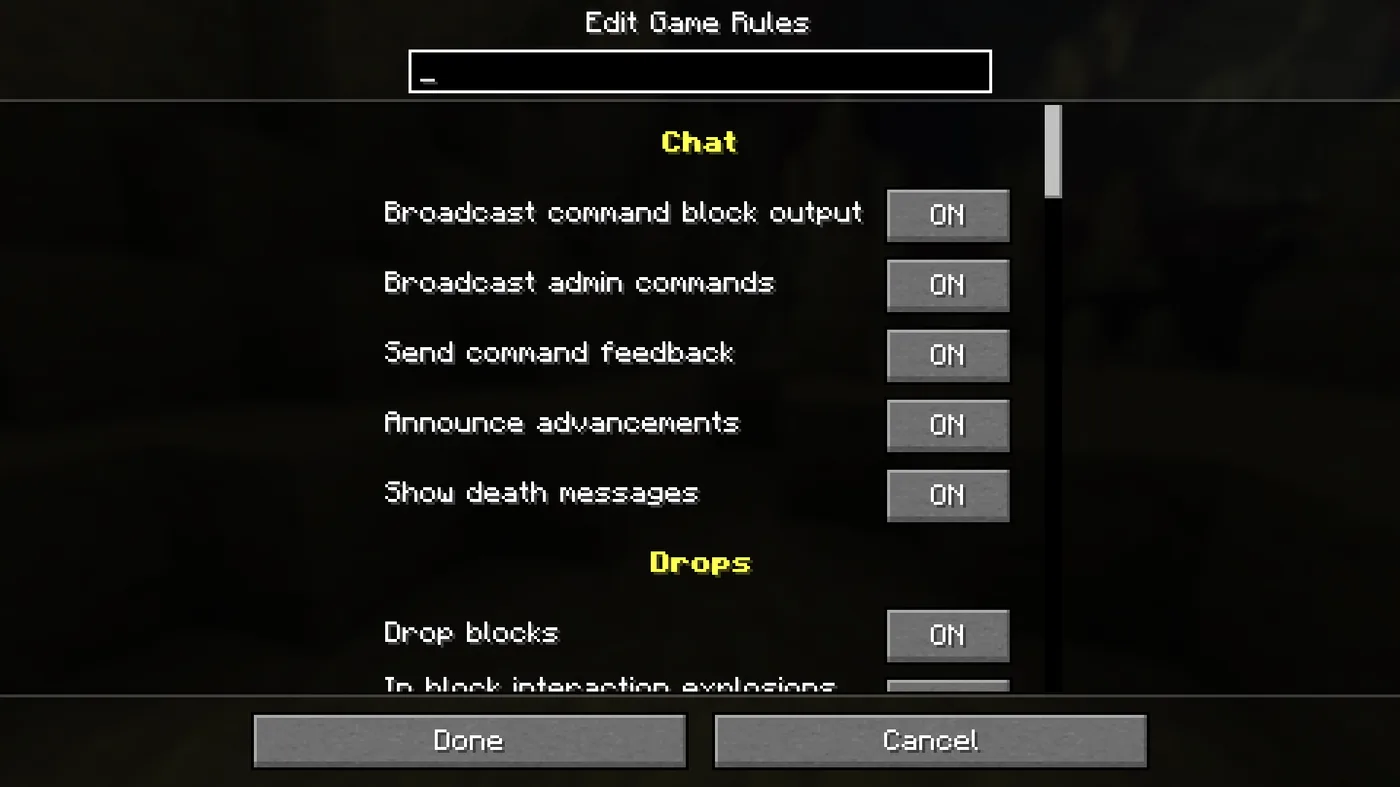
Before December 2025, the Java Edition command for keeping your items on death was /gamerule keepInventory true. That is not the rule's name anymore. Snapshot 25w44a moved game rules into a registry and renamed every one of them from camelCase to snake_case, and that change shipped in Java Edition 1.21.11, the Mounts of Mayhem drop, on December 9, 2025. Java's rule argument is case-sensitive and has to match a registered rule, so on the current Java release the command is /gamerule keep_inventory true.
Bedrock never went through the rename. It still uses all-lowercase names like keepinventory, and when you type them Bedrock does not care about capitalization.
The rename did more than change the case, too. Twenty-five rules were renamed beyond the case change, three now mean the opposite of what their old names said, and two were deleted and replaced by a number. Here is the whole set as of Java 26.3 and Bedrock 26.50: every ID, what it used to be called, the label the menu shows, the default, and which Bedrock rules permanently switch off achievements the moment you touch them.
Game rules at a glance
| Java Edition 26.3 | Bedrock Edition 26.50 | |
|---|---|---|
| Game rules | 59 (58 standard, 1 experimental) | 38 |
| Naming style | snake_case, e.g. keep_inventory | lowercase, e.g. keepinventory |
| Case-sensitive when typed | Yes | No |
| Rules that exist on both editions | 29 | 29 |
| Edition-exclusive rules | 30 | 9 |
| Change them without a command | Edit Game Rules, at world creation or from World Options (26.1 and later) | Create New World and Edit World screens, about half the rules |
The counts come from the Minecraft Wiki's game rule list for Java and Microsoft's /gamerule reference for Bedrock, which lists the same 38 names. The one experimental Java rule is max_minecart_speed, and it only exists in a world with the Minecart Improvements experiment switched on. Our rails and minecarts guide covers what it does.
The rename, old name to new
Any rule that existed before 1.21.11 and is missing from the table below (and from the fire and minecart notes further down) simply switched to snake_case: keepInventory became keep_inventory, mobGriefing became mob_griefing, randomTickSpeed became random_tick_speed. These 25 are the ones Mojang's 25w44a changelog lists as renamed beyond the case change:
| Old Java name (before 1.21.11) | New Java name | Bedrock name |
|---|---|---|
announceAdvancements | show_advancement_messages | — |
commandBlocksEnabled | command_blocks_work | commandblocksenabled |
commandModificationBlockLimit | max_block_modifications | — |
disableElytraMovementCheck | elytra_movement_check (inverted) | — |
disablePlayerMovementCheck | player_movement_check (inverted) | — |
disableRaids | raids (inverted) | — |
doDaylightCycle | advance_time | dodaylightcycle |
doEntityDrops | entity_drops | doentitydrops |
doImmediateRespawn | immediate_respawn | doimmediaterespawn |
doInsomnia | spawn_phantoms | doinsomnia |
doLimitedCrafting | limited_crafting | dolimitedcrafting |
doMobLoot | mob_drops | domobloot |
doMobSpawning | spawn_mobs | domobspawning |
doPatrolSpawning | spawn_patrols | — |
doTileDrops | block_drops | dotiledrops |
doTraderSpawning | spawn_wandering_traders | — |
doVinesSpread | spread_vines | — |
doWardenSpawning | spawn_wardens | — |
doWeatherCycle | advance_weather | doweathercycle |
maxCommandChainLength | max_command_sequence_length | maxcommandchainlength |
maxCommandForkCount | max_command_forks | — |
naturalRegeneration | natural_health_regeneration | naturalregeneration |
snowAccumulationHeight | max_snow_accumulation_height | — |
spawnRadius | respawn_radius | spawnradius |
spawnerBlocksEnabled | spawner_blocks_work | — |
Mojang's changelog frames it as making the names more descriptive, and the wiki's version history adds that many were renamed to reflect their labels in the Edit Game Rules menu. That is why doDaylightCycle became advance_time (the menu says "Advance time of day") and doInsomnia became spawn_phantoms. Two more renames happened outside that list: the experimental minecartMaxSpeed became max_minecart_speed in the same snapshot, and Bedrock replaced its own locatorbar with playerwaypoints in Bedrock 26.30, migrating true to everyone and false to off.
Each full Java ID carries a namespace, minecraft:keep_inventory, but the command takes the short form. The wiki's own examples all drop the prefix. If you run command blocks or datapack functions written before 1.21.11 that set game rules, check them against this table.
Three rules now mean the opposite
Three old rules were phrased as "disable X". Their replacements are phrased as "X", so the value flips, and the changelog says so directly:
| What you used to type | What you type now | Result |
|---|---|---|
disableRaids true | raids false | No raids |
disableElytraMovementCheck true | elytra_movement_check false | Server stops speed-checking elytra flight |
disablePlayerMovementCheck true | player_movement_check false | Server stops speed-checking players |
The raids rule has two side effects worth knowing before you use it. With raids off, Bad Omen is not removed when you walk into a village, and switching it off mid-raid stops the raid but leaves the raiders standing there. More on how raids start in our raids and pillagers guide.
Fire tick is gone, and a radius replaced it
doFireTick and allowFireTicksAwayFromPlayer (the second one only arrived in 1.21.5) were both removed in 1.21.11. Their replacement is a number: fire_spread_radius_around_player, the maximum distance in blocks from a player at which fire can spread.
| Value | What fire does |
|---|---|
| 128 (default) | Spreads within 128 blocks of a player |
| 0 | Does not spread at all |
| -1 | Spreads at any distance, even with no player nearby |
So the Java answer to "how do I stop fire spreading" is now /gamerule fire_spread_radius_around_player 0, and -1 is the lowest value the rule accepts. Bedrock kept the old switch: /gamerule dofiretick false.
Keep inventory, precisely
The command is /gamerule keep_inventory true on Java 1.21.11 and later, and /gamerule keepinventory true on Bedrock. The menu calls it "Keep inventory after death". Here is what it actually keeps, per the wiki's notes on the rule:
| On death with keep inventory on | Kept? |
|---|---|
| Items in your inventory | Yes |
| Experience | Yes |
| Health and hunger | No, both reset as normal |
| Status effects | No, all removed (Mojang marked MC-67352 "works as intended") |
| Items with Curse of Vanishing | Yes, they do not vanish (MC-108353, also "works as intended") |
That Curse of Vanishing line is the surprising one: the curse exists to delete an item on death, and keep inventory overrides it. The effects line matters if you were counting on a potion to see you through a respawn. Our status effects guide covers what you lose.
On Bedrock, keepinventory sits on the cheats side of the fence, which has a permanent cost covered further down. On Java, a Hardcore world locks the in-game Edit Game Rules button entirely, so keep inventory is not a lifeline you can reach for mid-run.
Every Java game rule, grouped like the menu
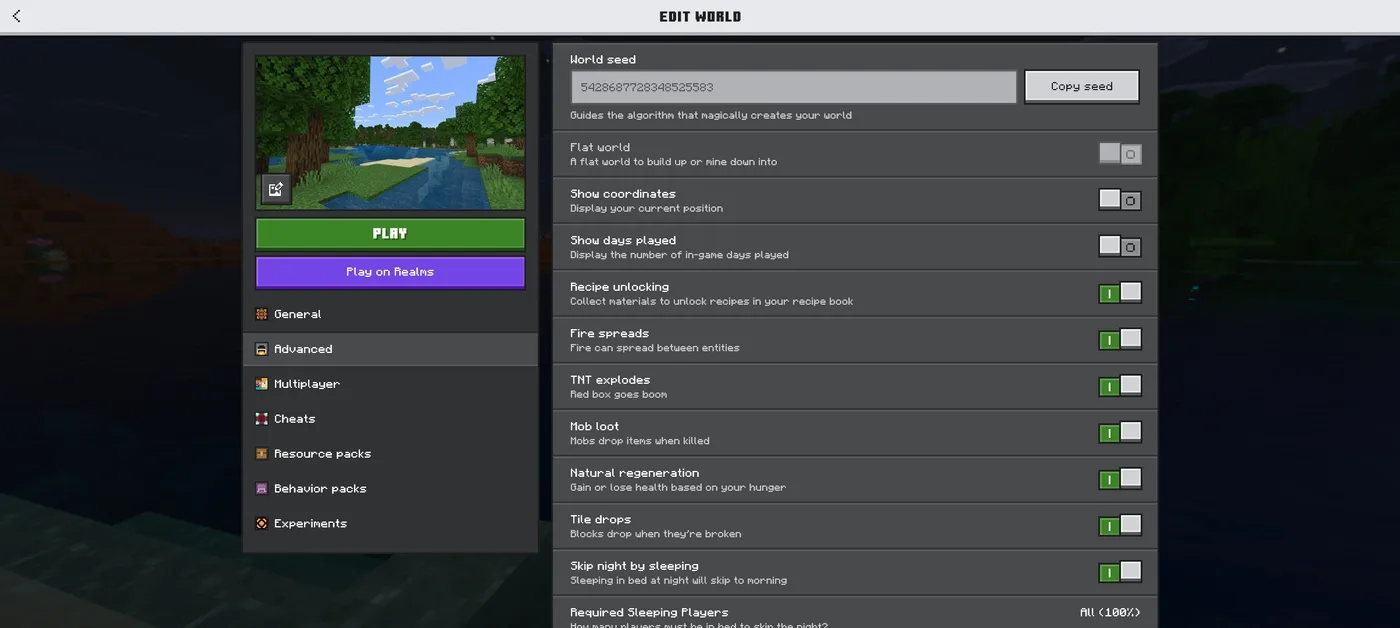
The Edit Game Rules screen sorts rules under seven headings. The tables below follow that grouping, with the label each rule shows in the menu (as of 26.2), the Bedrock equivalent where one exists, and the Java default.
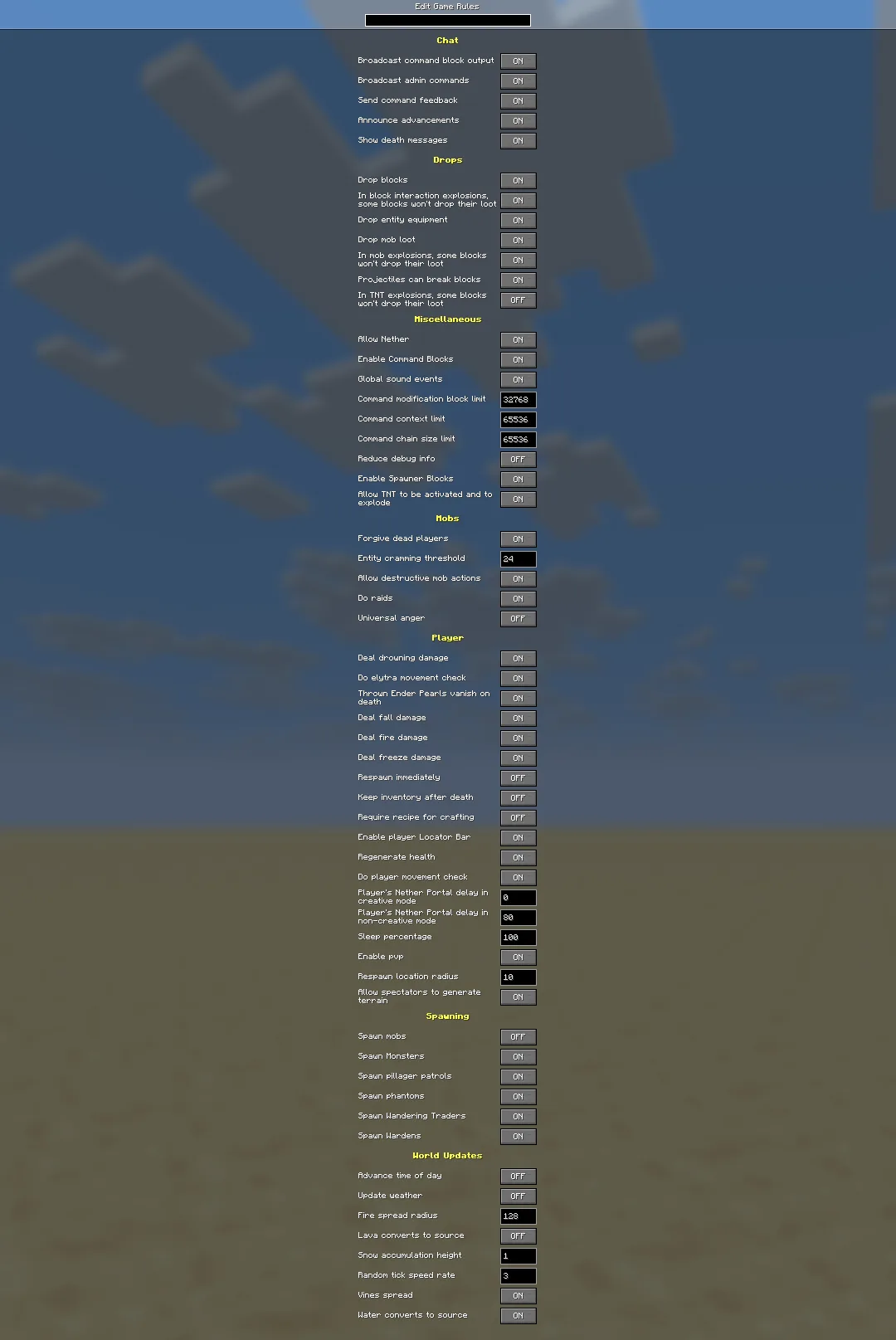
One warning about that screenshot: the world it was taken in has Spawn mobs, Advance time of day and Update weather switched off. Read defaults from the tables, not the picture.
Chat
| Java ID | Bedrock ID | Menu label | Default | What it does |
|---|---|---|---|---|
command_block_output | commandblockoutput | Broadcast command block output | true | Command blocks tell operators what they ran |
log_admin_commands | — | Broadcast admin commands | true | Logs admin commands to the server log |
send_command_feedback | sendcommandfeedback | Send command feedback | true | Command results appear in chat |
show_advancement_messages | — | Announce advancements | true | Advancements are announced in chat |
show_death_messages | showdeathmessages | Show death messages | true | Death messages in chat, including a pet's death to its owner |
Drops
| Java ID | Bedrock ID | Menu label | Default | What it does |
|---|---|---|---|---|
block_drops | dotiledrops | Drop blocks | true | Broken blocks drop items |
block_explosion_drop_decay | — | In block interaction explosions, some blocks won't drop their loot | true | A block explosion, like a bed used outside the Overworld, drops only some of what it destroys |
entity_drops | doentitydrops | Drop entity equipment | true | Non-mob entities drop items; off, emptying an item frame drops nothing |
mob_drops | domobloot | Drop mob loot | true | Mobs drop items and experience orbs |
mob_explosion_drop_decay | — | In mob explosions, some blocks won't drop their loot | true | Creeper-style explosions drop only some destroyed blocks |
projectiles_can_break_blocks | projectilescanbreakblocks | Projectiles can break blocks | true | Projectiles break chorus flowers, pointed dripstone and decorated pots |
tnt_explosion_drop_decay | tntexplosiondropdecay | In TNT explosions, some blocks won't drop their loot | false | TNT drops everything it destroys unless you switch this on |
That last default is the odd one out: block and mob explosions lose drops by default, TNT does not. Blocks destroyed by TNT drop 100% of the time, as if mined with an unenchanted tool (so no Fortune), which has been true on Java since 1.14 and on Bedrock since 1.21.0. One Bedrock catch from the wiki's explosion notes: worlds created before 1.21 keep their old tntexplosiondropdecay setting, so an older Bedrock world only gets full TNT drops after you set it to false yourself.
Miscellaneous
| Java ID | Bedrock ID | Menu label | Default | What it does |
|---|---|---|---|---|
allow_entering_nether_using_portals | — | Allow Nether | true | Nether portals take you to the Nether |
command_blocks_work | commandblocksenabled | Enable Command Blocks | true | Command blocks run |
global_sound_events | — | Global sound events | true | Wither spawning, ender dragon death and End portal activation sounds reach every player regardless of distance |
max_block_modifications | — | Command modification block limit | 32768 | Block cap for /clone, /fill and /fillbiome |
max_command_forks | — | Command context limit | 65536 | Maximum forks per tick for command blocks and functions |
max_command_sequence_length | maxcommandchainlength | Command chain size limit | 65536 | Maximum chained commands per tick from one source |
reduced_debug_info | — | Reduce debug info | false | Trims the F3 screen and blocks the F3+B hitbox and F3+G chunk-border views |
spawner_blocks_work | — | Enable Spawner Blocks | true | Monster spawners work |
tnt_explodes | tntexplodes | Allow TNT to be activated and to explode | true | TNT explodes; off, TNT minecarts cannot be lit either |
max_minecart_speed | — | — (experimental) | 8 | Minecart top speed, 1 to 1000; Minecart Improvements experiment only |
If you want to try vanilla commands for yourself, the command blocks guide is the starting point. This list is the settings layer underneath them.
Mobs
| Java ID | Bedrock ID | Menu label | Default | What it does |
|---|---|---|---|---|
forgive_dead_players | — | Forgive dead players | true | Angry neutral mobs within 65×21×65 blocks calm down when the player they are chasing dies |
max_entity_cramming | — | Entity cramming threshold | 24 | How many pushable entities can pile up before cramming damage starts (6 HP every half-second); 0 turns it off |
mob_griefing | mobgriefing | Allow destructive mob actions | true | Mobs can change blocks and pick up items |
raids | — | Do raids | true | Raids can happen |
universal_anger | — | Universal anger | false | An angered neutral mob attacks any nearby player, not just the one who hit it |
Player
| Java ID | Bedrock ID | Menu label | Default | What it does |
|---|---|---|---|---|
drowning_damage | drowningdamage | Deal drowning damage | true | You still lose air with it off, you just take no damage |
elytra_movement_check | — | Do elytra movement check | true | Server speed-checks elytra flight |
ender_pearls_vanish_on_death | — | Thrown Ender Pearls vanish on death | true | Your in-flight pearls disappear if you die |
fall_damage | falldamage | Deal fall damage | true | Fall damage on or off |
fire_damage | firedamage | Deal fire damage | true | Covers fire, lava, campfires and magma blocks |
freeze_damage | freezedamage | Deal freeze damage | true | Powder snow damage |
immediate_respawn | doimmediaterespawn | Respawn immediately | false | Skips the death screen |
keep_inventory | keepinventory | Keep inventory after death | false | Keep items and experience on death |
limited_crafting | dolimitedcrafting | Require recipe for crafting | false | You can only craft recipes you have unlocked |
locator_bar | playerwaypoints | Enable player Locator Bar | true (Bedrock: everyone) | Locator bar on or off; Bedrock takes everyone or off |
natural_health_regeneration | naturalregeneration | Regenerate health | true | Health regenerates from a full enough hunger bar; golden apples and Regeneration still heal with it off |
player_movement_check | — | Do player movement check | true | Server speed-checks players |
players_nether_portal_creative_delay | — | Player's Nether Portal delay in creative mode | 0 | Game ticks a Creative player stands in a portal before it fires |
players_nether_portal_default_delay | — | Player's Nether Portal delay in non-creative mode | 80 | Same for everyone else; 80 game ticks is the familiar 4 seconds |
players_sleeping_percentage | playerssleepingpercentage | Sleep percentage | 100 | Percentage of Overworld players who must sleep to skip the night |
pvp | pvp | Enable pvp | true | Players can damage each other |
respawn_radius | spawnradius | Respawn location radius | 10 | How far from world spawn you land with no personal spawn point |
spectators_generate_chunks | — | Allow spectators to generate terrain | true | Spectators load new chunks |
The portal delay pair is worth knowing if you run a nether hub on a server: the 4-second wait is a game rule, not a hard-coded constant.
Spawning
| Java ID | Bedrock ID | Menu label | Default | What it does |
|---|---|---|---|---|
spawn_mobs | domobspawning | Spawn mobs | true | Natural spawning, plus global spawns: cats, phantoms, patrols, wandering traders, zombie sieges and creaking hearts |
spawn_monsters | — | Spawn Monsters | true | Monsters spawn naturally |
spawn_patrols | — | Spawn pillager patrols | true | Pillager patrols spawn |
spawn_phantoms | doinsomnia | Spawn phantoms | true | Phantoms spawn at night |
spawn_wandering_traders | — | Spawn Wandering Traders | true | Wandering traders spawn |
spawn_wardens | — | Spawn Wardens | true | Wardens can spawn |
Java has separate switches for patrols, traders, wardens and plain monsters. Bedrock has none of those four as game rules, only the broad domobspawning and doinsomnia; it controls patrols and wandering traders with a separate command, /mobevent, instead.
World Updates
| Java ID | Bedrock ID | Menu label | Default | What it does |
|---|---|---|---|---|
advance_time | dodaylightcycle | Advance time of day | true | Day-night cycle and moon phases move |
advance_weather | doweathercycle | Update weather | true | Weather changes on its own; /weather still works with it off |
fire_spread_radius_around_player | — (Bedrock uses dofiretick) | Fire spread radius | 128 | See the fire section above |
lava_source_conversion | — | Lava converts to source | false | New lava source blocks can form |
max_snow_accumulation_height | — | Snow accumulation height | 1 | Snow layers per block, from 0 (none) to 8 (a full block) |
random_tick_speed | randomtickspeed | Random tick speed rate | 3 (Bedrock: 1) | Random ticks per chunk section per game tick |
spread_vines | — | Vines spread | true | Vines grow onto nearby blocks; cave, weeping and twisting vines are not affected |
water_source_conversion | — | Water converts to source | true | New water source blocks can form |
Bedrock-only game rules
Nine Bedrock rules have no Java counterpart:
| Bedrock ID | What it does | Changeable without cheats? |
|---|---|---|
dofiretick | Fire spreads and burns out on its own | Yes |
functioncommandlimit | Maximum commands a single /function can run (default 10000) | No |
recipesunlock | Recipes unlock in the recipe book as you collect materials | Yes |
respawnblocksexplode | Beds and respawn anchors explode in the wrong dimension; false stops it | Yes |
showbordereffect | Border block particles are shown | No |
showcoordinates | Your coordinates show on the HUD | Yes |
showdaysplayed | The in-game day count shows on the HUD | Yes |
showrecipemessages | Recipe-unlock notifications appear | Yes |
showtags | Item tooltips show "Can place on" and "Can destroy" lists and item lock indicators | Yes |
showdaysplayed got a second job in Bedrock 26.10: with it on, Hardcore worlds show their number of days played on the Play screen.
Which Bedrock rules cost you achievements
This is the split that matters most on Bedrock. Some rules can be changed from the world settings or with /gamerule without turning cheats on. The rest need cheats, and per the Minecraft Wiki, a Bedrock world saved with cheats enabled can never earn achievements again, even if you switch cheats off later. The game's own warning, shown when you create a world with any of those settings, says the same thing.
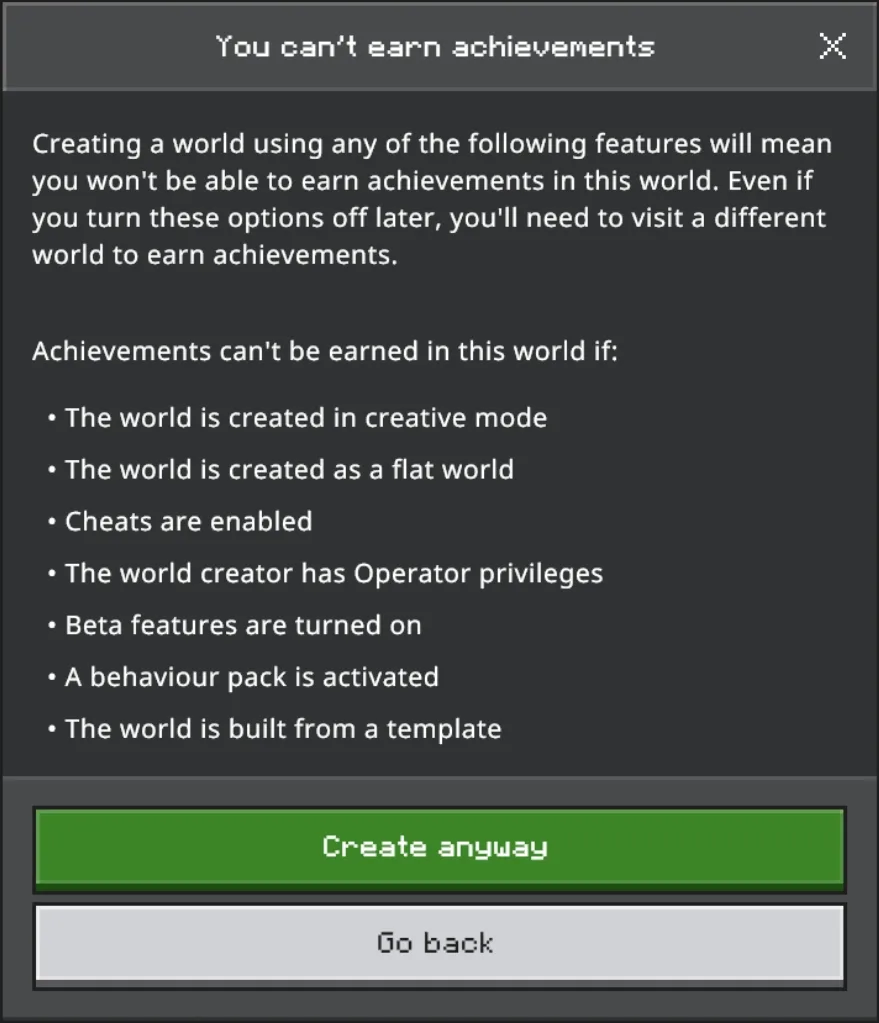
The 38 Bedrock rules split exactly in half:
| Safe: no cheats needed | Cheats only: locks achievements |
|---|---|
showdeathmessages | commandblockoutput |
dotiledrops | sendcommandfeedback |
domobloot | doentitydrops |
projectilescanbreakblocks | commandblocksenabled |
tntexplosiondropdecay | maxcommandchainlength |
tntexplodes | mobgriefing |
doimmediaterespawn | drowningdamage |
playerwaypoints | falldamage |
naturalregeneration | firedamage |
playerssleepingpercentage | freezedamage |
pvp | keepinventory |
spawnradius | dolimitedcrafting |
dofiretick | domobspawning |
recipesunlock | doinsomnia |
respawnblocksexplode | dodaylightcycle |
showcoordinates | doweathercycle |
showdaysplayed | randomtickspeed |
showrecipemessages | functioncommandlimit |
showtags | showbordereffect |
Read the right-hand column before you touch anything in a world you care about. Keep inventory, always-day, no weather, no phantoms and no mob griefing are all on the cheats side. A Bedrock survival world cannot have any of them and still earn achievements. The safe column is still useful: one-player sleep, fire spread, TNT, coordinates and natural regeneration can all be changed without the lock.
Where to change them without a command
Java Edition. All 58 standard Java rules have a toggle or number field in the Edit Game Rules menu, which you can open from the Create New World screen. Since Java 26.1 (March 24, 2026) you can also reach it from inside a world, through a World Options screen in the pause menu, and it has a search bar that matches a rule's ID, its name, its description and its category. Per the 26.1 change notes, the in-game rules screen is available to operators and disabled for everyone else.
Java 26.2 gave the host of a singleplayer world an Allow Commands toggle in World Options, so turning on /gamerule no longer needs the old Open to LAN workaround. Java 26.3 then moved World Options into the slot where the Open to LAN button used to be and split it into General and Multiplayer sections, with Allow Commands under General. In Hardcore, the Allow Commands, Edit Game Rules and difficulty controls are locked.
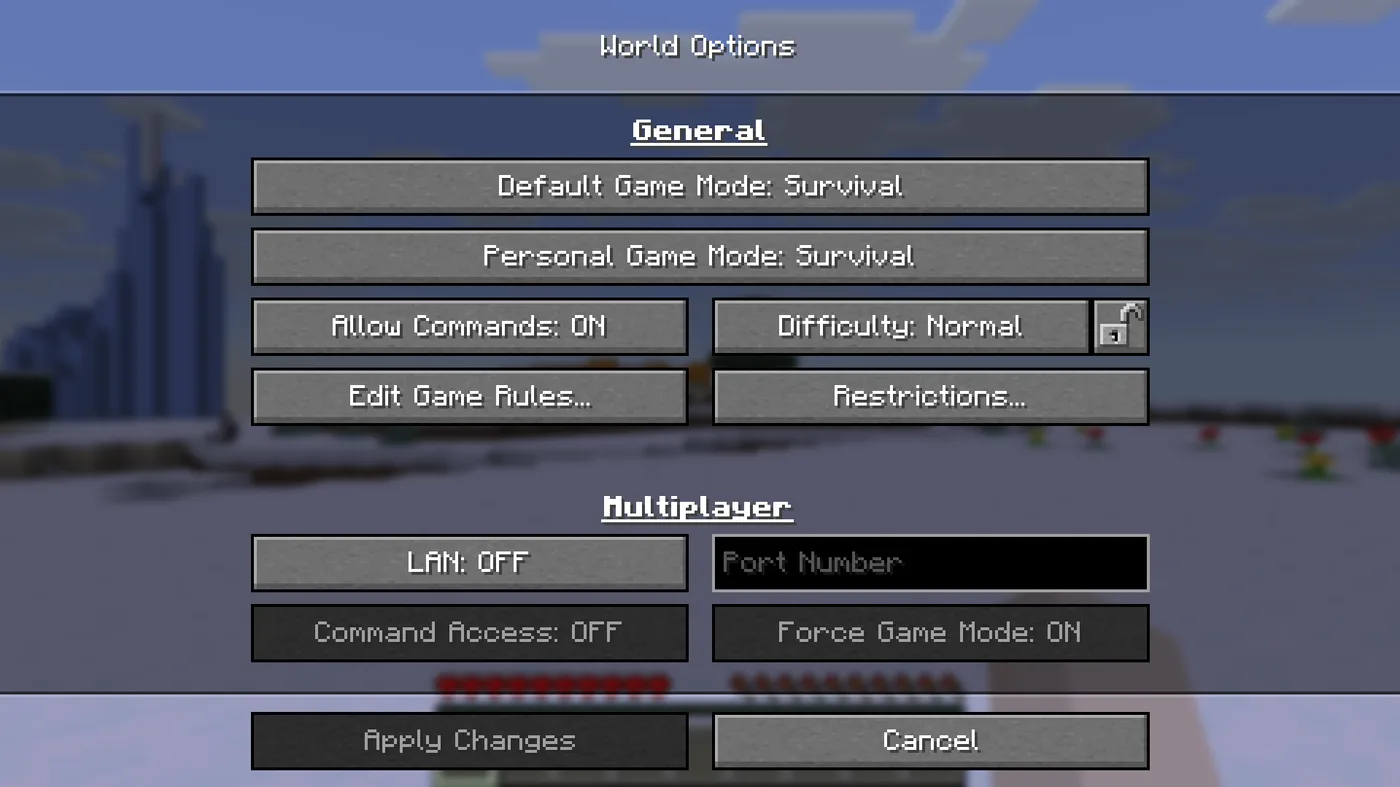
Bedrock Edition. About half the rules can be changed from the Create New World screen, the Edit World screen, and the settings in the pause menu. Everyday toggles like coordinates, fire spread, TNT and natural regeneration sit in the Advanced tab; keep inventory, the daylight cycle and mob griefing sit in the Cheats tab. The rest are command-only, or editable in the Bedrock Editor's export screen.
Five rules that break something when you flip them
These are the rules whose side effects reach past their names, all taken from the wiki's notes on each one.
mob_griefingfalse does not just stop creepers cratering your base. Villagers stop farming and stop picking up food, though they keep breeding until the food already in their inventory runs out. That quietly stalls a crop-fed villager breeder. Allays stop collecting items. Piglins stop picking up thrown gold, but you can still barter by using gold on a piglin directly. It has no effect on bees, breezes, frogs, turtles or players.block_dropsfalse eats shulker boxes. Containers still spill their contents, just not themselves, with one exception: a broken shulker box drops nothing at all, contents included.spawn_mobsfalse does not give you a mob-free world. It only covers natural and global spawning. Monster spawners, raids, spawn eggs, iron golems and commands all still produce mobs. The spawner guide covers how the spawner block works.random_tick_speedis a crop-speed dial with edges. 0 freezes random ticks: no crop growth, no leaf decay. Above 4096, plant growth and leaf decay become instant. It does not touch coral dying, frogspawn hatching or sniffer eggs hatching. The defaults also differ, 3 on Java and 1 on Bedrock, so a number copied from a Java tutorial is not the same setting on Bedrock. Our automatic farms guide works its growth maths at the Java default of 3.players_sleeping_percentage0 still needs a sleeper. Zero means one player in bed is enough, not that the night skips itself. Anything over 100 means the night can never be skipped by sleeping. Since 1.21.11 the rule's minimum is 0, so negative values are out.
Quick Action Checklist
- On Java 1.21.11 or later, use the snake_case names:
keep_inventory,advance_time,advance_weather,spawn_phantoms,mob_griefing,spawn_mobs. - On Bedrock, use the lowercase names:
keepinventory,dodaylightcycle,doweathercycle,doinsomnia,mobgriefing,domobspawning. - Flip the value when translating
disableRaids,disableElytraMovementCheckordisablePlayerMovementCheck:raids falseis the new "no raids". - Stop fire spread with
fire_spread_radius_around_player 0on Java,dofiretick falseon Bedrock. - Check the cheats column before changing a rule in a Bedrock world you want achievements in: keep inventory, always-day and no phantoms all cost them, permanently.
- Audit old command blocks and datapacks that set game rules. Anything written before 1.21.11 uses the old names.
- On Java 26.3, skip the command entirely: pause menu, World Options, Edit Game Rules, then search for the rule. The screen is for operators only, which in singleplayer means switching Allow Commands on first.
Frequently Asked Questions
What is the keep inventory command in Minecraft?
Why did Minecraft rename the game rules?
Does turning on keep inventory disable achievements in Minecraft Bedrock?
How do you turn off fire spread in Minecraft Java now that doFireTick is gone?
How do you stop phantoms from spawning in Minecraft?
How do you make one player sleeping skip the night in Minecraft?
Keep Reading
- Minecraft Wiki — Game rule: full list, defaults, Bedrock availability, and additional behavior notes
- Minecraft.net — Snapshot 25w44a changelog: game rules moved to a registry and renamed to snake_case
- Minecraft Wiki — Java Edition 1.21.11 (Mounts of Mayhem), released December 9, 2025
- Minecraft Wiki — /gamerule command syntax, case sensitivity, and examples
- Microsoft Learn — Bedrock Edition /gamerule command reference and rule names
- Minecraft Wiki — Java Edition World Options screen (26.1 and 26.3 changes)
- Minecraft Wiki — Java Edition 26.1: in-game game rules screen and search bar
- Minecraft Wiki — Bedrock achievements and the settings that permanently disable them
- Minecraft Wiki — Bedrock Edition 26.30: locatorbar replaced by playerwaypoints
- Minecraft Wiki — Bedrock Preview 26.30.20: locatorbar true/false migrates to playerwaypoints everyone/off
- Minecraft Wiki — Java Edition 26.2: host gets Game Mode and Allow Commands in World Options
- Minecraft Wiki — Minecart Improvements: minecartMaxSpeed renamed to max_minecart_speed in 25w44a
- Minecraft Wiki — Explosion: TNT drop rate history and pre-1.21 Bedrock tntexplosiondropdecay worlds
- Minecraft Wiki — Bedrock Edition 26.10: Hardcore worlds show days played with showdaysplayed on
Related Guides

Minecraft on Switch 2: Free Upgrade, Price and Minecoins
Digital owners of Minecraft for Nintendo Switch get the native Switch 2 version free in most regions until January 31, 2027. Cartridge owners have been offered nothing so far. Here are the editions, the US prices, what the native version changes, and the Minecoins change that lands on the same day.
Minecraft Wandering Trader Guide: Trades, Spawns and Llamas
Every wandering trader shows 9 offers drawn from a pool of 100 that is the same on Java 26.3 and Bedrock 26.50. Here is the full price list from the game's own trade files, the odds of seeing the offer you want, what the trader buys from you, how long one takes to spawn, and why a name tag will not keep it.
Minecraft Spear Guide: Jab, Charge Damage, and Lunge
A diamond spear jabs for 4 damage. Held low on an elytra at rocket speed, the same spear charges for 37. The spear's charge takes its damage from how fast you are moving, and the weapon breaks several rules the rest of Minecraft combat runs on. Here are the real numbers for every tier, both attacks, and Lunge.
Minecraft Dye Guide: How to Make All 16 Colors
Fifteen of Minecraft's sixteen dyes come from a single item you can pick up, smelt or squid. Purple is the only one that does not exist outside a crafting grid, and green is the only one with no crafting recipe at all. Here is the whole palette in one table, which biome hands you eight of the sixteen for free, and the sheep trick that turns one dye into unlimited coloured wool.

Minecraft Survival Guide for Beginners: Your First Days
You have about ten minutes of daylight before the sun sets and the world tries to kill you. Here is exactly what to do with them — punch a tree, build a tool chain, and get a roof over your head before the zombies arrive.

Best Minecraft Enchantments, Ranked — The Ones Worth Your XP
Mending is the enchantment that ends the grind — gear that repairs itself forever. Everything else is a fight over your XP and anvil uses. Here is what actually earns a slot, ranked, with the real max levels.