How to Watch CS2 Demos: Controls, TrueView and Commands
Valve rebuilt the Counter-Strike 2 demo controller on October 14, 2026 and described only part of it in the patch notes. How to get a match onto your PC, what every button on the new bar does, how highlights and TrueView work, and the demo console commands, read from the game files.
Valve's notes for the October 14, 2026 Counter-Strike 2 update gave the demo viewer four short lines: a progress bar for demo downloads, camera controls that now work by clicking and dragging, free and chase cameras that keep working while a demo is paused, and fixes for jumping around a demo. The files that shipped with it show a much bigger job. The speed control became a slider that runs from 0.1x to 4x, the hotkey hints printed on the bar are gone, and the bar gained a player picker, a jump-to-the-next-kill button, a camera button, a tick counter and a menu that skips to the start of a round's action.
So a demo guide written before mid-October describes a bar that no longer exists. Here is the current one: how to get a match onto your PC, what every control on the new bar does, how highlights and TrueView work, and the console commands that still matter.
The controller comes from its own layout and script (huddemocontroller.xml and huddemocontroller.js), the Watch menu from the match-info and match-list scripts, and the settings and commands from the game's English strings and its console command and variable dumps, all read from SteamDB's public GameTracking-CS2 repository at the October 22, 2026 build. That build's release notes cover map scripting only, and the controller's layout and script have not changed since October 14; the October 22 build only restyled its menus and settings panel. The history comes from Valve's release notes.
Demos in 30 seconds
| Question | Answer |
|---|---|
| Where are my matches? | Watch, the TV icon in the main menu, then Your Matches |
| How do I play one? | Select it, press Download, then Watch when the download finishes |
| Can I skip to just my duels? | Yes: Watch Highlights on the match screen, or the film button in playback, shows only one player's kills and deaths |
| Playback speeds | Pause, 0.1x, 0.25x, 0.5x, 1x, 2x and 4x on the slider |
| Skipping | 15 seconds back or forward, a round at a time, or to the next kill |
| Cameras | First person, Chase Cam and Free Cam; the last two work while paused |
| What the player actually saw | TrueView, on by default when the demo matches your game version |
| Console | playdemo, demoui, demo_timescale, demo_gototick and more |
| Chat | Team chat is unreadable; all chat shows only through the Watch menu |
Getting a match onto your PC
The Watch menu is the TV icon in the main menu's top bar, with the tooltip "Watch matches and tournaments." It has three tabs: Your Matches, Downloaded and Majors.
- Open Your Matches. When the list is empty, the game's message says your recent "Ranked Competitive" matches will show up there. The rank system guide covers how Premier and Competitive differ.
- Select a match and press Download. While it works, a Downloading panel shows, and since October 14 it carries a progress bar and a percentage. When a match is too old, the Download button is greyed out and its tooltip says the demo has expired and can no longer be downloaded. The game does not say after how long.
- Press Watch. Once the match is on your PC, Download gives way to Watch, plus two icon buttons, Watch Highlights and Watch Lowlights. Those two only light up after you select a player's row on that match's scoreboard, and their tooltips then name the player.
- Clean up when you are done. The same screen has buttons to copy the match sharing code and to delete the local demo files. If a download breaks, a Download Incomplete button appears. It either offers to fetch the files again, as it does for a match opened from the Majors tab, or explains that the scoreboard is available but the match cannot be watched, as it always does from the Downloaded tab.
The script carries a "Watch This Round" handler for the round-by-round bars on the match screen, but in the current build that handler is switched off in the code. Start the demo and use the round arrows instead.
The Downloaded tab lists what is already on your PC. On disk, the client's strings put downloaded matches in a folder called replays, each .dem file with a .dem.info file beside it.
The controller, button by button
The bar along the bottom of the screen has two rows: a timeline on top and the controls underneath. From left to right:
| Control | What it does |
|---|---|
| Play/pause | Pauses, or resumes at 1x, whatever speed you were on before |
| Speed slider | Seven stops: pause, 0.1x, 0.25x, 0.5x, 1x, 2x and 4x. Dragging off pause resumes at that speed |
| Time and Tick | Elapsed and total time, plus the current tick as a six-digit number |
| -15s and +15s | Rewind or advance 15 seconds |
| Round arrows | Previous or next round |
| Round number | Opens a menu with Round Start, and Action Start where the game supplies one |
| Player arrows | Previous or next player. From Free Cam they put you back in first person first |
| Player name | Opens a list of every player, sorted by team. Click a living player to spectate them |
| Next-kill button | Jumps to two seconds before the next kill in the match, for any player |
| Camera button | Cycles FirstPerson, Chase Cam and Free Cam |
| Film button | Turns highlights mode on or off |
| Gear | Settings: X-Ray and the three TrueView options |
| Quit | Ends playback |
The timeline carries the rest. Each round is a band on the timeline, alternating in shade, and icons mark kills and deaths. The script rebuilds those icons every time you switch players, so they follow whoever you are watching. Clicking one jumps to 128 ticks before it, which the code writes as 64 × 2: two seconds at 64 ticks a second.
Three behaviours worth knowing:
- Play resumes at 1x, not your last speed. The play button's tooltip says so. To come out of a pause in slow motion, drag the slider from pause to 0.25x instead.
- The camera moves while the demo is paused. Valve decoupled demo camera movement from playback speed on April 25, 2024, so the camera could move during a pause, and its October 14 notes say the free and chase cameras are both usable while a demo is paused.
- On a narrow screen the bar folds itself up. The October 14 build first hides the camera label, then the tick counter, then shortens the time display, until the row fits.
If the bar is in your way, the demoui console command shows or hides it, and demo_ui_mode sets how it opens: 0 for off, 1 for minimal, which leaves only the timeline, and 2 for the full bar, the default.
Two checks a demo makes easy: run your peeks at 0.25x to check that you stopped before you fired (the movement guide explains why that matters), and watch your sprays in first person against the patterns in the spray control guide.
What October 14 changed

That is the bar from Valve's November 2025 TrueView announcement, with six speed buttons running up to 8x and the hotkey hints printed on it. The game files show the next step on January 21, 2026, when the six buttons became a single speed label that opened a menu, and X-Ray and TrueView got checkboxes in a new settings panel. The October 14 rebuild replaced most of what was left:
| Before October 14, 2026 | Since | |
|---|---|---|
| Speed | A label that opened a speed menu (six buttons, ¼x to 8x, before January 21, 2026) | A slider: pause, 0.1x, 0.25x, 0.5x, 1x, 2x and 4x |
| Hotkey hints | Next Camera, Next Player and the mouse mode, printed on the bar | Gone; player arrows, a player list and a camera button take their place |
| Time | Time only | Time plus a six-digit tick counter |
| Round number | Jumped back to the start of the round | Opens a menu: Round Start and Action Start |
| Next kill | Not on the bar | A button that jumps to the next kill |
| Exit | End Playback | Quit, with End Playback as its tooltip |
Valve's notes mention none of the slider, the player list or the kill button. If you miss 8x, try demo_timescale from the console; I have not tested how high it goes.
Highlights mode
Valve added highlights on May 23, 2024. Its notes describe a mode that plays only the kills and deaths of the player you are watching, and the kill and death markers on the timeline arrived in the same update. Two console variables set the length of each clip: demo_highlight_seconds_before is 6 and demo_highlight_seconds_after is 2, so each kill or death plays from 6 seconds before it to 2 seconds after, with a quarter-second fade at each end.
Turn it on with the film button, or start a demo already in it with Watch Highlights from the match screen. While it is on:
- The round arrows step between highlights instead of rounds, and the round number gives way to "Highlights," with a Highlight Start entry in its menu.
- The next-kill button stays with your player. It moves to the next kill or death of the player you are watching, not anyone's.
- It cannot start from Free Cam. The film button is greyed out while you are in Free Cam with highlights off; switch to first person or Chase Cam to turn it on.
Highlights is the fast review. For the context around a duel, such as the utility that came before it or where your teammates were, switch it off and watch the whole round.
TrueView: what the player saw
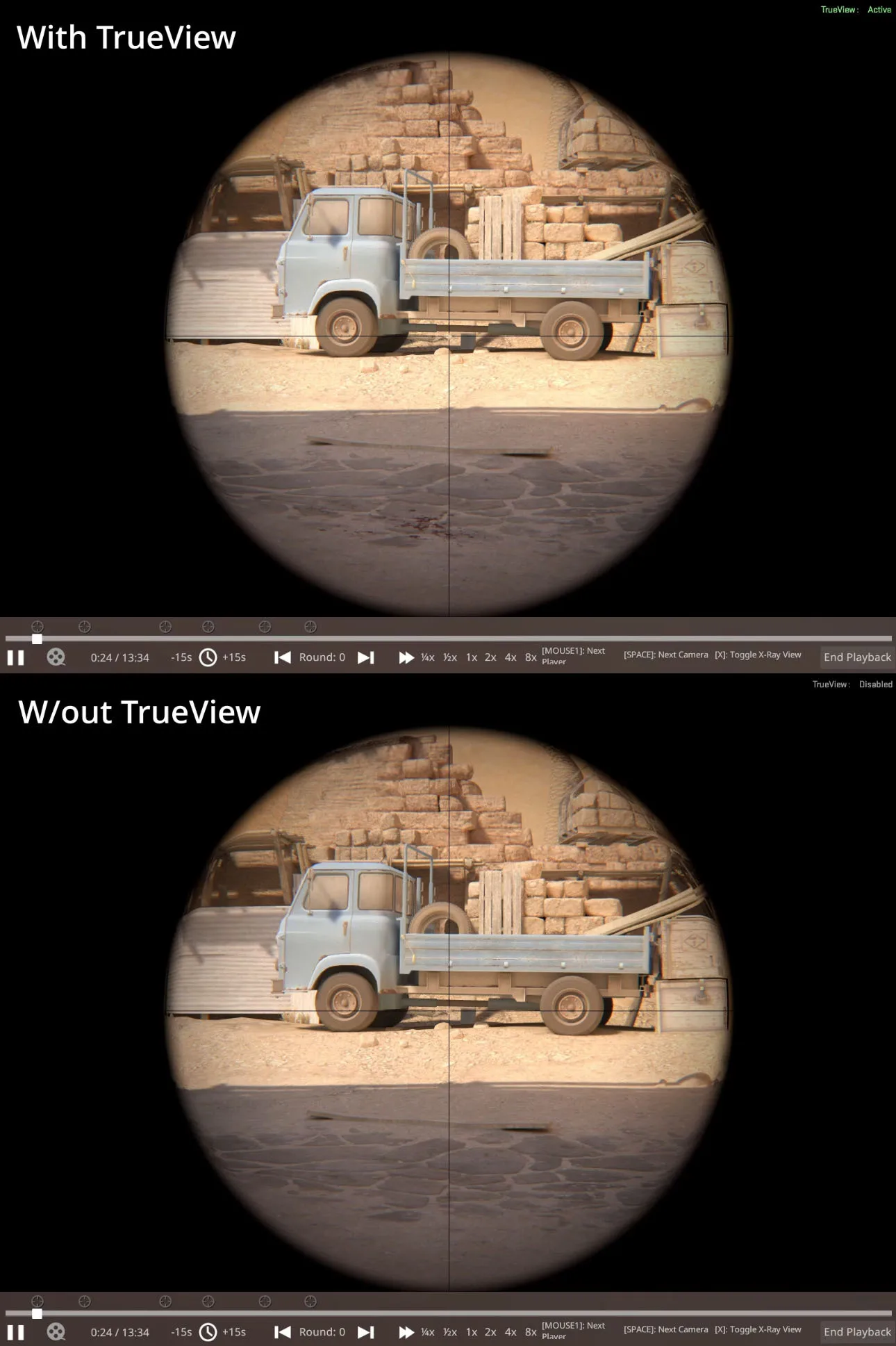
Valve added TrueView on November 4, 2025. Until then a demo showed the server's view of the match, with no allowance for network latency, so a shot could look like a miss and count as a hit, or the reverse. TrueView re-runs the watched player's client-side prediction to rebuild their screen more closely, and it also shows Damage Prediction effects if that player had them switched on. Valve's notes are specific about how close it gets: the frame on which the player clicked, the one hit registration uses, is accurate to the nearest playback frame, but frame timings are not rebuilt, so slow motion can still differ from what the player saw.
It lives under the gear:
| Setting | Console variable | Default | What it does |
|---|---|---|---|
| Enable TrueView | cl_demo_predict | 1 | 0 is off, 1 is on only when the demo's version matches your game's, 2 is always on |
| Include 'DOA' actions | cl_trueview_show_doa_predictions | On | Replays inputs the player's game predicted but the server never ran, because the player was already dead when they arrived |
| Allow Demo Version Mismatch | cl_demo_predict 2 | Off | Tries TrueView on a demo recorded on a different game version |
| No checkbox | cl_trueview_show_status | 2 | The TrueView: Active or Disabled label in the corner; 0 never, 1 only on a problem, 2 always |
The 'DOA' and version boxes only work while TrueView is on. The practical read:
- To judge what the player saw, leave the defaults alone. TrueView with 'DOA' actions is the closest you get to their screen.
- To judge what the server did, untick 'DOA' actions. The game's own description says that makes playback differ from the player's experience but match the server more closely.
- A demo recorded on another game version plays without TrueView by default. Tick Allow Demo Version Mismatch to try it anyway; Valve's notes warn it may not work properly on old demos.
Console commands that still work
Every name, default and description below is in the command and variable dumps of the October 22, 2026 build:
| Command | What it does |
|---|---|
| playdemo | Plays a recorded .dem file |
| demoui | Shows or hides the demo controller |
| demo_ui_mode | 0 off, 1 minimal, 2 full (the default) |
| demo_togglepause, demo_pause, demo_resume | Toggles, pauses and resumes playback |
| demo_timescale | Sets the playback speed |
| demo_gototick | Skips to a tick |
| demo_goto | Skips to a location in the demo |
| demo_step_tick | Plays a number of ticks (1 by default), then pauses |
| demo_marktick, demo_gotomark | Marks the current tick, then jumps back to it |
| demo_pauseatservertick | Pauses when playback reaches a given tick |
| demo_info | Prints information about the demo playing |
| listdemo | Lists a demo file's contents |
| demo_pause_at_end | Pauses on the last frame (the default); set it to 0 to go back to the main menu |
| demo_quitafterplayback | Quits the game when the demo ends |
| spec_mode, spec_next, spec_prev, spec_player | Changes the camera mode or the player you follow |
| spec_goto | Moves the camera to a position and angle (x y z pitch yaw) |
| spec_show_xray | Player outlines and names through walls; 1 by default |
The tick commands are the ones to learn. demo_marktick and demo_gotomark let you rewatch one duel as many times as you like: mark the tick before it, watch, jump back. And now that the bar shows the tick, you can note the number of a moment and return to it later with demo_gototick.
Recording works differently. The command dump flags record as a cheat command, so it will not run on a server with cheats off. Your matchmaking demos are recorded on Valve's servers: Valve's September 28, 2023 notes switched CSTV and demo recording off for a while to free up server capacity. On a server you run, tv_record records the match, and since November 8, 2023 tv_record_immediate 1 starts the recording from the moment you enter the command, rather than from the broadcast delay (tv_delay) earlier. The practice server guide covers setting up a server of your own.
Chat, old demos and other gotchas
- Team chat is gone, and all chat needs the Watch menu. Since September 9, 2026, demos encrypt chat the way CS:GO's did: team chat cannot be read in playback, and all chat appears only when you play the demo through the in-game Watch menu. Load it with playdemo and you see neither.
- Old demos can break after updates. Valve has fixed older demos failing to play more than once (December 13, 2023 and February 8, 2024), and the game carries an error for a demo file that is incompatible with your game version.
- Incomplete files still play. Since January 28, 2025 the game can play a demo that was copied from a match still in progress or recovered after a server crash.
- The end of a demo pauses. Since May 1, 2024 playback stops on the last frame instead of dropping you back at the main menu; demo_pause_at_end controls it.
- Skipping forward got faster. Valve's April 30, 2024 notes cut the time a forward skip takes by as much as 80%.
- Overwatch cases use a different bar. Valve added Overwatch on April 25, 2024 for demo review by trusted partners. In a case, the controller renames Quit to Skip To Verdict (Go To Verdict once you reach the end), hides the film button and ignores the show/hide toggle.
Demos in Valve's release notes
I searched the 311 Counter-Strike announcements Steam lists from March 22, 2023 to October 22, 2026 for "demo," "replay" and "TrueView." These are the lines that change how demos work for a player, plus the two fixes for older demos; I left out crash, animation, sound, visual and other minor fixes:
| Date | What Valve changed |
|---|---|
| September 27, 2023 | Demo playback support added on launch day |
| September 28, 2023 | CSTV and demo recording switched off for a time to free up servers |
| November 8, 2023 | tv_record_immediate added |
| December 13, 2023 | Fixed some older demos failing to play |
| February 8, 2024 | Fixed some older demos failing to play |
| February 15, 2024 | spec_player and spec_goto work in demo playback |
| April 25, 2024 | Camera movement decoupled from playback speed; Overwatch added |
| April 30, 2024 | Skipping forward up to 80% faster |
| May 1, 2024 | Demos pause at the end instead of returning to the main menu |
| May 23, 2024 | Kill and death markers on the timeline; highlights mode |
| January 28, 2025 | Incomplete demo files can be played |
| November 4, 2025 | TrueView |
| September 9, 2026 | Chat encrypted in demo files |
| October 14, 2026 | Download progress bar, click-and-drag camera controls, free and chase cameras while paused, seeking fixes; in the files, the rebuilt controller |
What I could not verify
- How long a match stays downloadable. The game says only that an expired demo can no longer be downloaded.
- Which modes Your Matches lists. Its empty-list message names "Ranked Competitive" matches; I could not check in the client which other modes appear.
- What Watch Lowlights picks. The files name the button but do not define the events it plays.
- What Action Start marks. The script takes one tick per round from the game; the name suggests the end of freeze time, but nothing in the files says so.
- The show/hide key. The game's strings still carry a "[Shift+F2]" label for the demo toggle, but nothing in the current controller displays it, and the key binder lists no demo keys.
- Whether the old hotkeys still work. The October 14 build removed the printed hints; I did not check whether the keys behind them still switch players and cameras.
- The top speed from the console. The slider stops at 4x; I did not test how high demo_timescale goes.
- The full path on disk. The client's strings give a replays folder but not where it sits.
More mode and weapon breakdowns live on the Counter-Strike 2 coverage hub, and the wider archive is on the Mythras blog.
Quick Action Checklist
- Watch (the TV icon), then Your Matches, then select a match, Download and Watch.
- Select a player's row on the scoreboard to enable Watch Highlights and Watch Lowlights.
- The speed slider runs from 0.1x to 4x, and the play button always resumes at 1x.
- Use -15s and +15s, the round arrows and the next-kill button to move around.
- Click the player's name to pick anyone alive from a list.
- Free Cam and Chase Cam both work while the demo is paused.
- Highlights plays 6 seconds before and 2 after each kill or death of the player you watch, and cannot be switched on from Free Cam.
- TrueView is on by default for demos from your current game version; tick Allow Demo Version Mismatch for older ones.
- Untick 'DOA' actions to see what the server ran rather than what the player's game predicted.
- Note the tick and use demo_gototick, or demo_marktick and demo_gotomark, to rewatch a moment.
- Play demos through the Watch menu if you want all chat; team chat is unreadable either way.
Frequently Asked Questions
How do you watch a demo in CS2?
How do you watch your highlights in CS2?
What is TrueView in CS2?
How do you speed up or slow down a CS2 demo?
What console commands control CS2 demos?
Why can't I see team chat in a CS2 demo?
Keep Reading
- huddemocontroller.js: Counter-Strike 2 demo controller script via SteamDB GameTracking (speed stops, 15-second steps, round and highlight navigation, next-kill jump, player list, camera modes, timeline icons, TrueView and X-Ray toggles, Overwatch behaviour)
- huddemocontroller.xml: Counter-Strike 2 demo controller layout via SteamDB GameTracking (buttons, settings checkboxes, time and tick labels)
- huddemocontroller.css: Counter-Strike 2 demo controller styles via SteamDB GameTracking (minimal mode collapses the control row)
- GameTracking-CS2 commit for the January 21, 2026 build via SteamDB (six speed buttons replaced by a speed menu; X-Ray and TrueView checkboxes in a new demo settings panel)
- GameTracking-CS2 commit for the October 14, 2026 build via SteamDB (rebuilt demo controller, download progress bar, new demo strings and tooltips)
- GameTracking-CS2 commit for the second October 14, 2026 build via SteamDB (demo bar folds to fit narrow screens; player list width)
- matchinfo.js: Counter-Strike 2 match screen script via SteamDB GameTracking (download, progress, watch, highlights and lowlights, delete, share code, disabled per-round watch)
- matchinfo.xml: Counter-Strike 2 match screen layout via SteamDB GameTracking (Download, Watch, Download Incomplete and progress bar)
- mainmenu_watch.xml: Counter-Strike 2 Watch menu layout via SteamDB GameTracking (Your Matches, Downloaded and Majors tabs)
- matchlist.js: Counter-Strike 2 match list script via SteamDB GameTracking (empty-list messages for Your Matches and Downloaded)
- mainmenu.xml: Counter-Strike 2 main menu layout via SteamDB GameTracking (Watch and Overwatch buttons)
- csgo_english.txt: Counter-Strike 2 English strings via SteamDB GameTracking (demo controller labels and tooltips, TrueView setting descriptions, Watch menu text, expired-demo and incompatible-demo messages)
- commands.txt: Counter-Strike 2 console command dump via SteamDB GameTracking (playdemo, demoui, demo_* commands, spec_* commands, record flagged as cheat, tv_record)
- convars.txt: Counter-Strike 2 console variable dump via SteamDB GameTracking (cl_demo_predict, cl_trueview_show_doa_predictions, cl_trueview_show_status, cl_demo_freecam, demo_ui_mode, demo_highlight_seconds_before and _after, demo_pause_at_end, spec_show_xray, tv_record_immediate)
- client_strings.txt: Counter-Strike 2 client string dump via SteamDB GameTracking (replays folder, .dem and .dem.info files)
- Release Notes for 9/27/2023: Valve (demo playback support added)
- Release Notes for 9/28/2023: Valve (CSTV and demo recording temporarily disabled)
- Release Notes for 11/8/2023: Valve (tv_record_immediate added)
- Release Notes for 12/13/23: Valve (fixed some older demos failing to play)
- Release Notes for 2/8/2024: Valve (fixed some older demos failing to play)
- Release Notes for 2/15/2024: Valve (spec_player and spec_goto work in demo playback)
- Release Notes for 4/25/2024: Valve (demo camera decoupled from playback speed; Overwatch added)
- Release Notes for 4/30/2024: Valve (forward skips up to 80% faster)
- Release Notes for 5/1/2024: Valve (demos pause at the end)
- Release Notes for 5/23/2024: Valve (kill and death timeline markers; highlight mode)
- Counter-Strike 2 Update, January 28, 2025: Valve (incomplete demo files can be played)
- Introducing TrueView: Valve, November 4, 2025 (TrueView announcement, comparison image and Damage Prediction)
- Counter-Strike 2 Update, November 4, 2025: Valve (TrueView release notes; cl_demo_predict 2 override)
- Counter-Strike 2 Update, September 9, 2026: Valve (chat encrypted in demo files)
- Counter-Strike 2 Update, October 14, 2026: Valve (demo and replay viewer improvements)
- Counter-Strike 2 Update, October 22, 2026: Valve (map scripting changes only; the build this post reads)
Related Guides
CS2 Practice Server Setup: The Commands That Work
sv_grenade_trajectory does not exist in Counter-Strike 2. Neither does cl_grenadepreview or r_cleardecals. Half the practice configs online are CS:GO leftovers that fail silently. Here is what CS2 actually ships.
CS2 Casual Explained: Money, Free Armor, Maps and Rules
A lost round of Casual pays $2,400 and a won one $2,700, and on Office and Italy a loss pays more than three of the four ways to win. Counter-Strike 2's Casual mode, read from its config, its map groups and Valve's release notes: the money, the free armor and kits, the four map groups, the rules that differ from Competitive and what it does to your rank.
CS2 Retakes Explained: Loadout Cards, Maps and Rules
On 19 of the 20 bombsites Retakes plays, the game file that places the bomb puts 75% of its weight on the default plant. Nuke A is the exception. Counter-Strike 2's 4v3 after-plant mode, read from its config, its card definitions and its per-map files: how a round runs, every loadout card on both sides, the two map groups and what it does to your rank.
CS2 Wingman Explained: Maps, Money and Rank
Lose the first four rounds of a Wingman half and the fourth loss pays you $2,900, while an elimination win pays $2,750. Counter-Strike 2's 2v2 mode runs on its own config: smaller round awards, a higher and flatter loss bonus, an $8,000 cap, a 90-second clock and a seven-map pool that ignores Active Duty. Here is the whole mode from the game files and Valve's release notes, including every community map Valve has rotated through it.
CS2 Economy Guide: Buy Rounds, Loss Bonus, and MR12
Half the rounds you lose in CS2 are lost in the buy menu, before anyone fires a shot. Here are the exact payout numbers, the loss bonus ladder, and the force-buy math that decides whether your next three rounds are winnable.
CS2 SCAR-20 vs G3SG1: The $5,000 Two-Shot Autosnipers
The SCAR-20 and G3SG1 are the same rifle in Counter-Strike 2's weapon file except for three values: reload time, recoil, and the flinch numbers behind tagging. Both cost $5,000, pay $300 a kill, kill with any two hits and one-tap a helmet at any range. Here is the pair from the game files, what March 2026 did to their ammo, and how the money compares with the AWP.