Minecraft Enchanting Setup Guide: Build a Level 30 Room
Most enchanting rooms are built wrong. Here is the exact bookshelf geometry for level 30, what the three offers actually cost you, why you should enchant books instead of gear, and how to stop hitting Too Expensive on the anvil.
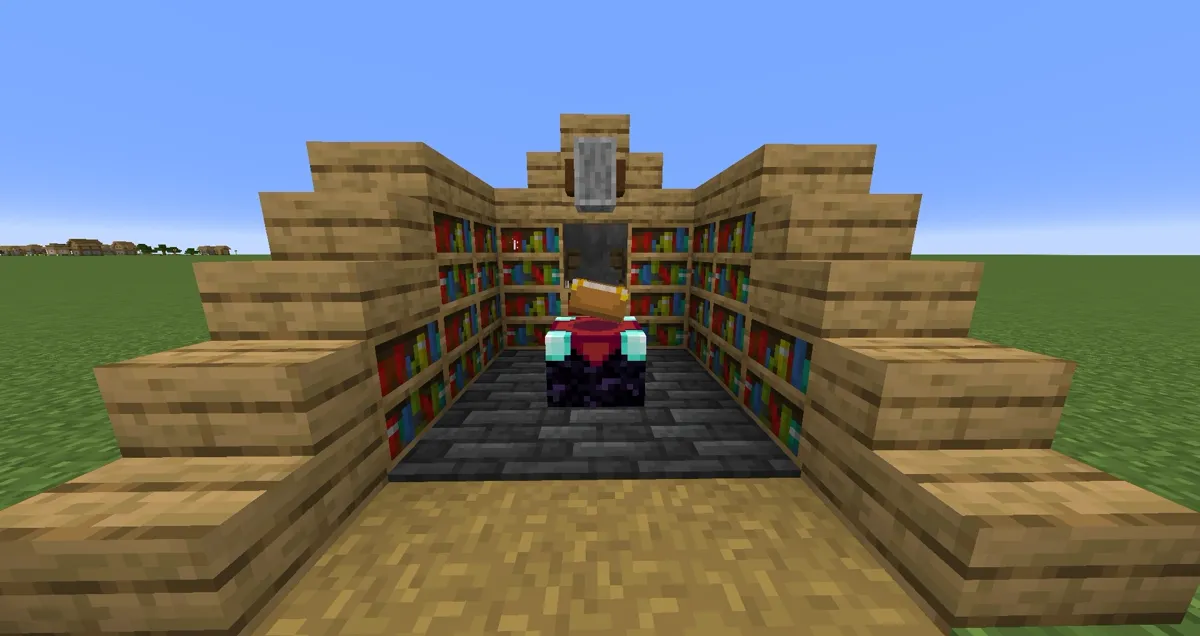
Almost every enchanting room I see in a friend's world is built slightly wrong. Bookshelves jammed flush against the table. Twenty-two shelves crammed into a corner because more must be better. A single anvil in the basement that says "Too Expensive!" on every combine, so the player just shrugs and wears unenchanted diamond into the Nether.
Enchanting isn't complicated, but it is picky. There is an exact bookshelf count, an exact geometry, a cost structure that most players never look at, and one workflow decision — books versus gear — that separates a setup that produces Protection IV plus Unbreaking III plus Mending from one that produces a pickaxe with Bane of Arthropods on it. Here's the whole thing, built once, built right.
What a real enchanting setup costs you
The full kit is four things. Get all four in one room and you never have to walk anywhere.
- Enchanting table — 4 obsidian, 2 diamonds, 1 book. The diamonds sting early, so this usually comes right after your first real diamond run.
- 15 bookshelves — each one is 6 wood planks plus 3 books, and each book is 3 paper plus 1 leather. That's 90 planks, 45 books, 135 paper (135 sugar cane), and 45 leather for the full ring. The leather is the bottleneck; cows and a hopper-fed mob farm or villager trades fix it fast.
- Anvil — 3 blocks of iron plus 4 iron ingots, so 31 ingots total. Anvils wear out and eventually break, so plan on building more than one over a world's lifetime.
- Grindstone — 2 sticks, 1 stone slab, 2 wood planks. Cheap, and it pays for itself the first time you strip a garbage enchantment off a good tool.
Add a chest and a couple of torches and that's the room. You don't need a beacon, you don't need 50 shelves, and you definitely don't need a mob grinder in the ceiling to make it "work."
The 15-bookshelf rule and the gap everyone gets wrong
Fifteen bookshelves is the cap. Fifteen gets you the level 30 offer in the bottom slot, which is the highest the table goes. The sixteenth shelf does nothing. The thirtieth shelf does nothing. Every shelf past 15 is decoration.
The part people botch is placement. Two rules:
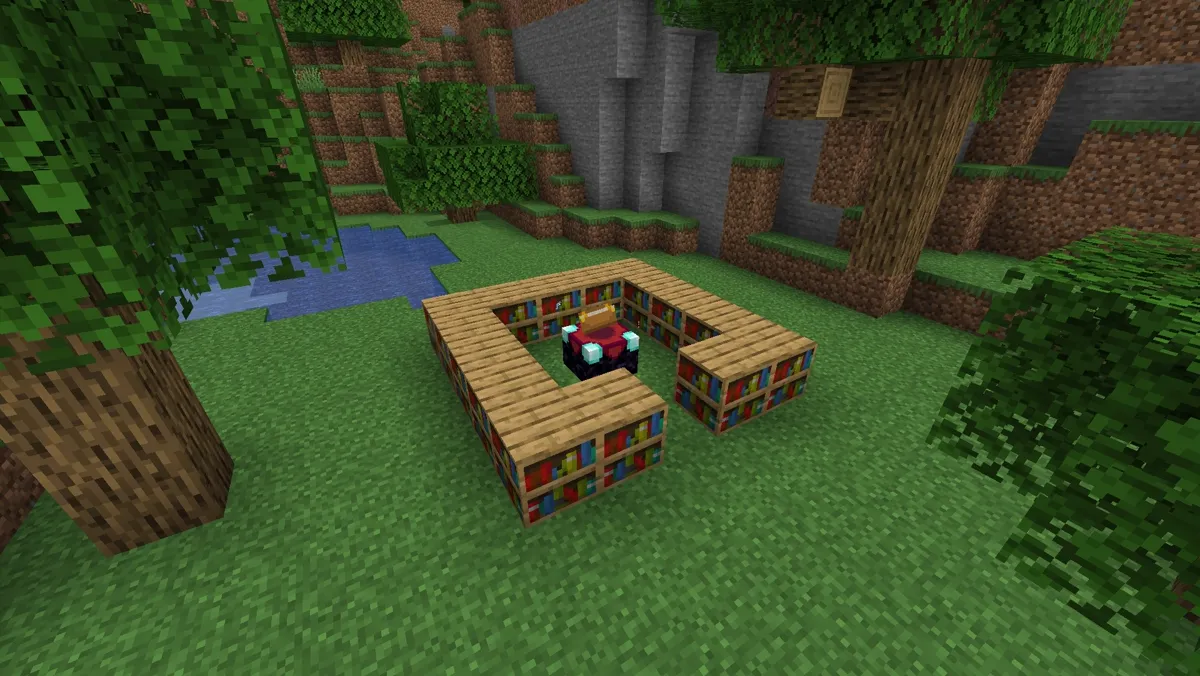
- There must be exactly one block of air between the shelf and the table. A bookshelf pressed directly against the enchanting table contributes nothing. If you place a block, a chest, a torch on the floor, or a slab in that gap, that shelf gets blocked and stops counting.
- Shelves count on the table's level and one level above it. The table sits in the middle of a 5x5 footprint; the shelves go around the perimeter of that 5x5, both on the floor level and stacked one block up. That perimeter holds 16 positions per layer, and you only need 15 total across both layers — so you leave yourself a doorway and fill in the rest.
The classic build is simple: dig or wall out a 5x5 room, put the table dead center, and run bookshelves around the walls one block high, then a second layer on top until you hit 15. You'll know it worked because the offers on the right side of the GUI read 30 in the bottom slot.
One modern gotcha: chiseled bookshelves do not power an enchanting table. They're storage furniture for books, they look great, and they contribute zero enchanting power. If your level counter mysteriously reads low, check that you didn't build a whole beautiful wall of the chiseled variant.
Lapis, levels, and what the three offers actually cost
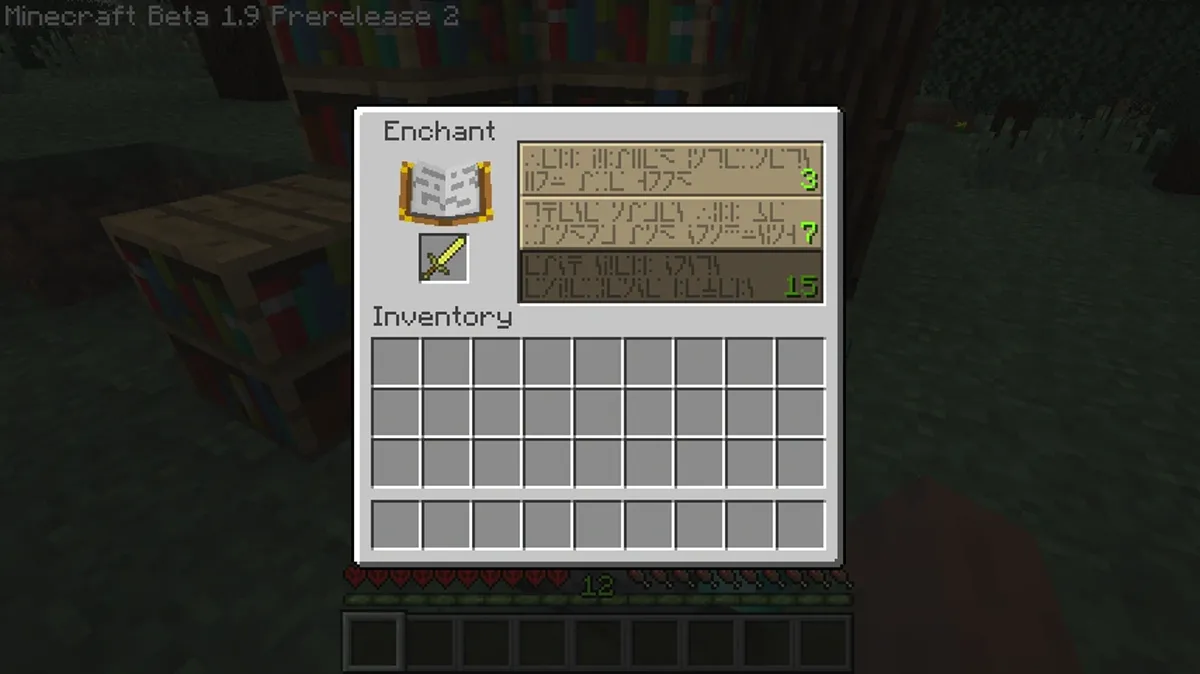
Open the table with an item in the left slot and lapis lazuli in the right, and you get three offers. The number in gold on the right of each row is the level you must have. The little number in the corner of the slot is the lapis you'll spend, which is 1, 2, or 3 depending on the row.
Here's the bit that surprises people: you don't lose 30 levels for a level 30 enchant. You need to be level 30 to see and click the bottom offer, but the enchant only consumes 3 levels (and 3 lapis). The top row consumes 1 level and 1 lapis, the middle 2 and 2. You need the level total as a key, not as payment.
Which is why you should always enchant from the bottom slot. The top slot is cheap in levels, but it hands you one weak enchantment at low tiers, and it burns the same random seed. Level 30 offers roll multiple enchantments at high tiers — that's how you get Protection IV plus Unbreaking III on a single click instead of Protection I alone.
Two more mechanics worth knowing:
- The three offers are locked to your current enchantment seed. Swapping the item in the slot changes what the offers say, but the underlying roll stays put until you actually enchant something. So if all three offers are trash, enchant a cheap junk item (a stone sword, a spare book) from the top slot to burn the seed and reroll the whole board.
- Some enchantments are never available at the table. Mending, Frost Walker, Soul Speed, Swift Sneak, Curse of Binding, and Curse of Vanishing are treasure enchantments — they come from villager trades, fishing, and chest loot only. If you want Mending on your elytra, no amount of table rolling will get it.
Enchant books, not gear
This is the single biggest upgrade to your workflow, and it costs nothing.
When you enchant a tool or armor piece at level 30, you get whatever the game rolls. Sometimes that's beautiful. Sometimes it's Bane of Arthropods II on your netherite sword, and now it's stuck there and you have to grind it off.
When you enchant a book instead, you get the same roll — but a book is a container you can inspect and discard. Bad roll? Toss it in a chest, it costs you three levels and a piece of paper's worth of material. Good roll? Anvil it onto exactly the item you wanted it on.
The practical loop:
- Stack up books (they're basically free once you have sugar cane and a cow pen).
- Enchant books at the level 30 slot, over and over, until you have the specific enchantments you want.
- Combine the books you need on an anvil, then apply the result to your gear.
You end up with deliberate gear — Efficiency V, Unbreaking III, Fortune III, Mending on one pickaxe — instead of hoping the table smiles at you. If you're not sure which enchantments are worth the books, our best Minecraft enchantments breakdown ranks them by what actually changes your survival and mining speed.
Anvil combining, prior work penalty, and Too Expensive
The anvil is where good setups die. Its cost formula has one nasty term: prior work penalty.
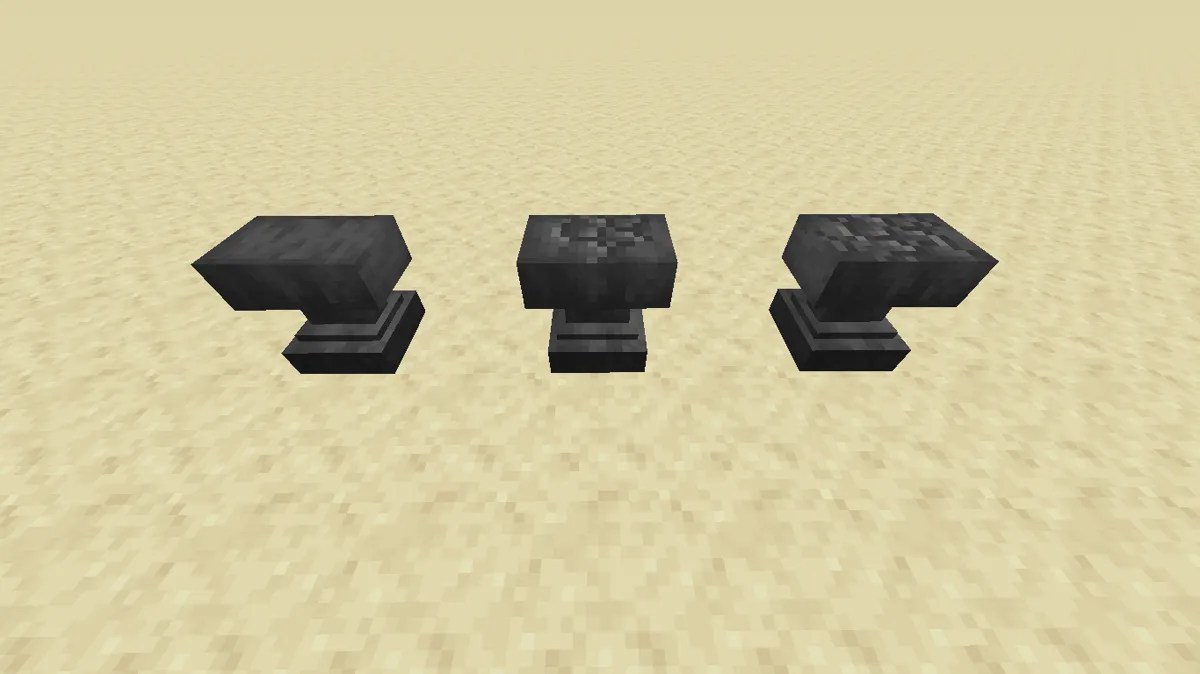
Every time an item goes through an anvil, it gains a "work" counter, and that counter adds to the cost of every future combine. The penalty escalates hard: 0, then 1, then 3, then 7, then 15, then 31 extra levels. Combine sloppily six or seven times and your item is effectively unusable on an anvil forever.
Two rules that keep you under the cap:
- Combine books together first, then apply to the item once. Two Sharpness IV books combine into a Sharpness V book. Merge your whole enchantment package into a single book, then apply it to the gear in one operation. The gear ends up with a work penalty of 1 instead of 5.
- Combine cheap-to-cheap, not everything into one item. Merging two lightly-worked books is far cheaper than repeatedly stacking books onto an already heavily-worked tool.
If you see "Too Expensive!" in red, you've crossed the survival-mode cap on Java Edition and that specific combine is off the table. Your options are: apply the enchantment to a fresh item instead, or accept the gear as-is. Our anvil and repairing guide goes deeper on repair costs and how to keep a tool alive without blowing up its work counter.
Also worth remembering: renaming an item in the anvil costs a level and also bumps the work counter. Name your gear at the very end, not at the start of a build-out.
Librarian villagers beat your table for the good stuff
Here's the uncomfortable truth about the enchanting table: for specific enchantments, villager trading is straight up better.
Park a lectern next to an unemployed villager and it becomes a librarian. A fresh librarian offers one enchanted book trade. If you don't like the book, break the lectern and place it again before you trade with them — the villager loses the job, re-rolls, and offers a different book. Repeat until you get what you want.
This is how most players actually get Mending, and it's how you skip the entire random-roll lottery for high-value enchantments. Trade with a librarian once and their offers lock, so do all your rerolling before you buy anything. Emeralds are the cost, and a paper-farm or a couple of trading-hall librarians make emeralds trivial.
The table still earns its place: it's your bulk source for the common enchantments (Protection, Sharpness, Efficiency, Unbreaking, Fortune) and it doesn't need a villager infrastructure. Use the table for volume, use librarians for the specific stuff.
The grindstone and when to wipe an item
The grindstone strips every non-curse enchantment off an item and gives you experience back for what it removes. That's it, and it's more useful than it sounds.
Use it when:
- A tool rolled something useless — you enchanted a sword and got a low-tier junk mix. Grind it, get some XP back, and start over with a clean item and a book you actually chose.
- You're farming XP from junk enchanted gear. Zombies and skeletons drop enchanted iron gear, pillagers drop enchanted crossbows, and fishing gives you enchanted books and rods. Feed all of it to a grindstone and you convert loot you'd otherwise burn into levels.
- You need to reset an item's usefulness. Note: the grindstone removes enchantments but does not reset the prior work penalty in a way that saves a hopelessly expensive item, and it will never remove Curse of Binding or Curse of Vanishing.
Getting to level 30 without hating your life
Enchanting eats levels, and going from 0 to 30 is roughly 1,395 experience points — which is why you want a source, not a scavenge.
Fast options, ranked by effort:
- A mob spawner farm. Find a dungeon spawner, box it in, funnel the mobs into a kill chamber. It's the classic answer and it runs while you're doing other things.
- Ore mining. Deepslate diamond, redstone, lapis, coal, and especially quartz in the Nether all drop XP directly. If you're strip mining anyway, you're already banking levels.
- Furnace smelting. Smelting stacks of anything gives XP on collection, and it stacks up quietly in the background. Cactus and kelp farms into a smelter is a low-effort trickle.
- Bottles o' Enchanting from clerics. Villager trades give you bottled XP, which is the most on-demand form of levels in the game.
Our full XP guide breaks down XP rates per method if you want to optimize this properly. The short version: build one XP source that runs passively, and enchanting stops being a chore.
Java vs Bedrock notes
Mechanically the two editions line up closely, with a few differences that matter:
- The bookshelf math is identical. 15 shelves for level 30, one-block air gap, both editions.
- The "Too Expensive!" cap is a Java survival restriction at high anvil costs. Bedrock is more permissive with expensive combines, so a repair that's dead on Java may still go through on Bedrock if you have the levels.
- Librarian re-rolling by breaking and replacing the lectern works on both, but Bedrock villagers can be a bit stubbier about re-acquiring the job block — give them a moment and clear line of sight to the lectern.
- Treasure enchantments (Mending, Frost Walker, Soul Speed, Swift Sneak, the curses) are table-excluded on both editions.
- The enchantment seed reroll trick — enchanting a junk item to refresh the offers — works on both, though Bedrock's offer generation feels less sticky in practice.
Enchanting setup checklist
- Enchanting table crafted (4 obsidian, 2 diamonds, 1 book)
- Exactly 15 bookshelves placed, one block of air between each shelf and the table
- Shelves on the table's level and one level above, around a 5x5 perimeter
- Nothing blocking the gaps — no chests, torches, or slabs between shelf and table
- No chiseled bookshelves in the ring (they contribute nothing)
- Anvil and grindstone in the same room, with a chest for books
- Always enchant from the bottom (level 30) slot
- Enchant books, not gear, and merge books before applying
- A librarian villager on standby for Mending and other treasure enchantments
- One passive XP source built so levels aren't the bottleneck
Frequently Asked Questions
How many bookshelves do you need for level 30 enchanting?
Why is my enchanting table not showing level 30?
Does enchanting at level 30 cost you 30 levels?
Should I enchant books or items directly?
What does Too Expensive mean on the anvil?
Can you get Mending from an enchanting table?
How do I reroll bad enchanting table offers?
What does the grindstone actually do?
Keep Reading
Related Guides
Minecraft Anvil & Repairing Guide: Beat "Too Expensive!"
The anvil is the most misunderstood block in Minecraft. Half of players burn levels in the wrong order and then watch their netherite sword hit "Too Expensive!" forever. Here is exactly how repairing, combining, and the prior-work penalty work — and the order of operations that keeps your gear fixable.

Minecraft XP Guide: Fastest Ways to Level Up
XP is not points — it is the currency that runs your whole late game: enchanting, anvils, and Mending gear that repairs itself. Here are the fastest XP sources actually worth your time, ranked, with the real values.
Minecraft Armor Guide: Netherite, Trims & Best Setups
Armor in Minecraft isn't just 'more points = better.' Netherite adds toughness and knockback resistance that diamond doesn't, trims are pure cosmetics people treat like loot, and the enchant setup matters more than the material. Here's the whole stack, sorted.
Best Minecraft Farms to Build First
A farm is the difference between grinding and playing. The right first build hands you free iron, free XP, and free food while you do literally anything else. Here are the highest-value early and mid-game farms, ranked by what they actually unlock.
Minecraft Survival Guide for Beginners: Your First Days
You have about ten minutes of daylight before the sun sets and the world tries to kill you. Here is exactly what to do with them — punch a tree, build a tool chain, and get a roof over your head before the zombies arrive.
Best Minecraft Enchantments, Ranked — The Ones Worth Your XP
Mending is the enchantment that ends the grind — gear that repairs itself forever. Everything else is a fight over your XP and anvil uses. Here is what actually earns a slot, ranked, with the real max levels.