Minecraft Vulkan vs OpenGL: Java 26.4's New Default Renderer
Java Edition has rendered through OpenGL since the start. Mojang's plan is for 26.4, the Deep Freeze drop that hit Pre-Release 1 on 24 November 2026, to ship with Vulkan as the default instead. Here is what that means for your frame rate, your mods and your shaders, how to switch back, and what the new Improved Fog setting actually does.
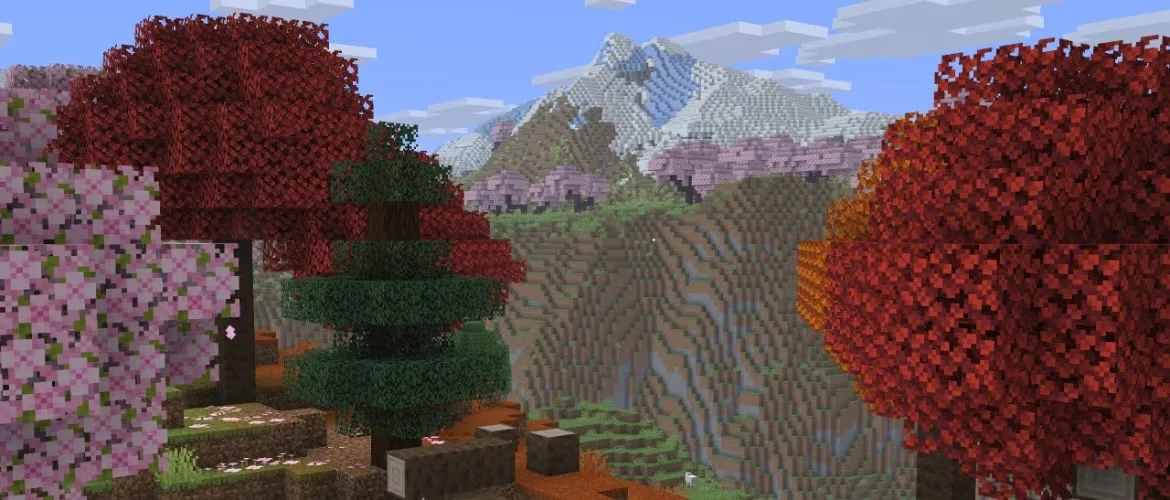
Java Edition has rendered through OpenGL since the beginning. In Mojang's words, Java "has been using it right from the start." That is about to change. 26.4 Pre-Release 1 landed on 24 November 2026, and since 26.4 Snapshot 9 (17 November) the Graphics API setting's Default has meant Vulkan, no longer labelled experimental. Mojang's developer note in that snapshot: "The plan is to ship 26.4 with Vulkan graphics API being the default one unless any critical issues are discovered before the full release."
If you have never opened Video Settings past the render distance slider, the switch will most likely just happen to you. If you run Sodium, play with shaders, or have an old GPU, it is worth five minutes now.
Last verified 25 November 2026 against Mojang's minecraft.net changelogs for Java 26.2, 26.4 Snapshots 1, 2, 5, 7 and 9, and 26.4 Pre-Release 1; the Minecraft Wiki's Options and options.txt pages; Mojang's bug tracker; and the Sodium and Iris release notes on Modrinth. Java 26.3 is the current release; 26.4 is not out yet.
This is a Java Edition guide: the Vulkan switch and the settings below are Java changes. On Bedrock, the big graphics switch is Vibrant Visuals, covered in our shaders guide.
The new video settings at a glance
| Setting | Options | Default in 26.3 (current) | Default in 26.4 (per Pre-Release 1) |
|---|---|---|---|
| Graphics API | Default, Prefer OpenGL, Prefer Vulkan | Default = OpenGL; Vulkan marked experimental | Default = Vulkan; no longer experimental |
| Improved Fog | On / Off | Does not exist | On with the Fancy and Fabulous presets, off with Fast |
| Improved Transparency | On / Off | On only with the Fabulous preset | Unchanged |
| Prefer DXGI Present (Windows only) | On / Off | Does not exist | Off; Mojang calls it experimental |
The Graphics API row is the one that matters. If you have never touched it, it is set to Default, and Default is the value Mojang changes underneath you. In 26.2's notes it said "Default" may be changed at its discretion and that it recommends Default "for all users unless you experience issues."
Why Mojang is leaving OpenGL
Mojang explained the move in a minecraft.net post, "Another step towards Vibrant Visuals," on 18 February 2026. The reasons, in its own framing:
- OpenGL is dead-ended. Mojang says OpenGL stopped receiving updates nine years ago, is deprecated on macOS, and "in the future OpenGL will not run at all on macOS devices." Supporting Macs also kept Java stuck on older OpenGL versions.
- Vulkan covers all three of Java's operating systems. It is supported directly on modern Windows and Linux devices, and on macOS through a translation layer. Mojang's 26.2 notes name it: MoltenVK, which translates Vulkan to Apple's Metal.
- It is the road to Vibrant Visuals on Java. Bedrock's built-in graphics overhaul has not shipped on Java. Mojang calls Vulkan "an important step" toward bringing it there, and says the switch will "hopefully reduce the number of driver-based bugs players experience."
The same post spells out the endgame: once Mojang is happy with Vulkan's performance and stability, it will remove the OpenGL implementation. It promises to notify players in advance and update the minimum requirements. 26.4 does not do that. Prefer OpenGL is still in the menu. But this is the step before it.
How Vulkan became the default
| Date | Version | What changed |
|---|---|---|
| 18 Feb 2026 | (announcement) | Mojang announces the OpenGL-to-Vulkan switch |
| 7 Apr 2026 | 26.2 Snapshot 1 | Vulkan added to snapshots with the new Graphics API option; Default behaves like Prefer Vulkan for testing |
| 16 Jun 2026 | 26.2 release | Vulkan ships as "Prefer Vulkan (Experimental)"; Default means OpenGL |
| 22 Sep 2026 | 26.4 Snapshot 1 | Default behaves like Prefer Vulkan again; the game stops changing the setting by itself after a startup crash |
| 3 Nov 2026 | 26.4 Snapshot 7 | Default temporarily picks OpenGL or Vulkan at random on each startup, so the OpenGL path gets testing too |
| 17 Nov 2026 | 26.4 Snapshot 9 | Vulkan is the default again and no longer considered experimental; Improved Fog becomes its own setting |
| 24 Nov 2026 | 26.4 Pre-Release 1 | First pre-release of the Deep Freeze drop; no graphics API changes |
The Snapshot 7 coin flip is worth knowing about if you played those builds and saw your performance swing between launches. Mojang's note said that after "some recent big changes to our rendering code," it wanted to test both backends, and that the random pick would be reverted. Snapshot 9 reverted it.
What Vulkan needs from your PC
From Mojang's 26.2 release notes, which still describe the requirement:
- Vulkan 1.2, with dynamic rendering and push descriptors. Mojang says this "may increase or decrease over time."
- Older hardware may not qualify. The February post says that for players "whose GPUs are 10 years old or more, Vulkan may not be supported." When Vulkan is not supported, the game falls back to OpenGL.
- Your dedicated GPU gets picked. Under Vulkan, Minecraft prefers a dedicated graphics card over integrated graphics, which Mojang flags as "a change from OpenGL." On a laptop with both kinds of GPU, that is a behaviour change worth knowing about.
- Macs go through MoltenVK. Mojang says the translation layer works "without performance penalties."
One fallback bug is already fixed. Before 26.4 Snapshot 7, a PC whose GPU lacked Vulkan support could end up on a software renderer (llvmpipe) running Vulkan instead of the real GPU running OpenGL (MC-307991). Snapshot 7 fixed that, so an old card should land on OpenGL as intended.
What the three Graphics API options do
The menu is in Options → Video Settings → Graphics API, and none of the three options is a hard lock:
| Option | What it tries first | If that fails |
|---|---|---|
| Default | Whatever Mojang currently picks: OpenGL in 26.3, Vulkan in 26.4 | Falls back like the matching Prefer option |
| Prefer Vulkan | Vulkan | OpenGL |
| Prefer OpenGL | OpenGL | Vulkan |
The rows come straight from Mojang's 26.2 notes, which describe each Prefer option as attempting one API "but fall back" to the other "if it doesn't work."
The behaviour that did change is what happens after a crash at launch. In 26.2 and 26.3, a startup crash makes the game rewrite the setting itself: from Prefer Vulkan to Default, and from Default to Prefer OpenGL. 26.4 Snapshot 1 removed that: "The game will no longer change the graphics API setting automatically if a startup crash is detected." So in 26.4, if Vulkan crashes your game on launch, it can keep crashing until you change the setting yourself. The next sections cover how.
How to tell which one you are running
Mojang's notes say the backend in use is shown in the F3 debug overlay, in its system_specs section. Since 1.21.9 the overlay is configurable, so if you press F3 and do not see your CPU, display and GPU lines, open the debug options with F3 + F6 and switch the system_specs entry on. Note that 26.4 Snapshot 2 redesigned the F3 screen, so its layout differs from older screenshots.
If 26.4 crashes or looks wrong
If the game runs but performance or visuals are off: go to Video Settings, set Graphics API to Prefer OpenGL, and relaunch so you know which backend the next session is on. Check F3 to confirm.
If the game will not launch at all: you cannot reach the menu, so edit the file instead. Close the game, open the options.txt file in your Minecraft game directory (.minecraft by default), find the line that starts with preferredGraphicsBackend, and change its value to opengl. The Minecraft Wiki's options.txt reference lists the accepted values as default, opengl and vulkan. Keep any quotation marks already around the value. Save, then launch.
Two reports the Minecraft Wiki ties to Vulkan were still open on Mojang's bug tracker when we checked on 25 November 2026, neither marked fixed for 26.4:
- MC-312444: the game crashes when the window is resized on Windows 10. The report itself does not name a backend; the Minecraft Wiki's snapshot pages link it to the Vulkan renderer.
- MC-312375: launching in windowed mode with Vulkan renders a corrupted image. The report says switching to fullscreen works around it, though some screen resolutions stay corrupted, and that the bug does not happen on OpenGL.
The Minecraft Wiki flagged both on every Java 26.4 snapshot from 3 through 10. Its Pre-Release 1 page does not carry that warning, but Mojang's Pre-Release 1 fix list does not include either bug, so treat them as unresolved. If either one hits you, Prefer OpenGL is the fix.
Sodium, Iris and other mods
Mojang's February post was blunt about mods: moving from OpenGL to Vulkan "will take modders more effort" than a normal version update, and mods that use OpenGL directly are the ones affected. It asked players to be patient with mod authors.
Here is where Sodium and Iris stood on 25 November 2026, from their own release notes on Modrinth:
- Sodium moved all of its rendering onto Mojang's own Blaze3D API in 0.9.0 (16 June 2026, for 26.2) and called it "the first version to experimentally support Vulkan." Its 0.9.1 release fixed a Vulkan crash when rendering very many sections. Its newest 26.3 build is 0.9.4-beta.2 (24 November); there is no 26.4 build yet, which is normal while 26.4 is still in pre-release.
- Iris, the shader-pack loader, said in its first 26.2 release (1.11.0): "Note that Vulkan is not supported." Its later notes for 26.2 and 26.3, up to 1.11.7 (30 September), do not say that has changed.
Here is what that means in practice. When 26.4 lands, do not update a modded instance on day one. Wait for 26.4 builds of your mods. If you play with shaders, read the Iris 26.4 release notes before changing anything, and expect Prefer OpenGL to be the setting to try if a shader pack fails to load or renders wrong. Our shaders guide covers installing Iris, and best Minecraft mods covers Sodium.
Improved Fog, explained
Improved Fog is a new video setting in 26.4, and it changes how the edge of your render distance looks.
Until 26.3, terrain at the edge of render distance faded into a flat, opaque fog colour, which is why far mountains could stand out as pale blocks against the sky. In 26.4, edge fog fades distant terrain out by lowering its opacity instead, per the Minecraft Wiki, and with the right settings the sky and clouds behind the terrain are blended into that fog so the line between land and sky disappears. Mojang introduced the blend in 26.4 Snapshot 2 (29 September) as part of Improved Transparency. Snapshot 9 split it into its own toggle.
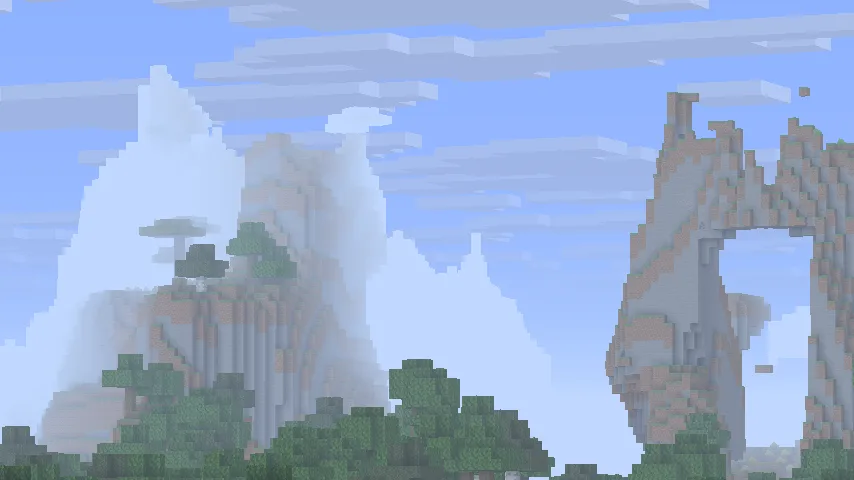
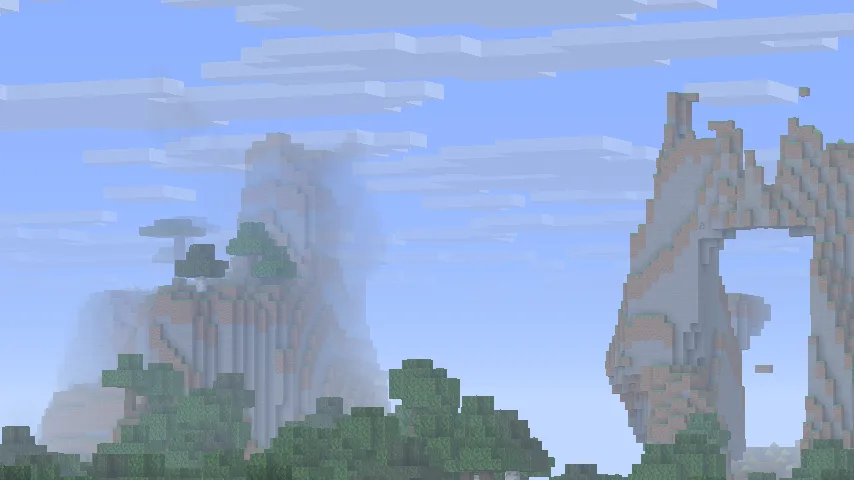
How the two settings combine, from Mojang's Snapshot 9 notes:
| Improved Fog | Improved Transparency | Result |
|---|---|---|
| On | On | Sky and clouds blend into the render distance fog |
| On | Off | Only the sky blends in, not the clouds |
| Off | On | Improved Transparency without the fog effect |
| Off | Off | Neither |
Mojang says the performance impact of Improved Fog "is minimal, but it may be noticeable on lower-end hardware." It is on by default, on in the Fancy and Fabulous presets, and off in Fast. If you are squeezing frames out of a weak laptop, it is one more box to untick, though render distance is still the bigger lever, as the performance section of our shaders guide explains.
Improved Transparency and Prefer DXGI Present
Improved Transparency is not new, but it has been rebuilt. It renders translucent objects such as water and stained glass with an order-independent transparency algorithm, so overlapping translucent surfaces draw in the right order. 26.3 replaced the old approach with that algorithm, and 26.4 Snapshot 1 simplified it, which Mojang says "slightly improved performance at least on some devices." It is still on only with the Fabulous preset by default.
Prefer DXGI Present arrived in 26.4 Snapshot 5 (20 October). It is Windows-only and asks the game to present frames through DirectX. Mojang lists possible gains in IME support (typing in languages that use an input method editor), Variable Refresh Rate support, and faster alt-tabbing in fullscreen. It is off by default, Mojang calls it experimental, and it says "not all hardware supports it." If you have a G-Sync or FreeSync monitor and alt-tab a lot, it is worth a try. If anything goes wrong, turn it back off.
When does 26.4 release?
Mojang has not announced a date. Pre-Release 1 on 24 November is the first pre-release, and Mojang's post describes the team as squashing bugs ahead of release. It also said "Pre-releases don't follow the usual Tuesday snapshot schedule," so more can arrive on any day before the full release. The Minecraft Wiki lists the drop as December 2026, but that line does not cite Mojang. The content side of Deep Freeze (the ice caves, the frostbite, freezing and the rest) is in our ice caves guide, and the jukebox changes are in our jukebox playlist guide.
Quick Action Checklist
- On launch day, leave Graphics API on Default unless something is wrong; that is Mojang's own recommendation
- Check F3 (turn on system_specs with F3 + F6) to see whether you are on Vulkan or OpenGL
- Performance or visuals worse? Switch to Prefer OpenGL in Video Settings and relaunch
- Game will not start? Set
preferredGraphicsBackendtoopenglin options.txt; 26.4 will not do it for you - Windowed mode looks corrupted on Vulkan? That is open bug MC-312375; go fullscreen or use OpenGL
- Modded or shaders? Wait for 26.4 builds of Sodium and Iris before updating, and read their notes on Vulkan
- Do not like the new sky-into-fog blend? Turn off Improved Fog; it is also a small win on low-end hardware
- On Windows with a VRR monitor, try Prefer DXGI Present, and turn it off if anything breaks
Frequently Asked Questions
Does Minecraft Java use Vulkan or OpenGL?
How do I switch Minecraft back to OpenGL?
Is Vulkan better than OpenGL in Minecraft?
What are the system requirements for Minecraft Vulkan?
Do Sodium and Iris work with Vulkan?
What does Improved Fog do in Minecraft?
Keep Reading
- Minecraft.net: Another step towards Vibrant Visuals (18 February 2026). Why Java is moving from OpenGL to Vulkan, macOS, modding impact, OpenGL to be removed later
- Minecraft.net: Minecraft 26.2 Snapshot 1 (7 April 2026). Vulkan support enters snapshot testing
- Minecraft.net: Minecraft Java Edition 26.2 (16 June 2026). Vulkan 1.2 requirement, MoltenVK, dedicated GPU preference, Graphics API options and startup fallback
- Minecraft.net: Minecraft 26.4 Snapshot 1 (22 September 2026). Default behaves as Prefer Vulkan; no automatic switch after a startup crash
- Minecraft.net: Minecraft 26.4 Snapshot 2 (29 September 2026). Sky and clouds blended into render distance fog; F3 redesign
- Minecraft.net: Minecraft 26.4 Snapshot 5 (20 October 2026). Prefer DXGI Present video setting
- Minecraft.net: Minecraft 26.4 Snapshot 7 (3 November 2026). Default picks OpenGL or Vulkan at random; MC-307991 llvmpipe fix
- Minecraft.net: Minecraft 26.4 Snapshot 9 and 10 (17 November 2026). Vulkan default and no longer experimental; separate Improved Fog setting
- Minecraft.net: Minecraft 26.4 Pre-Release 1 (24 November 2026). First pre-release for Deep Freeze; pre-releases off the Tuesday schedule
- Minecraft Wiki: Options. Graphics API values, preset defaults for Improved Fog and Improved Transparency, history
- Minecraft Wiki: options.txt (Java Edition). preferredGraphicsBackend accepts default, opengl or vulkan
- Minecraft Wiki: Java Edition 26.4. Render distance fog now fades by opacity, with before and after screenshots
- Minecraft Wiki: Debug screen. The system_specs section and the F3 + F6 debug options menu
- Mojang bug tracker: MC-312444. Crash when resizing the window on Windows 10 (open on 25 November 2026)
- Mojang bug tracker: MC-312375. Windowed mode renders incorrectly with the Vulkan backend (open on 25 November 2026)
- Modrinth: Sodium changelog. 0.9.0 for 26.2 moves to Blaze3D and experimentally supports Vulkan; 0.9.4-beta.2 for 26.3
- Modrinth: Iris changelog. 1.11.0 for 26.2 says Vulkan is not supported; 1.11.7 for 26.3
Related Guides
Best Minecraft Shaders Ranked, Plus How to Install
The right shader pack turns Java Edition's flat lighting into rolling shadows, real water, and sunsets that actually look like sunsets. Here are the packs worth installing, ranked by how good they look against how hard they hit your frame rate, plus the install path that does not involve OptiFine.
Best Minecraft Mods to Install Right Now
You do not need fifty mods. You need the right eight. Here are the Minecraft mods that change how the game feels — performance, quality of life, and big content — with the loader notes up front.
Minecraft Stronghold Guide: Finding, Loot, and Layout
A stronghold is not a hallway with a portal at the end of it — it is a sprawling, half-collapsed complex with up to nine room types, three separate loot tables, and a generation algorithm precise enough to predict a distance before you throw a single eye. Here is the whole structure, not just the part that gets you to the dragon.
Minecraft Woodland Mansion Guide: Loot, Vindicators, Totems
A woodland mansion is the only structure where you can punch an evoker to death and walk out with a Totem of Undying — the item that revives you the next time something one-shots you. It's also a maze full of axe-wielding vindicators and hidden rooms with diamonds behind fake walls. Here's how to find one, clear it without dying, and grab everything worth grabbing.
Minecraft Survival Guide for Beginners: Your First Days
You have about ten minutes of daylight before the sun sets and the world tries to kill you. Here is exactly what to do with them — punch a tree, build a tool chain, and get a roof over your head before the zombies arrive.
Best Minecraft Enchantments, Ranked — The Ones Worth Your XP
Mending is the enchantment that ends the grind — gear that repairs itself forever. Everything else is a fight over your XP and anvil uses. Here is what actually earns a slot, ranked, with the real max levels.