Roblox Ban Lists: How Cross-Game Bans Will Work
On November 9, 2026 Roblox announced Ban Lists: one list of banned players you link to several games, filled through a new BanListIds field on BanAsync. They launch January 29, 2027, ahead of Scoped User IDs. Here is how linking, sharing, the rules tab and the appeals queue work, and what to prepare before launch.
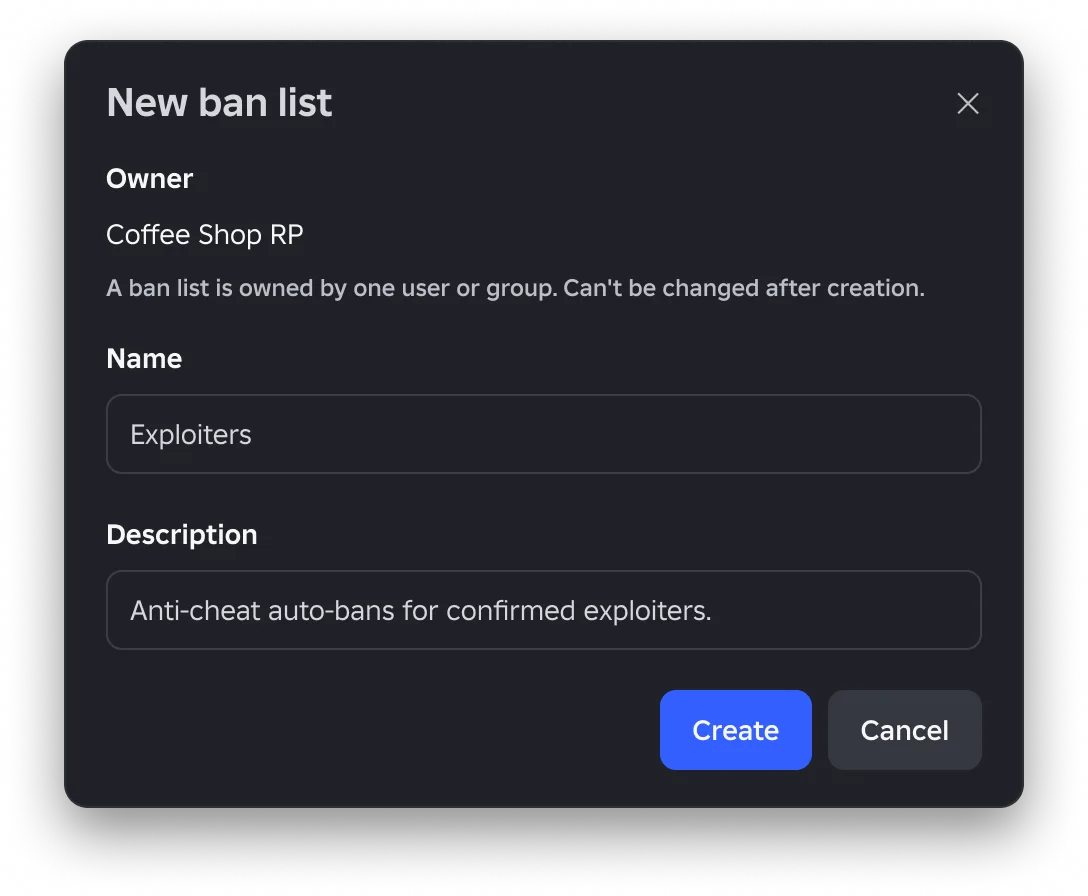
If you run more than one Roblox game and keep a shared ban list in a DataStore, a web database or a Discord bot, Roblox just told you what replaces it. On November 9, 2026 it announced Ban Lists: a list of banned players that lives on the platform, gets filled through BanAsync, and can be linked to any number of your games. It launches on January 29, 2027.
This post covers the new system only. For the Ban API it builds on (every BanAsync field, unban scope, alt accounts, device blocks) read the Roblox Ban API guide first.
Every screenshot in Roblox's announcement is labelled "not final design", so treat the UI here as a preview.
What Roblox announced, and why now
The timing is not a coincidence. Roblox's June 10, 2026 Scoped User IDs announcement gives players "a unique User ID for each game that they visit", and its update the same day said groups of games with shared moderation "will be impacted", promising "Ban API improvements to facilitate cross-game sharing of ban lists" before the wider rollout. A list keyed on one global user ID stops matching once the same player can arrive in your second game under a different ID.
Ban Lists are that promised improvement. The November 9 post says Roblox plans "to launch ban lists on January 29th, 2027 before Scoped User IDs", and closes by saying it will share Scoped User ID updates "as we get closer to rollout in January". The Scoped ID thread's own roadmap had listed October 2026 for the broad rollout; its latest update, dated September 1, 2026, said Roblox would share "full details on the updated solution and timeline in October."
How a ban list works, end to end
| Step | Where | What happens |
|---|---|---|
| Create | Creator Dashboard, or Open Cloud | A new list starts empty. The preview dialog says it is owned by one user or group, and the owner can't be changed after creation |
| Fill | BanAsync with BanListIds, or an import | Bans go into one or more lists in a single call |
| Link | Creator Hub, by ban list ID | The list applies to the whole game and starts rolling out immediately |
| Share | List settings | Private by default; shared with named creators, or made public |
| Appeal | Game details page, then your appeals queue | The banned player files; the game creator triages or forwards to the list owner |
Your current setup keeps working. Roblox says that if you don't ban across games you "won't need to use ban lists", and that existing custom moderation systems and standard BanAsync calls "will continue to work".
Filling a list: BanListIds on BanAsync
Players:BanAsync() gets a new optional field, BanListIds, an array of list IDs. This is Roblox's example, trimmed to a single list ID:
local Players = game:GetService("Players")

Players:BanAsync({
	UserIds = { player.User },
	Duration = -1,
	DisplayReason = "Repeated exploit usage",
	PrivateReason = "Detected via anti-cheat fingerprint XYZ",
	BanListIds = { "bl_2H8sJq..." },
})
Two things to notice. One call can add a player to several lists, so you don't need a BanAsync per list. And the example passes player.User, the new User value that Scoped User IDs introduced, rather than player.UserId. As of November 10, 2026 the Players reference in Roblox's creator-docs repository does not yet document BanListIds, and still describes UserIds as an array of user IDs. Write against the reference until it changes; the snippet above is a preview of launch-day usage, not something to ship today.
Linking a list to a game
A linked list covers the entire game. You enter a ban list ID in Creator Hub, and you can only link lists you own, lists another creator shared with you, or public lists. Roblox says the list "will immediately begin rollout" on linking, with the rollout time depending on the list's size.
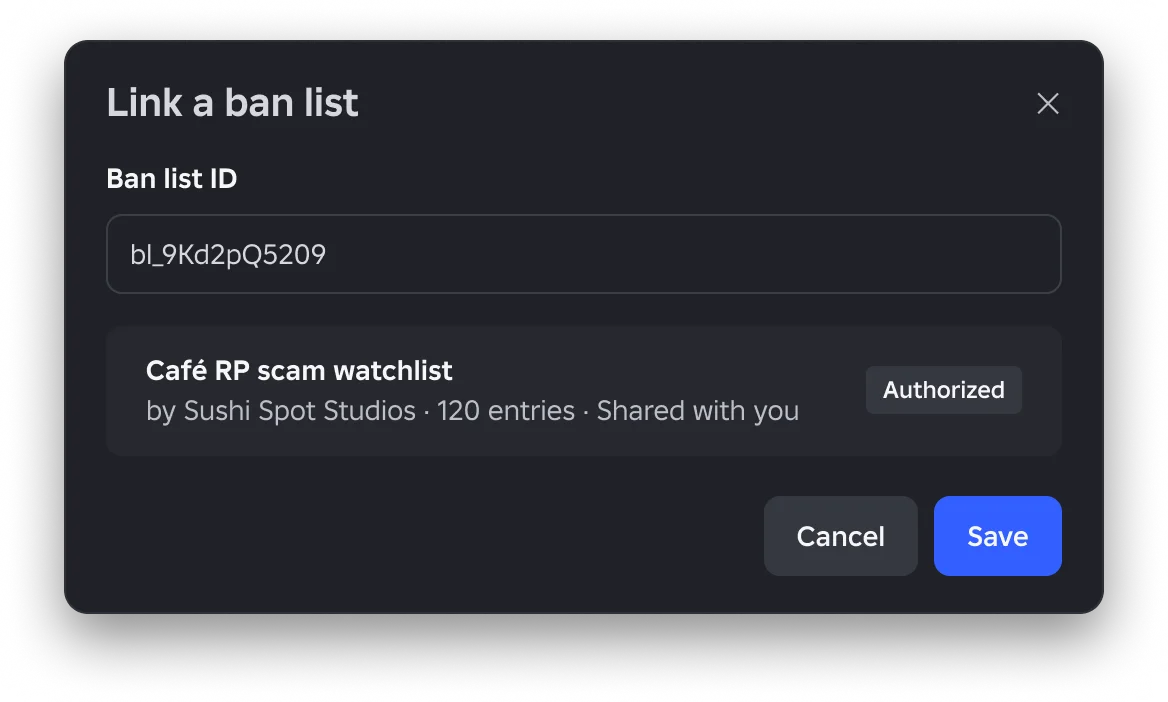
The rule that matters most: there is no per-game override. In Roblox's words, "Players on any linked ban lists will be banned, there is no individual game level override. If you want full control, use your own ban list." If a shared list bans someone you want to keep, you can forward their appeal to the list owner, but the ban stands until the owner acts or you unlink the whole list.
Sharing: private, named creators, or public
A list is private to its owner until you share it. You can share it with a specific set of creators, or make it public so anyone can link it. Shared lists are read-only to everyone except the owner.
Roblox staff answered the obvious abuse question in the thread: public lists "do not automatically apply to other games", and a list owner cannot attach a list to games they don't control, because "other Creators must consent to their use." Staff also said Roblox is not planning a public directory of ban lists, and that a ban list breaking the ban guidelines or Community Standards (a discriminatory one, for example) can be reported to Roblox.
The announcement itself warns that linking a public list means "you no longer have control over who may participate in your game", and recommends your own list or a friend's instead. In practice, a public list hands your door policy to a stranger whose list you can't edit.
Group lists follow existing group permissions. Per staff replies, members with the "Configure bans for all group games" permission can manage group-owned lists, and you can share a list with a developer who has permissions in another group so they can apply it to that group's games.
What a banned player sees
Three player-facing surfaces arrive with the system:
- A rules tab on every game. You write the rules in the Creator Dashboard. The tab shows the game's own rules plus the rules of every ban list linked to it.
- An in-game prompt that appears as soon as
BanAsyncfires, carrying the ban reason. Roblox says it is the creator's responsibility to give "a clear ban message including the rule that was broken." - A ban message on the game's details page, with a button to start an appeal. A staff reply adds that the message will name the lists the player is on.
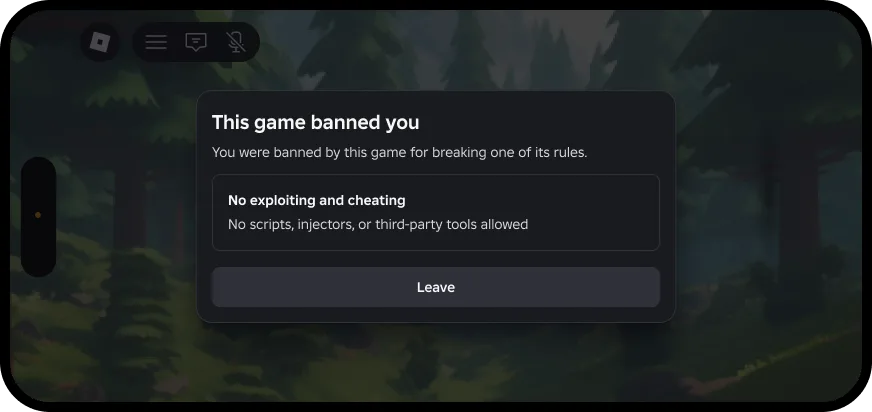
You don't have to restate Roblox's Community Standards as game rules. Staff said the rules tab is for game-specific or list-specific rules, such as not deliberately going out of bounds, and that you may also ban for off-platform harassment or fraud if you list it as a rule.
Appeals land with the game creator first
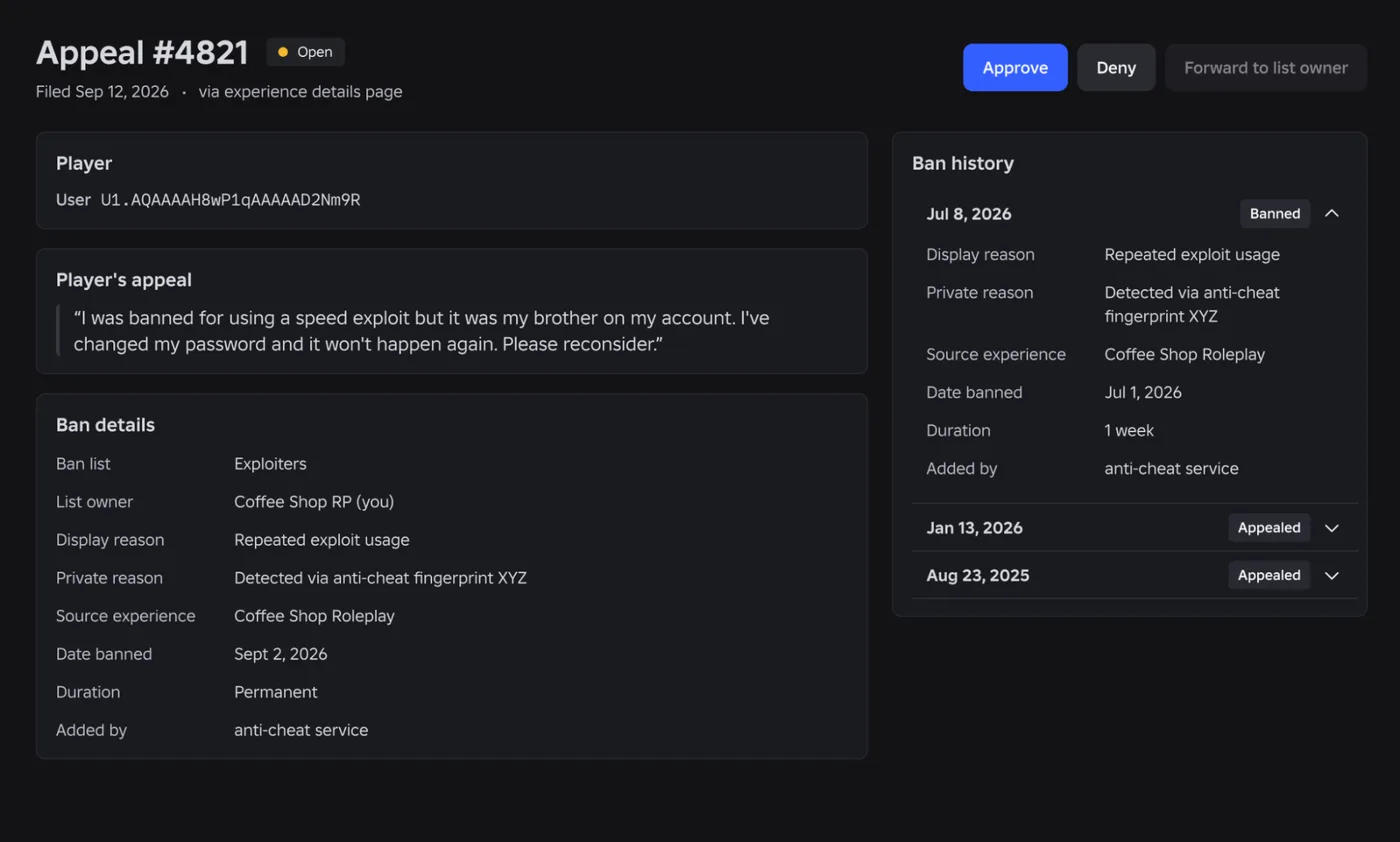
Players appeal from the game details page, and the appeal becomes a ticket for the game's creator, not Roblox support. If the ban came from a list you don't own, you see the appeal first and can forward it to the list owner. A staff reply adds a setting to auto-forward all ban-list appeals to their owners.
Staff answers in the thread fill in the rules:
| Question | Answer from Roblox staff |
|---|---|
| Can a player appeal any ban? | Yes, with no limit on the number of appeals |
| Can I stop appeal spam? | Yes, you can block a user from submitting further appeals |
| Does Roblox review my game bans? | No; it only checks bans against its ban guidelines and Community Standards when reported |
| Should I keep evidence? | Recommended, in moderator notes and private ban reasons, with recordings stored elsewhere if useful |
Roblox says it is the game creator's job to choose which lists to link and to unlink one that causes problems, giving non-responsive appeals as an example.
Moving an external ban list onto Roblox
If you keep a list off-platform today, Roblox will offer Open Cloud APIs to import it, and a staff reply says import will also be available directly in Creator Hub. These are the fields to prepare:
| Field | Required | Notes |
|---|---|---|
| User ID | Yes | The user ID you reference today |
| Game ID | No | Which game the ban happened in |
| Ban reason | No | Which rule the player broke |
| Ban date | No | Defaults to the current timestamp if missing |
Open Cloud coverage is promised across both the ban list system and the appeals system. Roblox's own wording is that off-platform list owners "will be able to transition" to the native system, and the announcement notes that off-platform solutions are often against its policy. If you run one, plan the move rather than waiting to see whether it survives Scoped User IDs.
Smaller changes staff confirmed in the thread
Several replies from Roblox staff on November 9 and 10 go beyond the original post:
UnbanAsyncis getting the samePrivateReasonfield asBanAsync, so you can log why someone was unbanned.- Bans in the dashboard will be searchable by display and private reason and filterable by properties such as time range.
- Lists can be created from the game's page in Creator Hub as well as through Open Cloud.
- Ban lists sit under a game, since they inherit the existing ban system's permissions. If you want a list detached from any live game, staff suggested creating a holder game to own it.
None of these is in the reference documentation yet, so treat each as a stated plan until it ships.
Quick Action Checklist
- Leave single-game bans alone; standard
BanAsynckeeps working and you don't need a list. - If you ban across games, plan one list you own and link it to each of your games after January 29, 2027.
- Start writing per-game rules now; the rules tab and ban messages are where players will read them.
- Put evidence in
PrivateReasonand moderator notes; Roblox's appeal-review mockup shows the private reason next to the ban. - Export any off-platform list into User ID, Game ID, ban reason and ban date columns, ready for import.
- Treat public lists as high risk: there is no per-game override, so a bad ban needs the list owner or an unlink.
- Keep
BanListIdsandUser-based ban code out of production until thePlayersreference documents them.
Frequently Asked Questions
What are Roblox Ban Lists?
When do Roblox Ban Lists launch?
Why is Roblox adding Ban Lists?
Can I override a Roblox ban list for one player in my game?
How do appeals work with Roblox Ban Lists?
Can someone add my Roblox game to their ban list without permission?
Keep Reading
- Roblox Developer Forum — Cross-Game Player Moderation Improvements (November 9, 2026, with Roblox staff replies)
- Roblox Developer Forum — Update on Safety & Privacy: Introducing Scoped User Identifiers (June 10, 2026, updated September 1, 2026)
- Roblox Creator Documentation — Players:BanAsync reference (official)
- Roblox creator-docs GitHub repository — source of the Players class reference (official)
Related Guides
Roblox Platform-Integrated Chat: Migrate Your Custom Chat
On October 21, 2026, Roblox announced that chat message text will stop being readable from game code. It is opt-in today, the default from February 2027 and required from May 2027. Here is what stops working, the replacement for each custom chat feature, which one has no replacement yet, and how to test it in Studio now.
Roblox Early Testers and the New Publish Flow: What Changed
Since October 12, 2026, you can let up to 10 friends play your unreleased, unrated Roblox game, and Roblox is rolling out a path that lets a game with no age-restricted content reach age-checked players 16 and older by answering one question instead of the full questionnaire. Here is who can be an early tester, what replaced the Private and Limited audience settings, what the one question actually covers, and what still takes the long road to players under 16.
Roblox BadgeService Guide: Award, Check, Debug
Call AwardBadgeAsync on a player who isn't currently in your server and it fails one of five documented requirements — silently, the same way it fails for a disabled badge or a place outside the badge's own experience. Here is every BadgeService method, which four are dead, the rate limit two of them share despite a 10x difference in batch size, and the deprecated check that Roblox says will now always return true.
Roblox Luau Type Checking: nocheck, nonstrict, strict
Roblox says every script used to default to no typechecking. That is no longer how it works: a Workspace property now sets the default mode, projects using only nocheck and nonstrict were moved to the New Type Solver automatically, and strict mode projects were not. Here is what each mode reports, what the new solver changed, and the annotation syntax that covers most code.
Best Roblox Games to Play in 2026
Roblox's front page is engagement bait. This is the filtered version: the games with real, sustained player counts and actual staying power, sorted by what you're in the mood for.
How to Get Robux Safely (Legit Ways + Scams to Avoid)
There is no free Robux generator. There never was. Here are the actual legit ways to get Robux without overpaying, the earning methods that really work, and the scams that exist purely to steal your account.