Roblox Early Testers and the New Publish Flow: What Changed
Since October 12, 2026, you can let up to 10 friends play your unreleased, unrated Roblox game, and Roblox is rolling out a path that lets a game with no age-restricted content reach age-checked players 16 and older by answering one question instead of the full questionnaire. Here is who can be an early tester, what replaced the Private and Limited audience settings, what the one question actually covers, and what still takes the long road to players under 16.
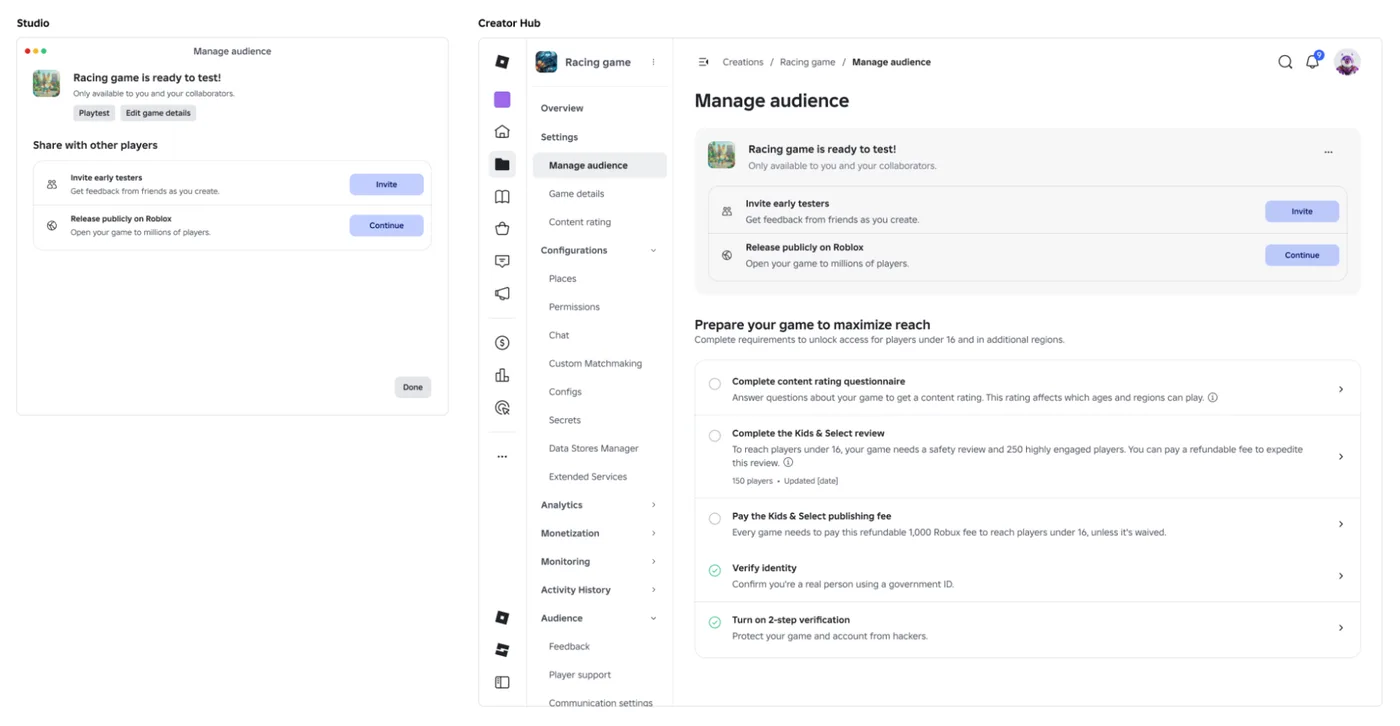
Until October 12, showing an unfinished Roblox game to one friend took the same paperwork as releasing it. Roblox's own Kids and Select FAQ said so up to October 13: "Private" games were "restricted solely to creators with Edit permissions," and to share with anyone else, "including those with Playtest permissions, you need to meet the new publishing eligibility requirements." The October 12 announcement is blunter: "Previously, gathering early feedback required meeting the full Kids and Select publishing requirements."
That announcement changed three things. You can now invite up to 10 early testers to play a game nobody has rated yet. A game with no age-restricted content can reach age-checked players 16 and older by answering one question instead of the full Maturity & Compliance Questionnaire. And the old Private and Limited audience settings are replaced by Playtest and Public. Roblox's documentation was rewritten to match on October 13.
The rollout is staged. Early tester invites started on October 12. The guided publishing flow that carries the rest is "rolling out across both Creator Hub and Studio, with all creators expected to have access within the coming weeks," so your menus may not match this guide for a while. The build side of making a game lives in our Studio basics and how to make a Roblox game guides. This one covers the release side: who can play your game, and when.
What changed on October 12
| Before | Now | Status on October 14 | |
|---|---|---|---|
| Letting friends test an unreleased game | Private games were Edit-only; anyone else needed the publishing requirements met first | Up to 10 early testers can preview it, rated or not | Live since October 12 |
| Audience settings | Private, Limited (Playtesters, Friends or Community Members) or Public | Playtest or Public | Rolling out with the guided flow |
| Releasing to age-checked players 16+ | The Maturity & Compliance Questionnaire, which Roblox says runs to "up to 30 questions" | One question about age-restricted content; "No" earns a Content May Vary label | Rolling out with the guided flow |
| Highly Engaged Player counts | Updated once a day | Updated every hour | Live since October 12 |
| Kids & Select threshold | 250 highly engaged players | Drops to 100 | Announced for November |
| Studio menu in Roblox's docs | File ⟩ Publish to Roblox | File ⟩ Publish | Docs updated October 13 |
Roblox first put early testing and the one-question path at "September 2026" in its RDC publishing thread on September 11. Our RDC 2026 recap noted that Roblox's own recap post gave early testing a different date, Late 2026. Early testers arrived on October 12, after the September target had passed, and the guided flow carrying the one-question path began rolling out the same day.
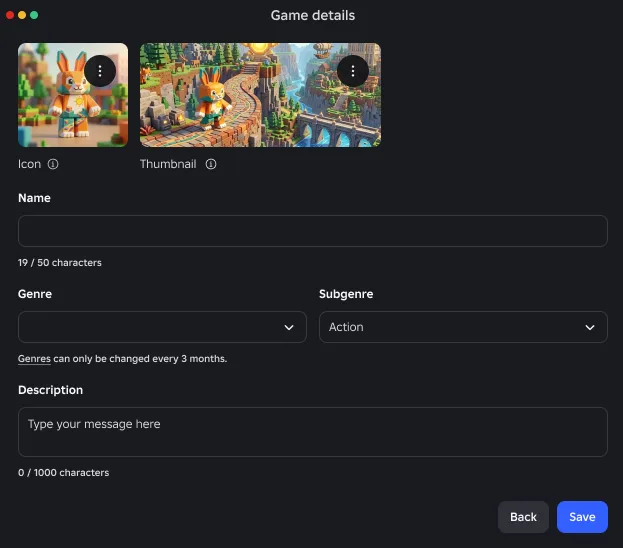
The first-publish window changed shape in the docs too. It now asks for an icon, a thumbnail, a name, a genre and optional subgenre, and a description, then publishes the game to the cloud with its own UniverseID. Roblox's genre page adds that you can only change genres once every three months, so pick one you are sure of.
Playtest and Public replace Private and Limited
The announcement defines the two new options in one line each. Playtest: "Your game can only be played by editors, early testers, or other playtesters you invite," which "replaces what was previously known as the 'Private' and 'Limited' audience settings." Public: "available on Roblox to anyone, pending age and geographical restrictions."
The documentation puts both on a Manage Audience page in Creator Hub, behind a Manage access button, with one switch on each tab:
| Tab | Setting | Who can play |
|---|---|---|
| Playtest | Early testers (always on) | You, users with Edit access, and the early testers you invite |
| Playtest | Playtesters switch on | Adds users with Edit or Playtest access |
| Public | Friends switch on | Only your friends, plus everyone allowed on the Playtest tab |
| Public | Friends switch off | Anyone on Roblox, pending age and geographical restrictions |
If you used the old settings, these are the closest matches by Roblox's own descriptions of each: Private is Playtest with only early testers, Limited ⟩ Playtesters is Playtest with the Playtesters switch on, Limited ⟩ Friends is Public with the Friends switch on, and Public is Public with it off. The old Community Members option for group-owned games has no row in the new table. The docs say only that an unreleased game is open to "group members with the appropriate roles and permissions."
Two rules decide what each switch costs you:
- Every release action carries the release requirements. The docs list four: releasing a game for the first time, publishing a new version of a released place, using Publish As to release into a different game, and "changing your target audience settings." Turning on the Friends switch is a change to your target audience, so it comes with the requirements covered under the one-question section below.
- Early testers skip the rating. Per the announcement, early testers "can preview your in-development game even if it hasn't been rated yet," so you don't have to finish the rating flow first. You still need the age check covered in the next section.
The docs also carry a daily cap: you can release up to five games a day that have never been released before. Pulling a released game and releasing it again doesn't count toward it.
Who you can invite as an early tester
You need an age check and must be at least 9. For a game you own, testers have to be your friends. For a group game, they have to be group members, and the age that matters is the group owner's. Testers must be "of similar age as the game owner (group owner for Groups)," using "the same age groups Studio collaboration already uses."
The docs spell those groups out:
| Your age | Friends you can add | Trusted Friends you can add |
|---|---|---|
| Under 9 | None | None |
| 9–12 | 9–15, plus under-9 friends with parent approval | Any age; under 9 needs parent approval |
| 13–15 | 9–17 | Any age; under 9 needs parent approval |
| 16–17 | 13 and older | Any age; under 9 needs parent approval |
| 18+ | 16 and older | Any age; under 9 needs parent approval |
Read the bottom row if you are an adult developer. A 15-year-old friend can't be your early tester unless the two of you are Trusted Friends. Roblox's FAQ adds that a tester under 13 needs a parent to approve Trusted Friend requests, and that "users from some unsupported regions can't be added as early testers."
Adding early testers in Studio and Creator Hub
Roblox describes two Studio routes and one Creator Hub route into the same early tester list.
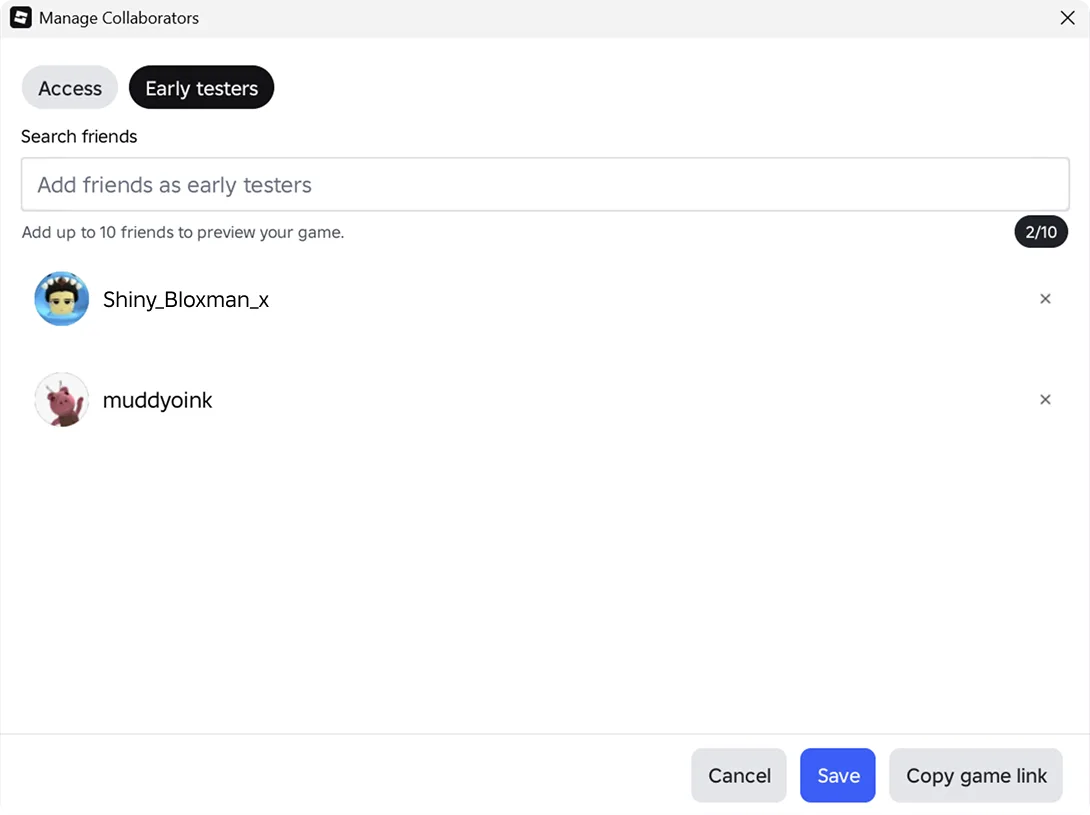
From the File menu (the docs' route): File ⟩ Invite early testers, search for up to 10 friends, then click Invite. If you haven't completed an age check or age verification, Roblox prompts you to complete an age check. The same choice appears inside the release flow: File ⟩ Publish offers an Invite button before Continue takes you to the release question.
From Manage Collaborators (the announcement's route): click the Collaborate button at the top right of Studio, open the Early testers tab, add up to 10 friends for a game you own or 10 group members for a group game, and click Save. Each tester gets a notification in the Roblox app, and Copy game link gives you a link to send them yourself. The docs say the same dialog lists each tester with the date you invited them and lets you remove anyone.
From Creator Hub: the announcement points to Creations ⟩ Experiences ⟩ your game ⟩ Configure ⟩ Permissions, where the same early tester list sits under Collaborators.
Group games work through a role. Adding 10 members "will create a new role to hold them," or you can use an existing role that has fewer than 10 members. "Each group game can have only one role that gives access to early testers."
Why an early tester cannot get in
Testers see the game with a watermark telling them it is a preview and that Community Standards still apply, and "the same in-game reporting and safety tools available in published games stay active." Roblox's FAQ lists six reasons an invited tester might be blocked:
| Block | Who can fix it |
|---|---|
| The tester hasn't completed an age check | The tester |
| You and the tester are in different age groups and aren't Trusted Friends | Both of you; under 13, the tester's parent approves the request |
| The Preview game setting is off on the tester's account | The tester; under 16, a parent can also change it |
| The game's content rating or label clashes with the tester's content restriction settings | The tester; under 13, a parent can also adjust them |
| The tester's parent has blocked this game | The parent (applies to testers under 16) |
| The tester is in a region where early testing is unsupported | No fix listed |
Parents of players under 16 can also switch off their child's ability to be added as an early tester at all.
Roblox's two pages disagree on one age line. The docs say early testers under 16 can't preview a game rated above the maturity their parent allows. The announcement FAQ puts that line at under 13, and adds that a tester can request permission from their parent "through the existing flow." Both agree testers under 18 can't preview a game rated Restricted. If your testers are 13 to 15, plan for the docs' stricter version until Roblox reconciles them. Per the FAQ, these age limits apply to games that have completed the Maturity and Compliance Questionnaire.
Early testers versus playtesters
The Playtest permission still exists, and Roblox now calls it the legacy playtester role. The FAQ draws the line between the two:
| Early testers | Playtesters | |
|---|---|---|
| How many | Up to 10 | "Larger groups, including people who you might not know" |
| Who | Similar-age friends, Trusted Friends, or group members via one role | Anyone you grant Playtest access |
| Content rating needed first | No | Yes: they can test "once you've set up Content Maturity ratings, assuming the content meets distribution requirements including Kids and Select" |
| Where you set it | Early testers list in Studio or Creator Hub | The Playtesters switch on the Playtest tab |
Use early testers for the checks Roblox's own announcement names, like "testing an obby's difficulty or verifying spawn locations," while the game is still taking shape. Move to playtesters once you have a rating and want a bigger closed test.
Going public: the one question
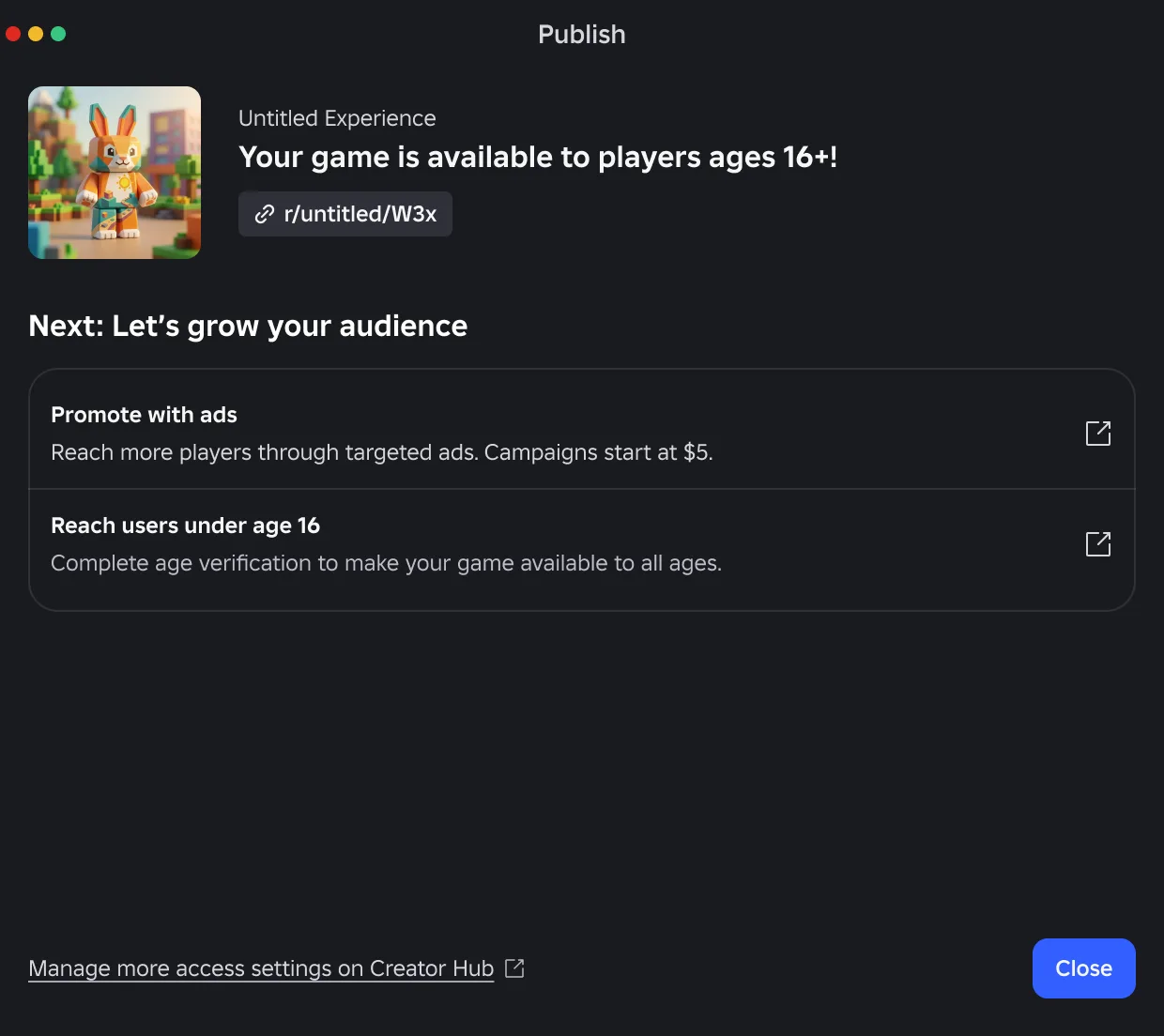
When you are ready to release, File ⟩ Publish ⟩ Continue asks a single question first: does your game contain age-restricted content?
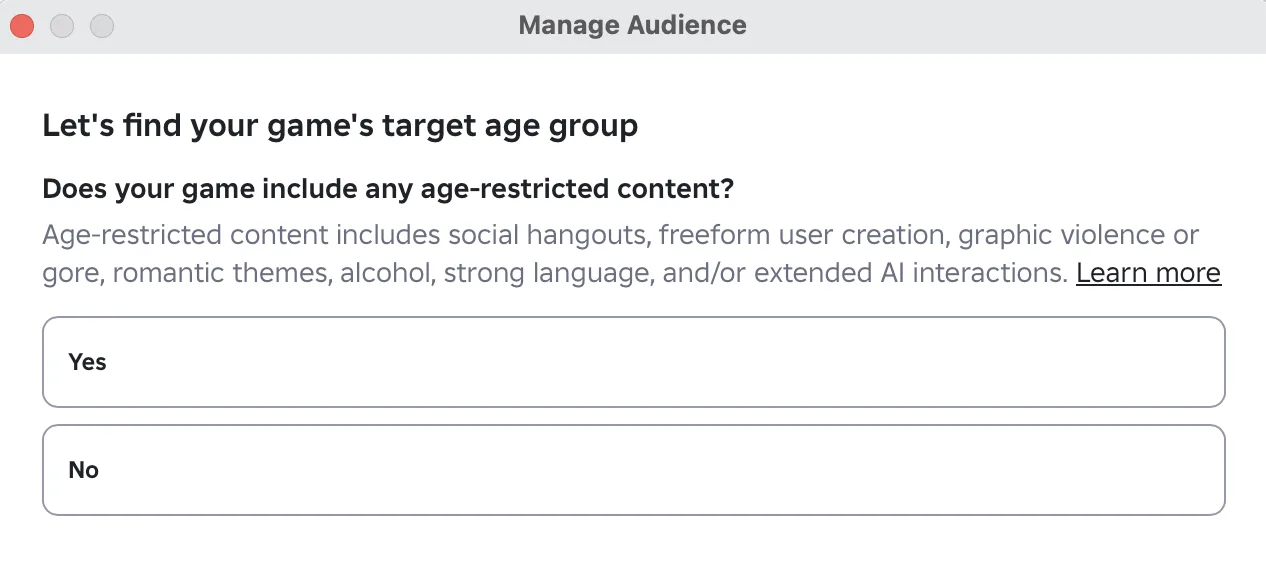
- No: the game gets a Content May Vary label and releases to age-checked users 16 and older "in most regions where Roblox is available." Reaching the remaining regions needs the full questionnaire.
- Yes: you complete the full questionnaire, and the game gets a label from your answers and releases to age-checked users 16 and older or to age-verified users 18 and older, depending on its content.
Content May Vary says nothing specific about what is in your game. Roblox's FAQ presents it as what lets you reach players 16 and older "without completing the full questionnaire," and says you can take the full one "any time" for a more precise rating. You will need that full rating anyway to reach players under 16.
The rest of the 16+ bar is short. Per the docs, your account has to be in good standing and at least two days old, and you need an age check through facial age estimation or a government ID. The Kids and Select requirements table marks the 16+ route free, with no fee, no subscription and no 2-Step Verification requirement.
What counts as age-restricted
The question lists seven things. Most are self-explanatory, and three are narrower than they sound once you read the Content maturity docs behind them:
| Category | What the docs actually mean |
|---|---|
| Social hangout | The primary activity is talking to or interacting with other players by voice or text: hangouts, vibe games, socializing spaces, sad rooms. A roleplay game isn't one if the roleplay is central. Roblox also warns that a title or description referencing social hangouts gets the game classified as one |
| Freeform user creation | Freehand drawing, painting, writing or spray paint on a surface; blank pixel canvases; timed-reveal drawings other players can see. It does not cover creations players assemble from 3D assets, "such as building a house or creating an outfit" |
| Extended AI interactions | Players interact with a generative AI model, and either cross-session memory is on or talking to the AI is the game's main purpose with no time limit. Anything else is a "limited" interaction |
So a building game where players assemble houses from parts is not a Yes on freeform creation alone, while a game with a spray-paint tool whose marks other players can see is. Two warnings from the same docs: "You must not add any age-restricted content to your game before receiving this label," and if an update changes any of your answers, you "must update your answers and resubmit the questionnaire."
Under 16 still takes the long road
The one-question shortcut stops at 16. Per the docs, reaching Roblox Kids and Select still takes everything above, plus:
- The full questionnaire, with a Minimal, Mild or Moderate (9+) rating.
- A verified account: facial age estimation if you are under 18, government ID if you are 18 or older.
- 2-Step Verification.
- Either a Roblox Plus or Premium subscription held for two consecutive months, or a one-time, refundable 1,000 Robux publishing fee per game.
- The evaluation: a trial phase open only to age-checked players 16 and older, an analysis of highly engaged players, a safety review, and 250 unique plays by highly engaged age-checked users within 60 days.
One part of that changed on October 12: Highly Engaged Player counts now update hourly instead of daily, and Roblox says that means "a game that suddenly takes off can begin promotion into Roblox Kids and Select in just a few hours, instead of a day or two." The announcement also repeats that the threshold drops from 250 to 100 "next month," the November date Roblox gave at RDC. The RDC recap covers the threshold's earlier cut from 500 to 250 and what counts as a highly engaged player. If you need a fixed date instead, the expedited review is still a refundable 50,000 Robux per game.
Where the rollout is still rough
As of October 14, two days in:
- Your menus may lag. The guided flow reaches "all creators" over "the coming weeks," so File ⟩ Publish, the one question and the Playtest/Public tabs may not have appeared for you yet.
- Roblox labels the same pages differently. The docs put Manage Audience under Publish settings, the announcement's screenshot shows it under Settings, and the announcement's Creator Hub route to early testers runs through Configure ⟩ Permissions. Search for the page name if your sidebar doesn't match.
- The Audience Reach tab is in question. The announcement says the hourly counts appear on the Audience Reach tab, and the Kids and Select docs still point to an Audience Reach dashboard. Within a day of the announcement, a developer asked in the thread where to find the count, saying the update had removed the Reach tab under Audience and that the number wasn't on the new Manage Audience page either. No Roblox staff member had answered as of October 14.
- Regions. Roblox says some regions can't use early testing, and one developer in the thread replied that collaborations aren't available in their country.
Quick Action Checklist
- Complete an age check before you try to invite anyone; you must be 9 or older.
- Invite up to 10 early testers from File ⟩ Invite early testers or the Early testers tab in Manage Collaborators. They can play before your game has any rating.
- Adults can only add friends aged 16 and older; anyone younger needs to be a Trusted Friend.
- For a group game, early testers come from a single role of up to 10 members.
- If a tester can't join, check their age check, Trusted Friend status, Preview game setting, parental blocks and region.
- Treat the Friends switch on the Public tab as a release: it carries the release requirements, while early testers need your age check but no rating.
- To reach 16+, answer the age-restricted content question honestly. Spray paint other players can see, drawing canvases, hangout-first games and AI chat with cross-session memory all mean Yes.
- Take the full questionnaire if you want players under 16, more regions, or a label more useful than Content May Vary.
- Watch Highly Engaged Player counts hourly, and expect the Kids & Select threshold to drop from 250 to 100 in November.
- Remember the cap: five never-released games a day.
Frequently Asked Questions
How do I invite early testers to my Roblox game?
Who can be an early tester on a Roblox game?
What does Content May Vary mean on Roblox?
What replaced the Private and Limited audience settings on Roblox?
Do I still have to fill out the full Roblox Maturity & Compliance Questionnaire?
What is the difference between early testers and playtesters on Roblox?
Why can't my friend join my Roblox game as an early tester?
Keep Reading
- Roblox Developer Forum — A Simpler Path to Publish, Plus Invite Early Testers (October 12, 2026, with FAQ)
- Roblox Creator Documentation — Create and publish games and places: early testers, release flow, target audience and release requirements (official)
- Roblox Creator Documentation — Roblox Kids and Select: publishing requirements by audience and the evaluation process (official)
- Roblox Creator Documentation — Content maturity and compliance: labels, Content May Vary, and questionnaire categories (official)
- Roblox creator-docs GitHub repository — October 13, 2026 commit replacing the Private, Limited and Public audience documentation (official)
- Roblox Creator Documentation — Genres: the three-month genre change limit (official)
- Roblox Developer Forum — Making Publishing Easier: Our Vision and What's Coming (September 11, 2026)
- Roblox Developer Forum — RDC26: What We Announced (lists Early testing as Late 2026)
Related Guides
Roblox Platform-Integrated Chat: Migrate Your Custom Chat
On October 21, 2026, Roblox announced that chat message text will stop being readable from game code. It is opt-in today, the default from February 2027 and required from May 2027. Here is what stops working, the replacement for each custom chat feature, which one has no replacement yet, and how to test it in Studio now.
Roblox BadgeService Guide: Award, Check, Debug
Call AwardBadgeAsync on a player who isn't currently in your server and it fails one of five documented requirements — silently, the same way it fails for a disabled badge or a place outside the badge's own experience. Here is every BadgeService method, which four are dead, the rate limit two of them share despite a 10x difference in batch size, and the deprecated check that Roblox says will now always return true.
Roblox Luau Type Checking: nocheck, nonstrict, strict
Roblox says every script used to default to no typechecking. That is no longer how it works: a Workspace property now sets the default mode, projects using only nocheck and nonstrict were moved to the New Type Solver automatically, and strict mode projects were not. Here is what each mode reports, what the new solver changed, and the annotation syntax that covers most code.
Roblox Text Filtering: FilterStringAsync Done Right
Chat is filtered for you. Pet names, sign text, shop names and anything you pull off an external API are not — and Roblox documents that it takes games down until filtering is added. Here is the actual API, the getter that is now dead, and the pattern that ships.

Best Roblox Games to Play in 2026
Roblox's front page is engagement bait. This is the filtered version: the games with real, sustained player counts and actual staying power, sorted by what you're in the mood for.

How to Get Robux Safely (Legit Ways + Scams to Avoid)
There is no free Robux generator. There never was. Here are the actual legit ways to get Robux without overpaying, the earning methods that really work, and the scams that exist purely to steal your account.