Roblox Platform-Integrated Chat: Migrate Your Custom Chat
On October 21, 2026, Roblox announced that chat message text will stop being readable from game code. It is opt-in today, the default from February 2027 and required from May 2027. Here is what stops working, the replacement for each custom chat feature, which one has no replacement yet, and how to test it in Studio now.
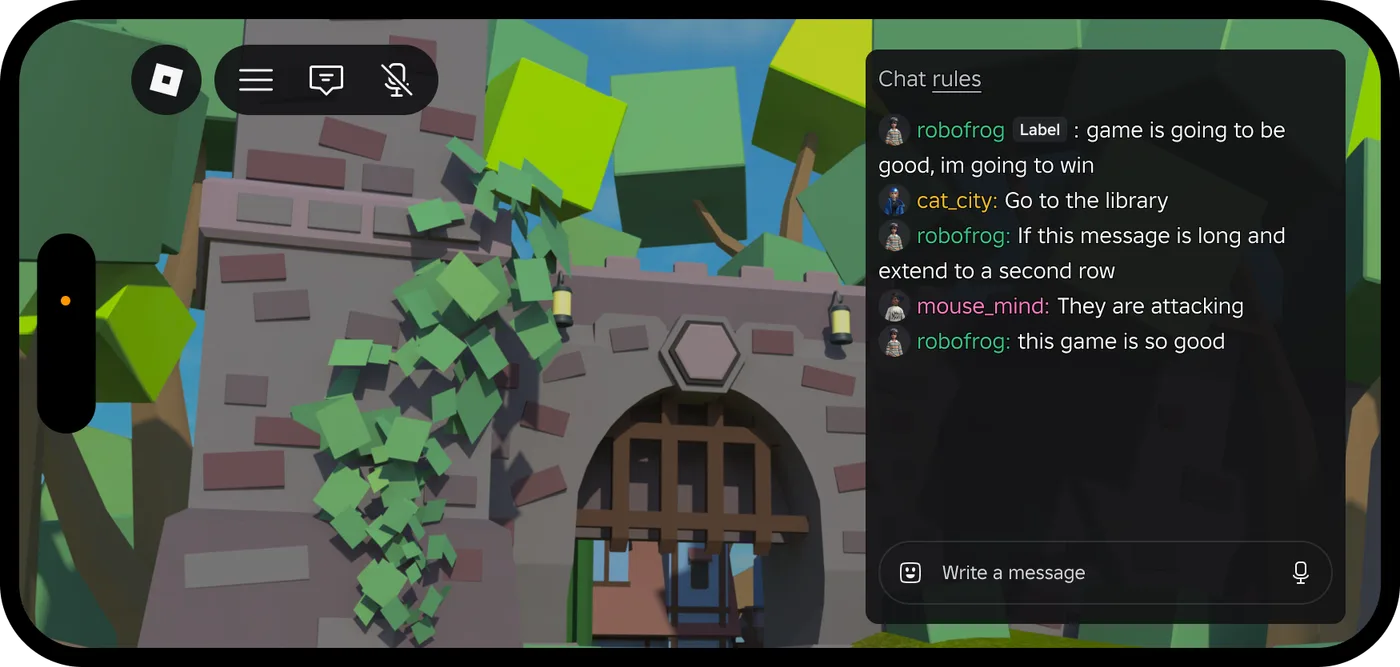
Roblox's October 21 chat announcement fits in one of its own sentences: "Message content will no longer be accessible in code." Once a game switches on platform-integrated chat, Roblox delivers and renders chat messages itself, "like how voice chat already works," and the APIs your scripts used to read message text hand back an empty string.
Today that is opt-in. Roblox's schedule makes it the default for every game in February 2027 and the only way to run custom chat from May 2027. If your game uses Roblox's default chat with no customizations, Roblox says you "do not need to take action." If it has a custom chat window, chat tags, admin commands typed into chat, a chat wheel or a chat log, each of those has a different replacement, and one of them doesn't exist yet.
This guide covers what stops working, what replaces each piece and when, and how to test it in Studio now. Filtering text that isn't chat, such as signs, pet names and shop names, is a separate job, covered in our text filtering guide.
Two changes in one announcement
The post bundles a policy that applies now with an API change on a timer. Keep them apart, because they hit different parts of a game.
The policy, which Roblox calls Phase 0 and dates "Now". Chat between users has to go through TextChatService. That part isn't new. Roblox retired the legacy chat system on April 30, 2025 and began auto-migrating the games that hadn't moved in May 2025, and its chat guidelines require "All games that offer in-game text chat for users" to integrate TextChatService. What is new is the enforcement notice. The announcement lists where real-time conversation tends to leak out of chat: "Signs, Bulletin Boards, Pet names, License plates, Trading systems, Announcement systems, Admin Tools, Comment Systems, and other free-text inputs." Those features "must be changed, removed, or rate limited to 1 update per minute," and "If your game isn't compliant, expect to hear from us in the upcoming weeks." Continued violations "may result in suspension or removal of your game."
The one-minute rule has been in the docs for a while. Roblox's chat guidelines called it a recommendation in January 2026 and have stated it as a requirement since a June 3, 2026 update: games with editable text that players can use and see "must add rate limits of at least 1 minute."
The API change, Phases 1 to 3. This is the part with a deadline:
| Phase | When | What happens |
|---|---|---|
| 1 | Now to February 2027 | You opt a place in by setting TextChatService.PlatformIntegratedChat to Enabled in Studio, test it, and report gaps |
| 2 | February 2027 | "All new and existing games will be opted in automatically, with an option to opt out" |
| 3 | May 2027 | "The updated TextChatService will be the only way to have custom chat in new and existing games," and the docs add that the unsupported APIs "will be deprecated" |
What stops returning text
With PlatformIntegratedChat set to Enabled, Roblox's documentation lists four groups of unsupported APIs. They return "", an empty string rather than nil, and log a warning, so your scripts keep running on no data:
| Unsupported API | What games used it for | Roblox's replacement |
|---|---|---|
TextChatMessage.Text, TextChatMessage.Translation | Custom chat windows | TextChannelWindow |
TextChatMessage.PrefixText | Chat tags and prefixes | Role badges, dated February 2027 |
TextChannel:SendAsync() | Chat wheels and custom presets | Quick Words |
TextChatService.OnIncomingMessage, Player.Chatted | Admin commands and moderation | TextChatCommand and read-only chat |
Two details sit outside that table. The TextChatService class reference says that with the setting Enabled, TextChatService.OnIncomingMessage and TextChannel.OnIncomingMessage callbacks "from developer scripts are not invoked, and only CoreScripts can set those callbacks." Code that restyled messages in those callbacks doesn't run at all. And the docs' migration section says command handling that reads raw chat text "no longer works," naming MessageReceived alongside Chatted and "anything else that inspects TextChatMessage content." The localization guide's note on chat translation is affected too: Translation is on the unsupported list.
What survives, per the announcement: "Channel membership, sender identity, delivery status, timestamps, and message IDs work the same."
This also ends a pattern Roblox endorsed during the 2024 migration. Its November 1, 2024 update told creators they were "welcome to design your custom UI and not use the default CoreUI," by switching off ChatWindowConfiguration.Enabled and ChatInputBarConfiguration.Enabled and drawing messages themselves. Under platform-integrated chat, "Custom chat UIs can no longer render messages themselves."
TextChannelWindow: the replacement window
TextChannelWindow launched with the announcement. It is a GuiObject that renders one TextChannel, and Roblox handles delivery, filtering and each player's chat settings inside it. You place it, size it and point it at a channel:
| Property or rule | What the reference and Roblox say |
|---|---|
Target | The TextChannel it shows. The default is nil, which shows nothing |
UseDefaultFont, FontFace | The platform font by default; set UseDefaultFont to false to use FontFace |
| Parent | A ScreenGui or other LayerCollector descendant. Roblox's October 22 update confirms it works in a SurfaceGui, for in-world phones and radios |
| Children | UICorner, UIAspectRatioConstraint, UISizeConstraint and scripts; the reference says other child types are rejected |
| Styling | Background and border transparency, and fonts. ChatWindowConfiguration properties don't apply, text size follows the player's settings, and message colour stays consistent across games |
| Channels | One per window, and "The Global channel isn't available as a target for a custom window" |
A Roblox staff member put the limit plainly in the thread: you control position, size and other inherited properties, "Though you can't style or restructure it like a Frame."
A radio channel in its own window takes two scripts. The server creates the channel. TextChannel.AddPlayersOnJoin defaults to false, and the announcement warns that without it a window targeting a custom channel "won't receive messages for players who haven't been explicitly added":
-- Script in ServerScriptService
local TextChatService = game:GetService("TextChatService")

local radio = Instance.new("TextChannel")
radio.Name = "Radio"
radio.AddPlayersOnJoin = true -- every player who joins becomes a member
radio.Parent = TextChatService:WaitForChild("TextChannels")
The client builds the window, following the pattern in Roblox's platform-integrated chat docs:
-- LocalScript in StarterPlayerScripts
local Players = game:GetService("Players")
local TextChatService = game:GetService("TextChatService")

local playerGui = Players.LocalPlayer:WaitForChild("PlayerGui")
local radio = TextChatService:WaitForChild("TextChannels"):WaitForChild("Radio")

local screenGui = Instance.new("ScreenGui")
screenGui.Name = "RadioChat"
screenGui.ResetOnSpawn = false
screenGui.Parent = playerGui

local window = Instance.new("TextChannelWindow")
window.Size = UDim2.fromOffset(400, 300)
window.Position = UDim2.fromOffset(10, 10)
window.BackgroundTransparency = 0.5
window.Target = radio
window.Parent = screenGui
Placement and scaling work like any other GUI object, which our UI design basics guide covers.
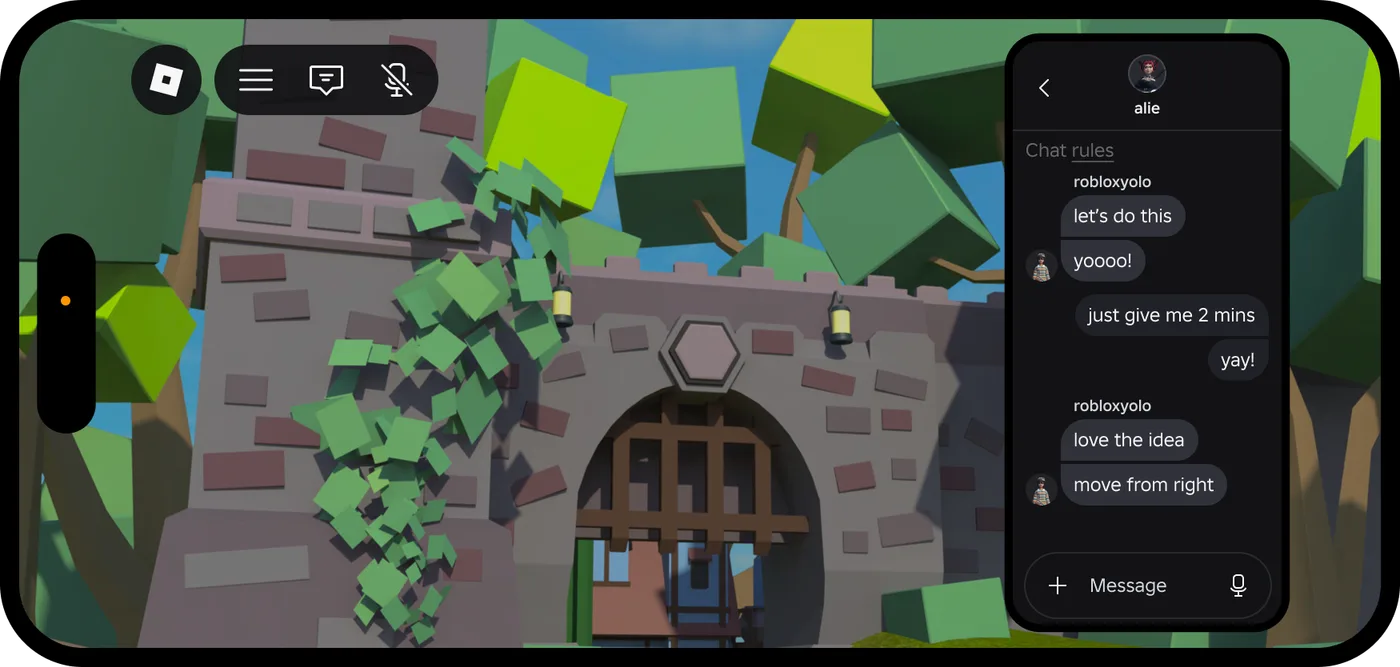
Two more settings finish the job:
- Keep the channel out of the default window. By default, the default chat window renders messages from every
TextChannel, so your radio messages show up twice. SelectChatWindowConfigurationunderTextChatServiceand setTextChannelDisplayModetoDefaultTextChannels. The docs say you can set it only in Studio or from a plugin; scripts can read it but not change it. Default channels created at runtime, such as Team and Whisper, still appear in the default window. - Several channels means several windows. Roblox's advice is a
TextChannelWindowfor each channel with your own navigation between them. For a channel players can read but not post in, setTextSource.CanSendto false. Roblox says it is "considering" multi-channel support inside one window, and recommends the default window until then if you need that.
Prefixes and chat tags: wait for February
Chat tags are the one custom feature with no replacement today. PrefixText returns empty under platform-integrated chat, and the docs are blunt about it: "If your game requires prefixes, don't enable platform-integrated chat yet."
Roblox's October 22 roadmap update dates the replacement: "In February 2027, prefixes will become role badges." Every badge "goes through our text filter," and you will be able to "set, remove and read badges at runtime and choose a badge color." Gradients aren't in the first version, and Roblox says it is "exploring icons." Separately, display name colour and gradients become customizable in November 2026, and display names "will always show in chat."
Chat commands move to TextChatCommand
An admin system that listens to Player.Chatted and splits the string is exactly what breaks. The replacement is TextChatCommand. Each one holds up to two aliases, PrimaryAlias and SecondaryAlias, and its Triggered event passes the sender's TextSource plus "The full, unfiltered text used to trigger the command that can be used to dissect parameters from the command message." A matched command is intercepted: in the reference's example, "/mute SomeUserName" fires the mute command and "is not replicated to other users."
Set it up in Studio: add a TextChatCommand under TextChatService, name it KickCommand, set PrimaryAlias to /kick, and untick AutocompleteVisible so it isn't suggested to every player. Per the reference, the command "still works when typed in full." Then, on the server:
-- Script in ServerScriptService
local Players = game:GetService("Players")
local TextChatService = game:GetService("TextChatService")

local kickCommand: TextChatCommand = TextChatService:WaitForChild("KickCommand")

-- UserIds of your moderators
local MODERATORS = {
	[000000000] = true,
}

kickCommand.Triggered:Connect(function(textSource, unfilteredText)
	if not MODERATORS[textSource.UserId] then
		return
	end
	local targetName = string.split(unfilteredText, " ")[2]
	local target = targetName and Players:FindFirstChild(targetName)
	if target and target:IsA("Player") then
		target:Kick("Removed by a moderator.")
	end
end)
The permission check is the line that matters. A chat command anyone can type is a moderation tool anyone can use. Our ban API guide covers the same server-side checks for an admin panel, and escalating from kicks to BanAsync.
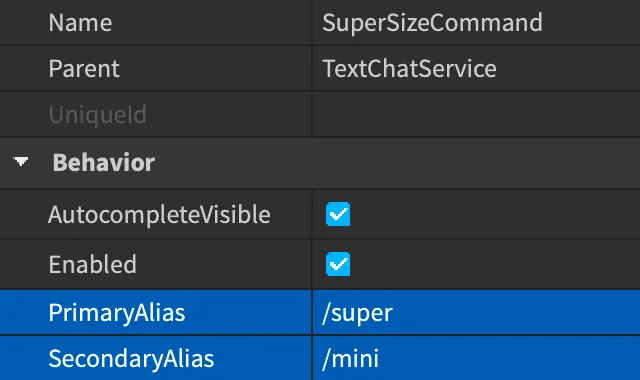
Two limits for now:
- The keyword has to come first. Per the October 22 update,
TextChatCommandtriggers "when a message starts with a keyword." Detecting keywords anywhere in a message, plus "an option to still send the message to chat when a command triggers," are dated "by February." - Test your argument parsing. Roblox's migration page doesn't say whether
Triggeredstill passes the full text with platform-integrated chat on. If your commands take arguments, confirm they still parse in a test place before you rely on them.
Chat wheels become Quick Words
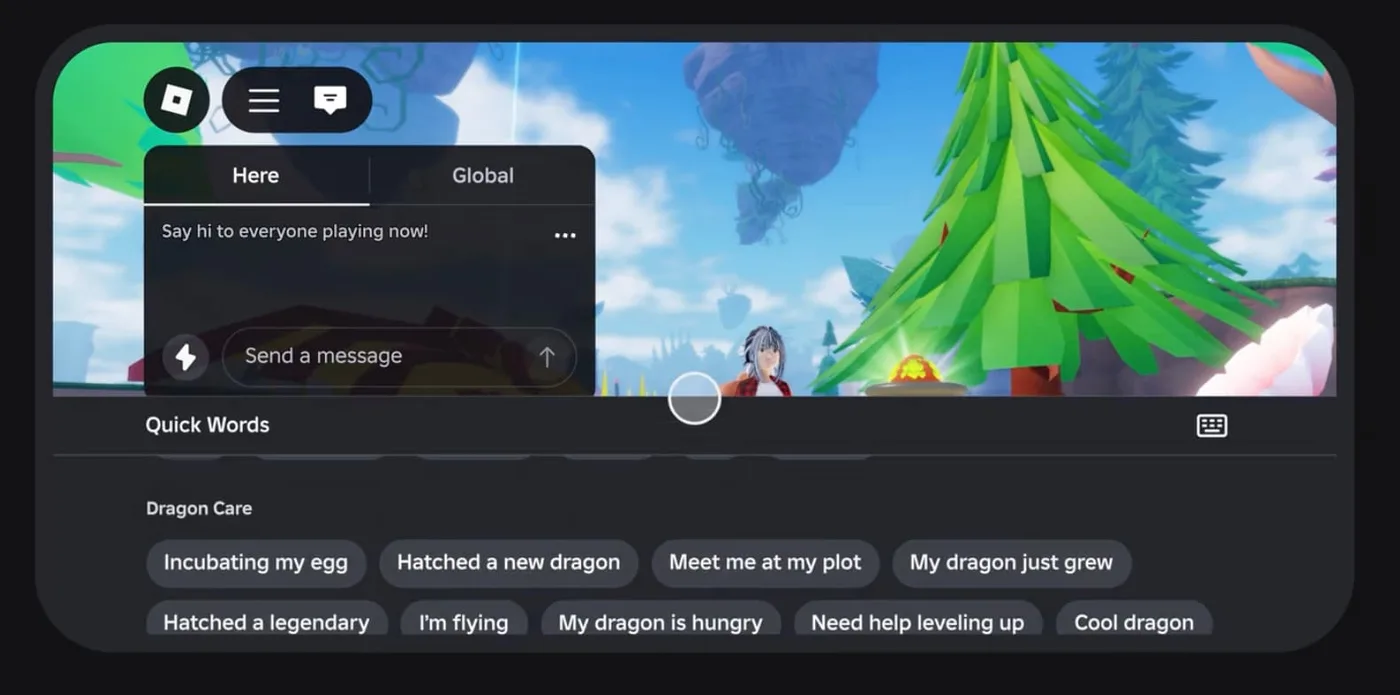
TextChannel:SendAsync() is on the unsupported list for presets and chat wheels. The announcement says "Custom presets can no longer render in chat," and that Roblox's preset policy will be updated "by February 2027" to match. The replacement launched on October 13: custom Quick Words.
| Quick Words rule | Value |
|---|---|
| Where | Creator Hub ⟩ your game ⟩ Configure ⟩ Chat ⟩ Quick Words |
| Categories | Up to 3, with 3 to 10 Quick Words in each |
| Length | Fewer than 25 characters per Quick Word |
| Language | English input only; Roblox translates them into each player's chat language |
| Defaults | Your categories replace Roblox's default ones; General stays available across games |
| Review | Draft, Pending, Not approved or Published; a rejected phrase can be revised and republished |
| Where players see them | The Here and Global tabs of the chat window |
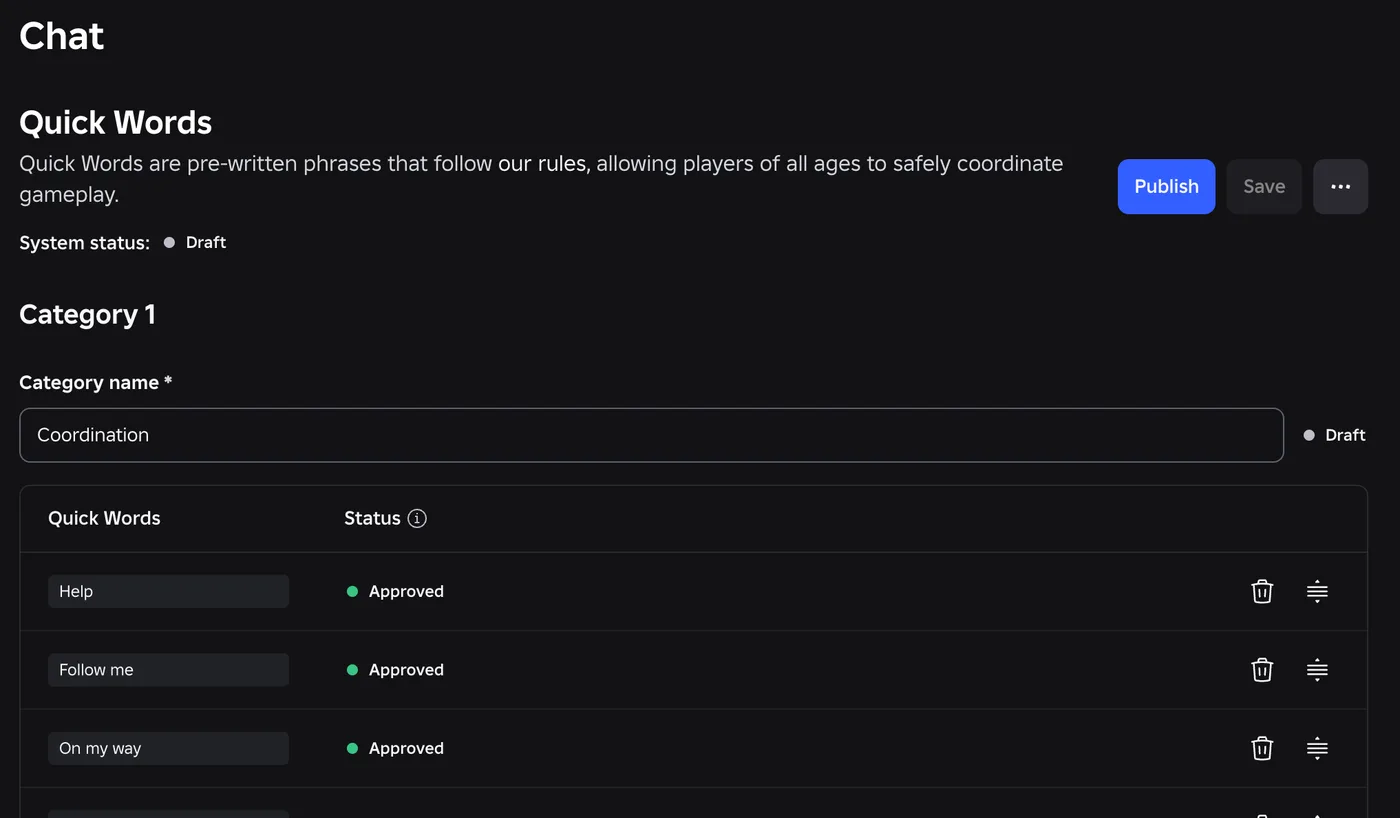
The review uses Roblox's preset system guidelines, which are stricter than "keep it clean." Presets are for "immediate gameplay intent, not dialog," and they must not "gain meaning when combined, repeated, or sequenced." The guidelines' own examples draw the line: "Need help," "Reloading" and "Enemy nearby" pass, while "Where are you from?" fails. Quick Words already work in the default window. Roblox dates them inside TextChannelWindow "Later this year." Our RDC 2026 recap has the September announcement that preceded this launch.
Moderation without chat logs
The docs FAQ answers the logging question directly. With platform-integrated chat on, "no API returns player message content on the client or server." You can't record, export or pull chat logs from code.
What Roblox offers instead:
- Read-only chat. A Roblox staff member explained in the thread that giving a group role the permission they called "Moderate experiences" lets members "see all chats live in the game as long as they are 18+ and have toggled the read-only chat in-game setting on." Roblox's Groups documentation describes that role permission as viewing "all in-game chat messages (read-only; member must be 18+)" and banning or managing banned users across every game the group owns. It is a powerful role, so grant it carefully.
- Message history, which Roblox says is coming by the end of the year.
- Creator blocked words on top of Roblox's filter, which Roblox says "will land by May 2027."
- Player-side tools: reporting, muting and blocking.
What does not change
- Bubble chat styling. You can still customize overhead bubbles with
BubbleChatConfiguration, and useTextChatService.OnBubbleAddedto style individual bubbles by player or game state. - System messages.
DisplaySystemMessageworks inTextChannelWindowand supports rich text. It runs on the client, so for a server-wide announcement Roblox says to "send the message from the server to each player." Announcements you write as the creator are one-way, so they "aren't subject to the 1-minute rate limit." They still aren't filtered, so keep player text out of them, as our text filtering guide explains. - Signs, boards and notes. The docs FAQ says the update doesn't touch them, and the policy is unchanged: no two-way communication between players, rate limits of at least 1 minute, and moderation. Roblox's rate-limited text input sample shows a 60-second cooldown per player on a bulletin board.
- Comment systems, message boards and in-game mail. "This update covers TextChatService only." The chat guidelines still treat comments that support replies as conversation, though, and Phase 0 names comment systems among the common leaks. On October 22, Roblox said it would share clearer chat policy guidance in the thread "by next week."
Testing it this week
Roblox asks creators to test in a test place first, so make a copy of your place, then:
- In the Explorer, select
TextChatService. - In the Properties panel, set
PlatformIntegratedChatto Enabled. - Play-test: send chat, open your chat UI, run your commands and trigger your chat wheel.
- Read the Output window. Each unsupported API logs a warning when it hands back an empty string, which gives you a list of call sites to replace.
Set it back to Disabled to revert. The docs say you can change the property only in Studio, not from a script, and the class reference marks it "not accessible from experience scripts," so a script can't check whether it is on. Write the replacement code so it works either way. To see the windows working before you touch your own place, Roblox points to its TextChannelWindow test game, the one shown in its demo videos.
What Roblox has dated next
Roblox says it will post new features in the thread monthly. These are its dates, not shipped features:
| Feature | Where | Roblox's date |
|---|---|---|
| Emojis | Default window first, then TextChannelWindow | November |
| Voice typing, translations and AI rephrases | TextChannelWindow (already in the default window) | November |
| Display name colour and gradients | Both | November 2026 |
| Avatars, bubbles and Quick Words in the window | TextChannelWindow | Later this year |
| Message history | Not specified | End of 2026 |
| Role badges, replacing prefixes | Both | February 2027 |
| Commands that match keywords anywhere in a message | TextChatCommand | By February |
| Quick Action Menu: tap a name to view profiles, report or block | Both | By April 2027 |
| Typing indicators | Both | 2027 |
| Creator blocked words | Not specified | By May 2027 |
One date conflicts within the announcement itself. Its New APIs table says PlatformIntegratedChat "Can be set to Disabled to opt out anytime before March 2027." The October 22 update says "you can stay opted out of this update until May 2027," which matches Phase 3 and the docs. Until Roblox reconciles the two, treat March 2027 as the safe deadline for finishing your migration.
Quick Action Checklist
- If your game uses Roblox's default chat with no customizations, you have nothing to change.
- Audit signs, boards, pet names, trading and admin tools now: anything players can use to talk outside
TextChatServiceneeds a rate limit of at least 1 minute, or has to be changed or removed. - Search your code for
TextChatMessage.Text,Translation,PrefixText,SendAsync,OnIncomingMessage,MessageReceivedandChatted. Each one is a migration task. - Rebuild custom chat windows as
TextChannelWindows, one per channel, withAddPlayersOnJoinon custom channels andTextChannelDisplayModeset toDefaultTextChannels. - If you rely on chat tags, don't enable platform-integrated chat until role badges arrive, dated February 2027.
- Move chat-typed admin commands to
TextChatCommand, check permissions on the server, and test argument parsing with the setting on. - Replace chat wheels with Quick Words: up to 3 categories of 3 to 10 English phrases, each under 25 characters.
- Give trusted adult moderators the group permission that unlocks read-only chat, instead of logging messages.
- Test on a copy of your place with
PlatformIntegratedChatset to Enabled, and read the Output warnings. - Plan to finish before March 2027, the earlier of Roblox's two opt-out dates.
Frequently Asked Questions
What is platform-integrated chat on Roblox?
When does Roblox require platform-integrated chat?
Do I need to change anything if my Roblox game uses the default chat?
What replaces custom chat UIs in Roblox?
Can Roblox games still use chat prefixes and tags?
How do admin commands work with Roblox platform-integrated chat?
Can Roblox game admins still read chat logs?
Keep Reading
- Roblox Developer Forum — Important TextChatService Updates: How to Test and What's Next (October 21, 2026, with October 22 roadmap update)
- Roblox Creator Documentation — Platform-integrated chat: unsupported APIs, enabling it, TextChannelWindow, TextChannelDisplayMode and FAQ (official)
- Roblox Creator Documentation — TextChannelWindow class reference (official)
- Roblox Creator Documentation — TextChatService class reference: PlatformIntegratedChat (official)
- Roblox Creator Documentation — TextChatCommand class reference: aliases, AutocompleteVisible and Triggered (official)
- Roblox Creator Documentation — Custom text chat commands (official)
- Roblox Creator Documentation — Quick Words: categories, limits and review states (official)
- Roblox Developer Forum — Create Your Game-Specific Quick Words (October 13, 2026)
- Roblox Creator Documentation — Preset system guidelines (official)
- Roblox Creator Documentation — Chat system guidelines: TextChatService requirement and the 1-minute rate limit (official)
- Roblox creator-docs GitHub repository — January 6, 2026 commit adding the 1-minute rate limit to the chat guidelines as a recommendation (official)
- Roblox creator-docs GitHub repository — June 3, 2026 commit making the 1-minute rate limit a requirement in the chat guidelines (official)
- Roblox Creator Documentation — Rate-limited text inputs example (official)
- Roblox Creator Documentation — Groups: role permissions, including read-only in-game chat for members 18+ (official)
- Roblox Creator Documentation — Bubble chat customization (official)
- Roblox Developer Forum — Migrate to TextChatService: Removing Support for Legacy Chat and Custom Chat Systems (October 30, 2024, with November 1, 2024 update)
- Roblox Developer Forum — Update on Legacy Chat Deprecation and TextChatService Migration (April 30, 2025 retirement and May 2025 auto-migration)
Related Guides
Roblox Early Testers and the New Publish Flow: What Changed
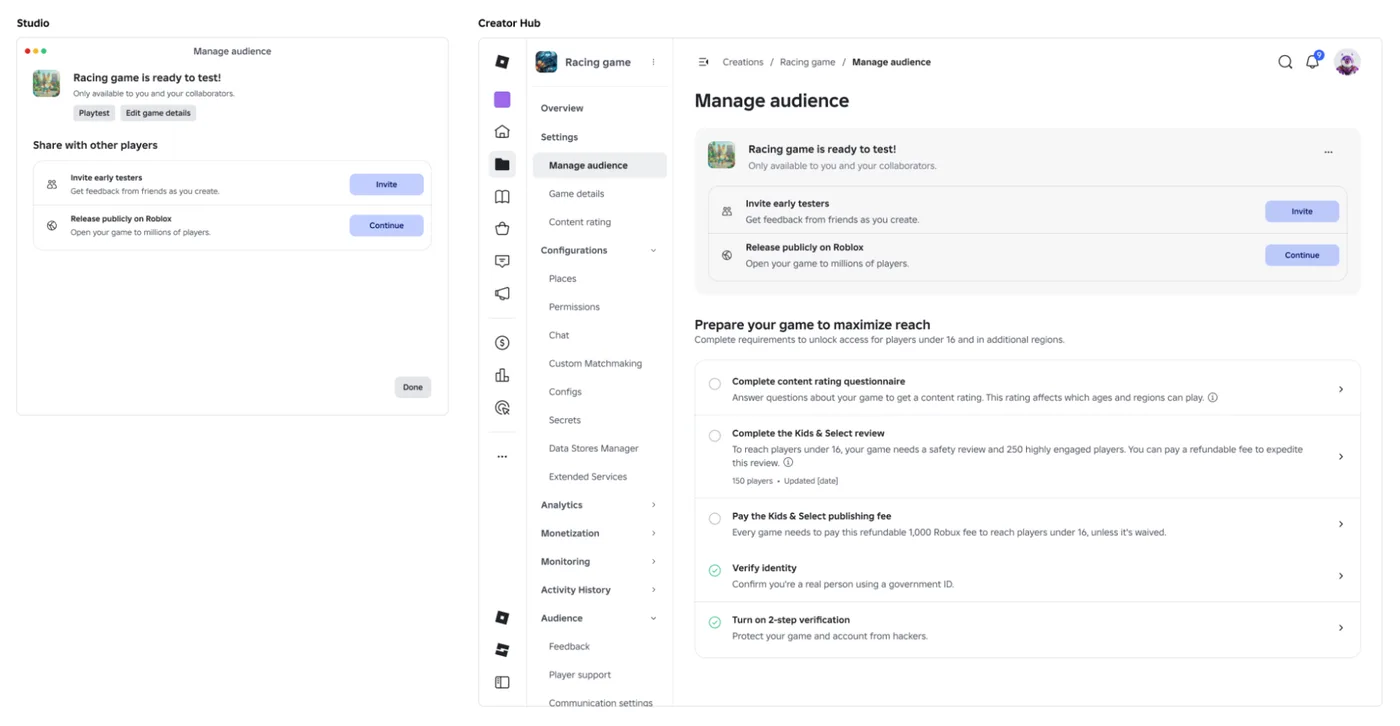
Since October 12, 2026, you can let up to 10 friends play your unreleased, unrated Roblox game, and Roblox is rolling out a path that lets a game with no age-restricted content reach age-checked players 16 and older by answering one question instead of the full questionnaire. Here is who can be an early tester, what replaced the Private and Limited audience settings, what the one question actually covers, and what still takes the long road to players under 16.

Roblox BadgeService Guide: Award, Check, Debug
Call AwardBadgeAsync on a player who isn't currently in your server and it fails one of five documented requirements — silently, the same way it fails for a disabled badge or a place outside the badge's own experience. Here is every BadgeService method, which four are dead, the rate limit two of them share despite a 10x difference in batch size, and the deprecated check that Roblox says will now always return true.
Roblox Luau Type Checking: nocheck, nonstrict, strict
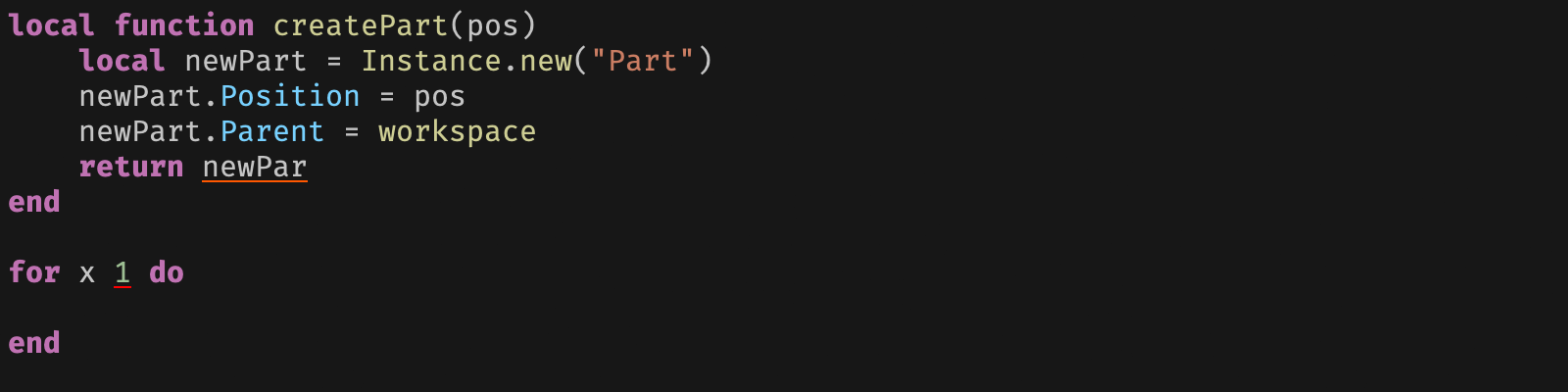
Roblox says every script used to default to no typechecking. That is no longer how it works: a Workspace property now sets the default mode, projects using only nocheck and nonstrict were moved to the New Type Solver automatically, and strict mode projects were not. Here is what each mode reports, what the new solver changed, and the annotation syntax that covers most code.
Roblox Text Filtering: FilterStringAsync Done Right
Chat is filtered for you. Pet names, sign text, shop names and anything you pull off an external API are not — and Roblox documents that it takes games down until filtering is added. Here is the actual API, the getter that is now dead, and the pattern that ships.

Best Roblox Games to Play in 2026
Roblox's front page is engagement bait. This is the filtered version: the games with real, sustained player counts and actual staying power, sorted by what you're in the mood for.

How to Get Robux Safely (Legit Ways + Scams to Avoid)
There is no free Robux generator. There never was. Here are the actual legit ways to get Robux without overpaying, the earning methods that really work, and the scams that exist purely to steal your account.