Roblox Ban API: BanAsync, Alt Accounts, Device Blocks
Player:Kick() drops someone from one server. Players:BanAsync() evicts them from every server, keeps them out for as long as you say, and bans their suspected alts by default. Here is every field in the config table, the scope rule that decides whether your unban does anything, the 24-hour device block only one unban path can lift, and why GetBanHistoryAsync fails in Studio.
Player:Kick() is not a ban. It drops a player from the one server you called it on, and Roblox's own Ban API launch post describes the Kick API as only able to remove users "temporarily." Building a real ban out of it takes three systems: a list of banned IDs in a DataStore, a check on every PlayerAdded, and a MessagingService broadcast so the other servers find out.
Players:BanAsync() replaces all three with one server call. Per the class reference, "Roblox's backend systems will evict players across all servers from the place(s) that you specify," the ban persists for whatever duration you set, every ban and unban lands in a queryable history, and by default the ban follows the player to their suspected alternate accounts. Since June 2026 it can also block the banned player's desktop device for 24 hours.
It also carries a scope rule that decides whether your unban does anything, a device block that only one of three unban paths can lift, and a history method that fails in Studio. Here is the whole engine API, the Creator Hub dashboard, and the Open Cloud endpoints the engine methods are built on.
Kick removes, BanAsync bans
Roblox launched the Ban API on June 25, 2024, and the announcement was direct about the relationship: "All of these features are improvements over the existing Kick API." Kick stays active so old code keeps working, but Roblox recommends new setups do "all of your account actions through the Ban API." The difference, from the two class references and that post:
Player:Kick(message) | Players:BanAsync(config) | |
|---|---|---|
| Reach | The server the player is on | "All servers from the place(s) that you specify" |
| Rejoining | Temporary removal only, per Roblox's launch post | Blocked for Duration seconds, or permanently with -1 |
| Alternate accounts | Not covered | Suspected alts banned by default |
| History | None | GetBanHistoryAsync() and the Creator Hub dashboard |
| Message | Optional string you pass | DisplayReason plus the time left on the ban |
From a LocalScript | Can only kick the local player | Errors |
Kick still removes someone from a single server. The moment you want a player to stay gone, it is the wrong tool.
Switch on BanningEnabled first
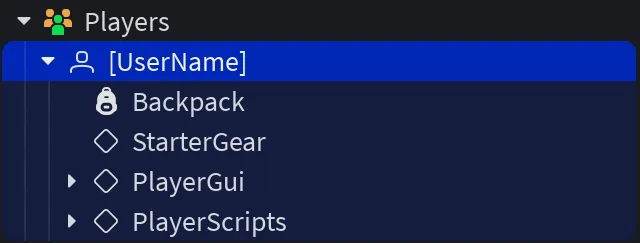
All three ban methods — BanAsync, UnbanAsync and GetBanHistoryAsync — sit behind one property. The reference says Players.BanningEnabled "enables or disables" the three methods that "constitute the ban API," and that it "cannot be set through developer-facing Luau and must be set in Studio through the Players properties window." It is tagged not scriptable, so there is no runtime switch: select Players in the Explorer, tick BanningEnabled in the Properties window, and publish.
The BanAsync config, field by field
BanAsync takes a single dictionary. Four fields are required and three are optional:
| Field | Required | Default | Rule |
|---|---|---|---|
UserIds | Yes | — | Array of user IDs; maximum size 50 |
Duration | Yes | — | Seconds; -1 is permanent; 0 and all other negative values are invalid |
DisplayReason | Yes | — | Shown to the banned player; maximum 400 characters; text-filtered |
PrivateReason | Yes | — | Your notes; maximum 1,000 characters; not filtered, never shared with the client |
ApplyToUniverse | No | true | false limits the ban to the place that made the call |
ExcludeAltAccounts | No | false | true stops the ban propagating to suspected alts |
ApplyDeviceBlock | No | false | true blocks the banned player's device for 24 hours |
Read the defaults column twice. Leave out the three optional fields and you get a universe-wide ban that reaches suspected alts, without a device block. The reference describes PrivateReason notes as ones that "can be considered safe from attackers," which makes it the right place for evidence, the moderator's ID and anything else your escalation logic reads back later.
A ban call you can ship
local Players = game:GetService("Players")

local DAY = 86400

local function banUsers(userIds, days, displayReason, privateReason)
	local config = {
		UserIds = userIds, -- up to 50
		Duration = if days then days * DAY else -1, -- seconds; -1 is permanent
		DisplayReason = displayReason, -- shown to the player, max 400, filtered
		PrivateReason = privateReason, -- your notes, max 1,000, never sent to clients
		ApplyToUniverse = true, -- the default, written out on purpose
	}

	local ok, err = pcall(function()
		Players:BanAsync(config)
	end)
	if not ok then
		warn("BanAsync failed:", err)
	end
	return ok, err
end
Three rules shape that wrapper. The method yields and "invokes an HTTP call to backend services which are subject to throttling and may fail," so it lives inside pcall. It runs on the server only — "client-side calls will result in an error." And a multi-user call does not fail as a unit: the method makes one HTTP call per user ID, then joins the failures into one comma-separated message. Roblox's example for a five-user call where users 2 and 4 failed:
"HTTP failure for UserId 2: Timedout, HTTP 504 (Service unavailable) failure for UserId 4: Service exception"
The reference adds that the message "will always include failure for UserId {} if it is an HTTP error," which makes the failed IDs recoverable:
local function failedUserIds(errorMessage)
	local failed = {}
	for id in string.gmatch(errorMessage, "failure for UserId (%d+)") do
		table.insert(failed, tonumber(id))
	end
	return failed
end
Retry only what comes back from that. If the list is empty, that same rule says the error was not an HTTP failure, so check the config before retrying anything — a Duration of 0, for example, is invalid.
Universe or place: the scope your unban has to match
ApplyToUniverse defaults to true, which extends the ban "to any place within that universe." Set it to false and the ban covers only the place that made the call — with one catch the reference spells out: a place-level ban in the start place "effectively results in the user being excluded from the entirety of the universe" anyway.
The scope matters more on the way out. UnbanAsync takes the same kind of config — UserIds (maximum 50) and ApplyToUniverse — and the reference is explicit that "unbans will only take effect on bans with the same ApplyToUniverse scope." A universe-level unban does not lift a place-level ban, and the reverse is also true. Mix scopes across your codebase and you get a player your own records say you unbanned who still cannot get in.
The dashboard has its own history with this. In a January 29, 2025 update to the Ban API launch post on the DevForum, Roblox said the Creator Hub Bans page listed only universe-level bans, and place-level bans had to be queried through Open Cloud with the place-level resource path. The current Bans documentation does not say either way. The simplest fix is to never find out: pick one scope for your whole game, and pass ApplyToUniverse explicitly in every ban and unban call.
One more UnbanAsync rule worth guarding against: passing a mix of valid and invalid user IDs — any ID that is not a positive number — is "undefined behavior," because "some network requests may succeed before all input is validated." Validate the array before you send it.
Alt accounts are banned unless you opt out
Alt detection shipped with the API, and it is on by default: "the default behavior of this API will propagate all bans from the source account you banned to any of their suspected alternate accounts." ExcludeAltAccounts = true turns that off per call.
The launch FAQ answers the three questions this raises. Unbanning the original account unbans it "and any suspected alternate accounts," while if you unban an alt, Roblox will "only unban that alt." You can see that an account is a suspected alt, but "you will not be able to see a list of usernames of suspected alternate accounts." And Roblox did not oversell the detection — the system is "fine-tuned to minimize false positives, but alt accounts may slip through."
Device blocks: 24 hours, desktop only, one way out
Roblox opened ApplyDeviceBlock to everyone on June 4, 2026, after a beta, pitching it at bad actors who come back "on burner accounts." When you ban a user who is currently connected with the field set to true, "the device associated with that user is also blocked from rejoining for 24 hours." Both the users guide and the June 4 announcement describe the block for a user connected at the moment of the ban, and neither says what it does for an offline user ID, so do not count on it there.
The limits, from the documentation and the launch post:
| Rule | Detail |
|---|---|
| Length | 24 hours; the announcement says this is "while we evaluate how creators use the feature" and that Roblox "may extend" it |
| Platforms | Desktop only — Windows and macOS. Mobile and console devices are not blocked |
| Other accounts | The block does not propagate as a ban to other accounts that have used the device |
| Lifting it | Only UnbanAsync — "unbanning a user through any other method, such as the Open Cloud API or the Creator Hub, will not lift the device block" |
That last row is the trap. The Creator Hub Bans page says unbanned users "can immediately access your game again," and it makes no mention of device blocks. If you device-blocked a player and then reversed the ban from the dashboard, the account is clear and the machine may not be. Reverse device-blocked bans with UnbanAsync.
The block is also the device-level tool Roblox actually hands you. Its FAQ on the upcoming scoped user IDs states that tracking players across games "without their consent - whether through fingerprinting, device signals, or any other method - violates Roblox's Terms of Use."
What the banned player sees, and what you may write
A banned player is "immediately evicted" and, on any attempt to rejoin, sees "an error modal displaying the time left on their ban and your DisplayReason." That string is subject to Roblox's text filter (the text filtering guide covers filtering the text your own game displays) and has to follow Roblox's ban-message guidelines:
- Allowed: pointing players at a platform or brand — Roblox's own examples are "Visit the Discord in my group/game page" and "Message me on Twitter or X."
- Not allowed: "personal information or direct links," which the guidelines extend to "a specific username or handle, or providing a direct link to a Discord server or X account."
The rules for the ban itself are just as specific. Your game's rules cannot contradict the Community Standards or Terms of Use; you "must clearly state" them "somewhere accessible to all users"; you must apply them fairly rather than "arbitrarily target certain users"; and appeals come to you. Roblox "will not mediate these appeals" unless the player believes your rules or their enforcement break the Community Standards, and Roblox "can moderate a game" when it has reason to believe they do.
Escalate from ban history
Players:GetBanHistoryAsync(userId) "retrieves the ban and unban history of any user within the experience's universe" as a BanHistoryPages object. Each entry is a table:
| Field | Type | Meaning |
|---|---|---|
Ban | boolean | true for a ban, false for an unban |
Duration | number | Seconds; -1 if permanent |
StartTime | string | When the action applied, ISO 8601 |
DisplayReason | string | What the user was shown |
PrivateReason | string | Your notes from the ban |
PlaceId | number | The place the action targeted; -1 for a universe-level action |
The reference names escalation as the use case — "the number of bans, the duration of previous bans," or logic built on your PrivateReason notes. A three-strike ladder:
local Players = game:GetService("Players")

local DAY = 86400
local LADDER = { DAY, 7 * DAY } -- first ban: 1 day, second: 7 days, then permanent

local function countPriorBans(userId)
	local ok, pages = pcall(function()
		return Players:GetBanHistoryAsync(userId)
	end)
	if not ok then
		return nil
	end

	local bans = 0
	while true do
		for _, entry in pages:GetCurrentPage() do
			if entry.Ban then
				bans += 1
			end
		end
		if pages.IsFinished then
			break
		end
		local advanced = pcall(function()
			pages:AdvanceToNextPageAsync()
		end)
		if not advanced then
			break
		end
	end
	return bans
end

local function nextDuration(userId)
	local prior = countPriorBans(userId)
	if prior == nil then
		return nil -- history unavailable: decide by hand, don't guess
	end
	return LADDER[prior + 1] or -1
end
Returning nil instead of a default matters here, because this method fails in more places than the other two — covered under testing below. A ladder that treats "could not read history" as "no history" hands a one-day ban to a repeat offender.
An admin command that cannot be turned against you
An in-game moderator panel means a RemoteEvent from a client to a server that holds the power to ban anyone. The Kick reference already states the principle: "You should only allow specific users whom you trust to trigger this method on other users." For a ban, that check has to happen on the server, on every call:
local Players = game:GetService("Players")
local ReplicatedStorage = game:GetService("ReplicatedStorage")

local banRequest = ReplicatedStorage:WaitForChild("BanRequest")

-- The UserIds your own servers report for your moderators
local MODERATORS = {
	[000000000] = true,
}

-- Fixed, pre-written reasons: the client picks a key, never the text
local REASONS = {
	exploiting = "Banned for exploiting. To appeal, see the Discord on our group page.",
	harassment = "Banned for harassing other players. To appeal, see our group page.",
}

banRequest.OnServerEvent:Connect(function(moderator, targetUserId, reasonKey)
	if not MODERATORS[moderator.UserId] then
		return
	end
	if typeof(targetUserId) ~= "number" or targetUserId <= 0 or targetUserId % 1 ~= 0 then
		return
	end
	local displayReason = REASONS[reasonKey]
	if not displayReason then
		return
	end

	local ok, err = pcall(function()
		Players:BanAsync({
			UserIds = { targetUserId },
			Duration = 7 * 86400,
			DisplayReason = displayReason,
			PrivateReason = "Banned by moderator " .. moderator.UserId .. " via in-game panel",
			ApplyToUniverse = true,
		})
	end)
	if not ok then
		warn("Ban failed:", err)
	end
end)
The reason keys do two jobs. They stop a compromised or spoofed client from writing arbitrary text into a ban message shown to another player, and they keep every DisplayReason inside the message guidelines because you wrote them all in advance. The PrivateReason records who issued the ban, which is exactly what you want in the history when an appeal arrives.
Testing: what Studio will and will not do
The three methods behave differently outside a live server, and the differences are documented:
| Method | Studio, Team Create, Team Test | Live server | Client |
|---|---|---|---|
BanAsync | Callable, but "the bans will not apply to production" | Applies | Errors |
UnbanAsync | Input validation runs; no ban requests are attempted | Applies | Errors |
GetBanHistoryAsync | Fails — it "will only succeed on production servers and not on client devices or in Studio" | Works | Fails |
So the escalation ladder above cannot be exercised in a playtest at all, which is the practical reason it returns nil rather than guessing. Test the ladder's arithmetic with a stubbed history, and test the real call in a published place against a spare account. Set ExcludeAltAccounts = true on any test ban: propagation runs from the banned account to its suspected alts, and the launch FAQ says creators cannot see a list of which accounts those are.
Banning from outside the game
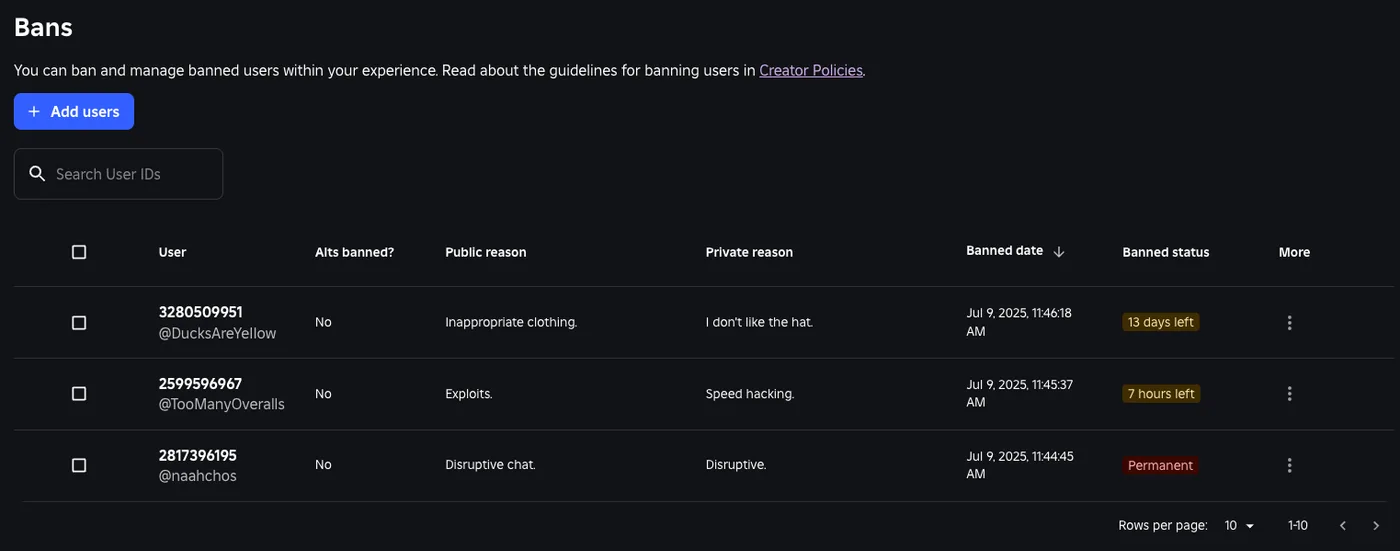
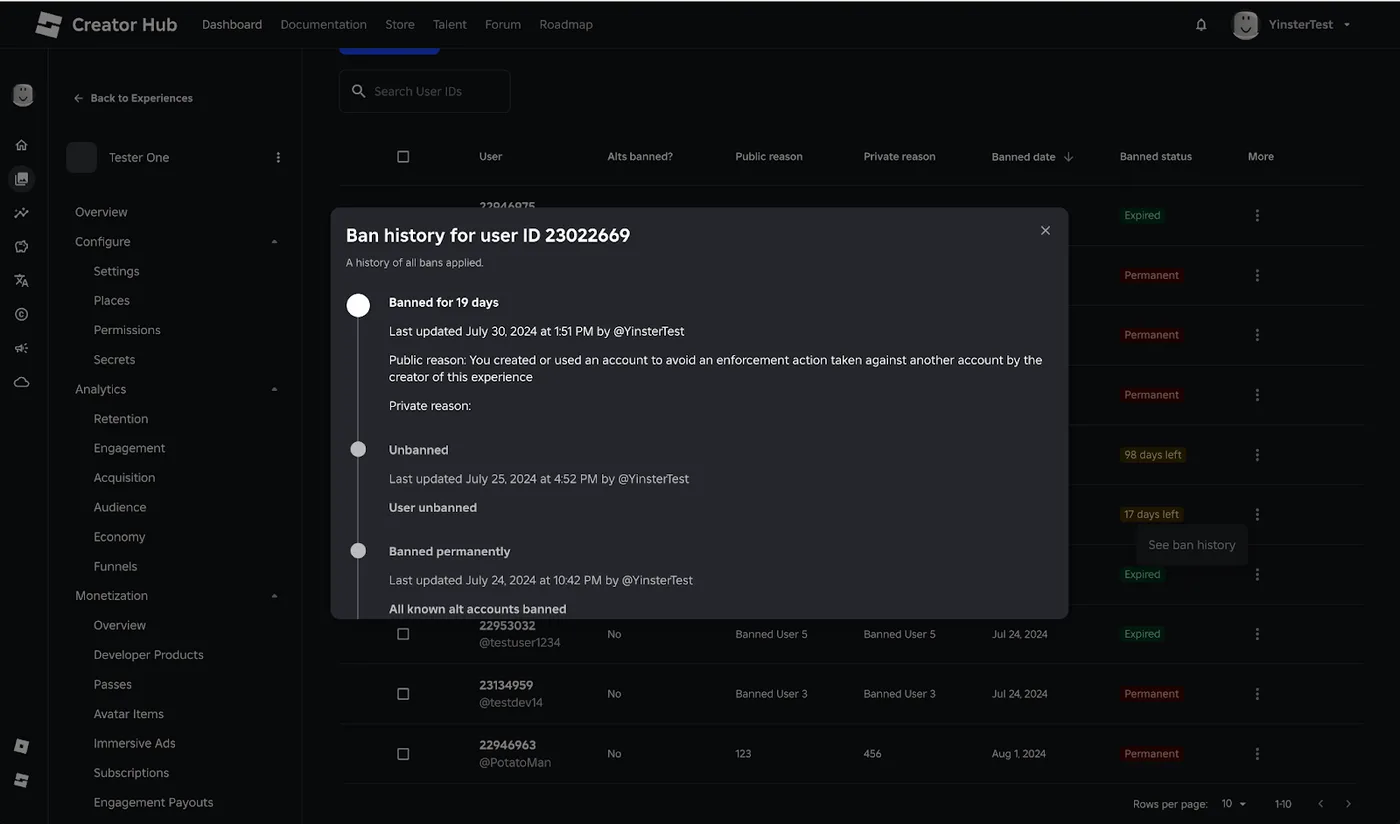
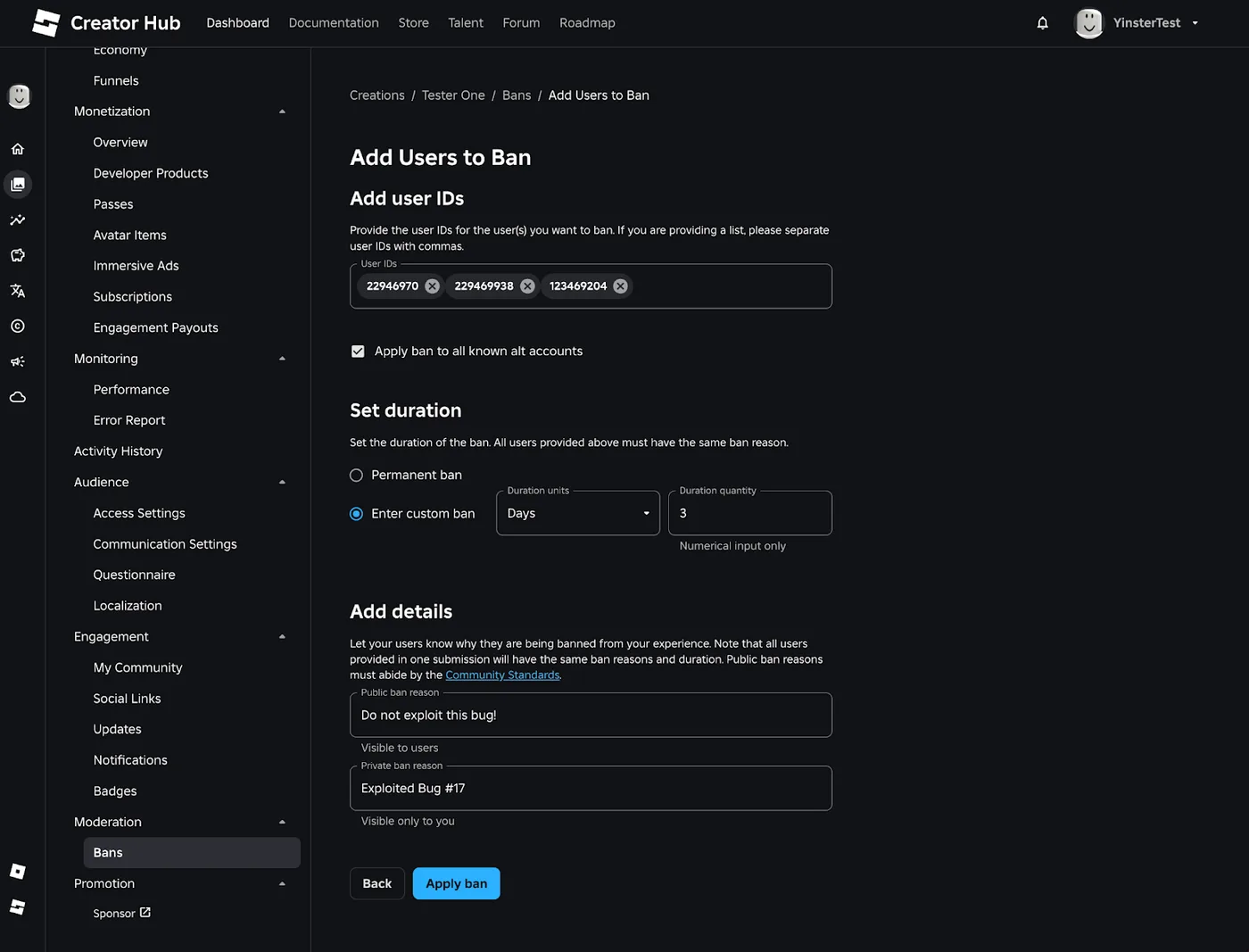
The dashboard. Every game on the Creator Hub has a Bans page under Moderation, open to the game owner or to group members with the "Configure bans for all group games" permission. Add users takes numeric user IDs — comma-separated for several — a checkbox to "apply ban to all known alt accounts," a duration, and public and private reasons, the same pair BanAsync calls DisplayReason and PrivateReason. Roblox's 2024 dashboard announcement put the batch limit at 50 users per submission, matching BanAsync. See ban history under the More column shows the per-user timeline, and Unban users does what it says without removing the history. The dashboard documentation lists no device-block option.
Open Cloud. Both BanAsync and UnbanAsync are built on the User Restrictions Open Cloud API, so a Discord bot or an external moderation tool can manage the same bans. Restrictions live at a universe path (universes/{universe_id}/user-restrictions/...) or a place path, need the universe.user-restriction:read or :write scope, and carry the same 400- and 1,000-character reason limits. Two details differ from the engine call. Duration is omitted for a permanent ban rather than set to -1, and when given must fall between 1 second and 315,576,000,000 seconds — 10,000 years. And the gameJoinRestriction object "must be updated atomically": field masks that index into it are not supported.
The per-universe rate limits, from the Open Cloud reference:
| Operation | Limit |
|---|---|
| Get User Restriction | 50 requests per second |
| List User Restrictions | 50 requests per second |
| Update User Restriction | 10 requests per second, and 2 per minute for the same user |
| List User Restriction Logs | 50 requests per second |
On top of those sit 150 requests per second per API key owner and 30 per second per OAuth2 authorization. The logs endpoint accepts a small filter — user and place, with == and && — for pulling one player's record. A game server can call these too, through the Open Cloud lane and secrets store covered in the HttpService guide.
Scoped user IDs and shared ban lists
Everything above keys on user IDs, and Roblox has announced a change to what a user ID is. Its June 10, 2026 DevForum post introduced scoped user IDs: each player gets "a unique User ID for each game that they visit," but only in games they first visit after the rollout — "Returning users to a game they've already played will continue to be referenced by their Global User ID." Within one game every ID stays unique; across games, "the same number can refer to different users."
That breaks one moderation pattern by design. A June 10 update posted at the top of the announcement says that for groups of games sharing ban lists, "this will be impacted," and promised "Ban API improvements to facilitate cross-game sharing of ban lists" before the broader rollout, then planned for October 2026. The most recent update there, dated September 1, 2026, says Roblox has "heard clearly" about "concerns with the implementation and its impact on moderation," and that it will "share full details on the updated solution and timeline in October."
What that means today:
- A single game with its own bans — the case this guide covers — sits outside the two cases Roblox flagged, cross-game player journeys and shared ban lists. For the rest, the same June 10 update said the "vast majority of games" would see minimal impact and need no code updates.
BanAsyncand the dashboard already work per universe. - Several games sharing one ID list should hold off on building anything new around cross-game IDs until Roblox publishes the October details. Under the plan it published in June, a player banned in one of your games would arrive in another under a different ID if that visit is their first after the rollout.
- The
Usertype is here now.Player.Userexists, and Roblox's users documentation says engine APIs that take a user ID also accept aUservalue. TheBanAsyncreference still documentsUserIdsas an array of user IDs, so passplayer.UserIdthere until that changes.
Quick Action Checklist
- Tick
Players.BanningEnabledin Studio's Properties window — no script can turn the ban API on. - Call
BanAsyncfrom a serverScript, insidepcall; client calls error. - Supply all four required fields:
UserIds(max 50),Durationin seconds (-1permanent),DisplayReason(max 400, filtered) andPrivateReason(max 1,000, never shown to the player). - Remember the defaults: universe-wide, alts included, no device block.
- On a multi-user failure, pull the failed IDs out of the
failure for UserIdmessages and retry only those. - Pick one
ApplyToUniversescope for the whole game and pass it explicitly — unbans only lift bans of the same scope. - Use
ApplyDeviceBlock = trueon connected desktop players for a 24-hour device block, and reverse those bans withUnbanAsync, never the dashboard or Open Cloud. - Keep ban messages free of usernames, handles and direct links; "the Discord on our group page" is fine.
- Post your game rules somewhere every player can see them, and answer appeals yourself.
- Build escalation on
GetBanHistoryAsync, treat a failed read as unknown, and test it on a live server — it fails in Studio. - Gate any ban remote with a server-side moderator check and fixed reason keys.
- If you share a ban list across several games, wait for Roblox's October scoped-ID details before building more on raw user IDs.
Frequently Asked Questions
How do you ban someone from your Roblox game?
What is the difference between Kick and BanAsync in Roblox?
Does the Roblox Ban API ban alt accounts?
How long does a Roblox Ban API device block last?
Why doesn't my Roblox unban work?
Why does GetBanHistoryAsync fail in Roblox Studio?
Can I manage Roblox game bans from a Discord bot or external tool?
Keep Reading
- Roblox Creator Documentation — Players class reference: BanningEnabled, BanAsync, UnbanAsync, GetBanHistoryAsync (official)
- Roblox creator-docs GitHub repository — source of the Players class reference (official)
- Roblox Creator Documentation — BanHistoryPages class reference (official)
- Roblox Creator Documentation — Player class reference, Kick (official)
- Roblox Creator Documentation — Users and players: ban users, device blocking, ban and message guidelines (official)
- Roblox Creator Documentation — Bans dashboard (official)
- Roblox Creator Documentation — Open Cloud bans and blocks: User Restrictions API, scopes and rate limits (official)
- Roblox Developer Forum — Introducing the Ban API and Alt Account Detection (June 25, 2024, with dashboard and scope updates)
- Roblox Developer Forum — Ban API: New Device Blocking Capability (June 4, 2026)
- Roblox Developer Forum — Update on Safety & Privacy: Introducing Scoped User Identifiers (June 10, 2026, updated September 1, 2026)
- Roblox Creator Documentation — Users and domain-scoped user IDs (official)
Related Guides
Roblox Animation Graph Editor: Blends and State Machines
Animation graphs left beta on July 15, 2026, and on October 8 Roblox added State Machine nodes and Expressions as a Studio beta. Here is how a graph loads like any animation, what each of the 15 node types does, how SetParameter drives it, what the beta features can't do in a live game yet, and who runs the graph under each authority mode.
Roblox Collision Summaries: Impact Speed, Point and Normal
Touched tells you what your part hit. BindToCollisionSummaries, live since October 6, 2026, tells you where, from which direction and how hard. Here are the seven fields, why one bump arrives as several summaries, the Normal field Roblox's own pages describe two ways, and the network-ownership rule that decides which machine sees a summary at all.
Roblox Localization: How to Translate Your Game
Since June 2026, any player can switch on Automatic Translations and read your game through Roblox's machine translator, whether or not you ever opened the Localization page. Here is what gets translated, how to stop it on text that should stay put, the five kinds of text automatic capture never sees, and the Translator and real-time APIs that cover the rest.

Roblox Studio Plugins: Build, Debug, and Publish
A Roblox Studio plugin is not a game script with extra steps — the plugin global is not passed to ModuleScripts automatically, ChangeHistoryService does nothing at runtime, and Roblox's own tutorial still teaches a method its own reference page marks deprecated. Here is how to build one that actually works: toolbar button, undo support, a dockable widget, saved settings, and what publishing it to the Creator Store pays.

Best Roblox Games to Play in 2026
Roblox's front page is engagement bait. This is the filtered version: the games with real, sustained player counts and actual staying power, sorted by what you're in the mood for.

How to Get Robux Safely (Legit Ways + Scams to Avoid)
There is no free Robux generator. There never was. Here are the actual legit ways to get Robux without overpaying, the earning methods that really work, and the scams that exist purely to steal your account.