Ocarina of Time Remake: Switch 2 Buttons for All 12 Songs
The Switch 2 remake moved the ocarina notes again; only the 3DS's two shoulder-button notes stayed put. Here are the 12 learned songs with fixed inputs in the default Normal layout, checked against two sources, plus how to turn on humming, what Practice Mode and the songbook do, and why I am not printing a Classic table yet.
The N64, 3DS and Switch 2 versions of Ocarina of Time each play the same songs on a different default set of buttons, and the Switch 2 remake adds a second layout as an option. If you are following an N64 or 3DS guide, its note charts are wrong for the remake's buttons. The melodies are the same; the buttons that play them have moved.
This guide is the remake's song list in its default layout, with each input checked against two sources: Zelda Wiki's individual song pages and Game8's song list. It also covers the ocarina settings Nintendo documents in its own support article: humming, playing a real instrument, Practice Mode and the switch between the two button layouts. For what each song does and where you learn it, our Ocarina of Time songs guide still applies; it lists the N64 and 3DS inputs.
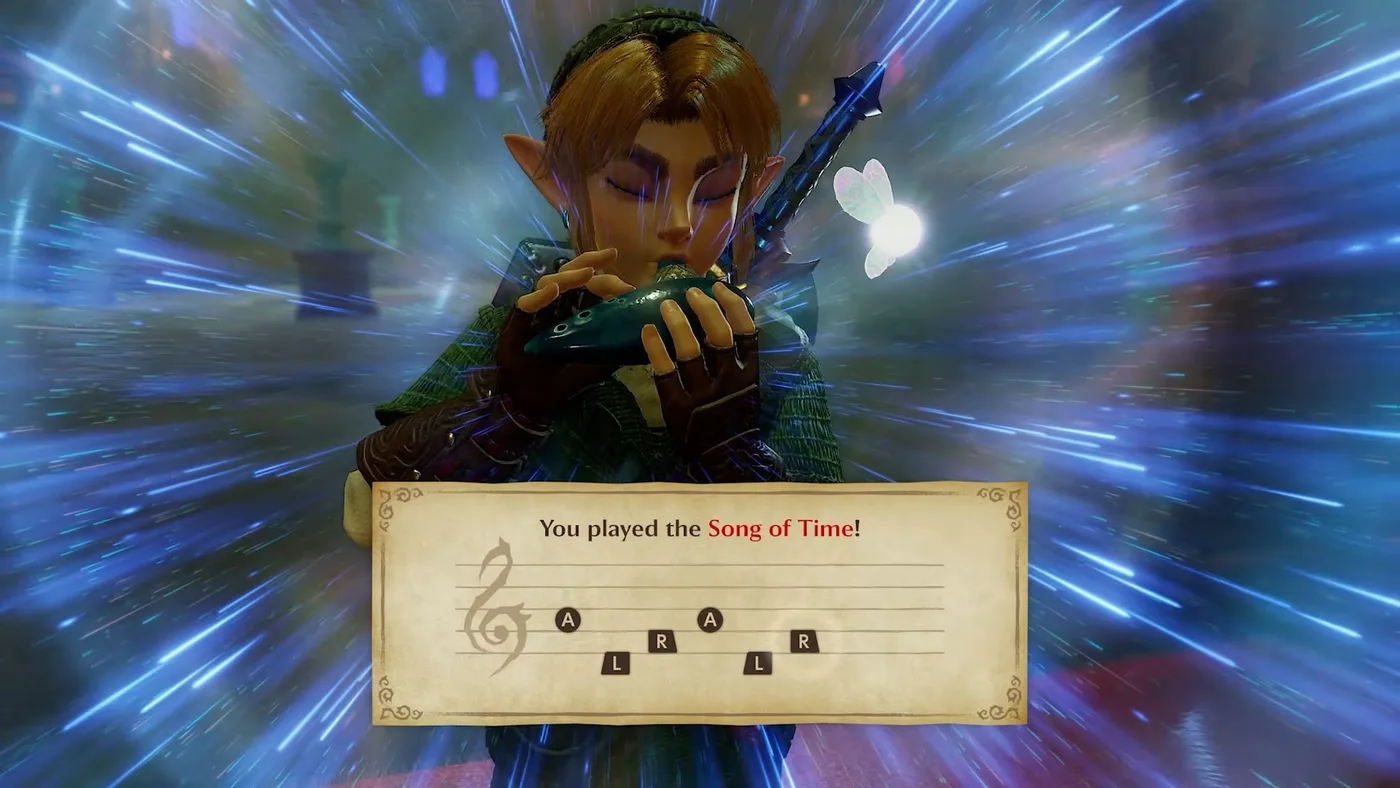
That is Nintendo's own screenshot of the Song of Time in the default layout: A, L, R, A, L, R. It matches both sources below.
The short version
| Question | Answer | Source |
|---|---|---|
| Where is the ocarina? | Left on the D-pad, permanently, once you have it | Zelda Wiki, Nintendo Support |
| Default note buttons, lowest to highest | L, R, A, Y, X ("Normal") | Zelda Wiki; Game8 lists the same five |
| Second layout | "Classic", using R, B, A, X and Y; switch with the "Swap Ocarina-Playing Controls" option | Nintendo Support, Zelda Wiki, Game8 |
| Humming | Set "Ocarina Mic Input" to Humming or Instruments under + Button > System > Options | Nintendo Support |
| Do you have to hum in tune? | No. The game reads the relative pitch between notes | Zelda Wiki |
| Practice Mode | Press the − Button on the ocarina screen | Nintendo Support |
| Songbook | ZL in the Normal layout, Right on the D-pad in Classic | Zelda Wiki |
Every song in the Normal layout
These are the inputs for the default layout. Zelda Wiki's song pages and Game8's song list (last updated November 10) give the same sequence for all twelve. The N64 column is from the same Zelda Wiki pages, for comparison.
| Song | Switch 2 (Normal) | N64 |
|---|---|---|
| Zelda's Lullaby | Y, X, A, Y, X, A | C-Left, C-Up, C-Right, C-Left, C-Up, C-Right |
| Epona's Song | X, Y, A, X, Y, A | C-Up, C-Left, C-Right, C-Up, C-Left, C-Right |
| Saria's Song | R, A, Y, R, A, Y | C-Down, C-Right, C-Left, C-Down, C-Right, C-Left |
| Sun's Song | A, R, X, A, R, X | C-Right, C-Down, C-Up, C-Right, C-Down, C-Up |
| Song of Time | A, L, R, A, L, R | C-Right, A, C-Down, C-Right, A, C-Down |
| Song of Storms | L, R, X, L, R, X | A, C-Down, C-Up, A, C-Down, C-Up |
| Minuet of the Forest | L, X, Y, A, Y, A | A, C-Up, C-Left, C-Right, C-Left, C-Right |
| Bolero of Fire | R, L, R, L, A, R, A, R | C-Down, A, C-Down, A, C-Right, C-Down, C-Right, C-Down |
| Serenade of Water | L, R, A, A, Y | A, C-Down, C-Right, C-Right, C-Left |
| Nocturne of Shadow | Y, A, A, L, Y, A, R | C-Left, C-Right, C-Right, A, C-Left, C-Right, C-Down |
| Requiem of Spirit | L, R, L, A, R, L | A, C-Down, A, C-Right, C-Down, A |
| Prelude of Light | X, A, X, A, Y, X | C-Up, C-Right, C-Up, C-Right, C-Left, C-Up |
The remake calls two songs by new names. Zelda Wiki lists "Minuet of Forest" as "Minuet of the Forest" and "Scarecrow's Song" as "Scarecrow Song". The Scarecrow Song is not in the table because neither source gives it a fixed input.
Translating an old guide
Every Normal input is a straight swap from the older versions, because the five notes are the same. Zelda Wiki's Ocarina of Time item page gives the buttons for each version from lowest note to highest, which makes this table:
| Note (lowest first) | N64 | 3DS | Switch 2 Normal |
|---|---|---|---|
| 1 | A | L | L |
| 2 | C-Down | R | R |
| 3 | C-Right | Y | A |
| 4 | C-Left | X | Y |
| 5 | C-Up | A | X |
Look at the face buttons. Y is on the left of the Switch 2's diamond, X on top and A on the right, which is where C-Left, C-Up and C-Right sat on the N64 controller. Zelda Wiki describes the Normal layout the same way: the 3DS's shoulder buttons for the two lowest notes, and the original layout for the other three. If you learned the songs on N64, three of the five notes are where your thumb expects them. If you learned them on 3DS, the shoulder notes are unchanged and the face buttons all moved.
The frogs' 14-note tune
The frogs' bug-catching game at Zora's River is not a song you learn, so it is not in the main table. Zelda Wiki's Bug-Catching Song page gives its Switch 2 Normal input as:
L, Y, A, R, Y, A, R, L, R, L, R, A, Y, L
The same page says the frogs stand roughly where the Normal layout's buttons sit on a Joy-Con 2 or Pro Controller, so the minigame can be harder in Classic. Zelda Wiki lists a Piece of Heart as the prize, the same reward our remake Heart Pieces guide counts at Zora's River. The N64 version of the tune is in our Zora's River guide.
Normal vs Classic
Nintendo's support page says the "Swap Ocarina-Playing Controls" option in the Options menu switches between two button styles. Zelda Wiki calls them Normal and Classic, and Game8 lists the same five buttons for each:
| Normal | Classic | |
|---|---|---|
| Default? | Yes, per Zelda Wiki | No |
| Buttons used | L, R, A, Y, X | R, B, A, X, Y |
| Lowest note | L | R |
| Second note | R | B |
| Third note | A | A |
| Songbook button | ZL | Right on the D-pad |
Zelda Wiki explains Classic as the closer match to the N64: the four face buttons stand in for the four C-buttons, and R takes the job of the N64's A button. Classic puts the bottom note on R and the other four on the face buttons, so all five notes sit under the right hand, as they did on the N64.
Pick Classic if your hands learned the songs on the N64's C-button diamond. Stay on Normal if you plan to do the frogs' minigame often, or if you want your inputs to match the button prompts in the table above and in Nintendo's screenshots.
Why there is no Classic table here
The brief for this guide was to confirm the Classic layout against a second source before printing it, and I could not do that for the top two notes.
Zelda Wiki disagrees with itself. Its Ocarina of Time item page lists Classic from lowest to highest as R, B, A, X, Y, which puts the fourth note (the N64's C-Left) on X and the top note (C-Up) on Y. Its individual song pages say the opposite. Minuet of the Forest in Classic is R, X, Y, A, Y, A there, which puts C-Up on X and C-Left on Y. The frogs' tune and Saria's Song follow the song pages too.
Game8 lists the same five Classic buttons but not which note each one plays. So the bottom three notes (R, B, A) are consistent across the Zelda Wiki pages I checked, and X and Y are not settled. When a source shows the Classic option in the final game, I will add the full table. Until then, switch to Classic and play a note on X: if it sounds like the top of the scale, the song pages are right.
Humming or playing a real instrument
The other big ocarina change is the microphone. Nintendo's store page says you can use traditional buttons or try humming, and that the Switch 2's microphone can hear your own instrument. Nintendo's support article on the setting says you can play a song you have learned by humming, whistling, singing or using an instrument, and Link plays it.
In part 4 of Nintendo's Ask the Developer interview, a developer named Ng recalls Eiji Aonuma coming to his desk with the idea of using the Switch 2's built-in microphone for voice recognition. Aonuma says he wanted players to hum a learned song and hear Link play it, and suggested that players who can play a real ocarina could have their playing recognised too. He also says voice input does not make the game any easier to progress through.
How to turn it on
From Nintendo's support article, in order:
- Load your save.
- Press the + Button and go to System.
- Select Options.
- Set Ocarina Mic Input to Humming or Instruments.
- Press B twice to back out.
- Take out the ocarina with Left on the D-pad.
- Hum, whistle, sing or play a song you have already learned.
Nintendo says you get the ocarina after about one to two hours of play, and the game itself prompts you to turn on mic input after you learn your first song. Zelda Wiki confirms the mic is off until you enable it in settings.
Zelda Wiki describes the two input choices this way: Humming is for your voice, Instruments is for a real instrument such as an ocarina. While the game is listening, a green "Listening for audio" prompt shows; an orange "Receiving audio" prompt means it is picking you up. Pressing + resets the audio input.
You do not need perfect pitch. Zelda Wiki says the game measures the relative pitch between your notes to decide which song you played, so a song hummed in the wrong key should still register.
If the game is not hearing you
Nintendo's support article lists the conditions it needs:
- The game listens through the console's built-in microphone. In TV or Tabletop mode, stay within about 8 feet of the console and keep anything from blocking the mic.
- Headphones or other microphones, including one connected to a Pro Controller, may get in the way.
- Check System Settings > Audio on the console. Under "Current Output and Input", the input should read System Microphone. If it does not, set "Input Microphone" to System Microphone.
That last one is the fix I would try first if you play docked with a headset plugged in.
Practice Mode and the songbook
Two tools on the ocarina screen, both useful while you get used to the new buttons:
- Practice Mode: press the − Button on the ocarina screen. Nintendo says that while a song's score is shown, you can check whether the game recognises the pitch and length of your notes. Zelda Wiki says it lets you test your humming or instrument without the input counting as a song, and that it works when mic input is enabled.
- Songbook: press ZL in the Normal layout, or Right on the D-pad in Classic, while the ocarina is out. Zelda Wiki says it lists every song Link has learned.
The songbook is the remake's answer to the 3DS's touch-screen song list. You do not need to keep the table above open once you have learned a song; the game will show it to you.
Smaller ocarina changes
These are from Zelda Wiki's Ocarina of Time item page. Some of them are cosmetic, but they explain why the remake's ocarina looks and behaves differently from older footage:
- The ocarina is assigned to Left on the D-pad as soon as you get it and hangs on Link's belt when he is not playing it.
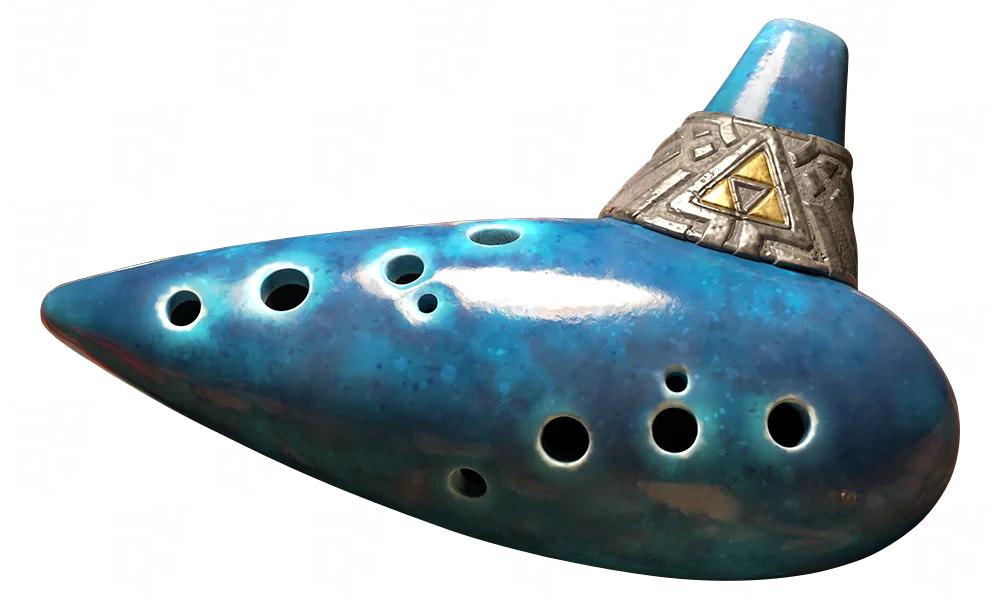
- It is held right-handed now, has ten holes instead of seven, and Link uses the proper fingering for each note. The model render above is the remake's redesigned ocarina.
- The on-screen staff has the correct number of lines for a treble clef, and the notes sit on the right lines.
- The camera no longer swings to face Link the moment he takes out the ocarina. It turns once the staff appears.
- Each note releases a faint magical "pop" in the air around Link.
- With a Nintendo Switch 2 Pro Controller, the controller vibrates to make the sound of the notes.
Our Switch 2 remake overview also notes that you can skip the cutscene that plays after a correct song, and Nintendo's screenshot of Zelda's Lullaby there shows the Skip prompt.
The phone side of this is separate. ZELDA NOTES has its own touchscreen ocarina for playing sheet music; that is covered in our ZELDA NOTES guide.
Still not documented
- Classic's top two notes. Covered above. Zelda Wiki's item page and song pages disagree on X and Y.
- The "off" value of Ocarina Mic Input. Nintendo names the two on settings, Humming and Instruments, but not what the default setting is called.
- Whether Instruments and Humming behave differently. Nintendo's support page lists both settings but describes humming, whistling, singing and instruments together. Neither source says whether the two settings tune recognition differently.
- Motion aiming and the rest of Options. Nintendo's store page says ranged weapons like the Fairy Bow and the Hookshot can be aimed with buttons or motion controls, and that this is changed in Options. The other options (camera, targeting, display) are not covered by the Nintendo pages cited here, so I have left them out of this guide rather than rely on a single guide site. The accessibility tags from Nintendo's store page are in our performance and resolution guide.
Quick Action Checklist
- Use the Switch 2 (Normal) column above, not the N64 or 3DS charts in older guides.
- To translate an old chart: A becomes L, C-Down becomes R, C-Right becomes A, C-Left becomes Y, C-Up becomes X.
- Want to hum? + > System > Options > Ocarina Mic Input, then Humming or Instruments.
- Not being heard? Check System Settings > Audio shows System Microphone, unplug the headset, and sit within about 8 feet of the console.
- Press − on the ocarina screen for Practice Mode, and ZL (Normal) for the songbook.
- Trying Classic? Expect the frogs' minigame to be harder, and check which of X and Y plays the top note.
- For what each song does, use our songs guide; for everything else that changed, the remake vs original differences.
Frequently Asked Questions
What are the ocarina buttons in the Ocarina of Time Switch 2 remake?
What is Zelda's Lullaby on Switch 2?
How do you hum songs in the Ocarina of Time remake?
Why is the Ocarina of Time remake not hearing my humming?
Is there a practice mode for the ocarina in the Switch 2 remake?
What is the Classic ocarina layout in the Ocarina of Time remake?
Keep Reading
- Mythras blog
- Ocarina of Time coverage hub
- Ocarina of Time songs guide
- Ocarina of Time Switch 2 remake guide
- Ocarina of Time remake vs original differences
- Ocarina of Time remake Heart Pieces
- Ocarina of Time Zora's River guide
- Ocarina of Time ZELDA NOTES guide
- Ocarina of Time remake performance and resolution
- Nintendo Support — How to Use Mic Input to Play the Ocarina (The Legend of Zelda: Ocarina of Time): + > System > Options > Ocarina Mic Input, Humming or Instruments, Practice Mode on −, "Swap Ocarina-Playing Controls" (read 2026-11-14)
- Zelda Wiki — Ocarina of Time (Item): Switch 2 Normal and Classic schemes, microphone input, songbook, Practice Mode, Pro Controller vibration (read 2026-11-14)
- Game8 — All Ocarina Songs List: Switch 2 inputs for every song (updated 2026-11-10; read 2026-11-14)
- Game8 — List of Controls: Normal and Classic ocarina button sets, Audio Input (updated 2026-11-11; read 2026-11-14)
- Zelda Wiki — Zelda's Lullaby: N64, 3DS and Switch 2 inputs (read 2026-11-14)
- Zelda Wiki — Minuet of the Forest: N64, 3DS, Switch 2 Normal and Classic inputs (read 2026-11-14)
- Zelda Wiki — Bug-Catching Song: Switch 2 Normal and Classic inputs, frogs placed for the Normal layout, Piece of Heart (read 2026-11-14)
- Nintendo (US store) — Ocarina of Time for Nintendo Switch 2: buttons or humming, play your own instrument, button or motion aiming changed in Options (read 2026-11-14)
- Nintendo — Ask the Developer Vol. 24, part 4: Aonuma on adding microphone input for the ocarina (read 2026-11-14)
- Zelda Wiki — Ocarina of Time (Nintendo Switch 2): renamed songs (read 2026-11-14)
Related Guides
Ocarina of Time ZELDA NOTES: Setup and All 11 Features
ZELDA NOTES for the Ocarina of Time remake needs update 1.1.1, the Nintendo Switch App and an online console, but no Nintendo Switch Online membership. Here is the setup, all 11 features as Nintendo documents them, and what the app costs you in Rupees.
Ocarina of Time Remake Boss Guide: What Changed
Six of the Switch 2 remake's bosses now have documented changes: Gohma, King Dodongo, Volvagia, Morpha, Ganondorf and a rebuilt four-phase Ganon. Here is what each change means for the fight, which N64 strategies still hold, and what the wikis have not documented yet.
Ocarina of Time Remake Shop Prices and Great Fairy Costs
Zelda Wiki now has price lists for five of the Switch 2 remake's shops and the Rupee cost of every Great Fairy. Here they are in tables, compared with the 3DS prices, plus the wallet each purchase needs and what is still undocumented.
Ocarina of Time Switch 2: Resolution, FPS and Modes
Nintendo never published a frame rate or resolution for the Ocarina of Time remake. Digital Foundry measured it: a held 60fps in both modes, 1080p to 1440p docked, 720p to 1080p handheld, upscaled with FSR 1 rather than DLSS. Here is what that means, what Nintendo's own pages add, and what is still undocumented.
Ocarina of Time Dungeon Order: The Full Route, Explained
Ocarina of Time looks like an open adventure and plays like a corridor. Eight required dungeons, three side dungeons, and only a couple of places where the game genuinely lets you pick. Here is the whole route with the reasons behind each lock.
Ocarina of Time Remake Heart Pieces: All 36 Locations
The Switch 2 Ocarina of Time still has 36 Pieces of Heart, but not the same 36. Two moved, the Ice Cavern piece is missing from both remake lists, and Death Mountain Crater gained a Business Scrub selling one. Here is every piece by area, with where the sources disagree.