PUBG Secondary Password: How to Set It Up for Ranked
Since Update 39.2 went live on 7 January 2026, PC players cannot enter Rank Mode without a 6-8 digit secondary password tied to a real mobile number — and neither can anyone in their party. Here is the setup flow, the 24-hour re-entry rule, the SMS limits that strand people mid-setup, the reset path when the phone number is gone, and the account-theft unban allowance that having one turns from once-ever into twice a year.
You queue Ranked for the first time in a while, and PUBG stops you at the lobby with a number pad. That is the secondary password, and it is not optional — it is the door on Rank Mode, and it locks your whole squad out, not just you.
KRAFTON shipped it in Update 39.2, published on 6 January 2026 and live on PC during the 7 January maintenance window. The patch notes and the support FAQ both scope it to PC platforms, and the FAQ confirms it replaced the older Ranked SMS verification outright rather than sitting alongside it.
What the secondary password actually is
It is a 6-to-8 digit number, set inside the game client, verified by SMS to a mobile number you own. It is not your Steam password, not your KRAFTON ID password, and not a login step — you get all the way to the PUBG lobby before it asks.
KRAFTON's stated purpose, per the support FAQ, is a security enhancement against account theft and unauthorised use, and a safer Rank Mode environment. Those are two separate jobs, and the second one is why it is enforced rather than offered.
It is a hard gate on Ranked, and it is party-wide
The FAQ is blunt on both counts:
- Mandatory for Rank Mode. You must set a secondary password to access Rank Mode. Everything else in the game — normals, Arcade, custom matches, Playgrounds, training — is reachable without one.
- One missing password blocks the party. If any member of a party has not set a secondary password, the party cannot play Ranked matches.
That second rule scales badly with squad size. A four-stack in which three people are verified and one is not cannot queue Ranked at all, and the FAQ describes no host override or exemption.
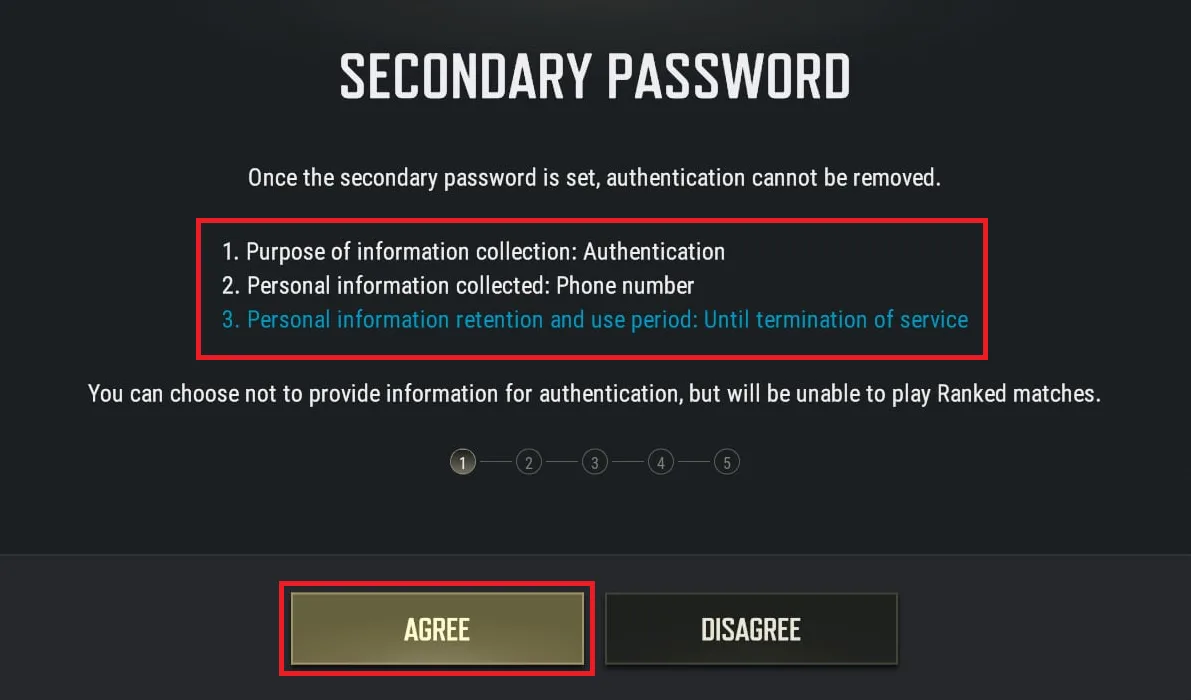
The consent screen states the trade in one line under the red box: you can choose not to provide the information for authentication, and you will be unable to play Ranked matches. Declining is a supported choice. It just costs you the mode.
This is a gate stacked on top of the ones already there. Rank Mode also wants a Battlegrounds Plus account and Survival Mastery 80 before it will take you, and the Ranked guide covers what happens to your RP once you are through.
The rules, in one table
| Rule | What PUBG Support states |
|---|---|
| Format | 6-8 digit number |
| Repetition limit | The same number cannot be used three or more times consecutively |
| Verification method | SMS to a mobile number, required for both setup and reset |
| Platform scope | Applies to all PC platforms |
| Required for | Rank Mode only; other content is unaffected |
| Party rule | If any party member has not set one, the party cannot play Ranked |
| Re-entry cadence | Once every 24 hours on the same PC, when entering the lobby |
| New PC | Verification required immediately, regardless of the 24-hour timer |
| Failed attempts | 5 or more failures sends you to the reset process |
| PIN code requests | 10 per window; further sends restricted for 24 hours |
| Removal | The setup screen states authentication cannot be removed; Update 39.2's notes say disabling it requires contacting Customer Support |
| Replaces | The old Rank Mode SMS verification, which was retired |
That last row matters for anyone reading older guides. The previous Ranked flow used a one-off SMS verification. KRAFTON's FAQ states plainly that it is gone and the secondary password system replaced it — and that a past Ranked SMS verification does not carry over. You verify again.
Setting one up
Seven steps, per PUBG Support's own walkthrough:
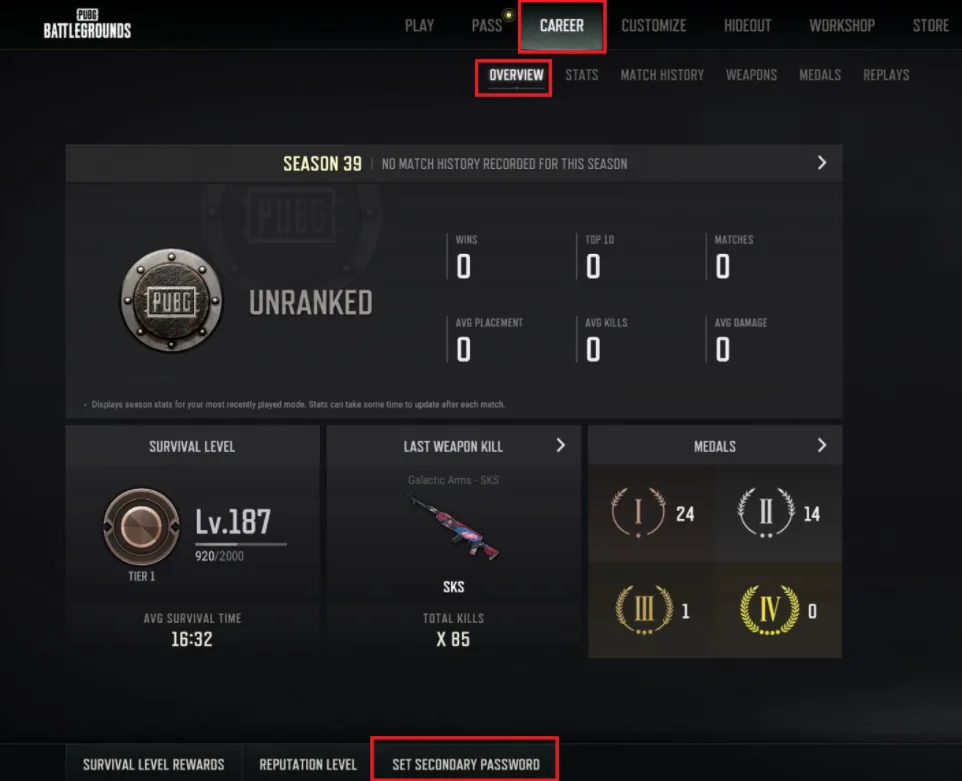
- Career → Overview → Secondary Password. The button sits in the bar along the bottom of the Overview screen, alongside Survival Level Rewards and Reputation Level. Update 39.2's notes add the Ranked menu as a second way in.
- Read the information-collection notice and select Agree. It collects a phone number, for authentication, retained until termination of service.
- Enter the mobile number you want the PIN code sent to, and select Send.
- Enter the PIN code from that SMS, and select Confirm.
- Set a 6-8 digit password.
- Re-enter it.
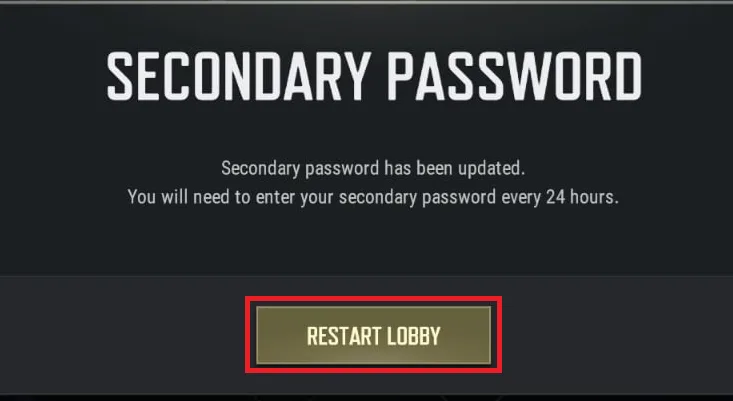
- Select Restart Lobby to finish.
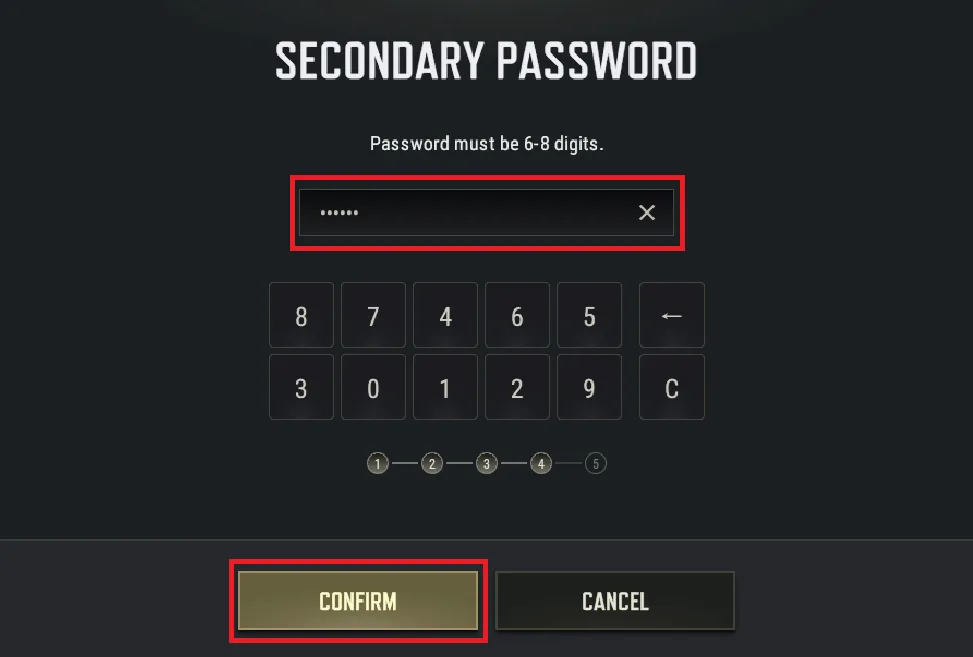
One thing to note from that screen: entry is done on an on-screen pad, and in KRAFTON's own screenshot it reads 8-7-4-6-5 over 3-0-1-2-9 rather than in numeric order. KRAFTON does not say whether that order is fixed or shuffled per prompt, so do not count on the digits sitting where this screenshot puts them.
Step 7 is not decorative either. The lobby restart is part of the flow, so do this between matches, not while a squad waits on you.
Turning it off means a support ticket
Two KRAFTON statements sit either side of this, and they do not say the same thing.
The consent screen, in the sentence above the red box, is flat: once the secondary password is set, authentication cannot be removed. There is no toggle in the client, and none of PUBG Support's five secondary-password articles — the FAQ, the setup walkthrough, the reset walkthrough, the SMS troubleshooting page and the reset-ticket page — describes an unset flow.
Update 39.2's own notes are narrower. Under Important Notes, after saying a forgotten password can be reset: "disabling the secondary password requires contacting Customer Support." So a route exists. It is a support ticket rather than a setting, and KRAFTON has published no criteria for when it grants one.
Plan around it being permanent, then. The phone number's stated retention period is until termination of service, and every future reset verifies against the number you enter at step 3 — so spend thirty seconds on that step if the number is a work phone, one you are about to give up, or one you share.
When you have to type it in
The cadence, per the FAQ:
- Same PC: once every 24 hours, on entering the lobby.
- Different PC: immediately, regardless of when you last verified.
- Skip it: you do not reach the lobby. Verification gates game access, not just the Ranked button — so a forgotten password is a full stop, not a partial one.
- Get it wrong five or more times: you are pushed into the reset process, which needs SMS again.
The different-PC rule has no grace period, so it applies in full to a laptop, a LAN rig or any second machine. Your phone needs to be reachable on both ends of that trip.
When the SMS never arrives
PUBG Support publishes a dedicated troubleshooting article for a stalled setup, last updated 15 January 2026 — a week after the feature went live on PC. The failure modes it lists:
| Symptom | Cause PUBG Support names | Fix |
|---|---|---|
| No PIN code arrives | Phone or carrier blocking international SMS | Check phone settings, contact the carrier, restart the device, retry |
| No PIN code arrives | Wrong country selected, or a mistyped number | Re-check the country code and the number |
| No PIN code arrives | Virtual number or landline used | Use a real mobile number |
| "Receiving PIN code has been restricted" | 10 PIN requests used | Wait 24 hours, then request again |
| "The number entered does not match the registered number" | Reset attempted with a different number | Use the number registered at initial setup |
| "Wrong pin code entered. Please try again." | An older PIN was entered | Use the newest code; delete earlier PIN messages to avoid mixing them up |
The 10-request ceiling is the trap in that list. Ten blind retries against a carrier that is filtering the message costs you the next 24 hours and gets you no closer. Change one variable — country code, spam filter, device restart — between attempts rather than resending the same request.
Resetting it, and losing the phone
Changing a password you still remember is the same seven-step flow with Reset Secondary Password in place of the setup button, and it demands SMS verification to the number registered at initial setup. Not a new one. The old one.
If that number is gone, or you think the account has been compromised, it becomes a support ticket. PUBG Support asks for:
- The reason for the reset request
- The mobile number registered when the secondary password was set
- The number you want to move to
- Your country of residence and the IP address you usually play from
- A Mobile Steam Guard authentication screenshot — the Steam Account Details page, captured full-screen in PC view
Two disqualifiers are stated outright: cropped or edited screenshots are not accepted, and neither is Steam Guard email authentication. If your account is on email-based Steam Guard today, switch to the mobile authenticator before you ever need the ticket — KRAFTON's own weekly ban notices ask players to sign up for it so accounts are not abused or banned.
Why KRAFTON built this
The context is in KRAFTON's 2025 anti-cheat review, which is where the January 2026 rollout was pre-announced, and in the 2026 anti-cheat roadmap published after it. The figures those two documents put on the record:
| Metric | Figure KRAFTON published | Source |
|---|---|---|
| Accounts permanently banned for cheat programs, as of Nov 2025 | ~7.81 million | 2025 review |
| Of those, cases determined by video review | ~39,000 | 2025 review |
| Funds confiscated through legal proceedings, as of Sept 2025 | ~$1,713,823 | 2025 review |
| Cheat programs blocked through legal proceedings | 30,000+ | 2025 review |
| Cheat-related ads and content reported, by 30 Nov 2025 | ~182,000 | 2025 review |
| Of those, removed | ~157,000 | 2025 review |
| DMA-based cheaters permanently banned in 2025 | ~260,000 | 2026 roadmap |
The 2026 anti-cheat roadmap keeps DMA cheats as the top priority and adds four other lines of work: protecting legitimate players through more precise screening, region-specific responses with attention to console, converting repeat offenders to permanent bans using AI-assisted video review, and prevention over punishment through hardware-based re-entry blocks.
Stolen accounts sit inside that problem rather than beside it. A thief with your credentials has a clean, established account to cheat on — and the permanent ban lands on the account, which is to say on you. KRAFTON's own framing of the secondary password names both jobs at once: prevention of account theft and unauthorised use, and a safer Rank Mode environment. The unban policy below is the clearest sign of how seriously it treats the first one.
What it buys you if the account is stolen
There is a concrete, non-obvious payoff. KRAFTON's Improved Unban Policy for Account Theft took effect on 22 July 2026 at 02:00 UTC, and it treats accounts differently based on this one setting:
| Account | Unban allowance for confirmed theft |
|---|---|
| Secondary password enabled | One unban per half-year, up to twice per year |
| No secondary password | One unban per lifetime |
Two clarifications came with it, and they are easy to swap. The first: an account that has a secondary password set and was permanently banned while it was stolen becomes eligible for up to two unbans per year from 22 July 2026 — the new criteria are not limited to thefts that happen after that date. The second: an account that spent its one lifetime unban on a theft case before the secondary password feature was introduced, and is then stolen again, gets one re-examination — if theft is confirmed the ban is lifted, and if it is not, the case is not reviewed again. Accounts with no secondary password stay on one unban per lifetime either way.
So the trade is: a phone number and a PIN that takes a support ticket to remove, in exchange for Ranked access plus a recovery path that is twice a year instead of once ever.
What it does not do
- It is not login two-factor. It gates the PUBG lobby, not your Steam or KRAFTON ID sign-in. Steam Guard Mobile Authenticator is a separate control and does a different job.
- It is not the whole Ranked gate. Battlegrounds Plus, Survival Mastery 80 and your placement matches are unchanged.
- It is scoped to PC. PUBG Support states the feature applies to all PC platforms. Console players following a PC guide should not expect the same prompt.
- It does not travel. PUBG accounts do not share progress or settings across platforms, and this is another per-account setting rather than a KRAFTON-wide one.
Quick Action Checklist
- Set the secondary password before your next Ranked session, not during it — step 7 restarts the lobby
- Register a real mobile number you will still control in a year; virtual numbers and landlines are rejected
- Treat it as permanent — the setup screen says authentication cannot be removed, and Update 39.2's notes route disabling it through Customer Support
- Pick 6-8 digits without the same number three or more times in a row
- Check every squadmate has one — a single unverified member blocks the party from Ranked
- Expect to re-enter it once per 24 hours, and immediately on any new PC
- Stop at ten PIN requests; the eleventh is locked out for 24 hours
- Keep the originally registered number reachable, because resets verify against it
- Switch Steam Guard to the mobile authenticator — email Steam Guard is not accepted for reset tickets
- Treat the old "SMS verification for Ranked" advice in older guides as retired
Frequently Asked Questions
Do you need a secondary password to play PUBG Ranked?
How do you set up a PUBG secondary password?
Can you remove a PUBG secondary password once it is set?
How often does PUBG ask for the secondary password?
What do you do if the PUBG secondary password SMS never arrives?
Does a PUBG secondary password help if your account is stolen?
Keep Reading
- PUBG Support — Please tell me about the secondary password (mandatory for Rank Mode, party rule, 24-hour cadence, PC scope)
- PUBG Support — How to Set Up a Secondary Password (seven-step flow with in-game screenshots)
- PUBG Support — How to Reset the Secondary Password (in-game seven-step reset flow via Career → Overview)
- PUBG Support — The secondary password setup is not proceeding properly (SMS troubleshooting, 10-request cap)
- PUBG Support — I need help resetting the Secondary Password (ticket requirements, Steam Guard mobile screenshot)
- PUBG: BATTLEGROUNDS — Patch Notes, Update 39.2 (6 Jan 2026; PC live 7 Jan, secondary password introduced)
- PUBG: BATTLEGROUNDS — Dev Letter: 2025 Anti-Cheat Review and Future Plans (ban and legal-action figures)
- PUBG: BATTLEGROUNDS Anti-Cheat 2026 Roadmap (five focuses, ~260,000 DMA bans in 2025)
- PUBG: BATTLEGROUNDS — Improved Unban Policy for Account Theft (effective 22 July 2026, 02:00 UTC)
- PUBG: BATTLEGROUNDS Weekly Bans Notice (08/17~08/23) — Steam Guard Mobile Authenticator recommendation
Related Guides
PUBG Custom Matches: How Hosting Works After Update 43.2
Update 43.2 gave PUBG custom match hosts a Force End button, random team assignment, a lobby-wide nickname hider, a host-only chat setting and a 0-10x explosion multiplier, and they don't all work in the same modes. Here is who can host, which tool works where, what Esports Mode copies from Ranked, and the patches that changed settings your old presets rely on.
PUBG Bans: What Gets You Banned and How Many Each Week
KRAFTON banned 34,271 PUBG accounts in the week of 12 to 18 October 2026, and 20,929 of them for cheating. Here is the Rules of Conduct penalty table, what counts as cheating on PC and console in 2026, the non-cheating offences that can still cost you the account, how reporting and appeals work, and 11 weeks of KRAFTON's own weekly ban figures.
PUBG Match Results and Leaderboard, Explained
Update 43.1's patch notes buried two stat-tracking systems under headings nobody reads top to bottom: an expanded Match Results screen filed under Arcade, and an entirely new Career Leaderboard filed under its own heading with no platform tag. Here's what each one actually shows, which modes the Match Results upgrade does and doesn't cover, and how the four leaderboard categories are scored.

What Is POBG? PUBG's Maintenance Mode Mini-Game
Update 42.3's patch notes name-drop a feature called POBG: Maintenance Mode and move on. It is not new — KRAFTON built it for April Fools 2021 as a chicken-uprising arcade shooter voiced by a villain called PlayerOmnom, then brought it back again as a full event mode in Update 37.1, August 2025. Here is what the 42.3 notes actually confirm about this third appearance, and what they leave unstated.
Best Weapons in PUBG: Tier List
Every PUBG tier list is out of date the moment a balance patch drops. So here's the list, ranked by role, plus the durable logic to re-tier any gun yourself when the next patch shakes things up.
Best PUBG Loadouts & Attachments
A naked M416 and a fully kitted M416 are basically two different guns. Here's how to build the strongest two-gun loadouts in PUBG and the attachment priority that turns loot into recoil control.