Roblox Animation Graph Editor: Blends and State Machines
Animation graphs left beta on July 15, 2026, and on October 8 Roblox added State Machine nodes and Expressions as a Studio beta. Here is how a graph loads like any animation, what each of the 15 node types does, how SetParameter drives it, what the beta features can't do in a live game yet, and who runs the graph under each authority mode.
One clip is easy. Our animation guide covers it start to finish: key it, publish it, LoadAnimation it, set its priority. The trouble starts with the second, third and tenth clip. A character that blends idle into run by speed, waves with its upper body while it walks, and plays a landing before it moves again turns into a pile of Play, Stop, AdjustWeight and priority calls that are hard to follow for anyone but their author. Roblox's own launch post describes that state plainly: "getting animations to blend smoothly together required writing custom Luau code."
The Animation Graph Editor moves that logic out of scripts and into an asset. It left beta on July 15, 2026, the day graphs started running in live games. On October 8, Roblox added State Machine nodes and Luau-style Expressions as a Studio beta, three weeks after its Fall roadmap had dated them "Mid 2027."
This guide covers how a graph loads, what each of the 15 node types does, the three AnimationTrack methods that connect your scripts to it, what the new beta features can and cannot do yet, and which machine runs the graph under each authority mode.
A graph is an animation, as far as your code knows
The July release post makes the key design point: "Both clips and graphs share the same animation asset definition. You can swap a clip and a graph in your code, and they will function identically in the engine." The engine's API dump agrees. It lists AnimationGraphDefinition as a subclass of AnimationClip.
So the pipeline is the one you already use. When you create a graph, the editor makes an AnimationGraphDefinition that holds your nodes, connections and parameters. You publish it, get an asset ID, and load it through an Animator. One code snippet in the July post loads it with Humanoid:LoadAnimation(), which is deprecated. The documentation's own sample uses the Animator, and so should you.
Three methods on the returned AnimationTrack do the rest:
| Method | What it does |
|---|---|
SetParameter(key, value) | Sets a graph parameter, before or during playback. If you call it before the graph has loaded, the value is stored and applied once the graph is ready. Non-finite numbers (NaN, inf) are sanitized to 0 with a warning |
GetParameter(key) | Reads back a value you set. Returns nil if SetParameter was never called for that key |
GetParameterDefaults() | Returns a dictionary of the parameters the graph defines and their default values; empty for a plain clip |
A player-character setup, for a game on the default authority mode (more on that below):
-- LocalScript in StarterCharacterScripts (Workspace.AuthorityMode = Automatic)
local RunService = game:GetService("RunService")

local character = script.Parent
local humanoid = character:WaitForChild("Humanoid")
local animator = humanoid:WaitForChild("Animator")

local graph = Instance.new("Animation")
graph.AnimationId = "rbxassetid://0" -- your published graph's asset ID

local track = animator:LoadAnimation(graph)
track:Play()

-- Print what the graph expects you to drive
for name, default in track:GetParameterDefaults() do
	print(name, default)
end

local connection = RunService.Heartbeat:Connect(function()
	track:SetParameter("Speed", humanoid.MoveDirection.Magnitude * humanoid.WalkSpeed)
end)

humanoid.Died:Connect(function()
	connection:Disconnect()
end)
Roblox's samples drive parameters from Stepped in the documentation and from Heartbeat in the October announcement, and neither page says one is required. Our Heartbeat vs RenderStepped guide covers what each loop costs. Rigs without a Humanoid are covered too: the July post's feature list includes support for AnimationController targets, and asked about it in the July thread, a Roblox staff member said AnimationControllers "should be capable of playing AnimationGraph via the LoadAnimation API on Animators."
Build the walk-and-wave starter graph
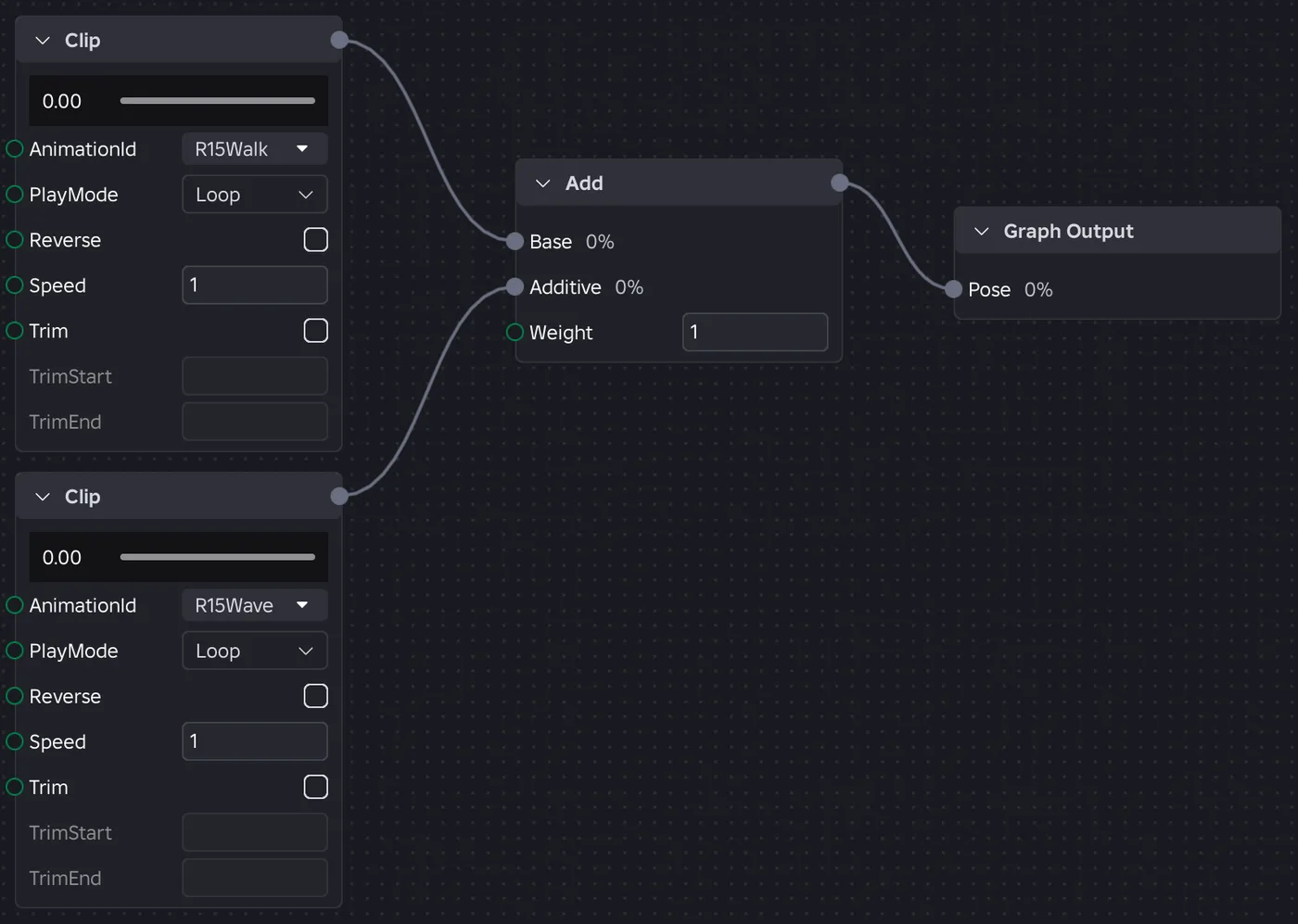
The documentation's starter graph layers a wave on top of a walk with four nodes: two Clips, an Add and the Graph Output. Condensed:
- Add a rig: Avatar tab ⟩ Character ⟩ My Avatar.
- Open Graph Editor from the same Avatar tab, select the rig, then Graph ⟩ New.
- Right-click the canvas ⟩ Insert Node ⟩ Clip. In its Animation ID dropdown, click Import and enter
507777826, Roblox's default walk. - Add a second Clip node with
507770239, the default wave. - Right-click ⟩ Add. Wire the walk clip to the Base port and the wave clip to Additive.
- Wire the Add node's output to the Pose port on Graph Output, then press the editor's play button.
Roblox publishes two places worth copying from: the Animation Graph Editor Simple Demo, linked from the main documentation page, and a state machine demo holding the full JumpFallLandRunExample graph. On October 8 a developer reported they had no animation permission for the state machine demo, and a Roblox staff member replied the same day that the permissions had been updated.
The node set, all 15 types
Enum.AnimationNodeType lists 15 node types plus InvalidNode, the unassigned default. Here is what each one does, from the enum reference's node-by-node entries and, for State Machine, its own documentation page:
| Node | What it does | Settings worth knowing |
|---|---|---|
| Clip | Plays one animation asset; a leaf with no inputs | AnimationId; PlayMode of Loop (default), PingPong, OnceAndHold or OnceAndReset; Reverse; Speed; TrimStart/TrimEnd in absolute seconds |
| Blend1D | Interpolates the two inputs nearest a Position on one axis | A position per input; extrapolates outside the range; PhaseSync |
| Blend2D | Blends inputs placed in a 2D space | InputMode Cartesian or Polar; X, Y; PhaseSync |
| Select | Plays the input named by a Selection string | Changing the selection triggers a transition |
| Priority Select | Plays the first input, top to bottom, whose Trigger is true | DefaultInterruptible: Always (default), Finished or Trigger |
| Sequence | Plays its inputs in order | LoopCount (0 means infinite); DefaultWaitFor Finished or Trigger |
| Random Sequence | Picks inputs at random, weighted | Per-input Weight; PlayCount (0 repeats forever); Seed, which keeps clients consistent (-1 is random) |
| Over | Lays the Over pose on top of the Base pose | Weight, default 1, unclamped |
| Add | Adds an additive pose to the Base pose | Weight, unclamped |
| Subtract | Produces A - Weight * B, turning an animation into an additive pose | Weight, default 1 |
| One Shot | Plays a pose over Base when a trigger fires, then blends back out | Trigger, Cancel, Interruptible, BlendMode; covered below |
| Mask | Filters a pose through per-joint weights | Mask (an ObjectValue); Invert |
| Speed | Scales the playback rate of its input | Speed; 0 pauses |
| State Machine | Named states plus transitions between them (Studio beta) | EntryState; transitions covered below |
| Graph Output | The final pose; added to every new graph automatically | Takes one Pose input |
Nodes are nestable: a Blend1D can feed an Over node, which can be one state of a state machine, which feeds Graph Output.
Parameters: how gameplay reaches the graph
Parameters are the graph's variables. The July post lists Number, String, Boolean and Enum types, and the One Shot node's documentation adds a Trigger parameter, which "automatically resets to false one frame after being set to true."
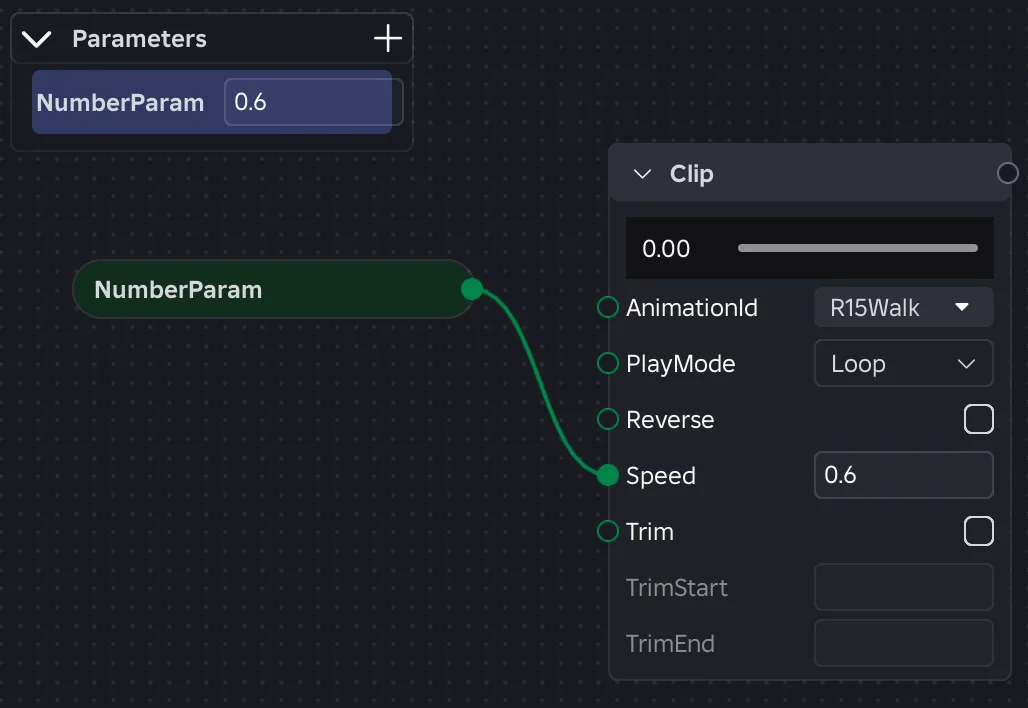
Any property with a green pin can be driven by one. Drag from the pin to empty canvas and the editor creates a parameter node wired to it. The Parameters pane in the top left edits values during preview, and your script edits them at runtime with SetParameter.
Two uses that are easy to miss:
- Swapping a clip at runtime. In July, a developer asked how to put a player's equipped UGC idle animation into a Blend1D slot. Roblox shipped runtime ID switching in August, and when the same developer asked for the API on August 19, the staff answer was: "You can wire AnimationId on a clip node to a parameter and set it via SetParameter like other node properties." That takes a String parameter, and Clip's
AnimationIdtakes the usualrbxassetid://form. - Gameplay state the graph can't see. Expressions, covered below, read only graph parameters. Roblox's FAQ is direct about anything else: "Use SetParameter() to pass anything else in."
-- "IdleAnim" is a String parameter wired to the idle Clip node's AnimationId pin
track:SetParameter("IdleAnim", "rbxassetid://0") -- the player's chosen idle
One known issue from the October 8 post: adding a parameter "will always add a green parameter node to the graph even if you don't wire it to something." Roblox says a fix is coming. Until then, delete the stray nodes.
Transitions: two curves, two timings
Select, Priority Select, Sequence and Random Sequence share one set of transition settings. These control the blend when the active input changes:
| Setting | What it controls |
|---|---|
DefaultTransitionDuration | Seconds to fully blend into the new input |
DefaultTransitionCurve | The easing curve for that blend |
TransitionOverrideDuration / TransitionOverrideCurve | Per-input overrides, applied when blending to that input |
WaitFor | Sequence nodes: advance when the input is Finished (default) or on a Trigger |
When | With Finished: start blending after the input ends, or BeforeFinished |
Two details shape how a graph feels.
Only two curves work. The documentation says transitions "currently only" support Linear and CubicV2. That is narrower than the five keyframe easing styles in the Animation Editor that our animation guide lists, so don't expect Elastic or Bounce on a graph transition. If you see the older Cubic value, skip it: the PoseEasingStyle reference deprecates it because it "has a bug where the direction is reversed between the editor and runtime."
BeforeFinished overlaps the ending. With BeforeFinished, the blend starts one transition duration early, so a 0.2-second transition begins in the final 0.2 seconds of the outgoing clip. There is one exception to the override rule: a BeforeFinished transition uses the outgoing input's overrides. As of October 8, Sequence and Random Sequence support BeforeFinished too.
Blend1D and Blend2D: phase sync and whose footsteps fire
A Blend1D node "linearly interpolates between the two animation poses closest to the current input position." Put idle at 0, walk at 8 and run at 16, feed it speed, and it crossfades for you. Past either end of the range, it "extrapolates using the two nearest inputs." Since July that is deliberate behaviour, not a bug, so a speed boost beyond your run position will push the run past its authored pose. If you don't want that, clamp the value before it reaches the node.
PhaseSync is what makes the blend look right. With the default, Synced, the node computes a "virtual duration" from the weighted average of its active inputs and adjusts each input's time step so "animations of different lengths" stay "in lockstep." That is what keeps a short run cycle and a longer walk cycle in step while the node blends between them. Unsynced lets each clip run at its own rate.
Blend2D adds a second axis. In Cartesian mode, X and Y are grid coordinates, which suits strafing with forward/back on one axis and left/right on the other. In Polar mode, X is a direction in radians and Y is a magnitude. The docs note that direction "is weighted more heavily" there, so inputs at similar angles but different speeds blend more smoothly than inputs at different angles. As of October 8 it also accepts negative Y values.
The detail that saves a debugging session is events. Markers you place in clips bubble up the graph, and those that reach the top fire through AnimationTrack:GetMarkerReachedSignal(), the same call our animation guide recommends for impact frames. Blend nodes filter them: "Only events from the highest-weight active input propagate, scaled by its blend weight. Events from the secondary input are silenced." Put a Footstep marker in both the walk and the run clip, and a half-blend fires one set of footsteps, from whichever clip carries more weight, not two. Under the global rules, an event whose weight reaches zero anywhere on the way up is dropped.
Layering: Over, Add, Mask and One Shot
Upper-body actions over locomotion are the second classic use. Roblox's July post gives the canonical example: a Mask node "isolates joints to specific bones (for example, waving only the upper body)."
- Over puts the
Overpose on top ofBase. Combined with a Mask, "masked-out joints in the Over pose reveal the Base pose entirely." That is the arms-wave, legs-run setup. - Mask holds a weight per joint, which allows partial "feathering" rather than an on/off split. Populate it from
HumanoidRigDescriptionfor standard humanoids or with the Picker for any rig. A mask can live by reference on another instance and be shared across nodes, andInvertreuses it as1 - weight. - Add and Subtract do pose arithmetic. Subtract computes
A - Weight * Bto turn an ordinary animation into an additive one, and Add layers that onto a base. Both weights are unclamped.
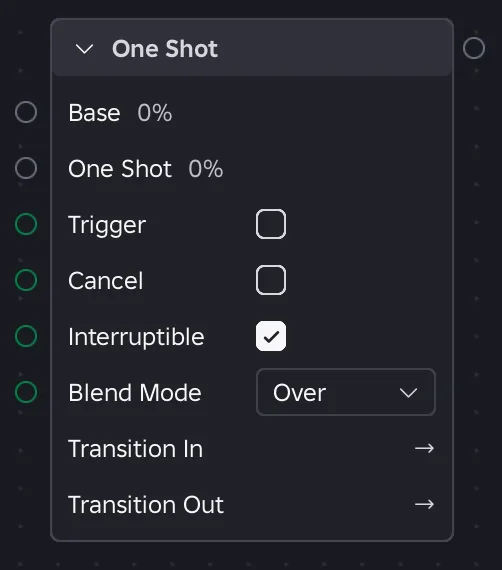
The One Shot node arrived after the July release; Roblox lists it among the fixes and additions in the October 8 post. It covers "the common 'fire an animation on an event' case (waves, punches, emotes, additive flourishes) in a single node." Before it, the same job meant composing an Over/Add/Subtract node with a Priority Select and resetting a trigger every frame.
| Property | Default | Behaviour |
|---|---|---|
Trigger | false | Starts a shot on a false-to-true edge |
Cancel | false | Ramps the active shot back out early |
Interruptible | true | A new trigger restarts the shot; false ignores triggers until it finishes |
BlendMode | Over | Over, Add or Subtract, matching those nodes |
TransitionInDuration / TransitionOutDuration | 0.15 s | Negative values are treated as 0 |
TransitionOutWhen | Finished | BeforeFinished lands the blend-out on the final frame |
Bind Trigger to a Trigger parameter, not a Boolean. The docs explain why: it resets itself, so a player spamming the key re-fires only on a fresh edge, and no script has to clear it:
-- "Wave" is a Trigger parameter wired to a One Shot node's Trigger pin
local UserInputService = game:GetService("UserInputService")

UserInputService.InputBegan:Connect(function(input, processed)
	if not processed and input.KeyCode == Enum.KeyCode.G then
		track:SetParameter("Wave", true) -- resets to false a frame later
	end
end)
For a game that ships on console and touch too, bind the action through the Input Action System instead of a raw key check.
State machines: the October 8 Studio beta
Read the two limits first, because they decide whether you can use any of this today:
- Enable it in Studio: File ⟩ Beta Features ⟩ Animation Graphs State Machines.
- Not in live games yet. The announcement's FAQ: "Can I use State Machines and Expressions in live games during the beta? No. They only work in Studio at the moment."
So this is a feature to prototype with, not to ship, until Roblox moves it to full release. The announcement calls it "an early beta" and says the design will be adjusted "based on what you report."
Why Priority Select was not enough
Roblox's announcement explains the gap with a sword combo. A character may go from Swing 1 to Swing 2, but not from Idle straight to Swing 2. Priority Select "checks all of its conditions every frame," so the condition meant to move Swing 1 to Swing 2 "could also fire while the character is still in Idle." Developers worked around that by tracking the state in Luau and feeding it into a Select node. A state machine keeps track of the current state itself, so a transition only fires from the states you wire it from.
The pieces:
- States. Each state is an input on the State Machine node and can be "a clip, a blend node, or another state machine." The input name has to match the state name.
- (Entry) marks the state the machine starts in.
- (Any) transitions "can fire from every other state," such as the announcement's example of going to Holster when
IsEquipped == false, mid-combo. - Transitions fire either on an expression (
Wait Forset to Expression, which isAnimationNodeWaitFor.Triggerunderneath) or when the source state is Finished.
| Transition property | Values |
|---|---|
Expression | A boolean parameter such as ShouldJump, or a condition such as Speed >= 12 |
When | With Finished: Finished or BeforeFinished |
Priority | 0 to 65,535; higher wins when several expressions are true |
Duration | Blend time in seconds, default 0.15. The editor labels this field Length |
Curve | Linear (default) or CubicV2 only |
Roblox's pages disagree on one priority detail. The documentation says that when two true transitions share a priority, "it selects one transition at random." The announcement says "each priority value has to be unique within the state machine." Giving every competing transition its own value satisfies both.
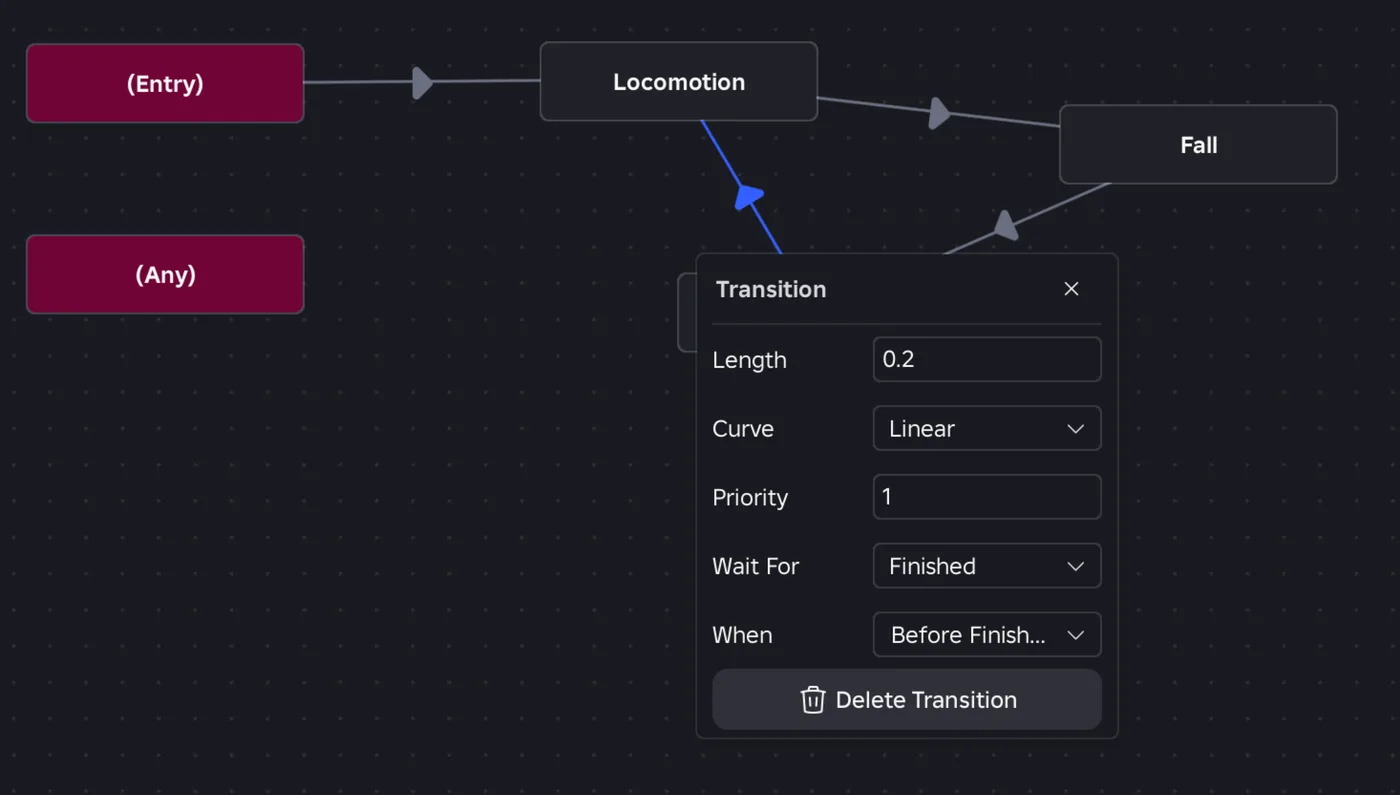
Jump, fall, land in three transitions
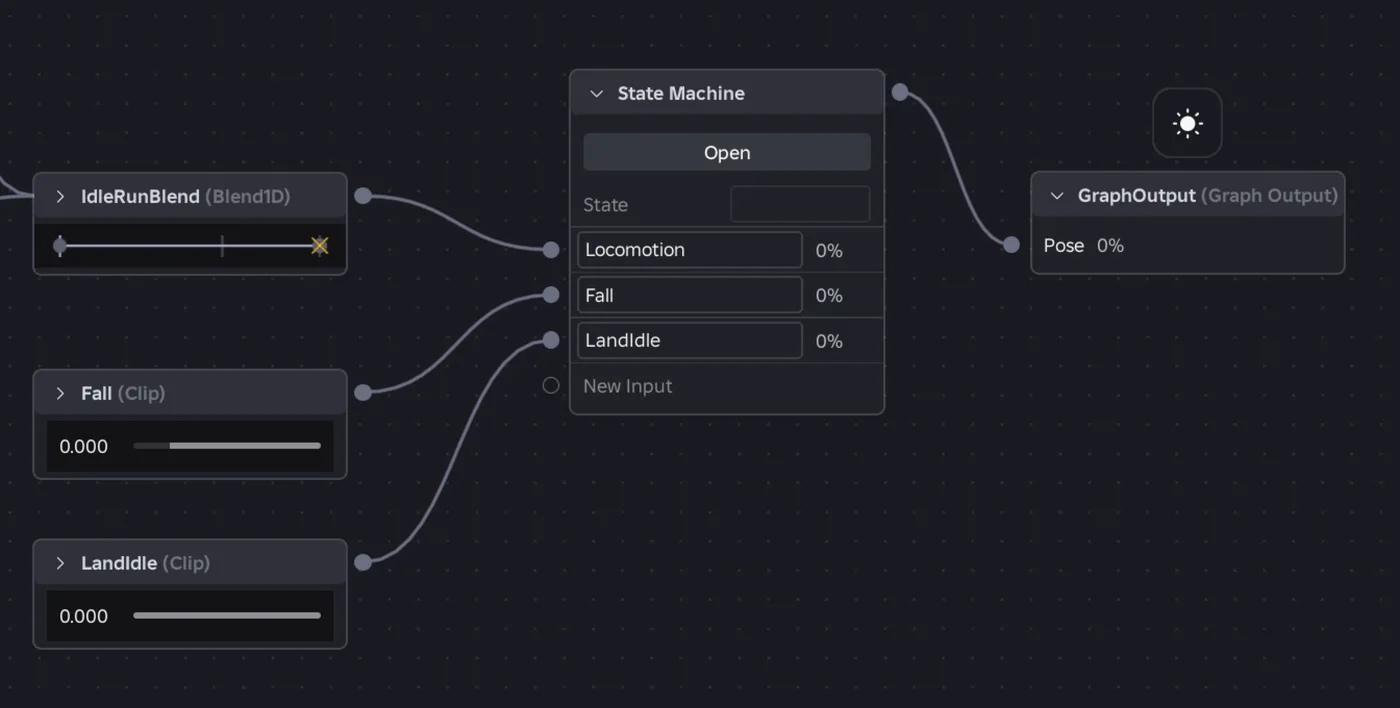
The documentation's worked example uses three states from JumpFallLandRunExample: Locomotion (an idle/run Blend1D), Fall and LandIdle (both clips set to OnceAndHold), plus a Boolean Grounded parameter. Entry goes to Locomotion, then:
| From | To | Wait For | Condition | Length |
|---|---|---|---|---|
| Locomotion | Fall | Expression | not Grounded | 0.2 s |
| Fall | LandIdle | Expression | Grounded | 0.1 s |
| LandIdle | Locomotion | Finished, BeforeFinished | Landing clip ends | 0.2 s |
Besides Speed for the locomotion blend, your script's new job is to keep Grounded honest. A Humanoid's FloorMaterial reads Air when it isn't standing on anything, which gives you a one-liner inside the loop from the first sample:
track:SetParameter("Grounded", humanoid.FloorMaterial ~= Enum.Material.Air)
The FloorMaterial reference adds two caveats: the character has to be able to collide with the floor to detect it, and the property can't tell you whether the Humanoid is swimming.
Two limits from the announcement. A state machine does not replace Humanoid states: jumping or dying "still come from the Humanoid or your own scripts," and you pass them in as parameters. And in the editor, "you can't manually set a state or trigger a transition" yet, so you test by changing parameters during preview. Priority Select isn't going away; Roblox's answer to "Should I stop using Priority Select?" was "No." Use the state machine when a transition should only apply from certain states.
Expressions: Luau-shaped, parameters only
An expression is "a short Luau-like formula that reads graph parameters and returns a value." It can drive a node property, such as a Blend1D's Position, or a state machine transition condition. To add one, drag a wire from a property pin and choose the expression option.
The documentation's worked example converts speed into the 0-to-1 range of a Blend1D set up with idle at position 0 and run at position 1:
math.clamp(MovementSpeed / MaxSpeed, 0, 1)
Multi-line expressions can use local and return:
local normalizedSpeed = Speed / MaxSpeed
local eased = math.clamp(normalizedSpeed, 0, 1)
return eased
| Supported | Not supported |
|---|---|
+ - * / ^ % //, comparisons, and/or/not with Luau truthiness | Loops and function definitions |
if ... then ... elseif ... else expressions | Tables and require() |
The math library, except frexp, noise and randomseed | Method calls such as obj:Method() |
Vector2, Vector3, Color3 and CFrame construction and members | Any library other than math |
String concatenation with .. | Reading the DataModel |
local, return, and if/else blocks that don't nest | Nested if or local inside an if body |
One quirk: math.modf() "currently returns only the integer portion." Per the announcement, each expression "is parsed once when the graph loads and is evaluated when a node uses it," and it is serialized with the graph asset rather than living in a script. If one fails to parse or evaluate during preview or a playtest, the error shows up in the Output window.
The payoff is fewer parameters and less glue code. One developer in the announcement thread reported that expressions let them cut 4 of 11 parameters from their graph and delete roughly 70 lines of animation code. One documentation wrinkle as of October 11: the state machine page's links to the Expressions page lead to a 404 on the Creator Hub. The page itself is live at create.roblox.com/docs/animation/graph-editor-expression, the address the October 8 announcement links to.
Who runs the graph: replication and Server Authority
The documentation states that "Animation graph parameters and internal node state replicate automatically," and which machine drives them depends on Workspace.AuthorityMode when the Animate script is created. You get that script from Graph ⟩ Create Animate script, which builds an Animate ModuleScript with a RunClient LocalScript, a RunServer Script, or both beneath it, depending on the case in the table below. It goes in StarterCharacterScripts for player characters, or on the rig for NPCs.
| Rig and mode | Scripts generated | Who drives the graph | Call SetParameter from |
|---|---|---|---|
| NPC, any mode | RunServer | The server; clients receive the state | The server |
Player, Automatic | RunClient | The owning client | The client; values replicate to the server and other clients automatically |
Player, Server | RunServer + RunClient | The server, with client-side prediction | Both: the server for the real simulation, the client for its prediction |
Three consequences:
- In Automatic mode you don't need a RemoteEvent for animation parameters. Several
SetParametercalls in one frame are "coalesced (last-writer-wins)," and other clients see the change after "one send interval plus network latency." Damage and other consequences still belong on the server, as our RemoteEvents guide covers. Only the animation state syncs itself. - Server mode replicates everything. That includes "elapsed time, current selections, transition progress, loop counts, and RNG seeds," so all clients see identical animation. The owning client's RunClient script switches on
PredictionModeon theAnimator, so the local player sees smooth animation that reconciles with the server if they disagree. Roblox's security docs still describe Server Authority as "currently in beta," the same status our collision summaries guide notes. - Studio previews use the unpublished graph. The generated script carries a
PreviewInStudioattribute. When true (the default), playtests load your local, unpublished graph, so you can iterate without publishing. It is "currently not supported" in Server mode.
One gap to check yourself. The StarterCharacterScripts reference says a LocalScript named Animate replaces the default animation script. The generator produces a ModuleScript named Animate, and the graph documentation doesn't say how the two interact. After generating, play-test and look under your character in the Explorer before assuming the default Animate script is gone.
Graph or AnimationTrack code?
Your existing animation code doesn't have to go anywhere. The July FAQ: "Your existing LoadAnimation scripts will continue to function." Asked in October about overhead, a Roblox staff member called the graph "an alternative to the AnimationTrack-based logic" and said it "should not interfere with performance of your games if you don't use it."
| Situation | Better fit today |
|---|---|
| Idle/walk/run blended by speed, or strafing by direction | Graph: Blend1D or Blend2D with PhaseSync |
| Upper-body actions over locomotion | Graph: Over plus Mask, or a One Shot |
| One-off emotes and flourishes on an input | Graph: One Shot with a Trigger parameter |
| Combos and reloads that may only follow certain states | State machine, but in Studio only until the beta ends; a Select node fed by your own Luau state until then |
| Replacing the default character animations completely | Check first. In July, staff said the preset locomotion graph in the example place "doesn’t have everything the default animate script today has" |
| A library of hundreds of interchangeable animations | Mixed. You can swap a clip node's AnimationId through a parameter, but each slot still has to exist in the graph. A developer asked on October 10 for loading arbitrary animations into clip slots at runtime, and the thread had no Roblox reply as of October 11 |
| Decisions that need the workspace, raycasts or other instances | Your script computes it, then passes the result in with SetParameter |
What is dated next for graphs
Roblox's Fall 2026 roadmap (September 18) names Animation Graphs in two items and lists root motion alongside them:
| Feature | Date given |
|---|---|
| Motion matching in Animation Graphs, selecting "the best pose from a large animation database" | Early 2027 |
| State Machine Nodes and Luau Expressions | Mid 2027, though both entered Studio beta on October 8 |
| Root motion, configuring "how much animation influences character physics" | Mid 2027 |
Roblox has not said whether "Mid 2027" now means the full release of state machines and expressions. Separately, the RDC 2026 recap dates a new default avatar movement system "that includes motion matching and root motion" to Early 2027. If you are rebuilding a character controller around graphs, those two dates are the ones to plan around.
Quick Action Checklist
- Build graphs from Avatar ⟩ Graph Editor, publish them, and load them with
Animator:LoadAnimation(), the same as a clip. Avoid the deprecatedHumanoid:LoadAnimation()in the July post's snippet. - Call
GetParameterDefaults()once to see what the graph expects, then drive it withSetParameter(); NaN and inf become0. - Use
LinearorCubicV2for transitions; no other curve applies. - Keep
PhaseSynconSyncedfor locomotion blends, and clampPositionif you don't want Blend1D to extrapolate. - Put footstep markers in every locomotion clip; a blend fires only the dominant clip's events.
- Use Over plus Mask for upper-body layers, and a One Shot with a Trigger parameter for emotes and punches.
- Swap animations at runtime by wiring a clip's
AnimationIdto a String parameter. - Turn on Animation Graphs State Machines under File ⟩ Beta Features to try state machines and expressions, and don't ship them: Roblox says they only work in Studio during the beta.
- Give every competing state machine transition its own
Priority. - Generate the Animate script with Graph ⟩ Create Animate script after setting
Workspace.AuthorityMode, and callSetParameterfrom the client (Automatic), the server (NPCs), or both (Server mode). - After generating, check in a playtest whether the default Animate script still runs.
Frequently Asked Questions
What is the Animation Graph Editor in Roblox Studio?
How do I play a Roblox animation graph from a script?
Can I use animation graph state machines in a live Roblox game?
How do I enable state machines in the Roblox Animation Graph Editor?
What can Roblox animation graph expressions do?
Do Roblox animation graph parameters replicate automatically?
How do I change which animation a Roblox animation graph plays at runtime?
Keep Reading
- Roblox Creator Documentation — Animation Graph Editor: building a graph, API integration, transitions, replication and the generated Animate script (official)
- Roblox Creator Documentation — Graph Editor state machines: states, transitions, priority and the jump/fall/land example (official)
- Roblox Creator Documentation — Graph Editor expressions: supported syntax and math library exceptions (official)
- Roblox Creator Documentation — AnimationNodeType enum: node-by-node reference for all graph node types (official)
- Roblox creator-docs GitHub repository — AnimationTrack class reference source: SetParameter, GetParameter, GetParameterDefaults (official)
- Roblox Creator Documentation — AnimationNodeDefinition class reference (official)
- Roblox Creator Documentation — AuthorityMode enum: Server and Automatic (official)
- Roblox Creator Documentation — PoseEasingStyle enum: Linear, CubicV2 and the deprecated Cubic (official)
- Roblox Creator Documentation — Network ownership and physics security: Server Authority beta status (official)
- Roblox Developer Forum — [Studio Beta] Introducing State Machines and Luau Expressions for Animation Graphs (October 8, 2026, with staff replies)
- Roblox Developer Forum — [Full Release] Animation Graphs: Create Complex Character Motion Visually (July 15, 2026, with staff replies)
- Roblox Developer Forum — Creator Roadmap 2026: Fall Update (September 18, 2026)
- Roblox Developer Forum — RDC26: What We Announced (September 11, 2026)
- Roblox Client Tracker — engine API dump listing AnimationGraphDefinition as a subclass of AnimationClip (community mirror of engine metadata)
Related Guides
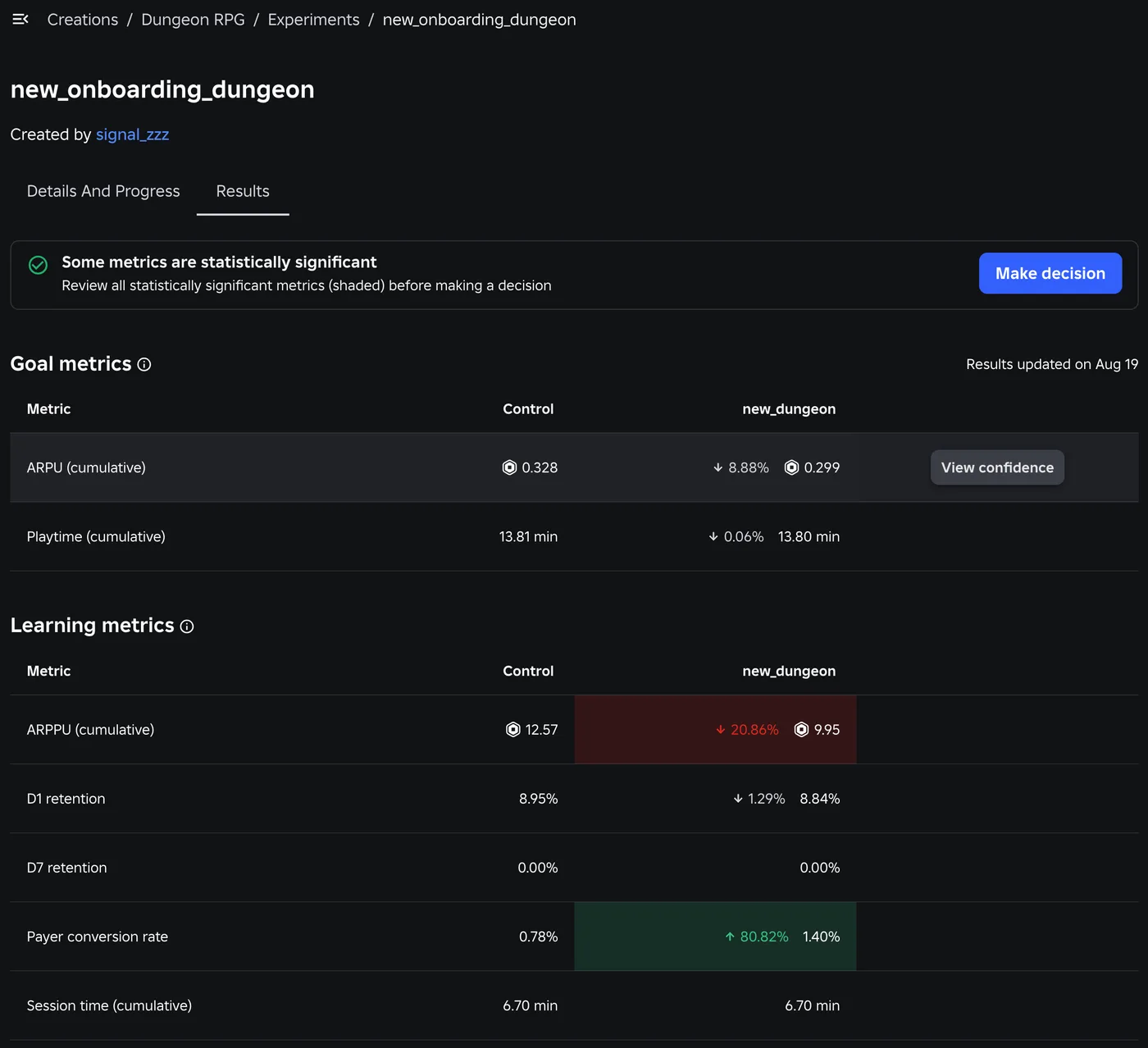
Roblox A/B Testing: Experiments and ConfigService Guide
Roblox has a built-in A/B testing system: configs hold the values, Experiments splits players between them, and since October 1, 2026 early harm detection watches the first 24 hours. Here is the rollout math, the one method call that decides who gets enrolled, the harm thresholds, and what Make decision actually does to your configs.
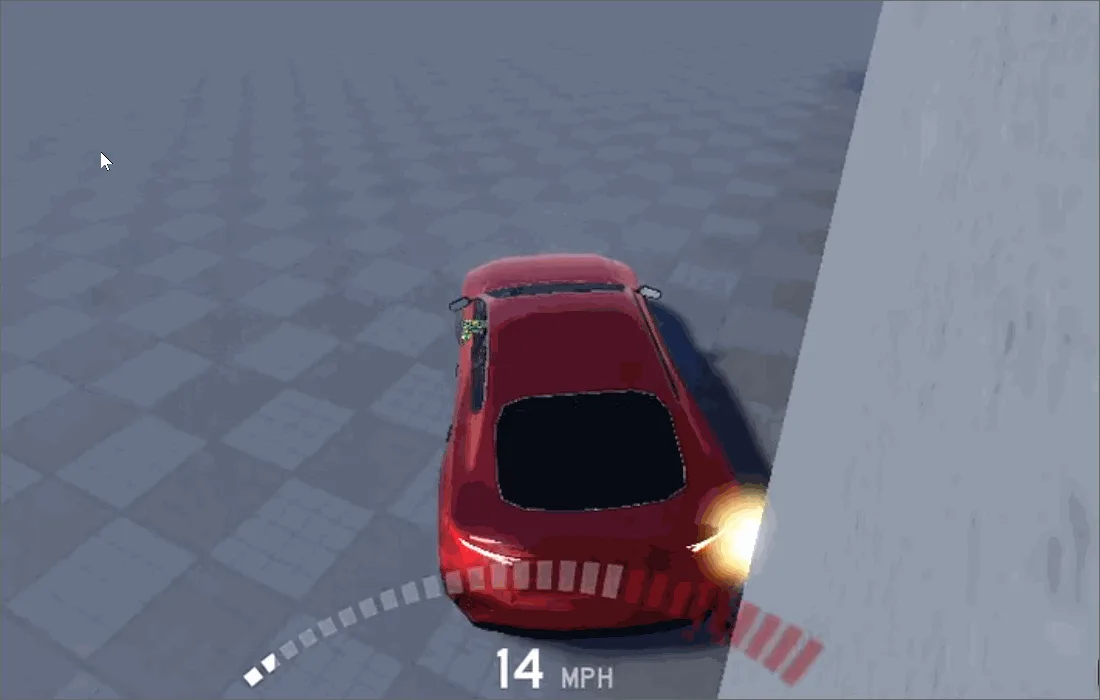
Roblox Collision Summaries: Impact Speed, Point and Normal
Touched tells you what your part hit. BindToCollisionSummaries, live since October 6, 2026, tells you where, from which direction and how hard. Here are the seven fields, why one bump arrives as several summaries, the Normal field Roblox's own pages describe two ways, and the network-ownership rule that decides which machine sees a summary at all.
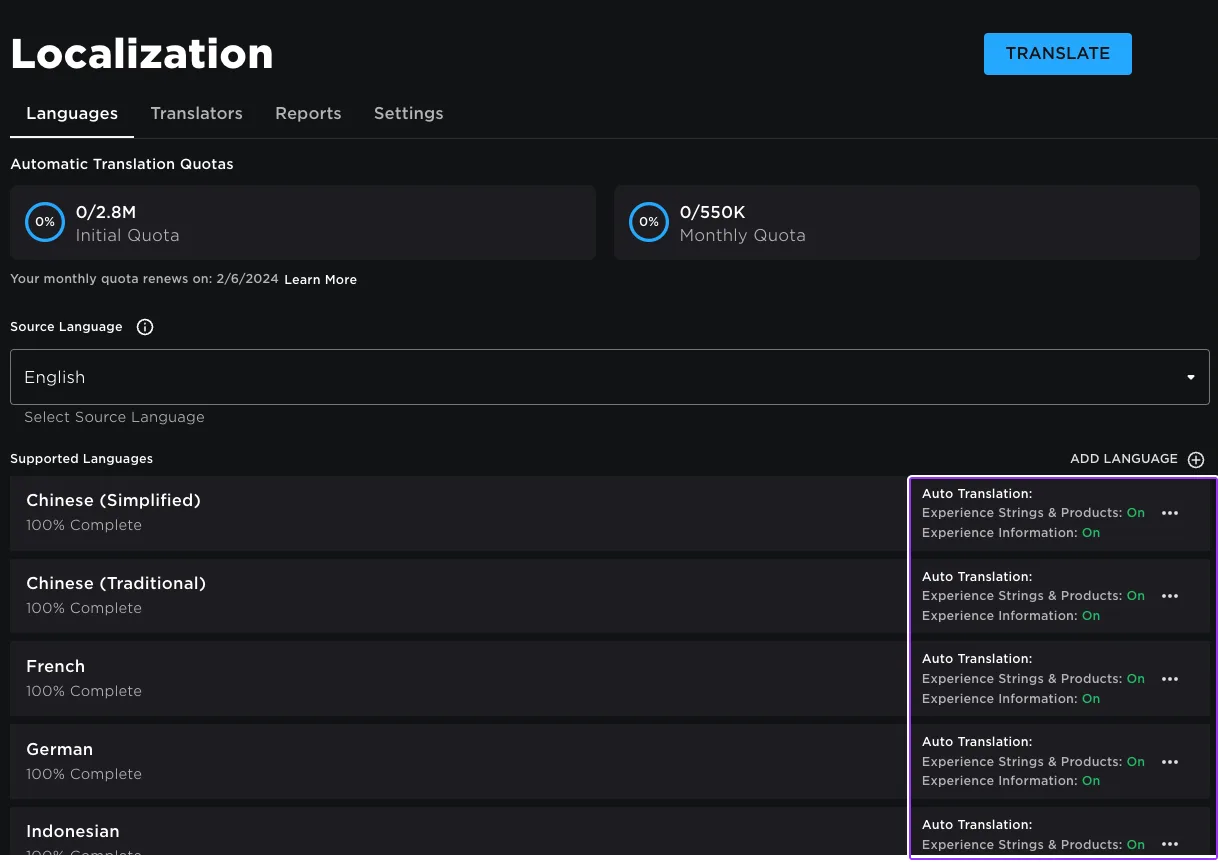
Roblox Localization: How to Translate Your Game
Since June 2026, any player can switch on Automatic Translations and read your game through Roblox's machine translator, whether or not you ever opened the Localization page. Here is what gets translated, how to stop it on text that should stay put, the five kinds of text automatic capture never sees, and the Translator and real-time APIs that cover the rest.
Roblox Ban API: BanAsync, Alt Accounts, Device Blocks
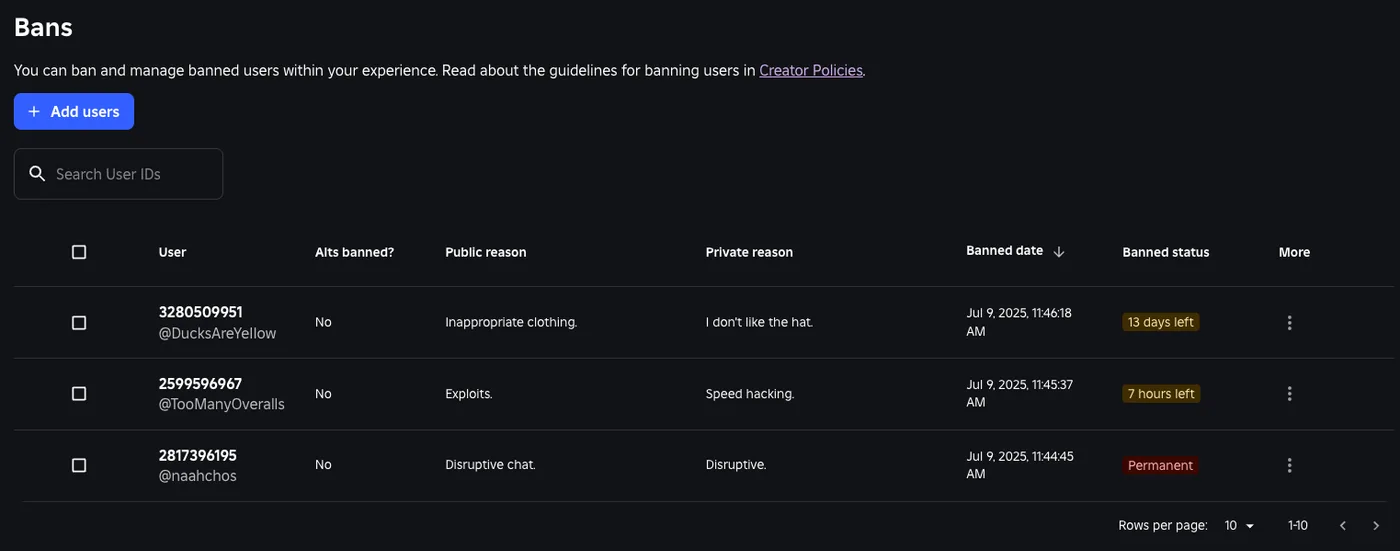
Player:Kick() drops someone from one server. Players:BanAsync() evicts them from every server, keeps them out for as long as you say, and bans their suspected alts by default. Here is every field in the config table, the scope rule that decides whether your unban does anything, the 24-hour device block only one unban path can lift, and why GetBanHistoryAsync fails in Studio.

Best Roblox Games to Play in 2026
Roblox's front page is engagement bait. This is the filtered version: the games with real, sustained player counts and actual staying power, sorted by what you're in the mood for.

How to Get Robux Safely (Legit Ways + Scams to Avoid)
There is no free Robux generator. There never was. Here are the actual legit ways to get Robux without overpaying, the earning methods that really work, and the scams that exist purely to steal your account.