Roblox Localization: How to Translate Your Game
Since June 2026, any player can switch on Automatic Translations and read your game through Roblox's machine translator, whether or not you ever opened the Localization page. Here is what gets translated, how to stop it on text that should stay put, the five kinds of text automatic capture never sees, and the Translator and real-time APIs that cover the rest.
If you have never opened the Localization page for your game, any player who has flipped one account setting can still be reading it in another language.
On June 15, 2026, Roblox announced a player setting called Automatic Translations. It sits on the Account Info page and in the in-game settings menu, and Roblox's announcement says what it does in one line: "If this setting is on, game names, game descriptions, and in-game text will be translated into the player's language." Asked in the same thread whether that needs any setup from developers, a Roblox staff member answered that it "will still work for games that haven't configured any supported languages; there's no action needed from developers to add languages manually."
So localization on Roblox is no longer a project you start. It is a machine translation that already runs on your UI for every player who opts in, and the work is controlling it: deciding what should never be translated, fixing what the machine gets wrong, and covering the text it cannot see. This guide covers all three, plus the Translator API and the real-time translation endpoint for text the automatic system never reaches.
Your game is already being translated
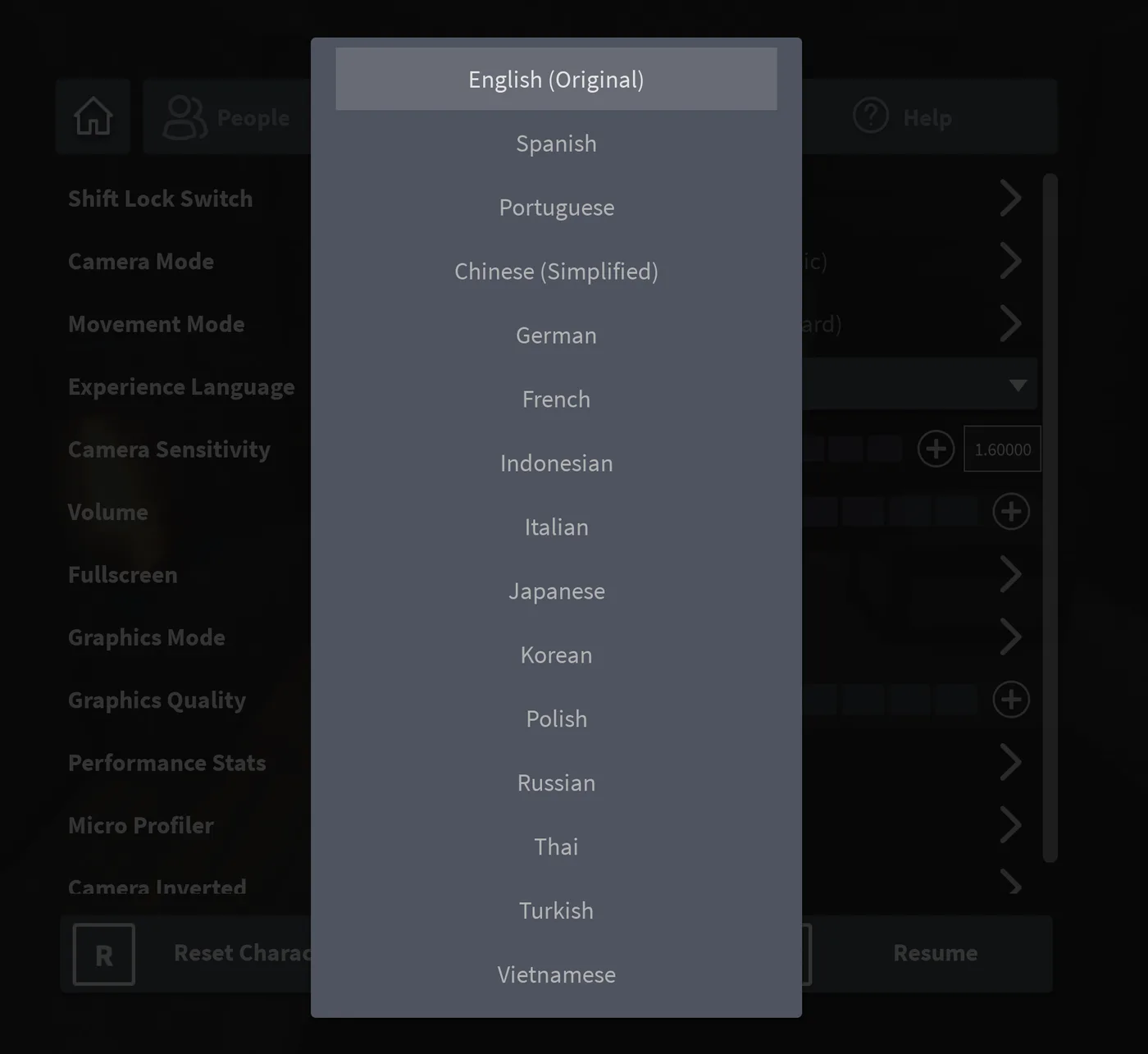
The June announcement fills in the player side. Players with the setting on who join a game where missing translations were filled in automatically see a badge on the loading screen saying the game has been auto-translated. They can switch language for one game from a dropdown in the in-game settings menu, and that choice "only impacts the current game and will persist across sessions." A Translation Feedback tool in the same menu sends bad or missing translations back to Roblox.
Roblox's case for doing this is engagement data. In an August 2025 post, it reported a two-week experiment from late June 2025 that auto-translated untranslated games for a small percentage of users. New-to-experience players who speak Japanese and Korean played 4% longer, and payer conversion rose 0.95% on average. When the account setting rolled out in June 2026, Roblox reported gains of 0.23% in overall spending and 1.27% in new-user playtime.
Both posts and the documentation repeat the rule that protects you. In the June announcement's words: "We'll never override a manual translation if it exists." Anything you translate yourself wins. Everything you leave blank is fair game for the machine.
Three layers decide what a player reads
Two different switches can put a machine translation on screen. The Localization docs spell out how they stack: "If you add any manual translations to your game, they will always be shown to players. Roblox only automatically generates translations if they are missing."
| Layer | Who sees it | Who controls it |
|---|---|---|
| Manual translations (yours or your translators') | Every player in that language, whichever route they took | You, on the Localization page or by CSV |
| Your own automatic translation (Use Translated Content plus per-language toggles) | Every player whose language you enabled | You |
| The player's Automatic Translations account setting | That player, in every game they play | The player; you override it with manual translations or AutoLocalize |
The practical reading: switching your own automatic translation off does not switch the player setting off. Two tools work against both routes: manual translations and the AutoLocalize property, covered below.
Turning it on yourself: four switches
Your game's localization settings live on Creator Hub under Manage Experience ⟩ Audience ⟩ Localization, or the ⋯ menu on the game tile ⟩ Configure Localization. Four settings decide whether your own translation pipeline runs:
- Source language. The language your game is written in. Roblox supports one at a time, and it defaults to your Roblox account language.
- Supported languages. Added from Languages ⟩ Add Language.
- Automatic Text Capture (ATC). Under Settings, the first toggle captures strings from your game's UI while users play. A second toggle lets Roblox remove stale entries, such as usernames or strings from a past event. That cleanup is on by default and only removes auto-captured strings with automatic translations, never manual work.
- Use Translated Content, then per-language toggles on the Languages tab. These come in two halves: Experience Information is your game's name and description, and Experience Strings & Products is the text inside the game.
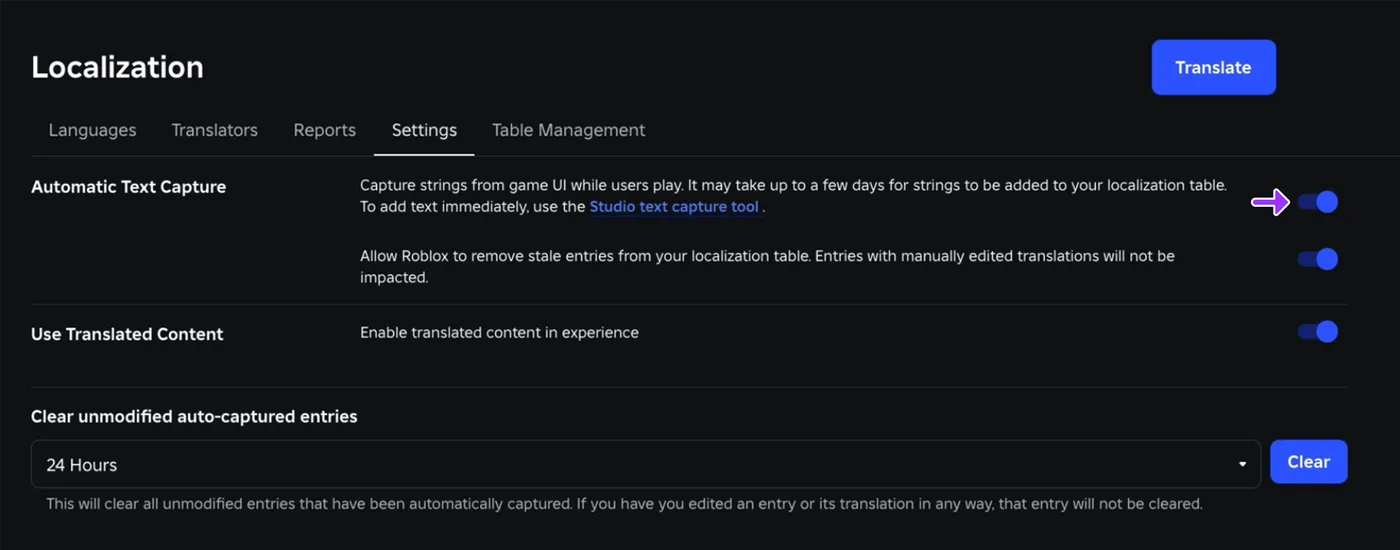
ATC is not instant. Roblox says it "evaluates over time which strings should be added," so new strings "may take up to a few days" to reach your table after players see them. If you need them now, use Studio's capture tool: Window ⟩ Localization ⟩ Localization Tools, enable Automatic Text Capture, and play-test. Strings land in the table "within 1–2 minutes," but the toggle resets every Studio session, so turn it back on each time you open Studio.
The 18 languages the machine covers
Automatic translation and the real-time translation API (covered later) do not cover the same list. Here are both, from the two documentation pages:
| Language | Automatic translation | Real-time API code |
|---|---|---|
| Arabic | Yes | Not supported |
| Chinese (Simplified) | Yes | zh-cn |
| Chinese (Traditional) | Yes | zh-tw |
| English | Yes | en-us |
| French | Yes | fr-fr |
| German | Yes | de-de |
| Hindi | Yes | Not supported |
| Indonesian | Yes | id-id |
| Italian | Yes | it-it |
| Japanese | Yes | ja-jp |
| Korean | Yes | ko-kr |
| Polish | Yes | pl-pl |
| Portuguese | Yes | pt-br |
| Russian | Yes | ru-ru |
| Spanish | Yes | es-es |
| Thai | Yes | th-th |
| Turkish | Yes | tr-tr |
| Vietnamese | Yes | vi-vn |
Your localization table reaches much further than the machine does. Roblox's language codes page lists 50 locale IDs you can add translations for, including Dutch, Swedish, Ukrainian and Bengali. None of those four is on the automatic list above, so a player in one of those languages sees only what you or a human translator wrote. The automatic system also "will always assume that source strings are in the game's source language," so a sign you wrote in Spanish inside an English game is treated as English.
What automatic text capture never sees
ATC captures text from UI objects such as TextLabel and BillboardGui, and only from objects with AutoLocalize enabled. Roblox's documentation lists five exemptions it cannot capture at all:
- The default Roblox leaderboards and chat
- Items or tools owned by a player
- Images with embedded text
- Badge names and descriptions pulled from the platform
- Pass names and descriptions pulled from the platform
Add two more. The same page says that for a TextBox, only PlaceholderText is captured, "the assumption is that strings in Text were provided by the player." And the Add source content page says text that doesn't appear during typical gameplay, such as a complex conversation tree, may take longer to collect through ATC, so Roblox recommends adding it by hand.
Each gap has a documented fix:
| Text ATC misses | Where to fix it |
|---|---|
| Badge and pass names and descriptions | Translate ⟩ Products tab, per language (it covers developer products too) |
| Words baked into an image | Upload a translated image per language and swap it by key (see scripting, below) |
| Rare strings such as dialogue branches | Add Entry on the Strings tab, or a CSV upload |
| Text players type, or text generated at runtime | The real-time translation API |
| Chat | TextChatService, which translates chat on its own |
The badge and pass row is worth acting on early. Badge and pass names set up in our BadgeService and game pass guides are pulled from the platform, which puts them on that exemption list, so ATC won't add them to the table.
AutoLocalize is the off switch
Some text should never be translated: a character's name, a street sign that is foreign on purpose, a username, a clan tag. The fix both the docs and the June announcement give is the AutoLocalize property in Studio's Properties panel. "If AutoLocalize is turned off, we won't attempt to translate the associated text," the announcement says, and it covers the player's account setting as well as your own pipeline.
AutoLocalize is defined on GuiBase2d, so every 2D GUI object has it, and ProximityPrompt carries its own copy for its object and action text (our ProximityPrompt guide lists it at its default of true). The reference also notes that a custom RootLocalizationTable only applies when AutoLocalize is true "on the GuiBase2d and its ancestors."
Two costs that are easy to miss:
- Excluded strings can still fill your table. A Roblox staff reply in the announcement thread said strings with
AutoLocalizedisabled "will still count against your localization table limit," and that with ATC and its automatic cleanup fully on, dynamic text "should be detected and removed from your table regularly." Keep the cleanup toggle on. - Your game's name is not a GUI object.
AutoLocalizecan't reach the title on your game page. The documented workaround is the Information tab: saving an empty string there "will be saved as a manual edit signaling that the text should not be translated," and players in that language see your source title. You have to do it once for each language.
Quotas, locks and the safety catch
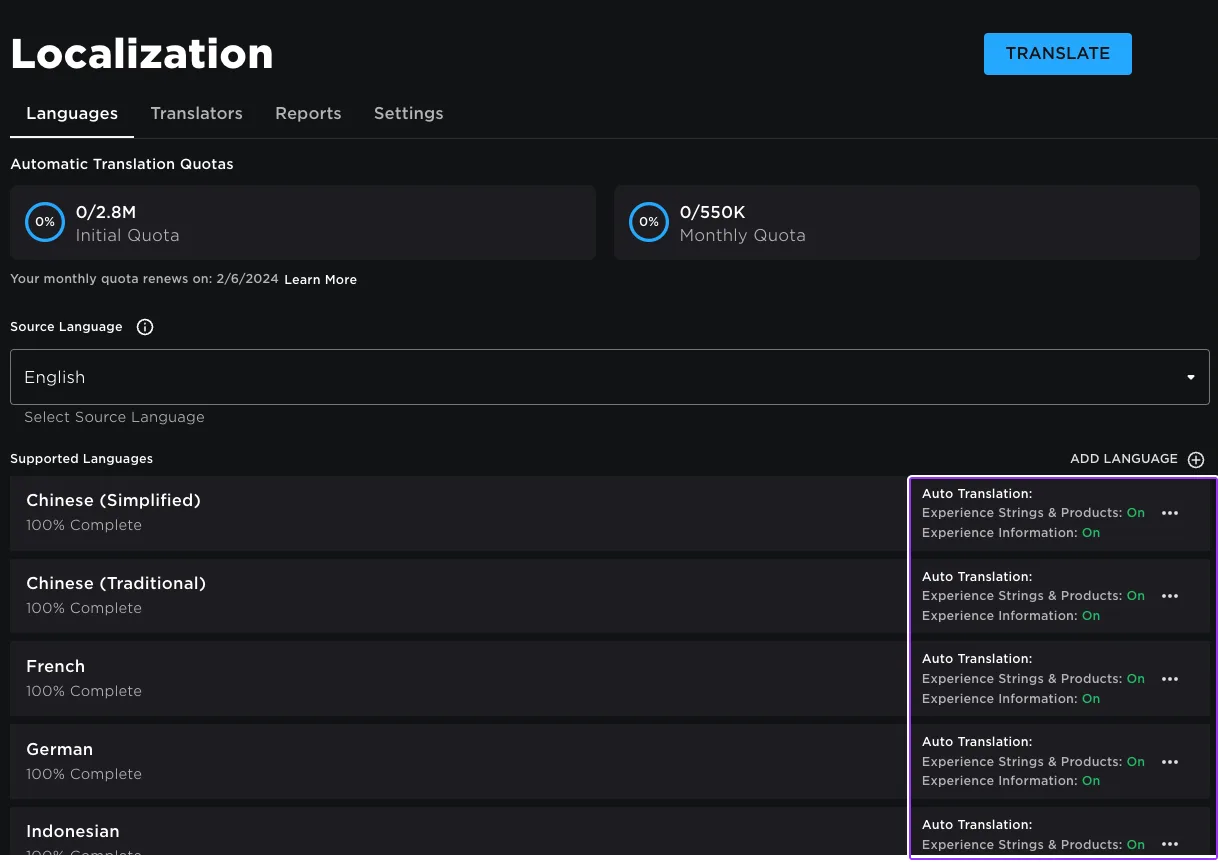
Automatic translation draws on an initial quota, used the first time a game is localized, and then a monthly quota that resets each month. Both are counted "per-character and per-language": translating "hello" into 10 languages costs 50 characters. The docs do not print the quota sizes. The example screenshot at the top of this page shows a 2.8M initial quota and a 550K monthly one, but its renewal date reads 2/6/2024, so read the numbers off your own Languages tab rather than that image.
Automatic translations are not frozen once made. When Roblox's model improves, it "refreshes any automatic translations," and each change appears in the entry's translation history. To keep one exactly as it is, lock it.
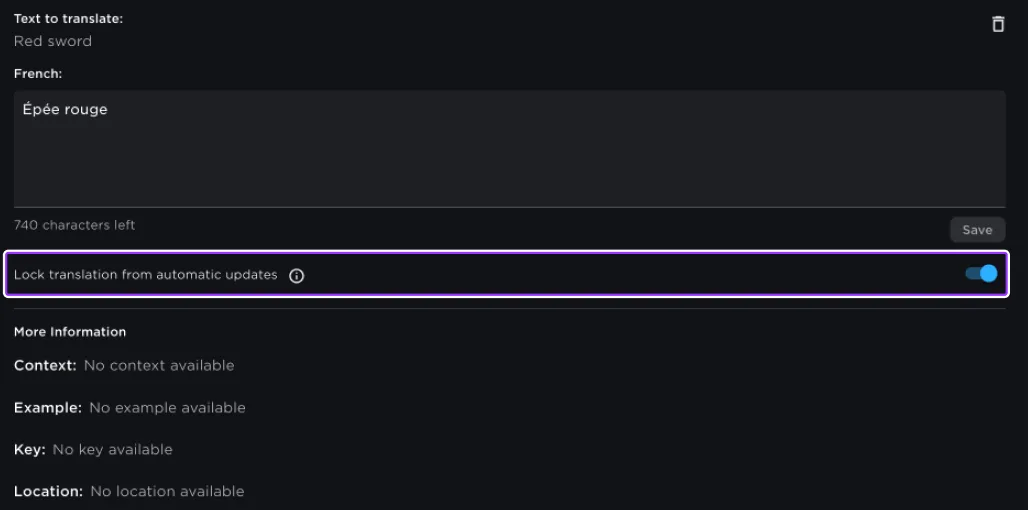
Locking has a cost the docs flag in a warning box. A locked entry becomes a manual entry, so "it will not be impacted by any automatic translation updates, including safety-related updates. If, in the future, it is discovered that the translation violates policy, your game will still be subject to moderation." Lock the entries you have checked, not the ones you have not read.
Two related defaults: manually added strings and manual translations start out locked, and clearing a translation is treated as an instruction. "If you manually clear a translation for an entry, the tool assumes that you don't want to translate that entry." To get a machine translation back, unlock the entry.
The localization table and its CSV rules
Every captured and manual entry ends up in one cloud localization table, with five columns:
| Column | What it holds |
|---|---|
| Source | Required. The text in your source language. Case-sensitive: an entry for "hello" does not translate "Hello" |
| Context | Optional. The path of the object the text appears on, used to pick between two translations of the same Source |
| Example | Optional notes for translators |
| Key | Optional. An identifier for script lookups with FormatByKey |
| Location | Filled in by ATC. Where the string was seen. ATC does not fill Context |
Three uniqueness rules apply: Source can never be empty, no two entries share both Source and Context, and no two entries share a Key.
For bulk work, download the table as a CSV from Creator Hub (Localization ⟩ Table Management) or from Studio's Localization Tools, then upload it again. The upload limits are 10,000 total entries, a 2 MB file and 1,000 added or modified entries per upload. Editing an auto-generated translation in the CSV locks it as manual. Deleting a translation cell deletes that translation and also locks it.
Deleting a whole row is where Roblox's pages disagree. The Remove content page says to delete the row in the spreadsheet and upload the file with Update. The Add translations page says removing a source row has "No change - entry will not be deleted," and that you must use Delete Table then Upload CSV on Creator Hub, or Advanced ⟩ Replace in Studio. Follow the second page, since it is the one that describes what the upload does to each row. Download a fresh copy before either route, so the file you upload is the whole current table.
Translators you invite (by username, user ID or group role) can edit translations in every supported language. They cannot change settings, add or delete entries, or invite anyone else. Roblox builds a contribution report every two weeks. Translators working from a CSV outside Roblox do not show up in it.
Parameters: one entry for every number and name
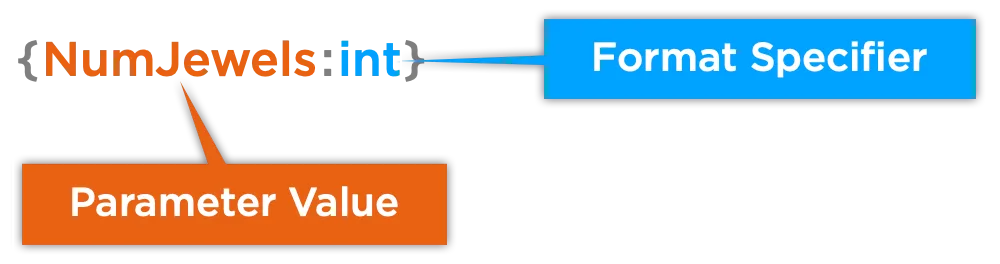
"You have 1,240 coins" and "You have 1,241 coins" are different strings to a lookup table. Parameters solve this: braces in the Source mark the part that changes, and an optional format specifier controls how a number is written.
| Specifier | Output |
|---|---|
int | Integer, no thousand separators: 1234 |
fixed | Two decimals, no thousand separators: 1234.50 or 1234,50 |
num | Two decimals with thousand separators: 1,234.50 |
HEX / hex | Integer as upper or lowercase hex: 3FF / 3ff |
datetime | UTC timestamp, readable: 2017-10-10 13:38:10 |
iso8601 | UTC timestamp, ISO-8601: 2017-10-12T22:02:38Z |
shorttime | Local hour and minute: 1:45 PM or 13:45 |
shortdatetime | Short date plus time: 10/10/2017 1:45 PM |
shortdate | Short date: 10/10/2017 or 2017-10-10 |
translate | Looks the value up as a Source string in your table |
Roblox's own example shows why the specifier matters. With the Source ${1:num} cash and {2:int} jewels and a Spanish translation, the in-game text "$2500.5 cash and 99.8 jewels" comes out as "$2.500,50 dinero y 100 joyas": the separators follow the locale, and int rounds 99.8 to 100. A named parameter such as {Player_Name} drops a username into a translated sentence without translating it, and {Place_Name:translate} translates the inserted word too, provided "Brazil" or "London" has its own row. One rule can trip you up: if an entry uses several parameters with specifiers, they must be "either all strings or all numbers."
Scripting it with Translator
Automatic translation covers text that sits in a GUI object. Anything your scripts build or swap needs LocalizationService and the Translator objects it returns. Three methods return one, and one of them is deprecated:
| Method | Locale it uses | Notes |
|---|---|---|
GetTranslatorForPlayerAsync(player) | The player's locale | Yields until the cloud table for that locale loads; can error, so wrap in pcall |
GetTranslatorForLocaleAsync(locale) | The code you pass, such as "es" | Same yield and pcall rules; use it for a fallback or a language picker |
GetTranslatorForPlayer(player) | The player's locale | Deprecated. Does not wait for the cloud table, so it can return a translator without your cloud translations |
The translator then offers Translate(context, text), which looks up a Source string (pass game if you don't need a context override), and FormatByKey(key, args), which looks up a Key and fills in parameters. A coin counter that re-renders when the player switches language:
-- LocalScript under a TextLabel. Table entry: Key "Key_CoinBalance",
-- Source "{Coins:int} coins", es "{Coins:int} monedas"
local LocalizationService = game:GetService("LocalizationService")
local Players = game:GetService("Players")

local label = script.Parent
label.AutoLocalize = false -- this label is translated by script

local ok, translator = pcall(function()
	return LocalizationService:GetTranslatorForPlayerAsync(Players.LocalPlayer)
end)

local currentCoins = 0

local function render()
	if ok then
		local formatted, text = pcall(function()
			return translator:FormatByKey("Key_CoinBalance", { Coins = currentCoins })
		end)
		if formatted then
			label.Text = text
			return
		end
	end
	label.Text = tostring(currentCoins) .. " coins" -- source-language fallback
end

if ok then
	translator:GetPropertyChangedSignal("LocaleId"):Connect(render)
end

render()
Two choices in that script come straight from the docs. FormatByKey throws if no table has the key, if numbered parameters get something other than an array, if named parameters get something other than a key-value table, or if args is missing a value the string uses, so it gets its own pcall. The LocaleId listener follows Roblox's guidance on language switches: a switch "automatically updates non-scripting localization assets" but "may not update scripted localization changes that have already rendered." The third choice is ours: AutoLocalize is off because ATC only captures from objects that have it on, so leaving it on risks your already-translated output being captured as new source text.
For anything bigger than one label, wrap the two translators and the fallbacks in a shared ModuleScript. Roblox's docs print a full TranslationHelper module for this.
Images and sounds by key
ATC cannot read words inside an image, so the documented approach is to upload one image per language and keep the asset IDs in the table under a Key, such as Key_JewelsImage with Source 2957093606 and the Spanish and Portuguese IDs in their own columns. A script then sets imageLabel.Image = "rbxassetid://" .. translator:FormatByKey("Key_JewelsImage"). The same pattern works for sounds, such as a voiced line per language. This is the case the LocaleId listener exists for: Roblox warns that a language switch may not update scripted images or sounds that have already rendered.
Six details the references bury
- Context matches from the right. When two entries share a Source, the service "compares object relationships in the Context field from right to left, using the closest match." In Roblox's own example, a
TextLabelunderplayerGui.ScreenGuipicks up the translation stored forworkspace.WindowScreen.SurfaceGui.TextLabel. Write full paths in Context and test the label you meant. LocalizationTableinstances are not for runtime edits. The class reference says tables "are not optimized to be modified at runtime" and that changing one "will cause the entire contents of the table to be replicated to all players." Keep per-player data out of them.- Seven
LocalizationTablemembers are deprecated. The methodsGetString,GetContents,SetContents,SetEntryandRemoveKeyare replaced byGetTranslator,GetEntries,SetEntriesandRemoveEntry, and theDevelopmentLanguageandRootproperties are deprecated too, the first in favour ofSourceLocaleId. Older tutorials still use the deprecated names. TextLabel.LocalizedTextshows what actually rendered. It is read-only and holds the translated string when one applied, falling back to the label's own text when none did. Print it next toTexton the client to debug a string that won't translate.- Four locale values, four meanings.
Player.LocaleIdis the locale on the player's Roblox account. It is hidden, read-only and not replicated, and Roblox's own samples read it in aLocalScript.LocalizationService.SystemLocaleIdis the operating system's locale andRobloxLocaleIdis the one used for Roblox's core UI.GetCountryRegionForPlayerAsyncreturns a country from the player's IP address, which is a location, not a language. - Don't copy the comments in one sample. In the docs' "Switch languages" sample, the expected-output comments are swapped: the Portuguese translator is labelled "joyas" (Spanish) and the Spanish one "jóias" (Portuguese). The code itself is fine.
Player-made text: the real-time translation API
Pet names, player-written notes and procedurally generated quest text are exactly what Roblox says the standard workflow "might miss": uncommon strings and strings generated during gameplay. For those, Roblox has a real-time translation API, announced as a beta on March 14, 2025. The documentation page still carries an early-development warning, and Roblox's Open Cloud spec still labels the endpoint BETA.
How it is wired matters more than usual:
- It is an Open Cloud endpoint (
POST /cloud/v2/universes/{universe_id}:translateText), but the spec marks it as not callable throughHttpServicewith an API key. The documented route is Roblox's Open Cloud package from the Creator Store (Toolbox ⟩ Creator Store ⟩ Packages), moved intoServerScriptServiceand called asoc:TranslateText(). That makes it a different lane from the API-key calls in our HttpService guide. - It only runs on servers Roblox authenticates. "The real-time translation API currently only supports RCC authentication," so a solo Studio play-test can't exercise it. Roblox says to deploy to a test instance with collaborative testing (Team Test).
- Input is filtered first. Roblox's announcement says text that fails the filter is not translated and comes back as a content-moderated error. The reference adds that the
translationsmap is empty "if the source text was filtered." Nothing on either page says the translated output replaces the per-viewer filtering in our text filtering guide, so keep that step for player text. - Parameters.
text, atarget_language_codesarray of BCP-47 codes, and an optionalsource_language_code. Leave that out and the service detects the source language.
A server-side wrapper with a per-server cache, following the shape of Roblox's sample:
-- Script in ServerScriptService; the OpenCloud package must be in ServerScriptService too
local ServerScriptService = game:GetService("ServerScriptService")
local oc = require(ServerScriptService.OpenCloud.V2)

local UNIVERSE_ID = 0 -- from your game tile's overflow menu on Creator Hub
local cache = {} -- [locale] = { [text] = translation }, lives as long as the server

local function translateFor(locale, text)
	cache[locale] = cache[locale] or {}
	local cached = cache[locale][text]
	if cached then
		return cached
	end

	local ok, result = pcall(function()
		return oc:TranslateText({
			path = oc:UniversePath(UNIVERSE_ID),
			text = text,
			target_language_codes = { locale },
		})
	end)
	if not ok or result.Error ~= nil then
		return nil -- show the original, or nothing for unfiltered player text
	end

	local translated = result.Response.translations[locale]
	if translated then
		cache[locale][text] = translated
	end
	return translated -- nil if the text was filtered or the locale is unsupported
end
Roblox's sample takes the player's LocaleId from the client through a RemoteFunction. Any remote that makes your server call a rate-limited service needs a per-player throttle and a length cap, or one client can spend your whole budget.
That budget is where the docs disagree. The translation page gives the API its own throttle of 600 + (1.5 × concurrent users) requests per minute per game, then adds "a combined limit of 150 requests per minute, per game server for all Open Cloud APIs," the same figure as the March 2025 announcement. Roblox's In-game HTTP requests page and HttpService reference give Open Cloud calls from a game server 2,500 per minute, separate from the 500-request external budget. A third page, Open Cloud's general Rate limits page, says Open Cloud calls made in-game through HttpService "also contribute to the fixed limit of 500 HTTP requests per minute per Roblox game server." Until Roblox reconciles them, design for 150 per server and cache every result.
Locales, the store page and your products
Since November 24, 2025, four languages can have region-specific translations, so "soccer" and "football" can coexist:
| Language | Locale IDs |
|---|---|
| English | en-us, en-gb |
| French | fr-fr, fr-ca |
| Portuguese | pt-br, pt-pt |
| Spanish | es-es, es-mx |
Translations under a language's Global heading apply everywhere, and a locale-specific translation overrides Global for players in that locale. One exception: if your source language is English, French, Portuguese or Spanish, locale-specific overrides for your game's name and description are not available for en-us, fr-fr, pt-br or es-es.
The store-facing side lives in the Translator Portal too. The Information tab takes a translated name and description, plus a localized icon and up to 10 thumbnails per game. The Products tab takes translated names and descriptions for developer products, passes and badges, which covers the gap from the ATC section above.
Chat runs on its own translator
Chat sits outside everything above. TextChatService translates messages itself for players who have chat translation on. TextChatService.ChatTranslationEnabled reports that preference and is client-only. A message's TextChatMessage.Translation holds the translated, filtered text, and it "can be an empty string" because the system skips messages between users with the same settings and languages without text filter support. One chat-shaped hole is TextChannel:DisplaySystemMessage(): its messages "aren't automatically filtered or localized," so translating system messages is your job.
What Roblox has dated next
These come from Roblox's Creator Roadmap and are dates, not shipped features:
| Feature | Date given | Source |
|---|---|---|
| Game translation glossary: fixed translations for terms like your title and character names, applied "even within automatic translations" | Late 2026 | Spring 2026 roadmap (May 8); not listed as shipped or delayed in the Fall update |
| Automatic translation for game icons and thumbnails | Late 2026 (moved from Early 2026) | Spring 2026 roadmap |
| Automatic translation for in-game images | Mid 2026 (moved from Early 2026); not listed as shipped or delayed in the Fall update | Spring 2026 roadmap |
| Dutch support in the app and in automatic in-game translation | Late 2026 | Fall 2026 roadmap (September 18) |
| Automatic text-to-speech translation | Late 2026 | Fall 2026 roadmap |
The glossary would replace the per-language blank-title workaround, and the Roblox staff member in the June thread pointed to it as the planned fix for names that should never be translated. Until it ships, AutoLocalize and manual entries are the controls Roblox documents.
Quick Action Checklist
- Plan on players with the Automatic Translations account setting seeing your game machine-translated, whether or not you set up localization.
- Turn
AutoLocalizeoff on names, usernames, clan tags and deliberately foreign text, and keep ATC's stale-entry cleanup on so excluded dynamic strings don't fill your table. - Protect your game's title per language with an empty manual entry on the Information tab until the glossary ships.
- Set a source language and supported languages, enable ATC, then Use Translated Content and both per-language toggles.
- Capture new UI in Studio with Localization Tools for a 1–2 minute turnaround. Re-enable it each Studio session.
- Translate badge, pass and developer product names on the Products tab; ATC doesn't capture badge or pass names pulled from the platform.
- Replace text baked into images with per-language images swapped by key.
- Use parameters with specifiers (
int,num,shortdate) instead of one entry per number. - Get translators with
GetTranslatorForPlayerAsyncinsidepcall, wrapFormatByKeyin its ownpcall, and re-render onLocaleIdchanges. - Lock only translations you have reviewed; locked entries skip Roblox's safety updates.
- Delete CSV rows with Delete Table + Upload CSV, or Studio's Advanced ⟩ Replace, not by uploading a file with the row removed.
- For player-made text, use the real-time translation API from the server, test it in Team Test, cache results, and budget for 150 Open Cloud requests a minute per server.
Frequently Asked Questions
Does Roblox automatically translate my game?
How do I stop Roblox from translating certain text in my game?
Which languages does Roblox automatic translation support?
What text does Roblox Automatic Text Capture miss?
What is the difference between GetTranslatorForPlayerAsync and GetTranslatorForPlayer in Roblox?
Why does Translator:FormatByKey throw an error in Roblox?
How do I translate player-generated text in Roblox?
Keep Reading
- Roblox Developer Forum — New Translation Setting for Players: Automatic Translations (June 15, 2026)
- Roblox Developer Forum — Automatic Translation Experiment Results And Next Steps (August 13, 2025)
- Roblox Creator Documentation — Localization overview and user-facing setting (official)
- Roblox Creator Documentation — Automatic translation: text capture, quotas, locks, supported languages (official)
- Roblox Creator Documentation — Manual translations and the cloud localization table (official)
- Roblox Creator Documentation — Add translations: locales, game information, products, CSV upload rules (official)
- Roblox Creator Documentation — Remove content from the localization table (official)
- Roblox Creator Documentation — Translate dynamic content: parameters and format specifiers (official)
- Roblox Creator Documentation — Localize with scripting: Translator, images, language switching (official)
- Roblox Creator Documentation — Automatically translate dynamic content: real-time translation API (official)
- Roblox Developer Forum — Introducing the Real-Time Translation API Beta (March 14, 2025)
- Roblox Creator Documentation — Language codes and locale IDs (official)
- Roblox Creator Documentation — Work with translators (official)
- Roblox Developer Forum — Locale Support for Translations (November 24, 2025)
- Roblox Creator Documentation — LocalizationService class reference (official)
- Roblox Creator Documentation — Translator class reference: Translate and FormatByKey (official)
- Roblox Creator Documentation — LocalizationTable class reference (official)
- Roblox Creator Documentation — GuiBase2d class reference: AutoLocalize and RootLocalizationTable (official)
- Roblox Creator Documentation — TextChatMessage class reference: Translation (official)
- Roblox Creator Documentation — TextChannel class reference: DisplaySystemMessage (official)
- Roblox Creator Documentation — Open Cloud Generative AI reference: Translate Text (Beta), rendered from the Open Cloud spec (official)
- Roblox Creator Documentation — In-game HTTP requests: Open Cloud rate limits (official)
- Roblox Creator Documentation — Open Cloud rate limits (official)
- Roblox Developer Forum — Creator Roadmap 2026: Spring Update (May 8, 2026)
- Roblox Developer Forum — Creator Roadmap 2026: Fall Update (September 18, 2026)
Related Guides
Roblox Animation Graph Editor: Blends and State Machines
Animation graphs left beta on July 15, 2026, and on October 8 Roblox added State Machine nodes and Expressions as a Studio beta. Here is how a graph loads like any animation, what each of the 15 node types does, how SetParameter drives it, what the beta features can't do in a live game yet, and who runs the graph under each authority mode.
Roblox Collision Summaries: Impact Speed, Point and Normal
Touched tells you what your part hit. BindToCollisionSummaries, live since October 6, 2026, tells you where, from which direction and how hard. Here are the seven fields, why one bump arrives as several summaries, the Normal field Roblox's own pages describe two ways, and the network-ownership rule that decides which machine sees a summary at all.
Roblox Ban API: BanAsync, Alt Accounts, Device Blocks
Player:Kick() drops someone from one server. Players:BanAsync() evicts them from every server, keeps them out for as long as you say, and bans their suspected alts by default. Here is every field in the config table, the scope rule that decides whether your unban does anything, the 24-hour device block only one unban path can lift, and why GetBanHistoryAsync fails in Studio.

Roblox Studio Plugins: Build, Debug, and Publish
A Roblox Studio plugin is not a game script with extra steps — the plugin global is not passed to ModuleScripts automatically, ChangeHistoryService does nothing at runtime, and Roblox's own tutorial still teaches a method its own reference page marks deprecated. Here is how to build one that actually works: toolbar button, undo support, a dockable widget, saved settings, and what publishing it to the Creator Store pays.

Best Roblox Games to Play in 2026
Roblox's front page is engagement bait. This is the filtered version: the games with real, sustained player counts and actual staying power, sorted by what you're in the mood for.

How to Get Robux Safely (Legit Ways + Scams to Avoid)
There is no free Robux generator. There never was. Here are the actual legit ways to get Robux without overpaying, the earning methods that really work, and the scams that exist purely to steal your account.