Roblox Cross-Server Data: Making 200 Servers Act Like One Game
Your game is not one world — it is however many servers Roblox spun up, each blind to the others. Global leaderboards, shared auctions, cross-server announcements and matchmaking all run through two services: MemoryStoreService and MessagingService. Here is what they actually cost you, and where the real ceilings sit.
Your game is not one world. It is however many servers Roblox decided to spin up, each with its own copy of the map, its own Luau state, and no idea the others exist. That is fine until someone asks for a global leaderboard, a shared auction house, a "rare item found" banner that everyone sees, or matchmaking that pulls four lobbies into one match.
The obvious move is a DataStore, because it is the cross-server storage you already know. It is the wrong tool, and Roblox says so in the opening paragraph of the memory stores page: memory stores suit "frequent and ephemeral data that change rapidly and don't need to be durable," while data stores are for what has to survive the session. Run a live leaderboard through an OrderedDataStore and you are spending a write budget of 300 + concurrent users × 20 requests per minute on numbers that go stale in ten seconds.
Two services cover this properly, and they solve different halves of the problem. Here is what each one does, what it costs, and the ceiling that sits underneath all of it.
Two services, two different jobs
MessagingService | MemoryStoreService | |
|---|---|---|
| What it moves | An event | State |
| Delivery | "Best effort and not guaranteed" | The call succeeds or returns an error you can see |
| Timing | "Typically within 1-2 seconds" | Described as low latency; no published figure |
| Payload ceiling | 1 kB per message | 32 KB per item value |
| Lifetime | None — fire and forget | Up to 3,888,000 seconds (45 days) |
| Reaches | Servers of the same experience | All servers in the live session |
The line that keeps designs sane: MessagingService tells other servers that something happened. Memory stores are where the thing that happened is written down. Use both together — publish a nudge, then have the receiving server read the truth out of a memory store. A dropped nudge costs you one late refresh. A dropped state update leaves two servers permanently disagreeing about who owns the auction.
MessagingService is a doorbell, not a database
Topics are developer-defined strings of 1–80 characters. SubscribeAsync() yields until the subscription registers and hands back an RBXScriptConnection; Disconnect() unsubscribes, and killing the script that holds the connection unsubscribes too. PublishAsync() yields until the backend has the message.
local MessagingService = game:GetService("MessagingService")

local TOPIC = "RareDrop"

local subscribeSuccess, connection = pcall(function()
	return MessagingService:SubscribeAsync(TOPIC, function(message)
		-- message.Data is your payload, message.Sent is Unix time in seconds
		announceToServer(message.Data)
	end)
end)
if not subscribeSuccess then
	warn(connection)
end

local publishSuccess, publishError = pcall(function()
	MessagingService:PublishAsync(TOPIC, { userId = 1234, itemId = "Hyperion" })
end)
if not publishSuccess then
	warn(publishError)
end
The callback receives a single table with exactly two fields: Data (your payload) and Sent (Unix time in seconds at which the message was sent). That is the whole contract.
Now the numbers, straight off the class reference, all of which Roblox flags as subject to change:
| Limit | Maximum |
|---|---|
| Size of message | 1 kB |
| Messages sent per game server | 600 + 240 × (players in that server) per minute |
| Messages received per topic | (40 + 80 × number of servers) per minute |
| Messages received for the entire game | (400 + 200 × number of servers) per minute |
| Subscriptions per game server | 20 + 8 × (players in that server) |
| Subscribe requests per game server | 240 per minute |
Two of those rows deserve attention. The per-topic receive limit and the game-wide one are different formulas, and the gap between them is real headroom. At ten servers a single topic can receive 840 messages a minute while the game as a whole can receive 2,400 — so splitting announcements across several topics buys throughput that one busy topic cannot reach. And the 1 kB message size rules out shipping a serialized inventory through it; ship an identifier and let the receiver look the rest up.
Then there is the sentence Roblox puts above the table: "Delivery is best effort and not guaranteed. Make sure to architect your experience so delivery failures are not critical." That is not boilerplate. It rules out using MessagingService as the transport for anything a player can lose money on. Roblox's own worked example in the cross-server messaging guide is a real-time server browser refreshed every minute and displayed on a maximum of 20 servers — a cache that repairs itself on the next tick, not a ledger.
If you need to publish into live servers from outside the game entirely, that is an Open Cloud job, not an in-experience one.
The three memory store structures, and the decision rule
MemoryStoreService gives you three primitives, and the docs are unusually direct about which to pick:
| Structure | Use it when | Roblox's listed use cases |
|---|---|---|
| Sorted map | Data needs a specific order | Global leaderboards, cross-server trading and auctioning |
| Queue | Data needs to be processed in a specific order | Skill-based matchmaking |
| Hash map | You look data up by key and do not care about order | Shared inventories, caching persistent data |
The tiebreaker is key count. Hash maps "automatically handle partitioning your data and are very useful if you have more than 1,000 keys," and below that Roblox recommends sorted maps instead. Its decision tree makes the same call for scanning: if you need to read all your items at once and expect fewer than 1,000 keys, it routes you to a sorted map rather than a hash map.
Shared size rules across the structures:
- Key size: 128 characters (sorted map and hash map)
- Value size: 32 KB — exceed it and you get
ItemValueSizeTooLarge - Sort key size: 128 characters
- Maximum expiration: 3,888,000 seconds, which is 45 days, and also the default
- Sorted map or queue capacity: 1,000,000 items and 100 MB total, per structure
Hash maps do not carry those per-structure item and memory caps, because they are spread over many partitions. More on that shortly.
Memory and request quotas are game-level, and they scale with your player count
The memory and request quotas do not work like data store limits: they apply to the whole experience, not to each server, and they move with your concurrent user count.
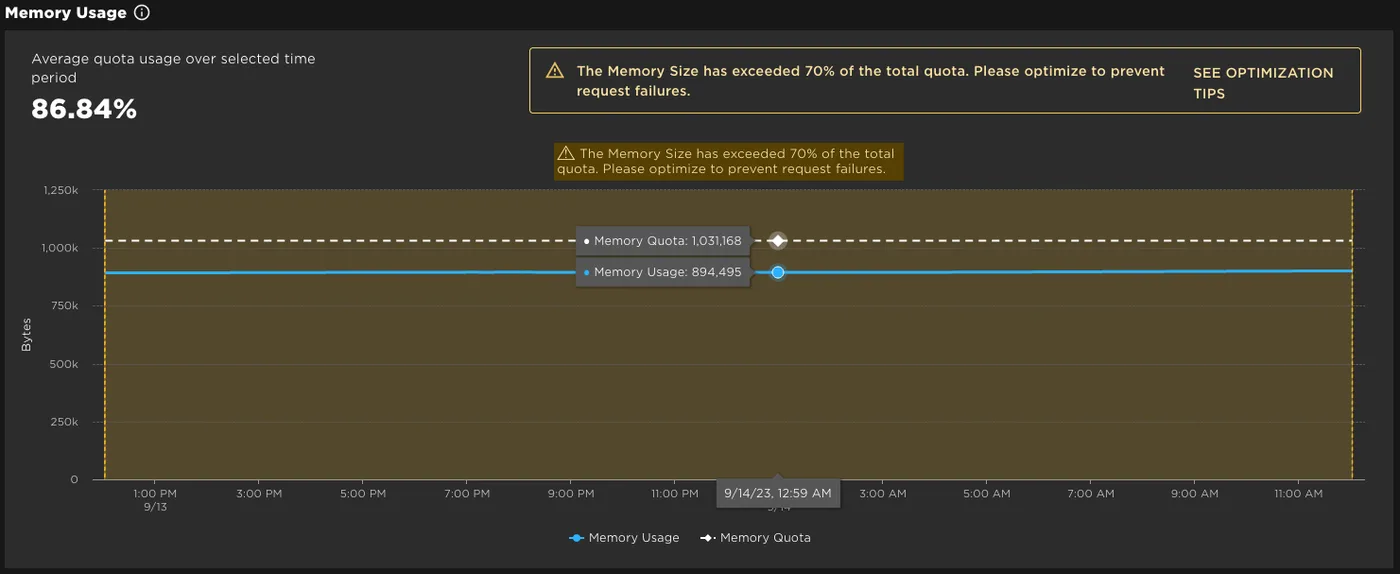
Memory: 64 KB + 1.2 KB × [number of users]. When users join, the extra quota is available immediately. When they leave, it does not shrink right away — there is an eight-day traceback period before the quota re-evaluates downward. Do the arithmetic on a small game and the number gets uncomfortable fast: at 100 concurrent users you have roughly 184 KB of total memory store space across the entire experience. That is under six items at the 32 KB ceiling.
Once you hit the memory quota, any request that would increase memory size fails. Requests that decrease it or leave it unchanged keep working — so a game that blows its quota can still read and delete its way out.
Requests: 1000 + 120 × [concurrent users] request units per minute, again game-wide. That allowance is shared across every server, which is flexible — one busy lobby can burn more than its share — and also means one badly written loop can starve the rest of your game.
Request units are not requests
Most calls cost one unit. The exceptions are where budgets quietly vanish:
MemoryStoreSortedMap:GetRangeAsync()costs one unit per item returned. Ten items back, ten units. An empty response costs one.MemoryStoreQueue:ReadAsync()costs per item returned, plus an additional unit every two seconds it spends waiting. That is thewaitTimeoutparameter doing damage.MemoryStoreHashMap:UpdateAsync()costs a minimum of two units.MemoryStoreHashMap:ListItemsAsync()costs [partitions scanned] + [items returned].
Put a number on it. A leaderboard panel that pulls the top 100 through GetRangeAsync() once every ten seconds spends 600 request units a minute — from one server. The base allowance before a single player joins is 1,000. Cache the result in a Luau variable and refresh on a timer, or that panel is your whole budget.
There is a second ceiling underneath the game-level one: exceeding 100,000 request units per minute against a single data structure returns DataStructureRequestsOverLimit.
Partitions are the limit you will actually hit
Memory stores write every item to exactly one partition, and partitions are fully managed for you. When hash maps shipped, Roblox added a single global per-partition throttling limit on top of the ceilings above — every data structure is constrained by it.
The consequence is structural, not a tuning detail. A sorted map or a queue lives on one partition. Every request to it lands on that same partition.
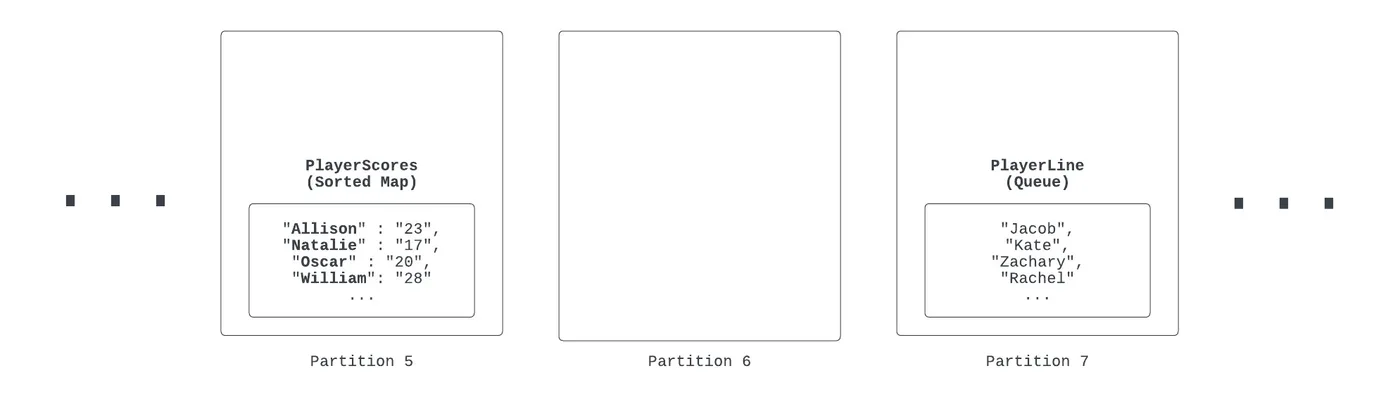
A hash map, by contrast, exists on all of them, with its items distributed automatically.
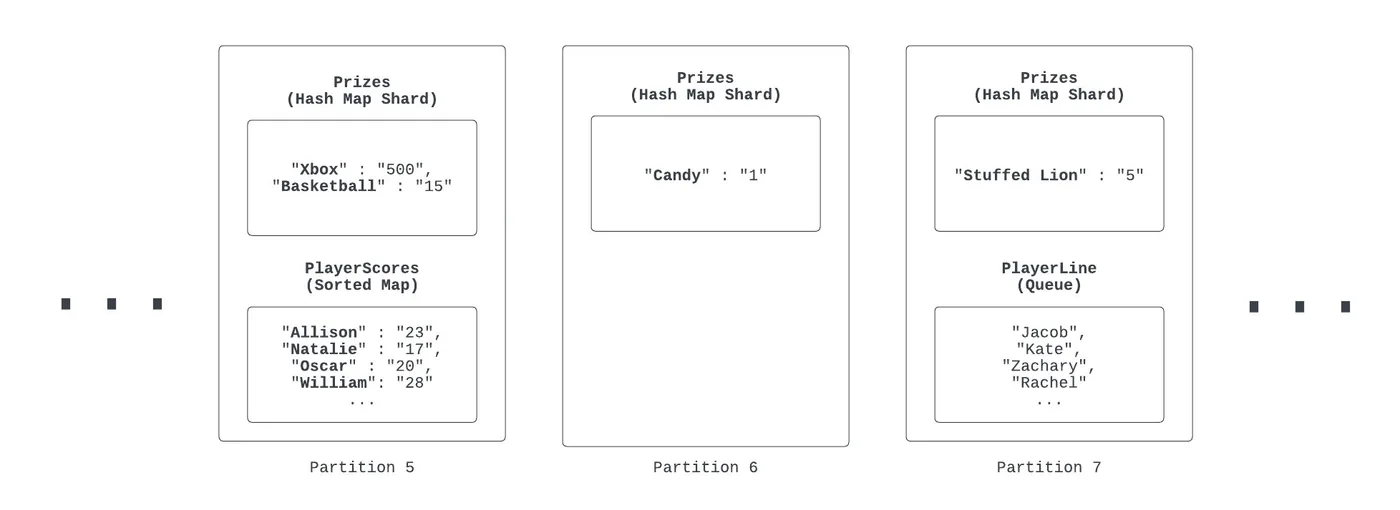
So with an illustrative per-partition limit, a sorted map and a queue are each capped at that limit, while a hash map spreading requests across many item keys clears it several times over. The catch is in the same paragraph: individual hash map item keys are still rate limited, so if most of your traffic targets one key you get throttled anyway.
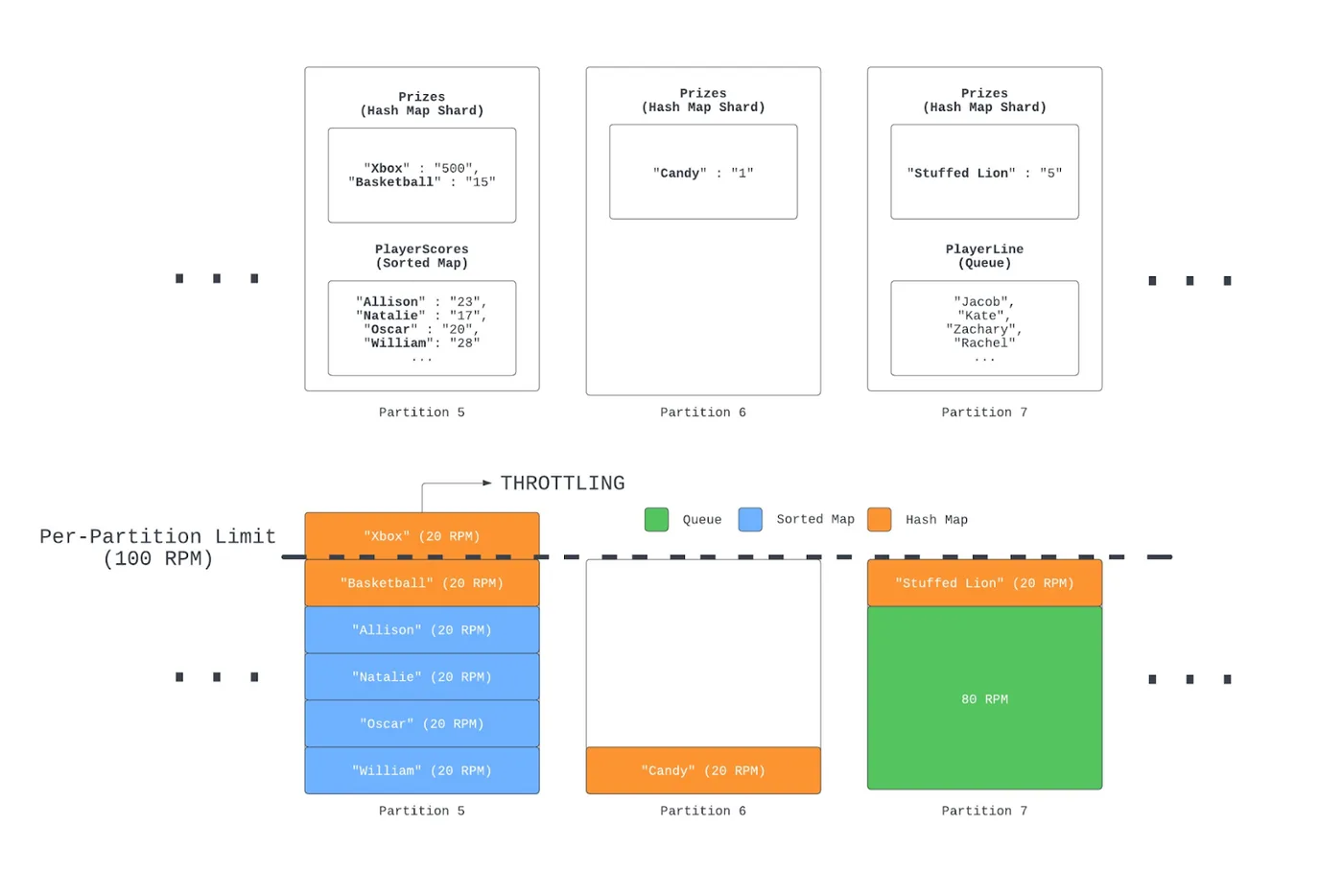
Roblox's own conclusion is worth quoting plainly: "if you don't need sorting or 'first in, first out' functionality, hash maps are usually the best choice for a memory store data structure."
The related anti-pattern is one line of code that looks completely reasonable. Store all your cross-server metadata as a nested object under a key called metadata, and every server that needs any field calls GetAsync("metadata") — all traffic to one key, therefore one partition. Store each field under its own prefixed key (metadata_user_count rather than user_count) and the hash map's automatic sharding starts working for you. For a key that genuinely is hot, the fix is to duplicate the same value across several keys and spread reads between them.
For sorted maps, which cannot spread, sharding means splitting by key prefix into several maps — the docs sketch four maps covering A–G, H–N, O–T and U–Z, with a helper function picking the bucket. Queues shard through a revolving pattern: an array of queues with separate read and add pointers that rotate on each operation.
A global leaderboard in a sorted map
Sorted maps take an optional sort key on write, and the sort key outranks the key itself when ordering. Ascending order puts numeric sort keys first, then string sort keys, then items with no sort key at all; ties on the sort key break alphabetically by key.
local MemoryStoreService = game:GetService("MemoryStoreService")

local sortedMap = MemoryStoreService:GetSortedMap("Leaderboard")

local function updateLeaderboard(itemKey, killsToAdd, deathsToAdd)
	local success, newStats, newScore = pcall(function()
		return sortedMap:UpdateAsync(itemKey, function(playerStats, playerScore)
			playerStats = playerStats or { kills = 0, deaths = 0 }
			playerStats.kills += killsToAdd
			playerStats.deaths += deathsToAdd
			-- playerScore is the sortKey the map orders on
			playerScore = playerStats.kills / math.max(playerStats.deaths, 1)
			return playerStats, playerScore
		end, 30)
	end)
	if success then
		print(newStats, newScore)
	end
end
UpdateAsync() is the method that makes this safe under concurrency, because it always modifies the latest value. When two servers collide, the system retries automatically until one of three things happens: the call succeeds, your callback returns nil, or it hits the maximum retry count and returns a conflict. Returning nil is the documented abort switch — that is how the auction example in the docs refuses a bid lower than the current high bid instead of fighting for the write.
Reading the board back is GetRangeAsync(Enum.SortDirection.Ascending, count, lowerBound, upperBound), where the bounds are tables carrying key and sortKey. To page through a large map, feed the last item you received back in as the next exclusive lower bound.
The honest tradeoff against OrderedDataStore: a memory store leaderboard is fast, cheap to update, and gone when its items expire — 45 days is the ceiling, and the docs push you toward far shorter expirations than that. An ordered data store persists across sessions but spends durable-storage budget (list operations sit at 300 + concurrent users × 2 per minute) on data you are rewriting constantly. The shape that falls out of the two descriptions: live season board in a sorted map, final standings written once to an ordered data store when the season closes.
Matchmaking in a queue: the invisibility timeout is the whole trick
MemoryStoreService:GetQueue() takes a name and an optional invisibility timeout in seconds, defaulting to 30. When a server reads an item, that item goes invisible to every other server for the duration of the timeout. Read it, act on it, then RemoveAsync() it before the clock runs out.
Miss the window and the item becomes visible again — which is the failure mode you want. If your matchmaking server crashes mid-match-creation, those players return to the queue instead of vanishing.
local MemoryStoreService = game:GetService("MemoryStoreService")

local queue = MemoryStoreService:GetQueue("Matchmaking", 30)

-- A lobby server adds a player, expiring the entry after 5 minutes
local addSuccess, addError = pcall(function()
	queue:AddAsync(player.UserId, 300, 0)
end)
if not addSuccess then
	warn(addError)
end

-- The matchmaking server pulls four, then removes them
while true do
	local readSuccess, items, id = pcall(function()
		return queue:ReadAsync(4, true, 20)
	end)
	if not readSuccess then
		task.wait(1)
	elseif items and #items > 0 then
		createMatchFor(items)
		local removeSuccess, removeError = pcall(function()
			queue:RemoveAsync(id)
		end)
		if not removeSuccess then
			warn(removeError)
		end
	end
end
The parameters are worth knowing exactly. ReadAsync(count, allOrNothing, waitTimeout) caps count at 100. allOrNothing defaults to false, meaning a short queue returns whatever it has; set it true and a queue with three players in it returns nothing at all, which is what you want when a match needs exactly four. waitTimeout defaults to -1, which waits indefinitely, retrying every two seconds — and remember each of those two-second polls costs a request unit. Set a real timeout.
AddAsync(value, expiration, priority) takes a priority as its third argument; leave it empty or pass 0 for plain FIFO, or pass a number to turn it into a priority queue — which is where skill ratings go. GetSizeAsync() takes an optional excludeInvisible boolean, defaulting to false, so by default your queue size includes items another server is already mid-way through processing.
Once a match is assembled, moving the players is a TeleportService job — usually into a reserved server.
Testing this without lying to yourself
Three hard gates first. MemoryStoreService must be called from the server (InvalidClientAccess otherwise), the place must be published (UnpublishedPlace), and every single call is an asynchronous network call that can fail — which is why each memory store data structure page carries a standing warning to wrap these calls in pcall(). Treat an unwrapped memory store call the same way you would treat an unwrapped DataStore call.
Studio behaviour has one very good property and two traps. The good part: memory store data is isolated between Studio and production, so testing in Studio cannot corrupt live data. The traps: Studio testing runs under the same quota formulas, and since you are the only user, those quotas come out tiny — 64 KB plus change, and 1,000-odd request units a minute. Roblox also notes slightly higher latency and elevated error rates in Studio than in production, from the extra access checks. A system that looks throttled in Studio may be fine live, and a system that looks fine in Studio has not been load-tested at all.
For the real picture, the Memory Stores observability dashboard sits on the Creator Dashboard under Monitoring ⟩ Memory Stores, holds 30 days of data, and returns a Request Failed error if you ask for a longer window. Four built-in email alerts fire at most once per day each:
- Warning — memory usage exceeded 70% of quota in the past hour
- Critical — memory size quota exceeded in the past hour
- Critical — more than 20% of memory store requests failed in the past hour
- Critical — more than 10% of requests throttled in the past hour
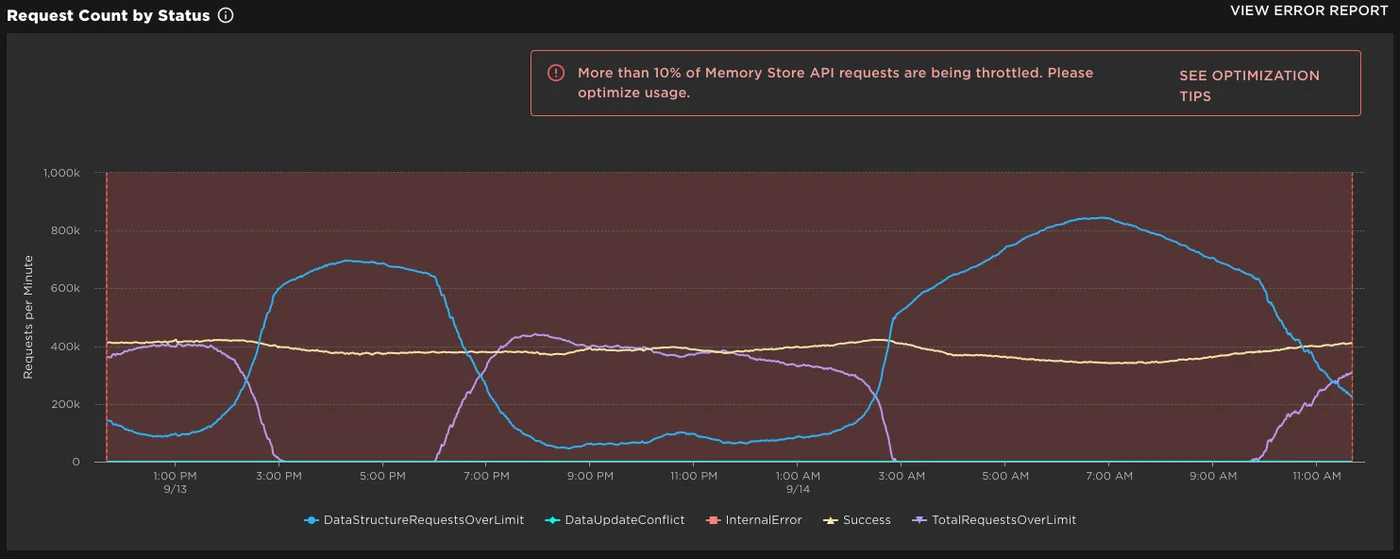
One reading tip on the Request Count by Status chart: ReadAsync() polls every two seconds and returns NoItemFound until items appear, so an idle matchmaking loop generates a wall of NoItemFound that is not an error. What matters is the Success-to-NoItemFound ratio, and whether DataStructureRequestsOverLimit or TotalRequestsOverLimit are climbing. For DataUpdateConflict, the documented fix is exponential backoff — retry at two seconds, then four, then eight — rather than hammering the same key.
Quick Action Checklist
- Route ephemeral cross-server state through
MemoryStoreService, and keepDataStoreServicefor what must survive the session. - Use
MessagingServiceto announce that state changed, never to carry the state itself — delivery is explicitly best effort. - Split chatty announcements across topics; the per-topic receive limit scales with server count, not players.
- Default to a hash map unless you need ordering (sorted map) or ordered processing (queue).
- Never store all your metadata under one key. Prefix each field into its own key so automatic partitioning can work.
- Budget request units, not requests:
GetRangeAsync()andReadAsync()charge per item returned. - Cache range reads in a Luau variable and refresh on a timer instead of polling the map.
- Set the shortest expiration that works, and delete processed items explicitly — expiration is the safety net, not the cleanup plan.
- Use
UpdateAsync()for anything two servers can touch, and returnnilfrom the callback to abort cleanly. - Set
allOrNothingtrue and a realwaitTimeouton matchmaking reads; the default waits forever and bills you every two seconds. - Remove queue items inside the invisibility timeout, which is 30 seconds unless you set it on
GetQueue(). - Wrap every call in
pcall(), then watch the observability dashboard for throttle and conflict statuses rather than trusting a Studio test.
Frequently Asked Questions
What is the difference between MemoryStoreService and DataStoreService in Roblox?
How do I build a global leaderboard across all Roblox servers?
Is Roblox MessagingService delivery guaranteed?
What are the MessagingService limits in Roblox?
Why are my Roblox memory store requests being throttled?
Does MemoryStoreService work in Roblox Studio?
Keep Reading
- Roblox Creator Documentation — Memory stores, limits and quotas (official)
- Roblox Creator Documentation — Memory store sorted map (official)
- Roblox Creator Documentation — Memory store queue (official)
- Roblox Creator Documentation — Memory store hash map (official)
- Roblox Creator Documentation — Partitions and per-partition limits (official)
- Roblox Creator Documentation — Memory store observability (official)
- Roblox Creator Documentation — Cross-server messaging (official)
- Roblox Creator Documentation — MessagingService class reference (official)
- Roblox Creator Documentation — MemoryStoreQueue class reference (official)
- Roblox Creator Documentation — Data store error codes and limits (official)
Related Guides
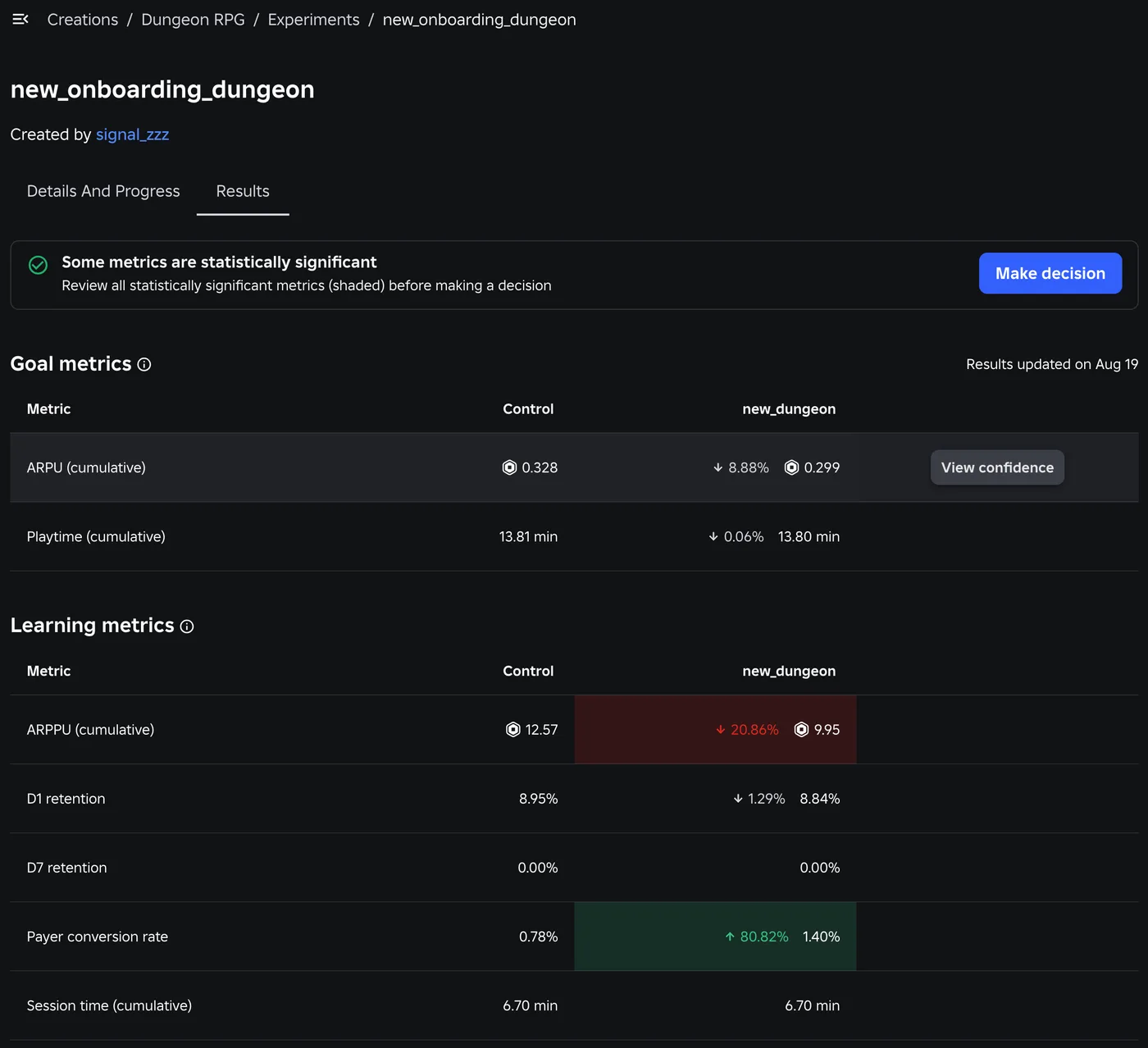
Roblox A/B Testing: Experiments and ConfigService Guide
Roblox has a built-in A/B testing system: configs hold the values, Experiments splits players between them, and since October 1, 2026 early harm detection watches the first 24 hours. Here is the rollout math, the one method call that decides who gets enrolled, the harm thresholds, and what Make decision actually does to your configs.
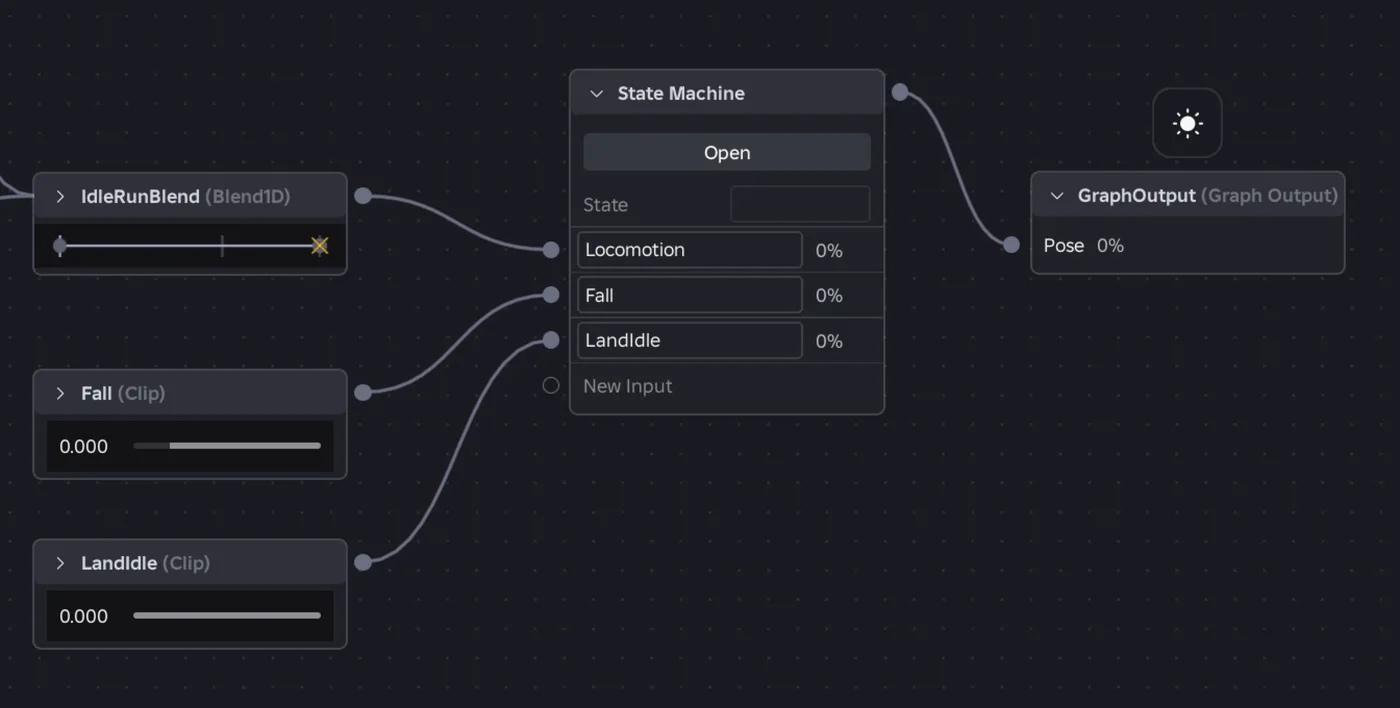
Roblox Animation Graph Editor: Blends and State Machines
Animation graphs left beta on July 15, 2026, and on October 8 Roblox added State Machine nodes and Expressions as a Studio beta. Here is how a graph loads like any animation, what each of the 15 node types does, how SetParameter drives it, what the beta features can't do in a live game yet, and who runs the graph under each authority mode.

Roblox Collision Summaries: Impact Speed, Point and Normal
Touched tells you what your part hit. BindToCollisionSummaries, live since October 6, 2026, tells you where, from which direction and how hard. Here are the seven fields, why one bump arrives as several summaries, the Normal field Roblox's own pages describe two ways, and the network-ownership rule that decides which machine sees a summary at all.
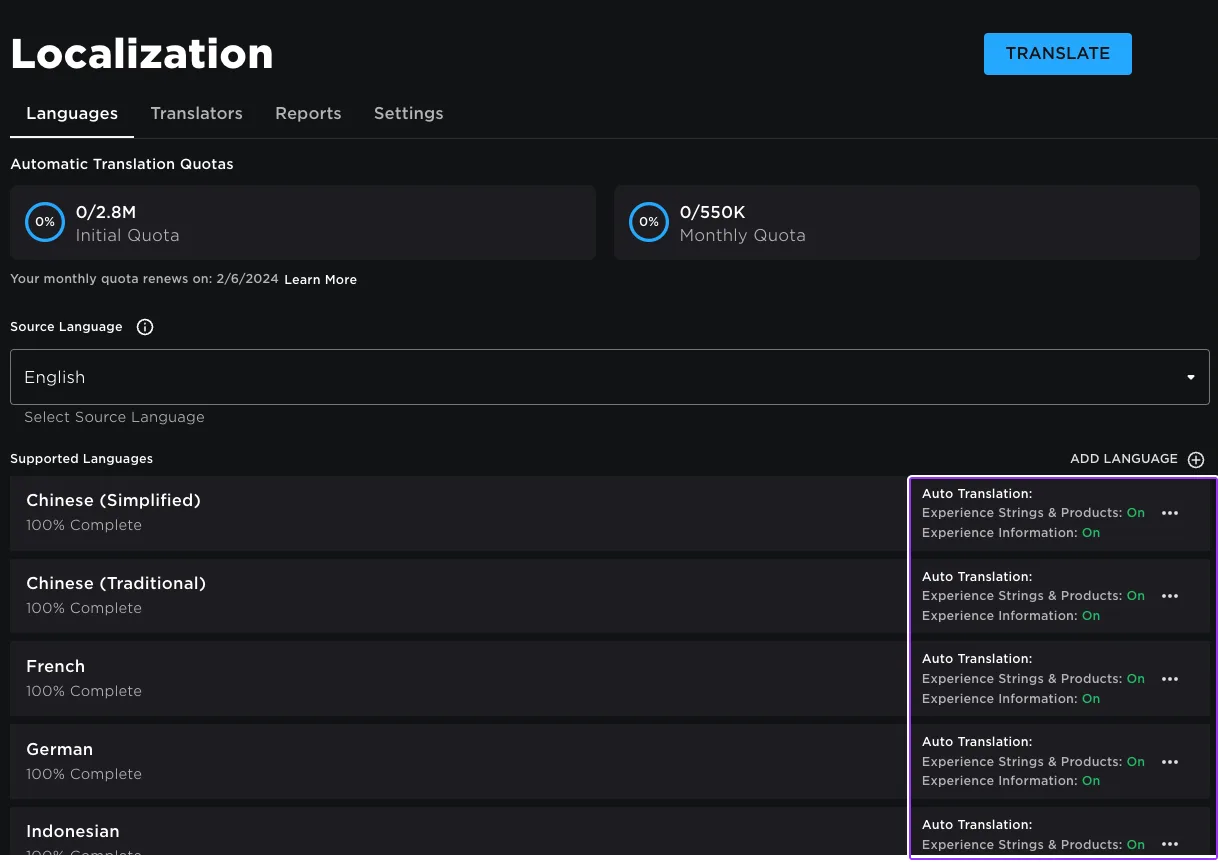
Roblox Localization: How to Translate Your Game
Since June 2026, any player can switch on Automatic Translations and read your game through Roblox's machine translator, whether or not you ever opened the Localization page. Here is what gets translated, how to stop it on text that should stay put, the five kinds of text automatic capture never sees, and the Translator and real-time APIs that cover the rest.

Best Roblox Games to Play in 2026
Roblox's front page is engagement bait. This is the filtered version: the games with real, sustained player counts and actual staying power, sorted by what you're in the mood for.

How to Get Robux Safely (Legit Ways + Scams to Avoid)
There is no free Robux generator. There never was. Here are the actual legit ways to get Robux without overpaying, the earning methods that really work, and the scams that exist purely to steal your account.