Roblox Studio Plugins: Build, Debug, and Publish
A Roblox Studio plugin is not a game script with extra steps — the plugin global is not passed to ModuleScripts automatically, ChangeHistoryService does nothing at runtime, and Roblox's own tutorial still teaches a method its own reference page marks deprecated. Here is how to build one that actually works: toolbar button, undo support, a dockable widget, saved settings, and what publishing it to the Creator Store pays.

Open Roblox's own reference page for Plugin and it says, in the middle of a code sample, that the plugin global "is not passed to ModuleScripts within the plugin. In order to use it in a ModuleScript, you must explicitly pass it." That is not a beginner mistake being corrected — it is a documented behaviour of the API itself, and it is the first thing that trips up anyone who structures a plugin the way they'd structure a game (main Script requiring a ModuleScript and expecting the same globals to carry over). A second thing worth knowing before you write a line of code: Roblox's own Studio widgets tutorial still walks through Plugin:CreateDockWidgetPluginGui() as of this writing — a method its own class reference marks "Deprecated: This method has been superseded by CreateDockWidgetPluginGuiAsync()." Two official pages, one live contradiction. This guide uses the current method and flags where the docs disagree with themselves.
This vertical has covered building games in Roblox Studio — Studio basics, Luau fundamentals, ModuleScripts — but never building a tool for Studio itself. A plugin is not a game script that happens to run in the editor. It has its own security context (PluginSecurity), its own undo/redo system that does nothing at runtime, and its own distribution and monetization path through the Creator Store that pays differently than the DevEx pipeline covered in the DevEx and monetization guide.
What actually makes a script a plugin
A regular Script becomes a plugin by where it runs, not by anything written in it. Roblox's documentation describes a plugin as "an extension that adds additional features or functionality to Studio," and the plugin global — the object every plugin API hangs off of — only exists when that script executes as a plugin: saved as a local plugin, running under PluginDebugService, or installed from the Toolbox. Run the exact same source as a normal Script in ServerScriptService and plugin is nil.
That single global is also where the ModuleScript gap above comes from. Plugin reference documentation gives the fix directly: pass plugin into an Initialize function on the module rather than expecting the module to read a global.
-- Script (the plugin entry point)
local pluginModule = require(script.Parent.PluginModule)
pluginModule:Initialize(plugin)
-- PluginModule (a ModuleScript)
local pluginModule = {}
local plugin

function pluginModule:Initialize(pluginReference)
	plugin = pluginReference
end

return pluginModule
Every plugin method call carries Security: PluginSecurity on its reference page — a different security class than the Script/LocalScript code this vertical's other guides cover, which is also why a plugin can do things an in-game script cannot: reach the Selection service, insert instances directly into ServerStorage from the Explorer, and drive Studio's own undo stack.
Turn on Plugin Debugging before you write anything
Before saving your first plugin, Roblox's tutorial has one setup step: enable Plugin Debugging Enabled in the Studio section of Studio's settings. Doing so "will expose the PluginDebugService in Studio, which provides real-time debugging for your plugin's code and makes it easier to reload and save your plugin." Skip this and every edit means re-saving the plugin file and hoping Studio picks it up; with it on, you get an explicit debugger tree and one-click reload, covered below.
Build a toolbar button: your first plugin
Roblox's own worked example is a plugin called AddEmptyScript that inserts an empty Script as the child of whatever the user has selected, or into ServerScriptService if nothing is selected. It is small enough to read in full and it demonstrates the three pieces every button-driven plugin needs — a toolbar, a button, and a click handler:
local ServerScriptService = game:GetService("ServerScriptService")
local Selection = game:GetService("Selection")

-- Create a new toolbar section and Plugins menu folder titled "Custom"
local toolbar = plugin:CreateToolbar("Custom")

-- Add a toolbar button labeled "Empty Script"
local newScriptButton = toolbar:CreateButton("Empty Script", "Create an empty script", "rbxassetid://14978048121")

-- Make button clickable even if 3D viewport is hidden
newScriptButton.ClickableWhenViewportHidden = true

local function onPluginButtonClicked()
	local selectedObjects = Selection:Get()
	local parent = selectedObjects[1] or ServerScriptService
	local newScript = Instance.new("Script")
	newScript.Source = ""
	newScript.Parent = parent
end

newScriptButton.Click:Connect(onPluginButtonClicked)
Plugin:CreateToolbar(name) both creates a labeled section in the Plugins ribbon tab and a matching folder in the Plugins menu — the code above's "Custom" argument is what produces the section you see below. PluginToolbar:CreateButton() takes a label, a tooltip ("Create an empty script"), and an icon asset id, and returns a PluginToolbarButton whose Click event is your entry point. ClickableWhenViewportHidden is worth setting explicitly — its default lets a plugin button go dead the moment the 3D viewport isn't visible, which is exactly the state a docked plugin widget puts Studio into.
Save it locally, then reload without restarting Studio
A plugin script has to exist somewhere Studio treats as a plugin, not as game content. The path:
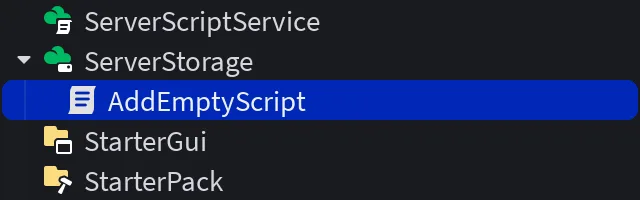
- Insert a
ScriptinsideServerStorageand rename itAddEmptyScript. - Paste the code above into it.
- With the script selected in the Explorer, choose Save as Local Plugin from Studio's Plugins menu, then Save in the popup — this "insert[s] the plugin script into your local Plugins folder of the Studio installation."
- The plugin appears under
PluginDebugServiceand starts running immediately.
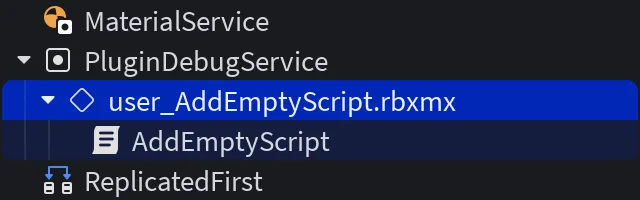
- Delete the original script in
ServerStorageand keep editing the copy insidePluginDebugService— Roblox's documentation calls this out as important, "otherwise you may end up applying changes to the wrong script." TheServerStoragecopy is a one-time source for the save step, not a live-edited original.
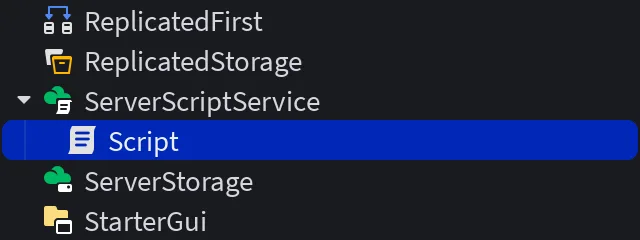
Click the button and a new empty Script lands wherever you had selected, or in ServerScriptService if nothing was:
From then on, edits go through PluginDebugService itself: right-click the plugin there and choose Save and Reload Plugin to push a change, or Reload Plugin to re-run without re-saving — useful for stepping through a breakpoint without persisting a half-finished edit. Right-clicking PluginDebugService itself and choosing Save and Reload All Plugins in Debugger (Ctrl+Shift+L / ⌘+Shift+L) reloads everything you're debugging at once.
Add undo and redo with ChangeHistoryService
Any plugin that changes the place — moving parts, setting properties, inserting instances — has to register those changes with ChangeHistoryService, or a player's <kbd>Ctrl</kbd>+<kbd>Z</kbd> simply won't touch what the plugin did. Roblox's class reference states plugin developers "must use ChangeHistoryService to tell Studio how to undo and redo changes," and separately notes that the service "is not enabled at runtime, so calling its methods in a running experience has no effect" — it is an editor-only system, not something to reach for inside a published game.
The pattern is begin, act, finish:
local ChangeHistoryService = game:GetService("ChangeHistoryService")
local Selection = game:GetService("Selection")

local toolbar = plugin:CreateToolbar("Example Plugin")
local button = toolbar:CreateButton("Neon it up", "", "")

button.Click:Connect(function()
	local recording = ChangeHistoryService:TryBeginRecording("Set selection to neon")
	if not recording then
		-- Only one recording per plugin can be active at a time.
		return
	end

	for _, instance in Selection:Get() do
		if instance:IsA("BasePart") then
			instance.Material = Enum.Material.Neon
		end
	end

	ChangeHistoryService:FinishRecording(recording, Enum.FinishRecordingOperation.Commit)
end)
TryBeginRecording() returns nil if your plugin already has a recording open — the docs are explicit that "you may only have one recording per plugin active at a time" — so the nil check above isn't defensive boilerplate, it's the documented failure mode. FinishRecording() takes the identifier plus an Enum.FinishRecordingOperation, which is one of three values, not just "commit or don't":
| Operation | What it does |
|---|---|
Commit | Adds the recorded changes to the undo/redo history as a new waypoint |
Cancel | Discards the recording and reverts the changes it captured; the identifier argument is ignored |
Append | Merges the recording into the waypoint immediately before it instead of creating a new one |
The older SetWaypoint(name) API still exists but its own reference page states it "will be deprecated soon in favor of TryBeginRecording()" — new plugins should skip it. If you do encounter it in older sample code, the convention documented for it is to call it after a set of changes, never before.
Build a dockable UI with a DockWidgetPluginGui
A toolbar button that just fires an action is one shape of plugin; a plugin with its own persistent panel is built on DockWidgetPluginGui. A custom widget starts from Plugin:CreateDockWidgetPluginGuiAsync(), which takes a unique string id and a DockWidgetPluginGuiInfo object built with exactly seven positional arguments, in this order:
| # | Parameter | Type | Default |
|---|---|---|---|
| 1 | InitialDockState | Enum.InitialDockState | Right |
| 2 | InitialEnabled | boolean | false |
| 3 | InitialEnabledShouldOverrideRestore | boolean | false |
| 4 | FloatingXSize | number | 0 |
| 5 | FloatingYSize | number | 0 |
| 6 | MinWidth | number | 0 |
| 7 | MinHeight | number | 0 |
local widgetInfo = DockWidgetPluginGuiInfo.new(
	Enum.InitialDockState.Float, -- initial dock state
	true,   -- initially enabled
	false,  -- don't override the previously saved enabled state
	200,    -- floating width
	300,    -- floating height
	150,    -- minimum width
	150     -- minimum height
)

local testWidget = plugin:CreateDockWidgetPluginGuiAsync("TestWidget", widgetInfo)
testWidget.Title = "Test Widget"
The pluginGuiId string ("TestWidget" above) is not cosmetic — it is "used to save the state of the widget's dock state and other internal details" between Studio sessions, which is what InitialEnabledShouldOverrideRestore is for: leave it false and a returning user's last enabled/disabled state wins over InitialEnabled; set it true and your InitialEnabled value always wins. MinWidth/MinHeight are floors, not guarantees — the datatype reference notes "each platform has its own absolute minimum that Roblox will enforce," giving the example that "on a Mac, the width can never be less than ~80 pixels" to leave room for the window's close/minimize/maximize buttons.
This is also the exact spot where Roblox's own documentation disagrees with itself, noted at the top of this guide: the class reference marks the older Plugin:CreateDockWidgetPluginGui() (no "Async") as deprecated in favor of the method above, but the tutorial page walking through widget construction still uses the deprecated, synchronous name in its sample code as of this writing. Both methods take identical arguments and both currently work — use CreateDockWidgetPluginGuiAsync, since it's the one the reference page says to use going forward.
Fill the widget with ordinary GuiObjects parented to it just like a ScreenGui — the UI design basics guide covers Frame/TextButton/UDim2 mechanics that apply unchanged here. Roblox also maintains a StudioWidgets GitHub repo of pre-built, dark-theme-aware checkboxes, radio buttons, and input fields specifically so third-party widgets don't look out of place next to Studio's own panels.
Two gaps a widget has that a game script does not
Theme. A widget that ignores Studio's light/dark setting looks broken next to native panels. Sync it by reading Enum.StudioStyleGuideColor values through the current theme and re-applying them on change:
local function setColors(objects)
	for _, guiObject in objects do
		guiObject.BackgroundColor3 = settings().Studio.Theme:GetColor(Enum.StudioStyleGuideColor.MainBackground)
		guiObject.TextColor3 = settings().Studio.Theme:GetColor(Enum.StudioStyleGuideColor.MainText)
	end
end

setColors({ testButton })
settings().Studio.ThemeChanged:Connect(function()
	setColors({ testButton })
end)
Input. UserInputService, the service most in-game UI relies on for key and mouse events, "doesn't work [in a widget] since these services expect the main game window to be in focus." The documented workaround is a transparent Frame stretched over the widget that listens for InputBegan directly, rather than reaching for UserInputService at all:
local frame = Instance.new("Frame")
frame.BackgroundTransparency = 1
frame.Size = UDim2.new(1, 0, 1, 0)
frame.Parent = testWidget

frame.InputBegan:Connect(function(inputObject)
	-- handle keyboard/mouse input scoped to this widget
end)
Persist settings across sessions with GetSetting and SetSetting
Plugin:SetSetting(key, value) and Plugin:GetSetting(key) store a value under your plugin's own storage and return it on later Studio sessions — the standard way to remember, say, whether a user has seen an onboarding message before:
local RAN_BEFORE_KEY = "RanBefore"
local didRunBefore = plugin:GetSetting(RAN_BEFORE_KEY)

if didRunBefore then
	print("Welcome back!")
else
	plugin:SetSetting(RAN_BEFORE_KEY, true)
end
The documented gotcha: "multiple instances of the same plugin can run simultaneously (for example, if multiple Studio windows are open)," and GetSetting() "can silently fail and return nil if multiple instances of the same plugin are actively reading and writing data." Roblox's own recommendation for a plugin that writes settings frequently is to re-check the returned value after a short delay before treating a nil as "this key has never been set," rather than trusting the first read.
Bind a keyboard shortcut without a toolbar button
Not every plugin action needs a visible button. Plugin:CreatePluginAction(actionId, text, statusTip, iconName, allowBinding) creates a PluginAction — an action Studio can list in its keyboard-shortcuts screen and let a user bind a hotkey to — with no toolbar button attached at all:
local pluginAction = plugin:CreatePluginAction(
	"HelloWorldAction",
	"Hello World",
	"Prints a greeting",
	"rbxasset://textures/sparkle.png",
	true -- allowBinding
)

pluginAction.Triggered:Connect(function()
	print("Hello world!")
end)
Set allowBinding to false for an action meant to be triggered contextually — say, from a right-click menu built with the related Plugin:CreatePluginMenu() — rather than something a user should be assigning a global hotkey to.
Publish it, then decide whether to sell it
Publishing and monetizing are separate steps. To publish: select the plugin script in the Explorer, choose Publish as Plugin from the Plugins menu, optionally upload a 512×512 thumbnail, fill in Name, Description, and Creator, then submit — it's now yours under the Toolbox's Inventory and Creations tabs.
Selling it on the Creator Store is a separate, optional distribution step, and Roblox's current documentation is specific about the split: you can "sell a Model or Plugin and earn 100% of net proceeds on transactions... as only taxes and payment processing fees are deducted," explicitly "bypassing platform fees and DevEx rates" — a different, USD-denominated payout path than the Robux-based DevEx system this vertical's monetization guide covers for game passes and developer products. Setting a USD price requires a seller account, administered through Stripe, which per Roblox's account-requirements page needs:
- Being 18 or older, or 13–17 with a parent/guardian reviewing the Creator Store terms and completing the Stripe form
- Roblox account 2-Step Verification enabled
- Residency in a country Stripe's cross-border payouts support — Roblox's own docs flag Brazil, China, India, and Russia as currently unsupported for seller onboarding
Distribution itself — even free plugins — is capped per 30-day window, and the cap depends on account verification status:
| Asset type | Verified account | Unverified account |
|---|---|---|
| Plugins | 10 | 2 |
| Mesh / Image / Model assets | 200 | 10 |
| Audio | 100 | 10 |
Account verification here means passing Roblox's age check or government-ID verification — explicitly not phone verification, which the docs call out as insufficient for this purpose.
Quick Action Checklist
- Enable Plugin Debugging Enabled in Studio's settings before saving anything, so
PluginDebugServiceexposes real-time reload. - The
pluginglobal is not passed intoModuleScripts automatically — pass it explicitly through anInitialize()call. - Build the toolbar with
Plugin:CreateToolbar()+PluginToolbar:CreateButton(), and setClickableWhenViewportHidden = trueif the button should still work while a widget is docked over the viewport. - Save via Save as Local Plugin, delete the original script in
ServerStorage, and keep editing the copy underPluginDebugService— editing the original silently orphans your changes. - Wrap every place-modifying action in
ChangeHistoryService:TryBeginRecording()/FinishRecording(); the service does nothing at runtime, so this only matters in Studio. TryBeginRecording()returnsnil, not an error, if a recording is already open for your plugin — check for it.- Use
Plugin:CreateDockWidgetPluginGuiAsync(), not the deprecated synchronousCreateDockWidgetPluginGui()that Roblox's own tutorial page still demonstrates. UserInputServicedoes not work inside a widget; capture input with anInputBegan-listening transparentFrameinstead.Plugin:GetSetting()can return a falsenilwhen multiple Studio windows run the same plugin at once — don't treat a singlenilread as proof a setting was never set.- Selling on the Creator Store pays 100% of net proceeds (taxes/processing only) but requires a Stripe seller account, 2-Step Verification, and residency outside a short list of unsupported countries — and plugin distribution itself is capped at 10 per 30 days even for verified accounts.
Frequently Asked Questions
Why is my Roblox Studio plugin global (`plugin`) nil inside a ModuleScript?
Does ChangeHistoryService work while a Roblox game is running, not just in Studio?
Should I use Plugin:CreateDockWidgetPluginGui or CreateDockWidgetPluginGuiAsync?
Why does UserInputService not work inside a Roblox Studio plugin widget?
How much money do developers actually keep from selling a Roblox Studio plugin?
How many plugins can I distribute on the Roblox Creator Store per month?
Keep Reading
- Roblox Creator Documentation — Studio plugins (official)
- Roblox Creator Documentation — Studio widgets (official)
- Roblox Creator Documentation — Plugin class reference (official)
- Roblox Creator Documentation — ChangeHistoryService class reference (official)
- Roblox Creator Documentation — DockWidgetPluginGuiInfo reference (official)
- Roblox Creator Documentation — Creator Store, distribution limits and seller requirements (official)
- Roblox — StudioWidgets GitHub repository (official, Studio-themed GUI components)
Related Guides
Roblox A/B Testing: Experiments and ConfigService Guide
Roblox has a built-in A/B testing system: configs hold the values, Experiments splits players between them, and since October 1, 2026 early harm detection watches the first 24 hours. Here is the rollout math, the one method call that decides who gets enrolled, the harm thresholds, and what Make decision actually does to your configs.
Roblox Animation Graph Editor: Blends and State Machines
Animation graphs left beta on July 15, 2026, and on October 8 Roblox added State Machine nodes and Expressions as a Studio beta. Here is how a graph loads like any animation, what each of the 15 node types does, how SetParameter drives it, what the beta features can't do in a live game yet, and who runs the graph under each authority mode.
Roblox Collision Summaries: Impact Speed, Point and Normal
Touched tells you what your part hit. BindToCollisionSummaries, live since October 6, 2026, tells you where, from which direction and how hard. Here are the seven fields, why one bump arrives as several summaries, the Normal field Roblox's own pages describe two ways, and the network-ownership rule that decides which machine sees a summary at all.
Roblox Localization: How to Translate Your Game
Since June 2026, any player can switch on Automatic Translations and read your game through Roblox's machine translator, whether or not you ever opened the Localization page. Here is what gets translated, how to stop it on text that should stay put, the five kinds of text automatic capture never sees, and the Translator and real-time APIs that cover the rest.

Best Roblox Games to Play in 2026
Roblox's front page is engagement bait. This is the filtered version: the games with real, sustained player counts and actual staying power, sorted by what you're in the mood for.

How to Get Robux Safely (Legit Ways + Scams to Avoid)
There is no free Robux generator. There never was. Here are the actual legit ways to get Robux without overpaying, the earning methods that really work, and the scams that exist purely to steal your account.