Super Mario 64 Camera Guide: C-Buttons, R and the Fixed Cam
Super Mario 64's camera is a dozen-plus cameras in a trench coat. Here is what every C-button and R press actually does, the LAKITU ↔ STOP setting hiding on the pause screen, why the camera buzzes at you, which camera each course loads with, and how it all changes on Switch and DS.
Super Mario 64 keeps its most useful camera setting on the pause screen, one line under Exit Course. Pause inside a course while Mario is standing still and the third option reads SET CAMERA ANGLE WITH R. Open it and you choose what the R button does: switch to a close camera behind Mario, which is the default, or freeze the camera in place for as long as you hold the button. The game even tells you so, on a signpost in Whomp's Fortress.
That setting is a good way into the whole system, because the camera is not one camera. The n64decomp decompilation of the game's code defines 14 camera modes, gives each area of each level a starting one, and swaps between them as Mario moves. The C-buttons mean different things in different modes, and that is why the same press turns the camera in one room and buzzes at you in the next.
Everything here comes from that decompilation unless a sentence says otherwise, with Ukikipedia and the Super Mario Wiki filling in the history and the other versions. Super Mario 3D All-Stars and the Nintendo Switch Online app both run a version of the N64 game, so the rules carry over; their button layouts and the DS remake's different camera are near the end.
The camera controls in one table
| Input (N64) | What it does | When it refuses |
|---|---|---|
| C-Left / C-Right | Swings Lakitu around Mario | Buzzes when the current camera cannot turn any farther; on the slide courses it only buzzes |
| C-Down | Pulls the camera back one step | A second press buzzes, because you are already zoomed out |
| C-Up | Zooms back in if you are zoomed out; otherwise switches to a first-person look | First person needs Mario on the ground, empty-handed and out of the water |
| Control Stick, in first person | Looks around | Mario cannot walk until you leave the view |
| A, B, C-Down, C-Left or C-Right, in first person | Leaves the first-person view | The stick only turns the view |
| R | Toggles Lakitu's camera and Mario cam, or freezes the camera while held, depending on the pause-menu setting | The freeze does not work inside the castle |
The game teaches most of this itself. On a brand-new file, a Lakitu stops Mario on the castle bridge, introduces the Lakitu Bros. as the cameramen filming his progress, and runs through the C-buttons, the buzzer, C-Up and R. A signpost in Bob-omb Battlefield repeats the lesson, and a Lakitu Bros. bulletin when you enter Whomp's Fortress recaps it. The detail those messages compress is that the C-Up button does two jobs: if C-Down has pulled the camera back, the first C-Up press only undoes that, and you need a second press to get the first-person view.
The setting hidden in the pause menu
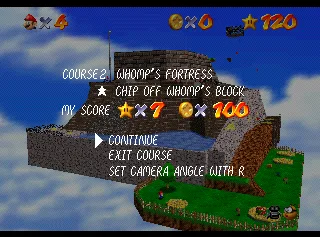
Move the cursor to SET CAMERA ANGLE WITH R and two choices appear side by side:
| Choice on screen | What R does | Its label underneath |
|---|---|---|
| LAKITU ↔ MARIO | Each press toggles between Lakitu's camera and Mario cam | (NORMAL)(UP-CLOSE) |
| LAKITU ↔ STOP | Holding R stops Lakitu where he is; letting go releases him | (NORMAL)(FIXED) |
Moving the cursor to a choice selects it, and closing the pause menu keeps it. The Whomp's Fortress sign labelled OBSERVATION PLATFORM spells out the same instruction: pause, switch the mode, and hold R to fix the camera in place. The rules around it, from the decompiled code:
- It only appears in a course, with Mario stopped. Pausing inside the castle or on its grounds opens a different screen with no camera option. In a course, the three options only show when Mario is in a state that allows Exit Course, such as standing, crouching, hanging from a ledge or treading water. Pause mid-run or mid-jump and you get the course and score display without the options.
- It is one or the other. With LAKITU ↔ STOP chosen, R no longer switches to Mario cam at all.
- It lasts until you load a file. The choice carries from course to course; loading a save file sets it back to LAKITU ↔ MARIO.
- The freeze stops Lakitu's position, not his aim. While you hold R he stops flying but keeps turning to keep Mario in frame, and the code's own comment notes that he flies to wherever he should be the moment you let go. A click plays when you press and when you release.
- Not inside the castle. The decompiled code skips the freeze in the castle interior and plays the buzzer instead. The Castle Grounds and the courtyard are separate levels, and it works there.
Ukikipedia adds one more use for it: freezing the camera keeps it from following Mario into a parallel universe, which would crash the game. That matters for glitch hunters, not for a normal playthrough.
Mario cam: what R does by default
The castle-bridge Lakitu calls his own camera the recommended angle. The Bob-omb Battlefield sign describes Mario cam as directly behind Mario, and the Whomp's Fortress sign says it always follows him. The decompiled code shows what that means in practice:
- It is close. The follow camera works at 800 units from Mario as Lakitu and 350 as Mario cam.
- It overrides the course's camera. With Mario cam on, the code replaces nearly every special camera, including the course-centred ones, the eight-direction stages, the fixed-angle rooms, the slides and the boss fights, with that same close follow camera. Swimming underwater, the water's surface, the first-person view and the inside of a cannon keep their own cameras.
- Warps turn it off. Each time a warp loads Mario into a new area, such as jumping into a painting, taking a pipe or moving between castle floors, the game resets the camera to Lakitu. Your pause-menu choice survives; the Mario cam itself does not, so press R again.
- C-Down still works with it, and if Lakitu was zoomed out when you switched, he goes back to that distance when you switch back.
That makes Mario cam the way out of a fixed angle. In the castle lobby and in the rooms of Big Boo's Haunt's mansion, where the code anchors Lakitu to a set point, one press of R gives you a camera that follows Mario instead.
Why the camera buzzes
The Lakitu Bros. bulletin in Whomp's Fortress explains the buzzer in one line: it sounds when you cannot move the camera any farther. In the code, that covers five situations:
| You pressed | Where | What the buzz means |
|---|---|---|
| C-Left or C-Right | A course-centred or outward camera | Lakitu is already at his limit on that side |
| C-Down | Anywhere you can zoom | You are already zoomed out |
| C-Left, C-Right or C-Down | A fixed-angle room, such as the castle lobby | This camera does not turn or zoom; C-Up still works |
| Any C-button | The slide courses, or riding Hoot | The slide camera stays locked behind Mario |
| R | Inside the castle, with LAKITU ↔ STOP chosen | The freeze is switched off indoors |
One version note: on the original 1996 Japanese cartridge, a second C-Down press stays silent. The North American, European, Shindou and iQue builds in the decompilation all buzz.
Each area loads its own camera
The level data gives every area a starting camera, triggers in some rooms and on some floors switch it, and most of the C-button behaviour follows from which one you are in:
| Camera | How it behaves | Where you meet it |
|---|---|---|
| Course-centred (radial) | Lakitu stays on the far side of Mario from a fixed point the level sets, looking in toward it. The first C-Left or C-Right turns him 60 degrees off that line, a second press 105, and the opposite button brings him back | Bob-omb Battlefield, Whomp's Fortress, Cool, Cool Mountain's mountainside, Lethal Lava Land's lava sea, Shifting Sand Land's desert, Tall, Tall Mountain's mountainside, Wet-Dry World's main room, both islands of Tiny-Huge Island, the Secret Aquarium |
| Outward (outward radial) | The reverse: Lakitu sits between that point and Mario and looks out at him. One 60-degree step each way | Tick Tock Clock, the inside of Lethal Lava Land's volcano, the first area of Dire, Dire Docks |
| Eight-direction | Each C-Left or C-Right press turns the view 45 degrees, all the way around | Rainbow Ride, Vanish Cap Under the Moat, Bowser in the Dark World, Bowser in the Fire Sea, Bowser in the Sky |
| Follow (close and free roam) | Lakitu trails Mario with no fixed point; the code runs both names through one routine | Big Boo's Haunt, the castle's upper floors and basement, the Castle Grounds and courtyard, Hazy Maze Cave, Jolly Roger Bay, Snowman's Land, Wiggler's cave, Eyerok's room, Tower of the Wing Cap, Cavern of the Metal Cap, Wing Mario Over the Rainbow |
| Fixed | Lakitu is anchored to a set point and turns to follow Mario. In Big Boo's Haunt he stays on that point; in the castle lobby the code lets him slide part of the way toward Mario | The castle lobby, and room by room in Big Boo's Haunt's mansion |
| Slide | Locked behind Mario | The Princess's Secret Slide and the slides in Cool, Cool Mountain and Tall, Tall Mountain |
| Boss | Aims at the point between Mario and the boss and pulls back as they move apart | The three Bowser arenas |
Apart from the Big Boo's Haunt rooms, those are the cameras each area loads with; a few more switches happen as you move. Riding Hoot in Whomp's Fortress puts you on the slide camera. The floors of King Bob-omb's and the Whomp King's arenas switch on the boss camera, which in Whomp's Fortress only happens on the first mission, when the Whomp King is there. Inside the castle, the doorways swap between the lobby's fixed camera and a close follow camera in each room.
On a course-centred camera with Lakitu centred, the view looks in toward the level's fixed point, and because the stick is read relative to the camera, pushing forward heads that way. It is also why the C-buttons there give you a few set angles rather than a free orbit. The Tick Tock Clock guide and the Rainbow Ride guide cover two of the courses that use the outward and eight-direction cameras.
Why Lakitu moves on his own
Three things in particular move the camera without a button press:
- Walls. On a course-centred camera, when a wall blocks Lakitu's view of Mario and you are not turning him, the code rotates him away from it, up to that same 105-degree limit.
- Camera floors. Some floors in the level data turn or re-centre the camera the moment Mario steps onto them. The decompilers' own example is Bob-omb Battlefield, where walking through the gate turns the camera to face up the hill path.
- Area switches. The region swaps in the previous section, such as the castle's doorways, the mansion rooms and Hoot.
Holding R on LAKITU ↔ STOP pins his position against all three; he still turns to watch Mario. Switching to Mario cam swaps the course-centred camera, along with its wall-dodging and camera floors, for the plain follow camera.
C-Up, and the warp that needs it
The first-person view has stricter rules than it looks. Per the decompiled code:
- Mario has to be on the ground. Press it while he is walking or crouching and he stops and stands first. It does not work in the air, in the water or while he is carrying something.
- The stick turns his head. He stays put until you leave the view with A, B, C-Down, C-Left or C-Right, or until something interrupts him, such as an enemy landing on him or the floor dropping away.
- It works in fixed-camera rooms, where the other C-buttons only buzz, and that matters for one specific spot.
That spot is the castle lobby at 10 Power Stars. The cap guide covers the result: stand in the sunlight on the rug, look up, and you are warped to the Tower of the Wing Cap. The look up is C-Up, not just Lakitu's angle. In the code, the warp fires only when Mario is in the first-person view on that patch of floor, with the view tilted as far up as it goes and pointed toward the light's source, within an arc about 45 degrees wide. If C-Up only zooms the camera in, press it again: the first press was undoing a C-Down. Nothing in that check looks at the red switch, which is why the Super Mario Wiki notes you can return the same way after the light has gone.
Reading the camera icon
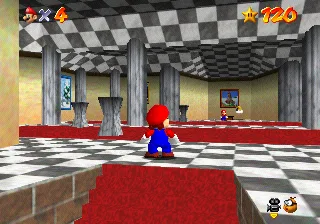
The bottom-right corner of the screen tells you which camera you have. The decompiled HUD code draws a film camera, then a second icon beside it:
| What you see | What it means |
|---|---|
| Lakitu's head | Lakitu's camera, the normal one |
| Mario's head | Mario cam |
| A third, fixed icon | You are holding R on LAKITU ↔ STOP |
| A small arrow under the camera | You are zoomed out with C-Down |
| A small arrow above the camera | You are in the C-Up view |
The Super Mario Wiki identifies the Lakitu sprite as the HUD icon for the normal camera mode. The screenshot above has the zoomed-out arrow showing.
Lakitu is in the castle, and in the credits
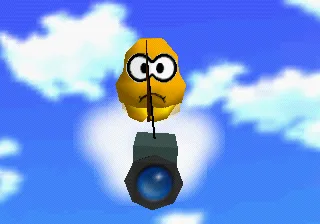
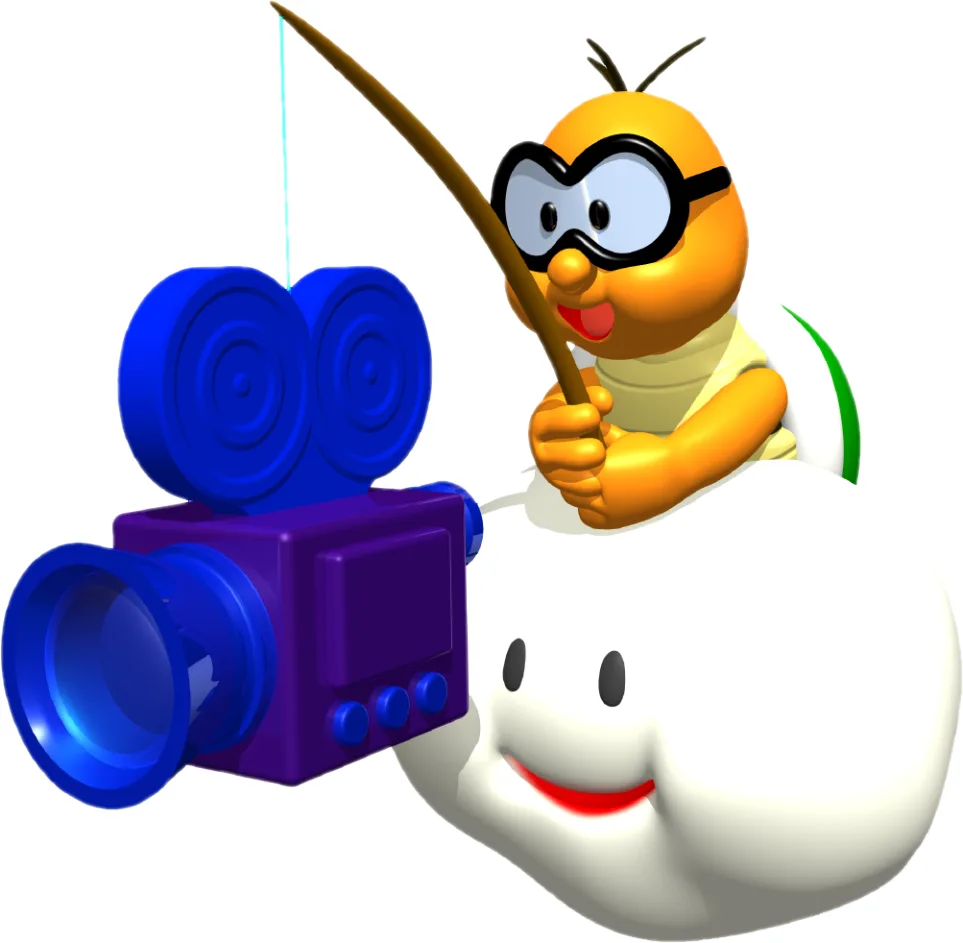
The Super Mario Wiki describes the Lakitu Bros. as camera-carrying Lakitus who film Mario's whole adventure, which is the game's in-world explanation for having a controllable camera at all. Three places make that literal:
- The opening. On a new file, the decompiled behaviour spawns a Lakitu that waits for Mario to step onto the castle bridge, then circles down to deliver the camera lesson. On a file with saved progress, he does not appear.
- The Mirror Room. In the second-floor room with the hidden Snowman's Land entrance, look into the mirror and you can see the Lakitu filming you, floating behind Mario's reflection. The reflection is staged: the castle's level script places a Lakitu object in the room, and its code moves him to the real camera's position flipped across the mirror, so he sits on the far side of the glass, then hides him whenever the camera leaves the stretch of room in front of it.
- The credits. The ending's staff roll credits Takumi Kawagoe as camera programmer, on the card shown during the Big Boo's Haunt shot. In the North American and European builds the same card also credits Giles Goddard as Mario face programmer.
The Super Mario Wiki also lists a camera-shutter click in the opening, at the moment the view switches to Lakitu's perspective, among the sounds the North American release added; the original Japanese release has no such sound.
What changes on Switch and DS
| Version | Camera controls | What else changes |
|---|---|---|
| Nintendo 64 | C-buttons; R for Mario cam or the freeze | The baseline everything above describes |
| Super Mario 3D All-Stars | The right stick stands in for the C-buttons; L or R changes camera mode | Version 1.1.0, released November 16, 2020, added an option to invert the camera controls in all three games, per Nintendo's support page |
| Nintendo Switch Online | On Joy-Con or a Pro Controller, the right stick or ZR plus a face button works as the C-buttons, per the Super Mario Wiki's control table; R is still R | The Super Mario Wiki notes the wireless Nintendo 64 controller for Switch also works |
| Super Mario 64 DS | The L and X buttons; in Dual-Hand mode, the touch screen | Full 360-degree camera control in every course except the Bowser ones, which keep eight fixed angles |
The DS details are from the Super Mario Wiki's page for the remake. The version differences guide covers which build each release runs.
Mistakes that make the camera worse
- Pausing on the move and looking for the setting. The camera option only appears once Mario has stopped. Stand still, then pause.
- Expecting Mario cam to stick. A painting, a pipe or a change of castle floor puts you back on Lakitu. Press R again on arrival.
- Hunting for Mario cam on LAKITU ↔ STOP. That setting takes R away from Mario cam entirely; switch back in the pause menu.
- Turning the camera mid-jump. On the course-centred and eight-direction cameras, each press swings Lakitu a set 60 or 45 degrees, and because the stick is read relative to the camera, forward swings with him. Set the angle before you jump.
- Mashing C-Up in the lobby. If you zoomed out earlier, the first press only zooms back in. Press once more for the first-person view, then tilt all the way up toward the light.
- Fighting a fixed-angle room. In the lobby or Big Boo's Haunt's mansion, the C-buttons cannot turn the camera. R for Mario cam does.
Quick Action Checklist
- Pause while standing still inside a course and open SET CAMERA ANGLE WITH R to choose LAKITU ↔ MARIO or LAKITU ↔ STOP.
- On LAKITU ↔ STOP, hold R to freeze the camera's position for a precise jump; it still turns to follow Mario.
- On LAKITU ↔ MARIO, press R for a close camera behind Mario that overrides fixed rooms, slides and boss cameras.
- Press R again after every painting, pipe or floor change: warps reset you to Lakitu.
- Read the buzz as "this camera cannot go further", not as a broken button.
- Use C-Down to pull back and C-Up to come back in; C-Up again, with Mario on the ground, is the first-person view.
- Leave first person with A, B, C-Down, C-Left or C-Right.
- At 10 stars, stand in the lobby sunlight, enter C-Up and tilt all the way up toward the light to reach the Tower of the Wing Cap.
- Check the bottom-right icon: Lakitu's head is the normal camera, Mario's head is Mario cam, and an arrow means you are zoomed out or in C-Up.
- On Switch, the right stick is your C-buttons; 3D All-Stars has had an invert-camera option since version 1.1.0.
Frequently Asked Questions
How do you control the camera in Super Mario 64?
How do you get a fixed camera in Super Mario 64?
What does the R button do in Super Mario 64?
Why does the camera buzz in Super Mario 64?
How do you look around in first person in Super Mario 64?
How do you move the camera in Super Mario 64 on Nintendo Switch?
Keep Reading
- camera.c (camera modes, C-button input, R-button modes, buzzer, fixed camera, triggers) — Super Mario 64 decompilation (n64decomp)
- camera.h (camera mode list and HUD status flags) — Super Mario 64 decompilation (n64decomp)
- ingame_menu.c (pause menu and camera options) — Super Mario 64 decompilation (n64decomp)
- text_strings.h.in (SET CAMERA ANGLE WITH R and option labels) — Super Mario 64 decompilation (n64decomp)
- dialogs.h (Lakitu Bros. messages and camera signposts) — Super Mario 64 decompilation (n64decomp)
- hud.c (camera status icon) — Super Mario 64 decompilation (n64decomp)
- mario_actions_stationary.c (first-person view and the sunlight warp check) — Super Mario 64 decompilation (n64decomp)
- mario.c (when first person is allowed) — Super Mario 64 decompilation (n64decomp)
- sm64.h (action flags for first person and pause exit) — Super Mario 64 decompilation (n64decomp)
- level_update.c (camera reset on warps and file load; credits) — Super Mario 64 decompilation (n64decomp)
- camera_lakitu.inc.c (intro Lakitu and the Mirror Room Lakitu) — Super Mario 64 decompilation (n64decomp)
- Castle interior level script (Mirror Room Lakitu placement) — Super Mario 64 decompilation (n64decomp)
- Whomp's Fortress object placements (OBSERVATION PLATFORM sign) — Super Mario 64 decompilation (n64decomp)
- Bob-omb Battlefield object placements (camera signpost) — Super Mario 64 decompilation (n64decomp)
- Tick Tock Clock area geo layout (starting camera mode; every area has one) — Super Mario 64 decompilation (n64decomp)
- Camera — Ukikipedia
- Lakitu Bros. — Super Mario Wiki
- Super Mario 64 — Super Mario Wiki
- Tower of the Wing Cap — Super Mario Wiki
- Super Mario 64 DS — Super Mario Wiki
- Super Mario 3D All-Stars — Super Mario Wiki
- How to Update Super Mario 3D All-Stars — Nintendo Support
Related Guides
Super Mario 64 Myths and Rumors, Debunked
A blurry plaque in Peach's Castle produced a $100 bounty from IGN, an April Fools joke from Nintendo, and a 2020 source-code leak that made the rumor half-true in the strangest way possible. Here is what "L is real 2401" actually says, why Ninja Mario and DS-era Waluigi were never real, and what got cut from Super Mario 64 for genuine, documented reasons.

How to Fly in Super Mario 64: Dive for Speed, Then Climb
Wing Mario can't flap for height. Every bit of height costs speed and every dive buys it back. Here is how takeoff works, the one glide the code holds steady, why the nose lifts on its own, how each flight ends, and the A-button trick that cancels fall damage.
Super Mario 64 Swimming Guide: Tap A, Don't Hold It
Holding A is the slow way to swim in Super Mario 64. Here is the stroke rhythm the code rewards, how the stick steers, how to jump out of the water, what each current does, and the eight seconds of free speed hiding in two clams.
Super Mario 64 Lives and Game Over: What You Actually Lose
A Game Over in Super Mario 64 is a file reload: you keep everything you saved and lose everything you did not. Here is when the game actually writes your file, exactly what a Game Over rolls back, the five courses where a fall is free, and every way to earn a life, from the coin tally to the Monty Mole streak that never runs dry.
Super Mario 64 Beginner Guide: Your First 30 Power Stars
Super Mario 64 does not gate you on difficulty, it gates you on Power Stars. Here is exactly which doors need what, which stars are fastest to grab, and the route that gets a first-timer from one star to thirty without wandering the castle in circles.
Super Mario 64 Music: Every Track and Where It Plays
Super Mario 64 scores 15 courses with seven songs, and only one of them belongs to a single course. Here is which track plays in every course and secret level, the five levels whose music rearranges itself as Mario moves, what triggers the boss music and the jingles, all 36 soundtrack tracks under their 1996 and current names, and where to listen today.