Minecraft Name Tags Guide: How to Get, Use & Secret Names
A name tag is the cheapest insurance policy in Minecraft: name almost any mob and it will never despawn, no matter how far you roam. The exceptions are wandering traders, which still leave, and most hostile mobs on Peaceful. Since Java 26.1 and Bedrock 26.10 you can craft one from a scrap of paper and a metal nugget, so there's no excuse for losing a zombie villager before you can cure it anymore. This guide covers every way to get one, the anvil step you can't skip, and the hidden names that flip mobs upside down.

Here is a classic, expensive mistake in survival Minecraft: you trap a zombie villager in a hole so you can cure it, head home for a golden apple and a splash potion of weakness, and by the time you get back it has quietly despawned into nothing. A name tag would have cost you one piece of paper and a nugget. That is the whole pitch — a name tag is the cheapest insurance policy in the game, and it turns almost any mob into a permanent fixture of your world. The two exceptions, wandering traders and most hostile mobs on Peaceful, are covered below.
For years the annoying part was actually getting one. You fished for them, found them in chests, or leveled a librarian all the way to master to buy them at 20 emeralds each. That changed in Java 26.1 and Bedrock 26.10 (March 2026): you can now craft a name tag from a scrap of paper and a single metal nugget. This guide covers every source, the anvil step a blank tag needs before it works, exactly what naming a mob does under the hood, and the hidden names that flip mobs upside down or turn a vindicator into a killing machine.
What a name tag actually does
A name tag does two things, and only one of them is cosmetic. The obvious effect is the floating nameplate above the mob's head. The important effect is that a named mob becomes persistent — it is taken off the despawn timer and no longer counts against the hostile mob cap. That is the reason to carry them. There are two exceptions, covered in the despawning section below: a named wandering trader still leaves, and most named hostile mobs are still removed on Peaceful.
Every non-persistent mob that can despawn is on a despawn clock. Wander far enough away, or leave a mob loaded for long enough with nobody nearby, and the game deletes it to save resources. For almost every mob, naming switches that clock off permanently. The zombie villager you are about to cure, the zombie you trapped as farm bait, the creeper you caught for a display — all of them stop being disposable the instant you apply the tag.

Two things a name tag does not do: it does not make a mob invincible (a named creeper will still blow up your named dog), and it does not tame anything. Naming a wolf does not make it yours — you still have to feed it bones. The taming and breeding guide covers that side. The name tag only handles the "please stop vanishing" problem, which is honestly the harder one to solve any other way.
How to get name tags right now
There are four reliable sources in current versions, and the pecking order shifted in March 2026. If you have an iron or gold farm feeding you nuggets, or a fishing setup, you effectively have infinite name tags. If you have neither, the crafting recipe is your friend.
Crafting one (the new easy way)
This is the headline change and the reason this guide exists. Since Java 26.1 and Bedrock 26.10, name tags are craftable from one piece of paper plus one metal nugget — iron, gold, or copper all work. It is a small recipe you can even do in the 2x2 inventory grid, no crafting table required, with the paper and nugget placed on a diagonal.
That makes name tags absurdly cheap. Paper comes from sugar cane, which you can farm on a riverbank in an afternoon, and a single iron ingot breaks down into nine nuggets — so one ingot is nine name tags. For anyone who used to hoard name tags like diamonds, the math just changed completely. Craft a stack before a long expedition and never worry about it again.
Fishing, chests, and the wandering trader
The older sources still exist and are worth knowing:
- Fishing — a name tag is a treasure catch with roughly a 0.8% chance per catch on an unenchanted rod (on Java, only when the bobber is in open water). That sounds tiny, but a proper AFK fishing farm with a Luck of the Sea rod prints them over time alongside enchanted books and saddles. The fishing guide walks through building one.
- Chest loot — name tags still generate in dungeon (monster room) chests and abandoned mineshaft chest minecarts, at good rates: about 42% of mineshaft chests and about a quarter of Java dungeon chests hold one. Ancient city and woodland mansion chests stopped carrying them in Java 26.1 and Bedrock 26.10, so do not raid those for tags. If you are already spelunking, crack every chest you find.
- Wandering trader — since Java 26.1 and Bedrock 26.10 the wandering trader can offer a name tag for one emerald, up to 5 per trader, when that trade rolls into its stock. On Java it is one of 78 common offers and each trader stocks 5 of them, so only about 1 trader in 16 carries it; Mojang's Bedrock changelog puts the chance at 7%, about 1 in 14. At one emerald it is priced as low as a trade goes, though dozens of the trader's other offers cost the same. The same update took name tags off the master librarian, who used to sell them for 20 emeralds and now offers candles instead, so do not go hunting a librarian for them. The wandering trader guide has the trader's full offer list and odds.
In short: craft them if you can, fish for them passively if you have a farm, and grab the wandering trader's when it shows up.
Renaming: the anvil step you can't skip
This is where new players lose their name tag for nothing, so read this twice. A name tag straight out of a chest or the crafting grid is blank, and a blank name tag does absolutely nothing when you use it on a mob. It is not even used up — it just fails silently and you assume the mechanic is broken.
You have to rename the tag in an anvil first. Put the name tag in the left slot, type the name you want in the text field, take the result from the output slot, and pay the experience cost — usually one level. Now the tag carries that name, and using it on a mob applies it.
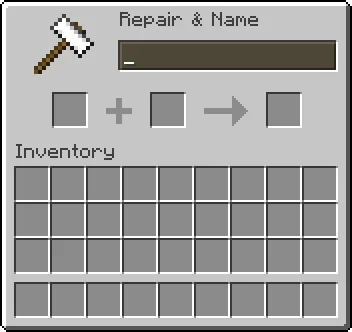
A couple of details that save headaches. You can only rename the tag in an anvil, not a cartography table or a grindstone. The renamed tag stacks with other tags of the exact same name, so if you want ten mobs all called "Steve" you can batch them from one anvil session. And because anvils take durability damage and cost levels, it is worth reading the anvil and repairing guide if you plan to rename in bulk — a cheap iron farm keeps you in fresh anvils.
Keeping your favorite mob from despawning
Let's make the persistence point concrete, because it is the entire reason to carry tags. Apply a renamed tag to any of these and it becomes permanent:
- A zombie villager you plan to cure. Until the cure starts it can despawn like any other zombie, so tag it the moment you trap it, not after you come back with the golden apple and weakness potion. Once the 3-to-5-minute cure is under way it will not despawn on its own.
- A wild animal you have not fed, bred, or tamed yet on Bedrock, such as a pink sheep you want for a wool farm. Bedrock can despawn wild animals until you interact with them; on Java, most animals stay put anyway.
- A "bait" mob for a farm you want to stay put in a loaded chunk.
One mob you do not need a tag for: your tamed horse. On Java, horses do not despawn, and on Bedrock taming or riding one already makes it persistent, so a tag on your best horse, donkey, or mule is a label, not insurance. The horses and mounts guide explains why the good ones are worth finding.
One caution: naming a mob does not stop it from dying. A named animal still drowns, burns, suffocates, or gets killed like any other. Persistence only defeats the despawn timer, not the health bar.
There are also two cases where a name tag will not hold on to a mob at all:
- Hostile mobs on Peaceful. Peaceful difficulty removes most hostile mobs, such as creepers, along with endermen, and a name does not exempt them, so a captured creeper or enderman will not survive the switch. If you want to keep one, stay on Easy or higher.
- Wandering traders. A named wandering trader still leaves when its timer runs out. Mojang closed that report (MC-143982) as working as intended, so a name tag is not a way to keep one.
The secret names and what they really do
Now the fun part. A handful of specific names trigger hidden effects when applied via name tag (and every one of them is case sensitive — capitalization and punctuation have to be exact). These are pure Easter eggs Mojang left in over the years, and most cost you nothing but a laugh.
Dinnerbone and Grumm
Name any mob "Dinnerbone" or "Grumm" and it renders upside down. That is it — the mob walks around flipped, pathing normally but visually inverted. The names honor two Mojang developers (Nathan Adams, whose handle is Dinnerbone, and Erik Broes, Grumm). It works on nearly every mob in the game, so an upside-down village full of flipped villagers is entirely achievable and deeply cursed.

jeb_ and Toast
Name a sheep "jeb_" (note the trailing underscore) and its wool cycles smoothly through the entire dye rainbow, shimmering between colors in real time. It is the flashiest Easter egg in the game and a staple of decorative builds. One catch worth knowing: if you shear a jeb_ sheep, the wool it drops is its actual underlying color, not the rainbow — the shimmer is a display effect only. The name honors Jens Bergensten, the longtime lead developer.
Name a rabbit "Toast" and it takes on a special memorial skin, added at a player's request for a lost pet rabbit named Toast. It is quieter than jeb_ but a sweet one.
Johnny, the walking disaster
This one actually changes gameplay. Name a vindicator (the axe-wielding illager from woodland mansions and raids) "Johnny" and it becomes hostile to almost every other mob, not just you — it will hunt down villagers, animals, other illagers' enemies, iron golems, and basically anything it can path to, except other illagers and a couple of immune mobs. A "Johnny" vindicator loose in a village is a wrecking ball. The name is a reference to the axe scene in The Shining. If you want to weaponize one, the woodland mansion guide covers where vindicators live and how they fight.
Mobs you can't name and other limits
Name tags cover the vast majority of mobs, but a few are off-limits. You cannot name the ender dragon — the tag simply does nothing on it. You also cannot name other players; name tags are strictly a mob tool. And you cannot apply a tag to a mob from a distance in survival — you have to be close enough to right-click it directly, which can be awkward with something hostile, so tag dangerous mobs from behind a fence or a boat.
A few more practical limits. A name tag is consumed on use — one tag, one mob, gone. If you want to rename a mob later, you need a fresh tag. You cannot remove a name from a mob once applied except by killing it. And naming a mob does not exempt it from griefing rules on servers or from being pushed around by pistons and water — persistence is the only guarantee you get.
None of that undercuts the core value. For the price of a piece of paper and a nugget, you turn a disposable mob into a permanent one, and you get a pocketful of Easter eggs on the side. There is no reason to adventure without a few in your inventory.
Quick Action Checklist
- Craft name tags cheaply (Java 26.1+ / Bedrock 26.10+): one paper + one metal nugget (iron, gold, or copper), diagonal in the crafting grid — one iron ingot makes nine.
- Grab them passively by AFK fishing (about 0.8% per catch) and from dungeon and mineshaft chests.
- Buy one from the wandering trader for a single emerald when the trade appears (only about 1 trader in 16 stocks it on Java, 7% on Bedrock).
- Always rename the tag in an anvil first — a blank name tag does nothing. It costs about one level.
- Tag zombie villagers you plan to cure as soon as you trap them, plus trapped farm-bait mobs and any mob you can't afford to lose.
- Skip the tag on a tamed horse for safety's sake: Java horses don't despawn, and taming one on Bedrock already makes it persistent.
- Remember naming stops despawning, not dying — named mobs still drown, burn, and take damage.
- Don't count on a tag for a wandering trader (it still leaves) or most hostile mobs on Peaceful (they are still removed).
- Flip any mob upside down with "Dinnerbone" or "Grumm" (case sensitive).
- Make a sheep shimmer rainbow with "jeb_" and give a rabbit the memorial skin with "Toast".
- Turn a vindicator into a mob-killing menace with "Johnny" — keep it far from anything you like.
- Don't bother trying to name the ender dragon or other players — it won't work.
Frequently Asked Questions
How do you get a name tag in Minecraft?
Why is my name tag not working on mobs?
Do name tags stop mobs from despawning?
What does naming a sheep jeb_ do in Minecraft?
What is the Dinnerbone name tag effect?
Keep Reading
- Name Tag — Minecraft Wiki
- Anvil — Minecraft Wiki
- Wandering Trader — Minecraft Wiki
- Name Tag — Minecraft Wiki: sources, persistence rules (wandering traders and hostile mobs on Peaceful excepted), mobs that cannot be named
- Minecraft.net — Java Edition 26.1 (March 24, 2026): name tag recipe, 1-emerald wandering trader offer, master librarian trade removed
- Minecraft Bedrock Edition 26.10 changelog: craftable name tags, wandering trader name tags, librarian trade removed
- Mob spawning — Minecraft Wiki: which mobs despawn on Java, and how a mob becomes persistent on Bedrock (tamed, ridden, fed, bred, named)
- Mojira MC-143982: named wandering traders still despawn (closed as working as intended)
- mcmeta (Java 26.3 game data): the 78-offer wandering trader common pool, 5 offers drawn per trader
- Zombie Villager — Minecraft Wiki: 3-5 minute cure; converting zombie villagers do not despawn
- Fishing — Minecraft Wiki: treasure odds per item and the Java open-water rule
Related Guides
Minecraft Wandering Trader Guide: Trades, Spawns and Llamas
Every wandering trader shows 9 offers drawn from a pool of 100 that is the same on Java 26.3 and Bedrock 26.50. Here is the full price list from the game's own trade files, the odds of seeing the offer you want, what the trader buys from you, how long one takes to spawn, and why a name tag will not keep it.
Minecraft Dye Guide: How to Make All 16 Colors
Fifteen of Minecraft's sixteen dyes come from a single item you can pick up, smelt or squid. Purple is the only one that does not exist outside a crafting grid, and green is the only one with no crafting recipe at all. Here is the whole palette in one table, which biome hands you eight of the sixteen for free, and the sheep trick that turns one dye into unlimited coloured wool.

Minecraft Happy Ghast Guide: Dried Ghasts, Harnesses, Flight
The happy ghast is the first flying mount in Minecraft that carries passengers, hauls a horse on a lead, and doubles as a solid block you can build off. Here is the whole pipeline, with the Java and Bedrock numbers that actually differ.
Minecraft Sniffer Guide: Eggs, Digging, and Ancient Seeds
The sniffer won the 2022 mob vote and then quietly became the only source of two plants in the game. Here is how to find its egg, hatch it fast, and actually get seeds out of the big lug.

Minecraft Survival Guide for Beginners: Your First Days
You have about ten minutes of daylight before the sun sets and the world tries to kill you. Here is exactly what to do with them — punch a tree, build a tool chain, and get a roof over your head before the zombies arrive.

Best Minecraft Enchantments, Ranked — The Ones Worth Your XP
Mending is the enchantment that ends the grind — gear that repairs itself forever. Everything else is a fight over your XP and anvil uses. Here is what actually earns a slot, ranked, with the real max levels.